| 赞 | 0 |
| VIP | |
| 好人卡 | |
| 积分 | 1 |
| 经验 | |
| 最后登录 | 2016-5-5 |
| 在线时间 | 77 小时 |
- 梦石
- 0
- 星屑
- 50
- 在线时间
- 77 小时
- 注册时间
- 2006-6-12
- 回帖
- 85
|
加入我们,或者,欢迎回来。
您需要 登录 才可以下载或查看,没有账号?注册会员
×
本帖最后由 wangxinly 于 2013-3-23 23:03 编辑
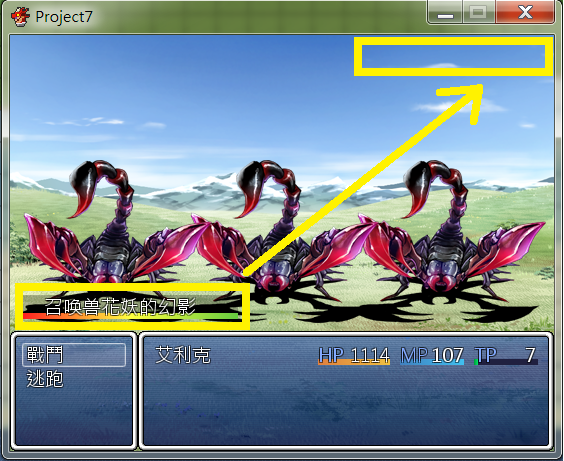
自己编写的一个召唤兽系统,可以在战斗时召唤出敌人来帮我方战斗。可以自己设定是否有回合数限制和是否挡住敌人的攻击
因为是新手,摸索着编写的,依然很多问题
比如召唤兽的辅助技能是给我方角色加,而我方角色是给自己加,所以召唤兽不能补血、辅助、复活等
另外敌人的全体攻击会被召唤兽全部挡住,而不会伤害到我方角色
使用这个召唤兽系统,要设定一个技能,技能使用效果里设置出发公共事件,公共事件里执行脚本$game_sunmmon.add(summon_id,liveturn=9999)
summon_id是数据库里的敌人的编号,liveturn是存在的回合,不填就默认9999
这个召唤兽系统要修改BattleManager
[pre lang="ruby" line="1"]#修改---------------------------------------------------------------------------
#召唤兽产生行动
def self.input_start
if @phase != :input
@phase = :input
$game_party.make_actions
$game_troop.make_actions
#修改
$game_sunmmon.make_actions
#修改结束
clear_actor
end
return !@surprise && $game_party.inputable?
end
#召唤兽参与回合行动
def self.make_action_orders
@action_battlers = []
@action_battlers += $game_party.members unless @surprise
@action_battlers += $game_troop.members unless @preemptive
@action_battlers.each {|battler| battler.make_speed }
@action_battlers.sort! {|a,b| b.speed - a.speed }
#修改
@action_battlers += $game_sunmmon.alive_members
#修改结束
end[/pre],可以对比着修改,或者直接在最后一个end前加入
这些在MAIN前新开一页复制进去就好
[pre lang="ruby" line="1"]#需要修改BattleManager
#战斗时才能使用的召唤兽系统,可以帮助战斗,不包括召唤兽,我方角色全灭即算战斗失败
#
#
#
#使用这个召唤兽系统,要设定一个技能,技能使用效果里设置出发公共事件
#公共事件里执行脚本$game_sunmmon.add(summon_id,liveturn=9999)
#summon_id是数据库里的敌人的编号,liveturn是存在的回合,不填就默认9999
#例如$game_sunmmon.add(30) 既是召唤第30个敌人"魔神"来帮忙战斗9999回合
#例如$game_sunmmon.add(29,3) 是召唤第29个敌人"魔王"来战斗3回合
#
#
#module是开关控制true和false
#召唤兽是否挡住敌人的全部攻击,true时所有攻击都由召唤兽来承受,包括全体伤害
#回合限制是召唤兽行动几回合后消失,不包括召唤出来的那个回合
#显示有边框的窗口,或者一个淡淡的底色
#前缀名和后缀名是区分怪物和召唤兽名字用的
#2013-03-23新增召唤兽最大数量限制和保留的方式
module SUMMON
#召唤兽控制开关
EnableAttack = true #召唤兽是否挡住敌人的攻击
EnableTrun = true #召唤兽是否有存在回合限制
EnableBack = true #召唤兽窗口显示边框或者底色
ItemWidthMin = 24*3 #召唤兽窗口的最小文字宽度
ItemWidthMax = 24*9 #召唤兽窗口的最大文字宽度
FirstName = "召唤兽" #召唤兽的前缀名
BackName = "的幻影" #召唤兽的后缀名
MaxSummon = 2 #最大的召唤兽数量
NewSummon = true #保留最新的召唤兽还是最老的,TRUE是保留最新
end
class Scene_Battle
alias start_sunmmon start
def start #战斗开始,创建召唤兽队伍的类的实例
$game_sunmmon=Game_Summoned.new #创建召唤兽队伍的类的实例
start_sunmmon
end
alias turn_end_sunmmon turn_end
def turn_end #回合结束
turn_end_sunmmon
$game_sunmmon.turnend #召唤兽存在回合-1
refresh_sunmmon_windows
end
def create_sunmmon_windows #创建召唤兽窗口
@sunmmon_window = Window_Summon.new(0,0)
refresh_sunmmon_windows
end
def refresh_sunmmon_windows #刷新召唤兽窗口
@sunmmon_window.show
@sunmmon_window.hide if @sunmmon_window.item_max==0
@sunmmon_window.width=@sunmmon_window.window_width
@sunmmon_window.height=@sunmmon_window.window_height
#@sunmmon_window.x=Graphics.width - @sunmmon_window.width
@sunmmon_window.y=Graphics.height - @sunmmon_window.height - @party_command_window.height
@sunmmon_window.refresh
end
alias create_all_windows_sunmmon create_all_windows
def create_all_windows
create_all_windows_sunmmon
create_sunmmon_windows
end
def refresh_status
@status_window.refresh
refresh_sunmmon_windows
end
end
#召唤兽的状态显示窗口
class Window_Summon < Window_Base
def initialize(x, y)
super(x, y, window_width, window_height)
self.opacity = 0 if SUMMON::EnableBack
refresh
end
def window_width
[[SUMMON::ItemWidthMin,item_width].max,SUMMON::ItemWidthMax].min+24+standard_padding * 2
end
def window_height
fitting_height(item_max)
end
def contents_height
window_height - standard_padding * 2
end
def item
$game_sunmmon.members
end
def item_max
item.size
end
def item_width
max=1
item.each {|item| max=item.name.size if item.name.size>max }
return max*24
end
def draw_sunmmon
item_max.times {|i| draw_item(i) }
end
def draw_item(index)
rect = Rect.new
rect.width = contents_width
rect.height = line_height
rect.x = 0
rect.y = (item_max-index-1) * line_height
contents.fill_rect(rect,Color.new(0, 0, 0, 64)) if SUMMON::EnableBack
#显示召唤兽血条
draw_new_hpgauge(rect.x,rect.y+12,rect.width,item[index].hp_rate)
#显示回合数
draw_text(rect.x,rect.y,24+2,rect.height,item[index].liveturn-1 ) if SUMMON::EnableTrun&&item[index].liveturn<101
#显示召唤兽名字
draw_text(rect.x+24-2,rect.y,rect.width-24+2,rect.height,item[index].name)
end
def draw_new_hpgauge(x,y,width, rate,gaugeheight=6)
contents.fill_rect(x, y+6, width, gaugeheight, gauge_back_color)
fill_w = (width * rate).to_i
contents.gradient_fill_rect(x+width/2,y+6,fill_w-width/2,gaugeheight,text_color(17),text_color(3)) if fill_w>width/2
contents.gradient_fill_rect(x,y+6,width/2,gaugeheight,text_color(18),text_color(17)) if fill_w>width/2
contents.gradient_fill_rect(x,y+6,fill_w,gaugeheight,text_color(18),text_color(17)) if fill_w<=width/2
end
def refresh
contents.clear
create_contents
draw_sunmmon
end
end
#实例 $game_sunmmon = Game_Summoned.new
#召唤兽队伍的类
class Game_Summoned < Game_Unit
def initialize
super
members
@index=0
end
def members
@summon=[] unless @summon
@summon
end
def alive_members
members.select {|member| member.alive? }
end
def add(summon_id,liveturn=9999) #增加召唤兽
summon = Game_Summon.new(@index,summon_id)
summon.liveturn=liveturn+1
@summon.push(summon)
@index+=1
summonlimit
end
def turnend #召唤兽回合处理
members.each do |summon|
summon.turnend
end
@summon.delete_if{|summon| summon.liveturn<=0} #清除不存在的召唤兽
summonlimit
end
def summonlimit
summonmax(SUMMON::MaxSummon,SUMMON::NewSummon)
end
def summonmax(num,new=true)
if @summon.size>num
if new
(1..(@summon.size-num)).each{|i|@summon.shift}
else
(1..(@summon.size-num)).each{|i|@summon.pop}
end
end
end
end
#召唤兽的类
class Game_Summon < Game_Enemy
attr_accessor :liveturn #存在的回合数
def friends_unit #对自己的角色辅助
$game_party
end
def opponents_unit #对敌人攻击
$game_troop
end
def name #名字前增加“召唤兽”
SUMMON::FirstName + @original_name + SUMMON::BackName
end
def turnend ##召唤兽是否有存在回合限制
@liveturn=[@liveturn-1,0].max if SUMMON::EnableTrun
end
end
class Game_Enemy
def opponents_unit #召唤兽存在时是否先攻击召唤兽
if SUMMON::EnableAttack&&$game_sunmmon.alive_members!=[]
$game_sunmmon
else
$game_party
end
end
end
[/pre]
|
评分
-
查看全部评分
|


 写轮眼
写轮眼
 发表于 2013-3-18 15:57:23

 提升卡
提升卡 沉默号角
沉默号角 喧嚣号角
喧嚣号角 变色卡
变色卡 升龙剑
升龙剑