| 赞 | 168 |
| VIP | |
| 好人卡 | |
| 积分 | 229 |
| 经验 | |
| 最后登录 | 2025-4-1 |
| 在线时间 | 8598 小时 |
- 梦石
- 0
- 星屑
- 22879
- 在线时间
- 8598 小时
- 注册时间
- 2011-12-31
- 回帖
- 3270
|
 发表于 2013-5-4 08:37:01
|
显示全部楼层
发表于 2013-5-4 08:37:01
|
显示全部楼层
本帖最后由 tseyik 于 2013-5-4 08:40 编辑
http://www4.plala.or.jp/findias/ ... ce_rgss3/index.html
メニュー>
乜ーブ画面改
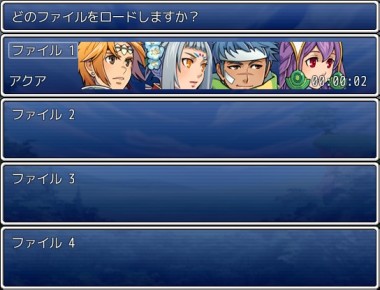
[pre lang="ruby" line="1"]#==============================================================================
# ■ VXAce-RGSS3-19 セーブ画面-改 [Ver.1.0.0] by Claimh
#------------------------------------------------------------------------------
# セーブ画面の表示を変更します。
# (注)導入前のセーブデータは使えません
#==============================================================================
#==============================================================================
# ■ Game_Party
#==============================================================================
class Game_Party < Game_Unit
#--------------------------------------------------------------------------
# ● セーブファイル表示用の顔グラフィック画像情報
#--------------------------------------------------------------------------
def faces_for_savefile
battle_members.collect do |actor|
[actor.face_name, actor.face_index]
end
end
end
#==============================================================================
# ■ DataManager
#==============================================================================
class << DataManager
#--------------------------------------------------------------------------
# ● セーブヘッダの作成
#--------------------------------------------------------------------------
alias make_save_header_faces make_save_header
def make_save_header
header = make_save_header_faces
header[:faces] = $game_party.faces_for_savefile
header[:map_name] = $game_map.display_name
header
end
end
#==============================================================================
# ■ Window_SaveFile
#------------------------------------------------------------------------------
# セーブ画面およびロード画面で表示する、セーブファイルのウィンドウです。
#==============================================================================
class Window_SaveFile < Window_Base
#--------------------------------------------------------------------------
# ● リフレッシュ
#--------------------------------------------------------------------------
def refresh
contents.clear
change_color(normal_color)
name = Vocab::File + " #{@file_index + 1}"
draw_text(4, 0, 200, line_height, name)
@name_width = text_size(name).width
draw_party_faces(100, (contents_height - 96) / 2)
draw_map_name(0, contents_height - line_height)
draw_playtime(0, contents_height - line_height, contents.width - 4, 2)
end
#--------------------------------------------------------------------------
# ● パーティキャラの描画
#--------------------------------------------------------------------------
def draw_party_faces(x, y)
header = DataManager.load_header(@file_index)
return unless header && header[:faces]
header[:faces].each_with_index do |data, i|
draw_face(data[0], data[1], x + i * 96, y)
end
end
#--------------------------------------------------------------------------
# ● マップ名の描画
#--------------------------------------------------------------------------
def draw_map_name(x, y, align=0)
header = DataManager.load_header(@file_index)
return unless header && header[:map_name]
name = header[:map_name]
draw_text(x, y, contents.width, line_height, name, align)
end
end
[/pre]
乜ーブ画面改2
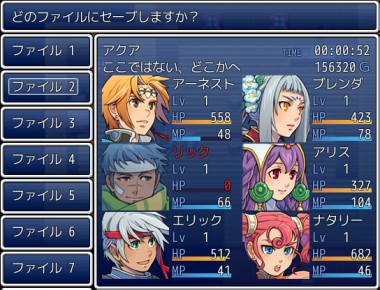
[pre lang="ruby" line="1"]#==============================================================================
# ■ VXAce-RGSS3-20 セーブ画面-改2 [Ver.1.1.0] by Claimh
#------------------------------------------------------------------------------
# セーブ画面の表示を改変します。
# (注)導入前のセーブデータは使えません
#------------------------------------------------------------------------------
#・ミッション名の更新
# $game_party.mission = "あらすじ"
#==============================================================================
#==============================================================================
# ■ SaveActor : セーブファイル用のダミーアクター
#==============================================================================
class SaveActor
#--------------------------------------------------------------------------
# ● 公開インスタンス変数
#--------------------------------------------------------------------------
attr_reader :name
attr_reader :level
attr_reader :hp
attr_reader :mp
attr_reader :mhp
attr_reader :mmp
attr_reader :face_name
attr_reader :face_index
#--------------------------------------------------------------------------
# ● オブジェクト初期化
#--------------------------------------------------------------------------
def initialize(actor)
@name = actor.name
@level = actor.level
@hp = actor.hp; @mhp = actor.mhp
@mp = actor.mp; @mmp = actor.mmp
@face_name = actor.face_name
@face_index = actor.face_index
@deAd = actor.dead?
end
#--------------------------------------------------------------------------
# ● 戦闘不能判定
#--------------------------------------------------------------------------
def dead?
@dead
end
#--------------------------------------------------------------------------
# ● HP の割合を取得
#--------------------------------------------------------------------------
def hp_rate
@hp.to_f / @mhp
end
#--------------------------------------------------------------------------
# ● MP の割合を取得
#--------------------------------------------------------------------------
def mp_rate
@mmp > 0 ? @mp.to_f / @mmp : 0
end
end
#==============================================================================
# ■ Game_Party
#==============================================================================
class Game_Party < Game_Unit
#--------------------------------------------------------------------------
# ● 公開インスタンス変数
#--------------------------------------------------------------------------
attr_accessor :mission # ミッション(ファイル画面表示用)
#--------------------------------------------------------------------------
# ● オブジェクト初期化
#--------------------------------------------------------------------------
alias initialize_save initialize
def initialize
initialize_save
@mission = ""
end
#--------------------------------------------------------------------------
# ● セーブファイル表示用の顔グラフィック画像情報
#--------------------------------------------------------------------------
def member_for_savefile
members.collect { |actor| SaveActor.new(actor) }
end
end
#==============================================================================
# ■ DataManager
#==============================================================================
class << DataManager
#--------------------------------------------------------------------------
# ● セーブヘッダの作成
#--------------------------------------------------------------------------
alias make_save_header_faces make_save_header
def make_save_header
header = make_save_header_faces
header[:map_name] = $game_map.display_name
header[:actors] = $game_party.member_for_savefile
header[:mission] = $game_party.mission
header[:gold] = $game_party.gold
header
end
end
#==============================================================================
# ■ Window_SaveFile
#==============================================================================
class Window_SaveFile < Window_Base
#--------------------------------------------------------------------------
# ● オブジェクト初期化 [再定義]
# index : セーブファイルのインデックス
#--------------------------------------------------------------------------
def initialize(height, index)
super(0, index * height, window_width, height)
@file_index = index
refresh
@selected = false
end
#--------------------------------------------------------------------------
# ● ウィンドウ幅
#--------------------------------------------------------------------------
def window_width
return 134
end
#--------------------------------------------------------------------------
# ● リフレッシュ [再定義]
#--------------------------------------------------------------------------
def refresh
contents.clear
change_color(normal_color)
name = Vocab::File + " #{@file_index + 1}"
draw_text(4, 0, 200, line_height, name)
@name_width = text_size(name).width
end
end
#==============================================================================
# ■ Window_SaveFile
#==============================================================================
class Window_SaveInfo < Window_Selectable
#--------------------------------------------------------------------------
# ● オブジェクト初期化
#--------------------------------------------------------------------------
def initialize(x, h)
@actors = []
super(x, h, Graphics.width - x, Graphics.height - h)
self.file_index = index
end
#--------------------------------------------------------------------------
# ● 項目の高さを取得
#--------------------------------------------------------------------------
def item_height
(contents_height - (line_height * 2)) / row_num
end
#--------------------------------------------------------------------------
# ● ウィンドウ内容の高さを計算
#--------------------------------------------------------------------------
def contents_height
height - standard_padding * 2
end
#--------------------------------------------------------------------------
# ● 列数の取得
#--------------------------------------------------------------------------
def row_num
return 3
end
#--------------------------------------------------------------------------
# ● 桁数の取得
#--------------------------------------------------------------------------
def col_max
return 2
end
#--------------------------------------------------------------------------
# ● 下端パディングの更新
#--------------------------------------------------------------------------
def update_padding_bottom
end
#--------------------------------------------------------------------------
# ● 横に項目が並ぶときの空白の幅を取得
#--------------------------------------------------------------------------
def spacing
return 16
end
#--------------------------------------------------------------------------
# ● 項目数の取得
#--------------------------------------------------------------------------
def item_max
return [@actors.size, 6].min
end
#--------------------------------------------------------------------------
# ● データ参照
#--------------------------------------------------------------------------
def data(header, symbol, default)
(header.nil? or header[symbol].nil?) ? default : header[symbol]
end
#--------------------------------------------------------------------------
# ● ファイル変更
#--------------------------------------------------------------------------
def file_index=(index)
return if @file_index == index
@file_index = index
header = DataManager.load_header(@file_index)
@actors = data(header, :actors, [])
@map_name = data(header, :map_name, "")
@playtime = data(header, :playtime_s, "00:00:00")
@mission = data(header, :mission, "")
@gold = data(header, :gold, 0)
create_contents
refresh
end
#--------------------------------------------------------------------------
# ● リフレッシュ
#--------------------------------------------------------------------------
def refresh
super
if @actors.empty? or @actors.nil?
draw_text(0, 0, contents_width, contents_height, "- empty -", 1)
return
end
draw_text(0, 0, contents_width, line_height, @map_name)
draw_playtime(contents_width - 128, 0, 128)
draw_text_ex(0, line_height, @mission)
draw_gold(contents_width - 128, line_height, 128)
end
#--------------------------------------------------------------------------
# ● 項目の描画
#--------------------------------------------------------------------------
def draw_item(index)
return if @actors.empty? or @actors.nil?
actor = @actors[index]
rect = item_rect(index)
rect.y += line_height * 2
draw_actor_face(actor, rect.x, rect.y, !actor.dead?)
draw_actor_name(actor, rect.x + 100, rect.y+line_height*0)
draw_actor_level(actor, rect.x + 100, rect.y+line_height*1)
w = [124, rect.width - 100].min
draw_actor_hp(actor, rect.x + 100, rect.y+line_height*2, w)
draw_actor_mp(actor, rect.x + 100, rect.y+line_height*3, w)
end
#--------------------------------------------------------------------------
# ● プレイ時間の描画
#--------------------------------------------------------------------------
def draw_playtime(x, y, width)
change_color(system_color)
contents.font.size -= 8
draw_text(x, y+4, width, line_height, "TIME")
contents.font.size += 8
change_color(normal_color)
draw_text(x, y, width, line_height, @playtime, 2)
end
#--------------------------------------------------------------------------
# ● 所持金の描画
#--------------------------------------------------------------------------
def draw_gold(x, y, width)
draw_currency_value(@gold, Vocab::currency_unit, x, y, width)
end
#--------------------------------------------------------------------------
# ● 水平線の描画
#--------------------------------------------------------------------------
def draw_horz_line(y)
line_y = y + line_height / 2 - 1
contents.fill_rect(0, line_y, contents_width, 2, line_color)
end
#--------------------------------------------------------------------------
# ● 水平線の色を取得
#--------------------------------------------------------------------------
def line_color
color = normal_color
color.alpha = 48
color
end
end
#==============================================================================
# ■ Scene_File
#==============================================================================
class Scene_File < Scene_MenuBase
#--------------------------------------------------------------------------
# ● セーブファイルウィンドウの作成
#--------------------------------------------------------------------------
alias create_savefile_windows_save create_savefile_windows
def create_savefile_windows
create_savefile_windows_save
@info_window = Window_SaveInfo.new(@savefile_windows[0].window_width, @help_window.height)
end
#--------------------------------------------------------------------------
# ● 選択状態の初期化
#--------------------------------------------------------------------------
alias init_selection_save init_selection
def init_selection
init_selection_save
@info_window.file_index = @index
end
#--------------------------------------------------------------------------
# ● 画面内に表示するセーブファイル数を取得
#--------------------------------------------------------------------------
def visible_max
return @savefile_viewport.rect.height / @help_window.height
end
#--------------------------------------------------------------------------
# ● カーソルの更新
#--------------------------------------------------------------------------
alias update_cursor_save update_cursor
def update_cursor
update_cursor_save
@info_window.file_index = @index
end
end
[/pre] |
评分
-
查看全部评分
|




 写轮眼
写轮眼
 提升卡
提升卡 沉默号角
沉默号角 喧嚣号角
喧嚣号角 变色卡
变色卡 升龙剑
升龙剑