查看: 5194|回复: 14

[有事请教] 视频标题插件PH_VideoTitle

[复制链接]
梦石
0
星屑
23566
在线时间
123 小时
注册时间
2019-5-18
回帖
44
发表于 2019-11-12 17:26:51 | 显示全部楼层 |阅读模式
悬赏500星屑已解决
找到一个可以用视频做标题的插件
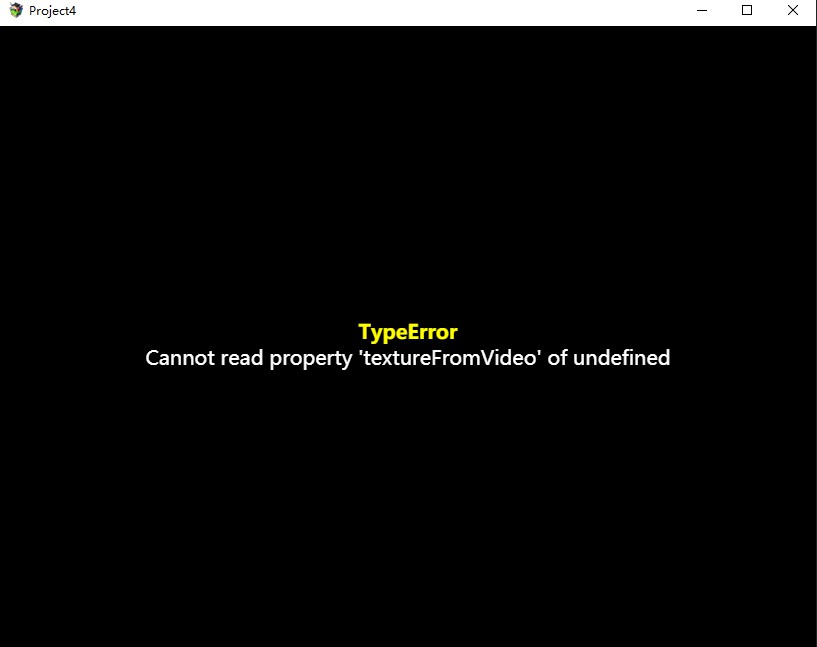
但是可能插件太久了,有语法错误了
本人是小白,恳请大佬们修复一下

2019-11-12_17_17_19.jpg


插件
PH_VideoTitle.zip (1.58 KB, 下载次数: 103)


点击展开/收起

/*:

PH - Video Title
@plugindesc This plugin allows you to put a video at the background of the Title Screen instead of a static image.
@author PrimeHover
@version 1.1
@date 11/12/2015

---------------------------------------------------------------------------------------
This work is licensed under the Creative Commons Attribution 4.0 International License.
To view a copy of this license, visit http://creativecommons.org/licenses/by/4.0/
---------------------------------------------------------------------------------------

@param Video Name
@desc Name of the video (See Help Section) | (E.g. "myVideo")

@param Video Muted
@desc Mutes the video in the title (0: No, 1: Yes)
@default 0

@param Video Loop
@desc Makes the video plays in a loop (0: No, 1: Yes)
@default 1

@param Video Poster Name
@desc Name and extension of the image to be shown when the video is loading (E.g. "poster.png")

@param Video Width
@desc Width of the video in the canvas (Default: 816)
@default 816

@param Video Height
@desc Height of the video in the canvas (Default: 624)
@default 624

@param Video Coord X
@desc Coordinate X of the video in the canvas (Default: 0)
@default 0

@param Video Coord Y
@desc Coordinate Y of the video in the canvas (Default: 0)
@default 0

@help

The video you want to play in background must be inside the "movies" folder in your project.
Supported extensions: "webm"

The poster you want to show while the video is not ready must be inside the "pictures" folder in your project.

*/

(function() {

    /* Getting the parameters */
    var parameters = PluginManager.parameters('PH_VideoTitle');
    var videoName = String(parameters['Video Name']);
    var posterName = String(parameters['Video Poster Name']);
    var videoMuted = Number(parameters['Video Muted']);
    var videoLoop = Number(parameters['Video Loop']);
    var videoWidth = Number(parameters['Video Width']);
    var videoHeight = Number(parameters['Video Height']);
    var videoX = Number(parameters['Video Coord X']);
    var videoY = Number(parameters['Video Coord Y']);

    /* Video Title Class */
    var PH_VideoTitle = null;

    function VideoTitle() {
        this.name = videoName;
        this.posterName = posterName;

        /* Creating video tag */
        this._video = document.createElement('video');
        this._video.id = 'VideoTitle_' + this.name.replace(/[^A-Z0-9]+/ig, "_");
        this._video.src = 'movies/' + this.name + '.webm';
        this._video.style.width = 0;
        this._video.style.height = 0;
        this._video.autoPlay = false;

        /* Control Options */
        this.setControlOptions();

        /* Appending the video at the body tag */
        document.body.appendChild(this._video);

        /* Starts video and creates the texture */
        this.setVideoTexture();
    }
    VideoTitle.prototype.constructor = VideoTitle;

    VideoTitle.prototype.setControlOptions = function() {
        if (videoLoop == 1) {
            this._video.loop = true;
        } else {
            this._video.loop = false;
        }

        if (videoMuted == 1) {
            this._video.muted = true;
        } else {
            this._video.muted = false;
        }

        if (posterName.trim() != '') {
            this._video.poster = 'img/pictures/' + this.posterName;
        }
    };

    VideoTitle.prototype.setVideoTexture = function() {
        this._texture = PIXI.VideoTexture.textureFromVideo(this._video);
        this._spriteVideo = new PIXI.Sprite(this._texture);
        this._spriteVideo.width = videoWidth;
        this._spriteVideo.height = videoHeight;
        this._spriteVideo.x = videoX;
        this._spriteVideo.y = videoY;
    };

    VideoTitle.prototype.pauseVideo = function() {
        this._video.pause();
    };

    VideoTitle.prototype.playVideo = function() {
        this._video.play();
    };


    /* Overwritten Scene_Title methods */
    Scene_Title.prototype.create = function() {

        /* Prevent the video to be duplicated */
        if (PH_VideoTitle === null) {
            PH_VideoTitle = new VideoTitle();
        }
        this.videoTitle = PH_VideoTitle;
        this.videoTitle.playVideo();
        this.addChild(this.videoTitle._spriteVideo);
        this.createForeground();
        this.createWindowLayer();
        this.createCommandWindow();
    };

    Scene_Title.prototype.start = function() {
        Scene_Base.prototype.start.call(this);
        SceneManager.clearStack();
        if (videoMuted == 1) {
            this.playTitleMusic();
        }
        this.startFadeIn(this.fadeSpeed(), false);
    };

    Scene_Title.prototype.terminate = function() {
        Scene_Base.prototype.terminate.call(this);
        this.videoTitle.pauseVideo();
        SceneManager.snapForBackground();
    };

})();


貌似就是这一个地方的错误

点击展开/收起    VideoTitle.prototype.setVideoTexture = function() {
        this._texture = PIXI.VideoTexture.textureFromVideo(this._video);
        this._spriteVideo = new PIXI.Sprite(this._texture);
        this._spriteVideo.width = videoWidth;
        this._spriteVideo.height = videoHeight;
        this._spriteVideo.x = videoX;
        this._spriteVideo.y = videoY;
    };

    VideoTitle.prototype.pauseVideo = function() {
        this._video.pause();
    };

    VideoTitle.prototype.playVideo = function() {
        this._video.play();
    };


影片标题
该插件可让您将视频放在标题屏幕的背景上,而不是静态图像。

安装
下载JS文件,并将其包含/plugins在项目的文件夹中。
打开插件管理器,选择文件PH_VideoTitle.js并将其打开。
使用Video Name参数定义要在背景中展示的视频的名称。该视频必须在/movies您项目的文件夹中(仅webm允许扩展)。
您可能需要在变量中定义可选的海报图像Video Poster Name。该图像应位于/img/pictures项目的文件夹中。
如何使用
您可以在此处通过示例查看完整的文档。
参量
Video Name:视频名称。
Video Muted:将标题中的视频静音(0:否,1:是)
Video Loop:使视频循环播放(0:否,1:是)
Video Poster Name:视频加载时要显示的图像的名称和扩展名(例如“ poster.png”)
Video Width:画布中视频的宽度(默认值:816)
Video Height:画布中视频的高度(默认值:624)
Video Coord X:画布中视频的X坐标(默认值:0)
Video Coord Y:画布中视频的Y坐标(默认值:0)
变更日志
2015年11月12日:版本1.1
2015年11月3日:README.md已更新
2015年11月2日:版本1.0

最佳答案

查看完整内容

拿去试试,我这找了个视频测试了下,有声音,可是没视频,是黑的,不知道是视频问题还是没改对,你先试试,要是你那也不行,我再看看什么情况。 编辑了下:把代码折叠了,不然好大一篇; 编辑了下:黑屏问题已经解决,屏蔽播放和暂停按钮即可,经过测试,静音、循环功能是完好的,我这视频文件较小,所以哪个poster image没看到效果; 遗留问题:不能控制播放和暂停; 测试环境,rmmv1.6.1; 编辑了下:新增增强优化版标题页面视频 ...
梦石
0
星屑
15295
在线时间
720 小时
注册时间
2011-7-16
回帖
1373

开拓者

发表于 2019-11-12 17:26:52 | 显示全部楼层
本帖最后由 walf_man 于 2019-11-15 13:09 编辑

拿去试试,我这找了个视频测试了下,有声音,可是没视频,是黑的,不知道是视频问题还是没改对,你先试试,要是你那也不行,我再看看什么情况。
编辑了下:把代码折叠了,不然好大一篇;
编辑了下:黑屏问题已经解决,屏蔽播放和暂停按钮即可,经过测试,静音、循环功能是完好的,我这视频文件较小,所以哪个poster image没看到效果;
遗留问题:不能控制播放和暂停;

测试环境,rmmv1.6.1;
编辑了下:新增增强优化版标题页面视频背景插件:RMMV标题页面用视频做背景的插件

代码

  1. /*:

  2. PH - Video Title
  3. @plugindesc This plugin allows you to put a video at the background of the Title Screen instead of a static image.
  4. @author PrimeHover
  5. @version 1.1
  6. @date 11/12/2015

  7. ---------------------------------------------------------------------------------------
  8. This work is licensed under the Creative Commons Attribution 4.0 International License.
  9. To view a copy of this license, visit http://creativecommons.org/licenses/by/4.0/
  10. ---------------------------------------------------------------------------------------

  11. @param Video Name
  12. @desc Name of the video (See Help Section) | (E.g. "myVideo")

  13. @param Video Muted
  14. @desc Mutes the video in the title (0: No, 1: Yes)
  15. @default 0

  16. @param Video Loop
  17. @desc Makes the video plays in a loop (0: No, 1: Yes)
  18. @default 1

  19. @param Video Poster Name
  20. @desc Name and extension of the image to be shown when the video is loading (E.g. "poster.png")

  21. @param Video Width
  22. @desc Width of the video in the canvas (Default: 816)
  23. @default 816

  24. @param Video Height
  25. @desc Height of the video in the canvas (Default: 624)
  26. @default 624

  27. @param Video Coord X
  28. @desc Coordinate X of the video in the canvas (Default: 0)
  29. @default 0

  30. @param Video Coord Y
  31. @desc Coordinate Y of the video in the canvas (Default: 0)
  32. @default 0

  33. @help

  34. The video you want to play in background must be inside the "movies" folder in your project.
  35. Supported extensions: "webm"

  36. The poster you want to show while the video is not ready must be inside the "pictures" folder in your project.

  37. */

  38. (function () {

  39.     /* Getting the parameters */
  40.     var parameters = PluginManager.parameters('PH_VideoTitle');
  41.     var videoName = String(parameters['Video Name']);
  42.     var posterName = String(parameters['Video Poster Name']);
  43.     var videoMuted = Number(parameters['Video Muted']);
  44.     var videoLoop = Number(parameters['Video Loop']);
  45.     var videoWidth = Number(parameters['Video Width']);
  46.     var videoHeight = Number(parameters['Video Height']);
  47.     var videoX = Number(parameters['Video Coord X']);
  48.     var videoY = Number(parameters['Video Coord Y']);

  49.     /* Video Title Class */
  50.     var PH_VideoTitle = null;

  51.     function VideoTitle() {
  52.         this.name = videoName;
  53.         this.posterName = posterName;

  54.         /* Creating video tag */
  55.         this._video = document.createElement('video');
  56.         this._video.id = 'VideoTitle_' + this.name.replace(/[^A-Z0-9]+/ig, "_");
  57.         this._video.src = 'movies/' + this.name + '.webm';
  58.         this._video.style.width = 0;
  59.         this._video.style.height = 0;
  60.         this._video.autoPlay = false;
  61.         //this._video.oncanplay = this.setVideoTexture();

  62.         /* Control Options */
  63.         this.setControlOptions();

  64.         /* Appending the video at the body tag */
  65.         //document.body.appendChild(this._video);

  66.         /* Starts video and creates the texture */
  67.         this.setVideoTexture();
  68.     }
  69.     VideoTitle.prototype.constructor = VideoTitle;

  70.     VideoTitle.prototype.setControlOptions = function () {
  71.         if (videoLoop == 1) {
  72.             this._video.loop = true;
  73.         } else {
  74.             this._video.loop = false;
  75.         }

  76.         if (videoMuted == 1) {
  77.             this._video.muted = true;
  78.         } else {
  79.             this._video.muted = false;
  80.         }

  81.         if (posterName.trim() != '') {
  82.             this._video.poster = 'img/pictures/' + this.posterName;
  83.         }
  84.     };

  85.     VideoTitle.prototype.setVideoTexture = function () {
  86.         //this._texture = PIXI.VideoTexture.textureFromVideo(this._video);
  87.         //this._texture = PIXI.Texture.fromVideo(this._video);
  88.         //this._texture = PIXI.Texture.fromVideo('movies/' + this.name + '.webm');
  89.         this._texture = PIXI.Texture.from(this._video);

  90.         this._spriteVideo = new PIXI.Sprite(this._texture);
  91.         this._spriteVideo.width = videoWidth;
  92.         this._spriteVideo.height = videoHeight;
  93.         this._spriteVideo.x = videoX;
  94.         this._spriteVideo.y = videoY;
  95.     };

  96.     VideoTitle.prototype.pauseVideo = function () {
  97.         //this._video.pause();
  98.     };

  99.     VideoTitle.prototype.playVideo = function () {
  100.         //this._video.play();
  101.     };


  102.     /* Overwritten Scene_Title methods */
  103.     Scene_Title.prototype.create = function () {

  104.         /* Prevent the video to be duplicated */
  105.         if (PH_VideoTitle === null) {
  106.             PH_VideoTitle = new VideoTitle();
  107.         }
  108.         this.videoTitle = PH_VideoTitle;
  109.         this.videoTitle.playVideo();
  110.         this.addChild(this.videoTitle._spriteVideo);
  111.         this.createForeground();
  112.         this.createWindowLayer();
  113.         this.createCommandWindow();
  114.     };

  115.     Scene_Title.prototype.start = function () {
  116.         Scene_Base.prototype.start.call(this);
  117.         SceneManager.clearStack();
  118.         if (videoMuted == 1) {
  119.             this.playTitleMusic();
  120.         }
  121.         this.startFadeIn(this.fadeSpeed(), false);
  122.     };

  123.     Scene_Title.prototype.terminate = function () {
  124.         Scene_Base.prototype.terminate.call(this);
  125.         this.videoTitle.pauseVideo();
  126.         SceneManager.snapForBackground();
  127.     };

  128. })();
复制代码


点评

多谢大佬,完美解决问题  发表于 2019-11-15 00:39
RMMV网络插件,开源免费,内含服务器端,无需强制登录,云数据,弹幕,云存档,排名,兑换码,版本检测,可自由上架下架删除。q群399090587
免打包运行MV游戏,云游戏,安卓App雷神游戏厅,在线玩游戏,上传下载游戏
开源游戏:重装机兵之重装归来【RMMV制作】全球首款按照美剧分季分集的方式发布的游戏
体素画 -- MV画3D像素图的画板
RMMV显示3D模型和场景的插件
RMMV显示spine骨骼动画的插件
RMMV秘密通道插件
突破敌群数量上限8个的插件
在rmmv中显示gif动态图片的插件
一款可以在mv游戏界面的任意位置显示任意文字的插件
RMMV Toast 插件 带物品得失提示,可以设置开启关闭 兼容yep itemcore
制作一个改名卡道具插件、调整标题页面菜单的插件、在标题页面之前显示大段文字的插件、标题页面显示版本号的插件
物品得失自动提示自动上色自动换行插件
我的Q群 663889472
另外,我的插件、范例、游戏都在这里
回复

使用道具 举报

梦石
0
星屑
456
在线时间
65 小时
注册时间
2019-8-9
回帖
9
发表于 2019-11-12 22:06:37 来自手机 | 显示全部楼层
更明显了,PixiJs版本老了,回去改一下,

点评

改了是黑屏,然后屏蔽了下面两个 是显视频第一帧图片,不播放视频啊  发表于 2019-11-13 01:44
新版已经不用PIXI.VideoTexture.textureFromVideo这样的写法了,改用PIXI.Texture.from或PIXI.Texture.fromVideo这样的写法了,而PIXI.Texture.fromVideo也在pixijsV5中将被弃用  发表于 2019-11-12 23:42
神了 您怎么看出来的?  发表于 2019-11-12 23:37
回复

使用道具 举报

梦石
0
星屑
23566
在线时间
123 小时
注册时间
2019-5-18
回帖
44
 楼主| 发表于 2019-11-13 01:40:58 | 显示全部楼层
walf_man 发表于 2019-11-12 23:38
拿去试试,我这找了个视频测试了下,有声音,可是没视频,是黑的,不知道是视频问题还是没改对,你先试试, ...

大佬,现在是有声音,但不能播放视频啊,
只显示视频开始的那一帧图片啊,
求大佬解决一下,

点评

试试楼下的代码,楼下大神增加了个update  发表于 2019-11-13 16:02
我编辑了两次,第二次编辑已经解决了播放视频只有声音没有画面的问题,现在我准备编辑第三次,因为我写了个增强版。  发表于 2019-11-13 02:36
回复

使用道具 举报

梦石
0
星屑
456
在线时间
65 小时
注册时间
2019-8-9
回帖
9
发表于 2019-11-13 09:54:55 | 显示全部楼层
/*:

PH - Video Title
@plugindesc This plugin allows you to put a video at the background of the Title Screen instead of a static image.
@author PrimeHover
@version 1.1
@date 11/12/2015

---------------------------------------------------------------------------------------
This work is licensed under the Creative Commons Attribution 4.0 International License.
To view a copy of this license, visit http://creativecommons.org/licenses/by/4.0/
---------------------------------------------------------------------------------------

@param Video Name
@desc Name of the video (See Help Section) | (E.g. "myVideo")

@param Video Muted
@desc Mutes the video in the title (0: No, 1: Yes)
@default 0

@param Video Loop
@desc Makes the video plays in a loop (0: No, 1: Yes)
@default 1

@param Video Poster Name
@desc Name and extension of the image to be shown when the video is loading (E.g. "poster.png")

@param Video Width
@desc Width of the video in the canvas (Default: 816)
@default 816

@param Video Height
@desc Height of the video in the canvas (Default: 624)
@default 624

@param Video Coord X
@desc Coordinate X of the video in the canvas (Default: 0)
@default 0

@param Video Coord Y
@desc Coordinate Y of the video in the canvas (Default: 0)
@default 0

@help

The video you want to play in background must be inside the "movies" folder in your project.
Supported extensions: "webm"

The poster you want to show while the video is not ready must be inside the "pictures" folder in your project.


Maintenance by Mikan on 2019.11.13
For PixiJs v4

*/

(function() {

    /* Getting the parameters */
    var parameters = PluginManager.parameters('PH_VideoTitle');
    var videoName = String(parameters['Video Name']);
    var posterName = String(parameters['Video Poster Name']);
    var videoMuted = Number(parameters['Video Muted']);
    var videoLoop = Number(parameters['Video Loop']);
    var videoWidth = Number(parameters['Video Width']);
    var videoHeight = Number(parameters['Video Height']);
    var videoX = Number(parameters['Video Coord X']);
    var videoY = Number(parameters['Video Coord Y']);

    /* Video Title Class */
    var PH_VideoTitle = null;

    function VideoTitle() {
        this.name = videoName;
        this.posterName = posterName;

        this.setVideoTexture();
    }
    VideoTitle.prototype.constructor = VideoTitle;

    VideoTitle.prototype.setControlOptions = function() {
        if (videoLoop == 1) {
            this._video.loop = true;
        } else {
            this._video.loop = false;
        }

        if (videoMuted == 1) {
            this._video.muted = true;
        } else {
            this._video.muted = false;
        }

        if (posterName.trim() != '') {
            this._video.poster = 'img/pictures/' + this.posterName;
        }
    };

    VideoTitle.prototype.getVideoSrc = function() {
        return 'movies/' + this.name + '.webm';
    }

    VideoTitle.prototype.setVideoTexture = function() {
        this._texture = PIXI.Texture.from(this.getVideoSrc());

        this._video = this._texture.baseTexture.source;
        this.setControlOptions();

        this._texture.baseTexture.source.pause();

        this._spriteVideo = new PIXI.Sprite(this._texture);
        this._spriteVideo.width = videoWidth;
        this._spriteVideo.height = videoHeight;
        this._spriteVideo.x = videoX;
        this._spriteVideo.y = videoY;
    };

    VideoTitle.prototype.pauseVideo = function() {
        this._video.pause();
    };

    VideoTitle.prototype.playVideo = function() {
        this._video.play();
    };

    VideoTitle.prototype.update = function() {
        this._texture.update();
    };


    /* Overwritten Scene_Title methods */
    Scene_Title.prototype.create = function() {

        /* Prevent the video to be duplicated */
        if (PH_VideoTitle === null) {
            PH_VideoTitle = new VideoTitle();
        }
        this.videoTitle = PH_VideoTitle;
        this.addChild(this.videoTitle._spriteVideo);
        this.createForeground();
        this.createWindowLayer();
        this.createCommandWindow();
    };

    Scene_Title.prototype.start = function() {
        Scene_Base.prototype.start.call(this);
        SceneManager.clearStack();
        if (videoMuted == 1) {
            this.playTitleMusic();
        }
        this.startFadeIn(this.fadeSpeed(), false);
    };

    Scene_Title.prototype.terminate = function() {
        Scene_Base.prototype.terminate.call(this);
        this.videoTitle.pauseVideo();
        SceneManager.snapForBackground();
    };

    var _MK_Scene_Title_update = Scene_Title.prototype.update;
    Scene_Title.prototype.update   = function() {
       _MK_Scene_Title_update.call(this);
       this.videoTitle.update();
    };

})();

点评

大佬你这个能播放视频,但是打开设置或者进入游戏再返回标题界面就又变成静态图片了  发表于 2019-11-15 00:38
回复

使用道具 举报

梦石
0
星屑
456
在线时间
65 小时
注册时间
2019-8-9
回帖
9
发表于 2019-11-13 09:57:12 | 显示全部楼层

适应了RMMV的pixiJS v4版本

点评

感谢大佬指点,仔细对比了和你的代码的区别,除了你的闭包,我的没闭包,发现没什么其它不同,我闭包之后,应该就没问题了。  发表于 2019-11-15 13:15
回复

使用道具 举报

您需要登录后才可以回帖 登录 | 注册会员

本版积分规则

Powered by Discuz! X5.0 © 2001-2026 Discuz! Team.

在本版发帖返回顶部