| 赞 | 4 |
| VIP | |
| 好人卡 | |
| 积分 | 1 |
| 经验 | |
| 最后登录 | 2017-9-1 |
| 在线时间 | 2276 小时 |
路人党员
- 梦石
- 0
- 星屑
- 52
- 在线时间
- 2276 小时
- 注册时间
- 2010-12-30
- 回帖
- 3011
|
加入我们,或者,欢迎回来。
您需要 登录 才可以下载或查看,没有账号?注册会员
×
本帖最后由 英顺的马甲 于 2015-8-17 10:41 编辑
脚本已经加强,支持文本选择并且已经通用(其实本来就不难通用 =.=||)
最近研究API研究的起劲,对着MSDN几天后,
拟定了一个输入法的方案便开始写起脚本来了,
写着写着,突然!怎么感觉似曾相识?!
原来有人写过了~囧
http://rpg.blue/thread-93059-1-1.html
仔细看了一下,虽然脚本很相像,
但是总觉得我的方案好多了,
至少我的功能完整,至少~囧
经过一系列的研究,要不调用DLL把输入条直接镶在RGSS Player内至少凭我的程度是办不到的
(就算用dll我也办不到~囧),在我的方案内解决了一个上述地址中脚本的一个bug,
要获取输入中光标的位置和限制字数除了取SendMessage的返回值别无他法==
这个输入法用到了三个脚本
获取窗口句柄(已经有了可不必):- #==============================================================================
- # ■ Kernel
- #------------------------------------------------------------------------------
- # 该模块中定义了可供所有类使用的方法。Object 类中包含了该模块。
- #==============================================================================
- module Kernel
- #--------------------------------------------------------------------------
- # ● 需要的 Windows API 函数
- #--------------------------------------------------------------------------
- GetWindowThreadProcessId = Win32API.new("user32", "GetWindowThreadProcessId", "LP", "L")
- GetWindow = Win32API.new("user32", "GetWindow", "LL", "L")
- GetClassName = Win32API.new("user32", "GetClassName", "LPL", "L")
- GetCurrentThreadId = Win32API.new("kernel32", "GetCurrentThreadId", "V", "L")
- GetForegroundWindow = Win32API.new("user32", "GetForegroundWindow", "V", "L")
- #--------------------------------------------------------------------------
- # ● 获取窗口句柄
- #--------------------------------------------------------------------------
- def get_hWnd
- # 获取调用线程(RM 的主线程)的进程标识
- threadID = GetCurrentThreadId.call
- # 获取 Z 次序中最靠前的窗口
- hWnd = GetWindow.call(GetForegroundWindow.call, 0)
- # 枚举所有窗口
- while hWnd != 0
- # 如果创建该窗口的线程标识匹配本线程标识
- if threadID == GetWindowThreadProcessId.call(hWnd, 0)
- # 分配一个 11 个字节的缓冲区
- className = " " * 11
- # 获取该窗口的类名
- GetClassName.call(hWnd, className, 12)
- # 如果匹配 RGSS Player 则跳出循环
- break if className == "RGSS Player"
- end
- # 获取下一个窗口
- hWnd = GetWindow.call(hWnd, 2)
- end
- return hWnd
- end
- end
- #==============================================================================
- # ■ TextBox by EngShun
- #------------------------------------------------------------------------------
- # 输入框的类。
- #==============================================================================
- class TextBox
- #--------------------------------------------------------------------------
- # ● 设置API
- #--------------------------------------------------------------------------
- CreateWindow = Win32API.new('user32','CreateWindowExW','lpplllllllll','l')
- ShowWindow = Win32API.new('user32','ShowWindow','ll','l')
- DestroyWindow = Win32API.new('user32','DestroyWindow','l','l')
- GetWindowText = Win32API.new('user32','GetWindowTextW','lpl','l')
- SetWindowText = Win32API.new("user32", "SetWindowTextW", "lp", "l")
- SetWindowPos = Win32API.new("user32", "SetWindowPos", "lliiiii", "i")
- GetWindowTextLength = Win32API.new('user32','GetWindowTextLengthW','l','l')
- UpdateWindow = Win32API.new('user32','UpdateWindow','l','i')
- SetFocus = Win32API.new('user32','SetFocus','l','l')
- SendMessage = Win32API.new('user32','SendMessageW','llll','l')
- GetKeyState = Win32API.new("user32","GetAsyncKeyState",'I','I')
- #--------------------------------------------------------------------------
- # ● 定义实例变量
- #--------------------------------------------------------------------------
- attr_accessor :focus
- #--------------------------------------------------------------------------
- # ● 初始化
- #--------------------------------------------------------------------------
- def initialize(text = "",limit = 8,number=false, x = 0, y = 458)
- c = 0x40011000
- c = (c|0x00001000) if number
- @window = CreateWindow.call(0, mb2wc('EDIT'), mb2wc(text), c, x, y, 240, 22, get_hWnd, 0, 0, 0)
- SendMessage.call(@window,0xC5,limit,0)
- @focus = true
- @disposed = false
- end
- #--------------------------------------------------------------------------
- # ● 释放
- #--------------------------------------------------------------------------
- def dispose
- @disposed = true
- DestroyWindow.call(@window)
- end
- #--------------------------------------------------------------------------
- # ● 刷新
- #--------------------------------------------------------------------------
- def update
- return if !@focus or @disposed
- UpdateWindow.call(@window)
- SetFocus.call(@window)
- end
- #--------------------------------------------------------------------------
- # ● 获取内容
- #--------------------------------------------------------------------------
- def text
- return if @disposed
- l = GetWindowTextLength.call(@window)
- str = [0].pack('S') * (l + 1)
- GetWindowText.call(@window, str, l+1)
- return wc2mb(str)
- end
- #--------------------------------------------------------------------------
- # ● 更改内容
- #--------------------------------------------------------------------------
- def text=(str)
- SetWindowText.call(@window, mb2wc(str))
- return if @disposed
- end
- #--------------------------------------------------------------------------
- # ● 设定位置
- #--------------------------------------------------------------------------
- def set_pos(x, y)
- SetWindowPos.call(@window, 0, x, y, 240, 22, 0x80)
- end
- #--------------------------------------------------------------------------
- # ● 获取光标位置
- #--------------------------------------------------------------------------
- def selection
- return if @disposed
- pos = SendMessage.call(@window,0xB0,0,0)
- return loword(pos),hiword(pos)
- end
- #--------------------------------------------------------------------------
- # ● 设置光标位置
- #--------------------------------------------------------------------------
- def select(*i)
- return if @disposed
- i[1] = i[0] if i.size == 1
- SendMessage.call(@window,0xB1,i[0],i[1])
- end
- #--------------------------------------------------------------------------
- # ● 获取限制
- #--------------------------------------------------------------------------
- def limit
- return if @disposed
- return SendMessage.call(@window,0xD5,0,0)
- end
- #--------------------------------------------------------------------------
- # ● 设置限制
- #--------------------------------------------------------------------------
- def limit=(i)
- return if @disposed
- SendMessage.call(@window,0xC5,i,0)
- end
- #--------------------------------------------------------------------------
- # ● 是否按下回车键
- #--------------------------------------------------------------------------
- def press_enter?
- return if @disposed
- return (@focus and Input.trigger?(Input::C) and (GetKeyState.call(13) != 0))
- end
- #--------------------------------------------------------------------------
- # ● 处理消息用
- #--------------------------------------------------------------------------
- def hiword(dword)
- return [dword].pack('L').unpack('SS')[1]
- end
- #--------------------------------------------------------------------------
- # ● 处理消息用
- #--------------------------------------------------------------------------
- def loword(dword)
- return [dword].pack('L').unpack('SS')[0]
- end
- #--------------------------------------------------------------------------
- # ● wchar -> char
- #--------------------------------------------------------------------------
- def wc2mb(text)
- ary = text.unpack('S*')
- ary.delete_at(-1)
- return ary.pack('U*')
- end
- #--------------------------------------------------------------------------
- # ● char -> wchar
- #--------------------------------------------------------------------------
- def mb2wc(text)
- return (text.unpack('U*') + [0]).pack('S*')
- end
- private :mb2wc ,:wc2mb ,:hiword ,:loword # 定义私有功能
- end
- #==============================================================================
- # ■ Sprite_TextBox by EngShun
- #------------------------------------------------------------------------------
- # 显示输入框用的活动块。
- #==============================================================================
- class Sprite_TextBox < Sprite
- #--------------------------------------------------------------------------
- # ● 设置缓存的类
- #--------------------------------------------------------------------------
- Cache = Struct.new(:bc ,:fc ,:sbc ,:sfc ,:fs ,:text ,:selection )
- #--------------------------------------------------------------------------
- # ● 定义实例变量
- #--------------------------------------------------------------------------
- attr_accessor :textbox
- attr_accessor :back_color
- attr_accessor :sel_back_color
- attr_accessor :sel_font_color
- attr_reader :width
- attr_reader :height
- #--------------------------------------------------------------------------
- # ● 初始化
- #--------------------------------------------------------------------------
- def initialize(x = 0,y = 0,w = 128,h = 32,bc = Color.new(255,255,255),fc = Color.new(0,0,0),sbc=Color.new(0,0,255),sfc=Color.new(255,255,255),tb = TextBox.new)
- super(nil)
- self.x = x
- self.y = y
- self.bitmap = Bitmap.new(4096,512)
- self.bitmap.font.color = fc
- @width = w
- @height = h
- self.src_rect.width = w
- self.src_rect.height = h
- if self.bitmap.font.methods.include?(:shadow)
- self.bitmap.font.shadow = false
- if self.bitmap.font.methods.include?(:outline)
- self.bitmap.font.outline = false
- end
- end
- @sel_back_color = sbc
- @sel_font_color = sfc
- @back_color = bc
- @textbox = tb
- tb.set_pos(x, y)
- @cache = Cache.new
- self.src_rect.set(0,0,w,h)
- refresh
- end
- #--------------------------------------------------------------------------
- # ● 刷新
- #--------------------------------------------------------------------------
- def update
- super
- return unless @textbox.focus
- @textbox.update
- if (self.bitmap.font.color != @cache.fc) or
- (self.bitmap.font.size != @cache.fs) or
- (@textbox.selection != @cache.selection) or
- (@sel_back_color != @cache.sbc) or
- (@sel_font_color != @cache.sfc) or
- (@textbox.text != @cache.text) or
- (@back_color != @cache.bc)
- refresh
- end
- end
- #--------------------------------------------------------------------------
- # ● 释放
- #--------------------------------------------------------------------------
- def dispose
- self.bitmap.dispose
- @textbox.dispose
- super
- end
- def width=(v)
- @width = v
- self.src_rect.width = v
- refresh
- end
- def height=(v)
- @height = v
- self.src_rect.height = v
- refresh
- end
- #--------------------------------------------------------------------------
- # ● 内容刷新
- #--------------------------------------------------------------------------
- def refresh
- @cache.fc = self.bitmap.font.color
- @cache.fs = self.bitmap.font.size
- @cache.sbc = @sel_back_color
- @cache.sfc = @sel_font_color
- @cache.text = @textbox.text
- @cache.bc = @back_color
- w = 4096
- h = @height
- self.bitmap.fill_rect(0,0,w,h,@back_color)
- self.bitmap.draw_text(4,0,w-4,h,@textbox.text)
- start = @textbox.selection.min
- _end = @textbox.selection.max
- length = _end - start
- t = @cache.text.scan(/./)[0,start].join("")
- s = self.bitmap.text_size(t).width
- if length == 0
- self.bitmap.fill_rect(s + 4, 2, 1, h-4, self.bitmap.font.color)
- if s > self.src_rect.x + @width
- self.src_rect.x = s - @width + 8
- elsif s < self.src_rect.x
- self.src_rect.x = s
- end
- else
- t2 = @cache.text.scan(/./)[start,length].join("")
- s2 = self.bitmap.text_size(t2).width
- @cache.fc = @cache.fc.clone
- self.bitmap.fill_rect(4+s,2,s2,h-4,@sel_back_color)
- self.bitmap.font.color = @sel_font_color.clone
- self.bitmap.draw_text((4 + s),0,s2,h,t2)
- self.bitmap.font.color = @cache.fc
- if start < @cache.selection.min and s < self.src_rect.x
- self.src_rect.x = s
- elsif _end > @cache.selection.max and (s + s2) > self.src_rect.x + @width
- self.src_rect.x = (s + s2) - @width + 8
- end
- end
- @cache.selection = @textbox.selection
- end
- private :refresh # 设置私有功能
- end
p/s:脚本整理得有些乱,请多多包涵<(_ _)>
以下提供了一个已经改好了的人物取名脚本(RMXP):- #==============================================================================
- # ■ Scene_Name
- #------------------------------------------------------------------------------
- # 处理名称输入画面的类。
- #==============================================================================
- class Scene_Name
- #--------------------------------------------------------------------------
- # ● 主处理
- #--------------------------------------------------------------------------
- def main
- @actor = $game_actors[$game_temp.name_actor_id]
- @Window = Window_Base.new(0,176,640,128)
- @window.contents = Bitmap.new(576,96)
- @window.draw_actor_graphic(@actor, 64, 80)
- @window.contents.draw_text(128,0,480,32,"请输入名称:")
- @sprite_tb = Sprite_TextBox.new(144,240,464)
- @sprite_tb.z = 500
- @sprite_tb.textbox.limit = $game_temp.name_max_char
- @sprite_tb.textbox.text = @actor.name
- @sprite_tb.textbox.sel_pos = @actor.name.length
- Graphics.transition
- loop do
- Graphics.update
- Input.update
- update
- break if $scene != self
- end
- Graphics.freeze
- @sprite_tb.dispose
- @window.dispose
- end
- #--------------------------------------------------------------------------
- # ● 刷新画面
- #--------------------------------------------------------------------------
- def update
- @sprite_tb.update
- if @sprite_tb.textbox.press_enter?
- if @sprite_tb.textbox.text == ""
- $game_system.se_play($data_system.buzzer_se)
- return
- end
- @actor.name = @sprite_tb.textbox.text
- $scene = Scene_Map.new
- end
- end
- end
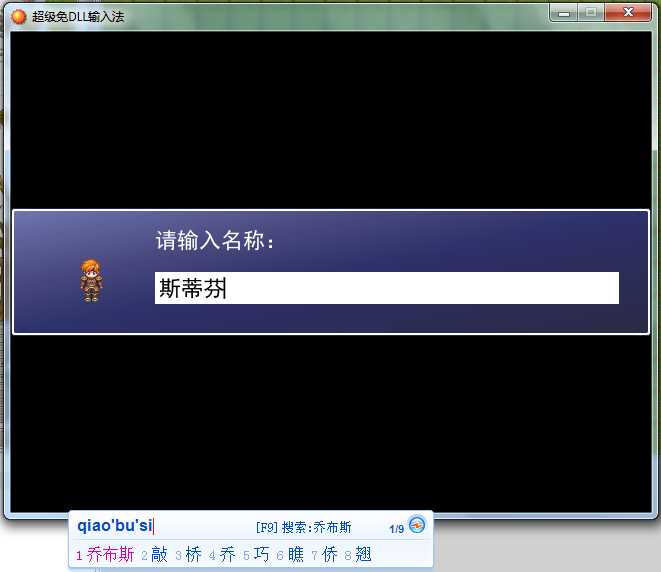
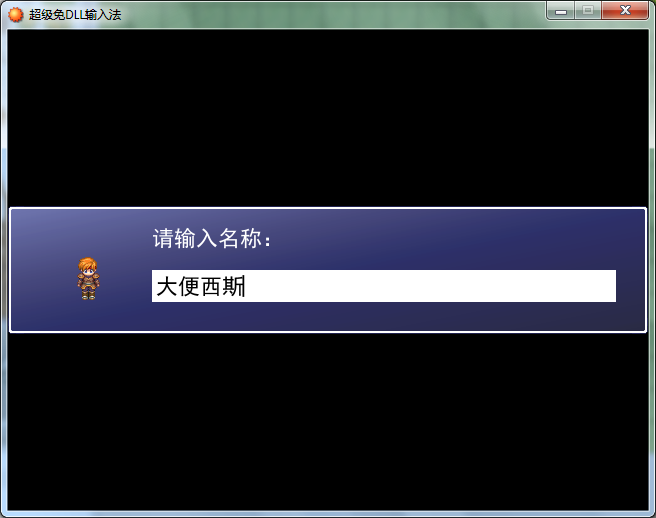
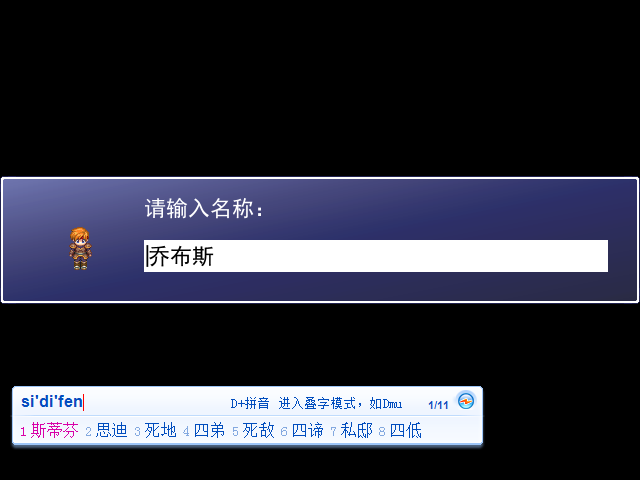 <=即使全屏输入法照样显示
|
评分
-
查看全部评分
|




 写轮眼

 发表于 2012-7-24 21:41:07


 提升卡
 沉默号角
 喧嚣号角
 变色卡
 升龙剑


 ~


 ...............
