查看: 4944|回复: 17

[有事请教] 请问用blt画图时,以邻近的形式缩放

[复制链接]
梦石
0
星屑
566
在线时间
46 小时
注册时间
2017-10-23
回帖
12
发表于 2020-5-27 23:45:26 | 显示全部楼层 |阅读模式

加入我们,或者,欢迎回来。

您需要 登录 才可以下载或查看,没有账号?注册会员

×
请问用bitmap.blt画图时,如何以邻近的形式缩放?
默认是会模糊化处理的, 我需要以像素形式的放大

点评

读取你要绘制的图片时,把平滑关掉不就行了?!  发表于 2020-5-29 07:43

评分

参与人数 1赞 +1 收起 理由
白嫩白嫩的 + 1 塞糖

查看全部评分

梦石
0
星屑
3922
在线时间
1198 小时
注册时间
2016-8-9
回帖
2355

开拓者

发表于 2020-5-28 12:05:31 | 显示全部楼层
同求,希望大佬来解答,顺便给楼主点个赞,这是个好问题
酸酸甜甜就④哇噢
回复

使用道具 举报

梦石
0
星屑
1343
在线时间
153 小时
注册时间
2020-4-26
回帖
146
发表于 2020-5-28 19:45:09 | 显示全部楼层
本帖最后由 moonyoulove 于 2020-5-28 19:46 编辑

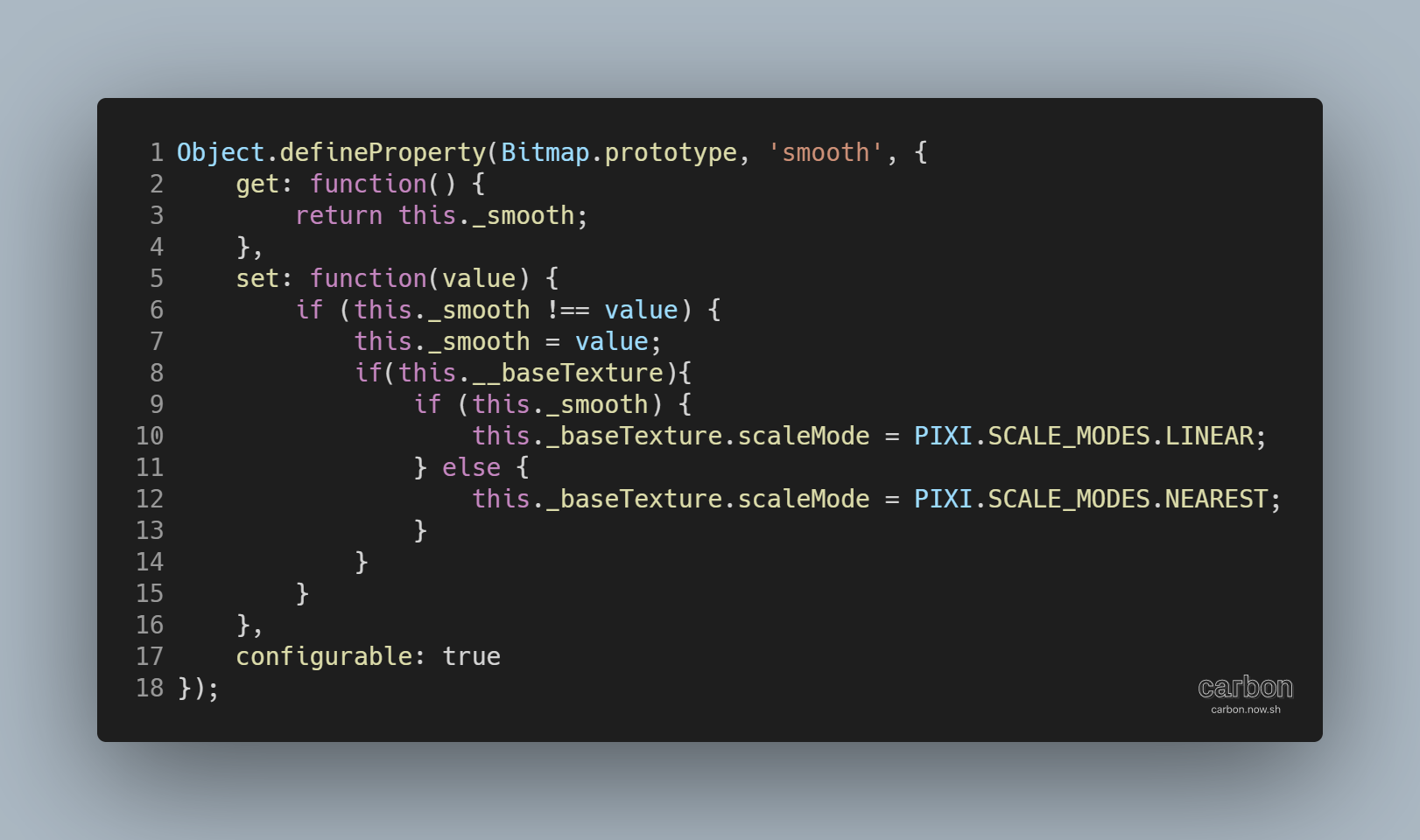
carbon (1).png
这个不知道行不行,要不然用canvas的方法
https://developer.mozilla.org/zh-CN/docs/Web/API/CanvasRenderingContext2D/imageSmoothingEnabled

回复

使用道具 举报

梦石
0
星屑
566
在线时间
46 小时
注册时间
2017-10-23
回帖
12
 楼主| 发表于 2020-6-5 01:31:38 | 显示全部楼层
moonyoulove 发表于 2020-5-28 19:45
这个不知道行不行,要不然用canvas的方法
https://developer.mozilla.org/zh-CN/docs/Web/API/CanvasRende ...

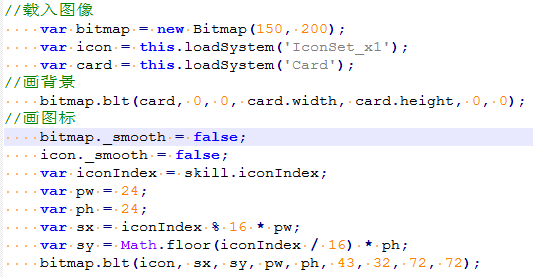
你好,抱歉这么晚才回。
我不太会用你说的这个。
对脚本的认识只会改造的水平。


@芯☆淡茹水

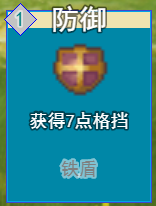
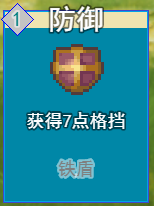
平滑似乎没什么用的样子
3.png 1.png

下面这个是需要的效果图
4.png
回复

使用道具 举报

梦石
0
星屑
758
在线时间
43 小时
注册时间
2011-4-15
回帖
6
发表于 2020-6-5 06:44:46 | 显示全部楼层
the answer is : bitmap._context.imageSmoothingEnable = false;
Add it.

example

example

点评

How does this js.  发表于 2020-6-5 22:31
回复 1 0

使用道具 举报

梦石
0
星屑
1998
在线时间
137 小时
注册时间
2020-5-7
回帖
34
发表于 2020-6-5 10:54:21 | 显示全部楼层
本帖最后由 chyj4747 于 2020-6-5 10:55 编辑
celica 发表于 2020-6-5 01:31
你好,抱歉这么晚才回。
我不太会用你说的这个。
对脚本的认识只会改造的水平。


用法:
bitmap.smooth = false;
用_smooth应该也没问题,但是会失去baseTexture的判断和设置

loadSystem函数有没有改过?默认是不做平滑处理的
内部是
this.loadBitmap('img/system/', filename, hue, false);
最后一个参数是否平滑,如果某个地方改成了true,那么你的icon本身就是平滑处理过的,也就是会模糊,即便你作为画板的bitmap没有平滑,但icon本身被平滑了那么画上去肯定也是模糊的
回复

使用道具 举报

梦石
0
星屑
566
在线时间
46 小时
注册时间
2017-10-23
回帖
12
 楼主| 发表于 2020-6-5 17:41:34 | 显示全部楼层
lvashe 发表于 2020-6-5 06:44
the answer is : bitmap._context.imageSmoothingEnable = false;
Add it.

@chyj4747

2.png

没有效果,是不是和电脑系统有关?
回复

使用道具 举报

梦石
0
星屑
1998
在线时间
137 小时
注册时间
2020-5-7
回帖
34
发表于 2020-6-5 19:30:22 | 显示全部楼层

跟电脑肯定没关系

你做个简单的demo然后传上来吧,你自己写代码的话可以只传js上来,当然图片如果不是默认的也记得一起打包传上来
回复

使用道具 举报

梦石
0
星屑
566
在线时间
46 小时
注册时间
2017-10-23
回帖
12
 楼主| 发表于 2020-6-5 19:55:42 | 显示全部楼层
chyj4747 发表于 2020-6-5 19:30
跟电脑肯定没关系

你做个简单的demo然后传上来吧,你自己写代码的话可以只传js上来,当然图片如果不是默 ...

  1. Spriteset_Map.prototype.createLowerLayer = function() {
  2.     Spriteset_Base.prototype.createLowerLayer.call(this);
  3.     this.createParallax();
  4.     this.createTilemap();
  5.     this.createCharacters();
  6.     this.createShadow();
  7.     this.createDestination();
  8.     this.createWeather();

  9.     this.b = false;

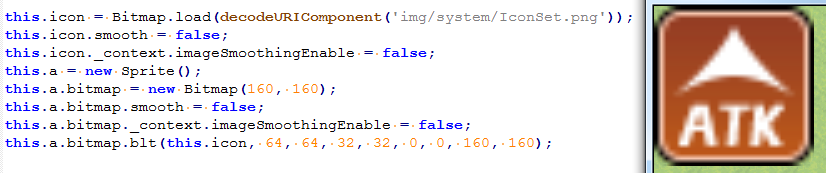
  10.     this.icon = Bitmap.load(decodeURIComponent('img/system/IconSet.png'));
  11.     this.icon.smooth = false;
  12.     this.icon._context.imageSmoothingEnable = false;
  13.     this.a = new Sprite();
  14.     this.a.bitmap = new Bitmap(160, 160);
  15.     this.a.bitmap.smooth = false;
  16.     this.a.bitmap._context.imageSmoothingEnable = false;
  17.     this.a.bitmap.blt(this.icon, 64, 64, 32, 32, 0, 0, 160, 160);

  18.     this.addChild(this.a);

  19. };

  20. Spriteset_Map.prototype.update = function() {
  21.     Spriteset_Base.prototype.update.call(this);
  22.     this.updateTileset();
  23.     this.updateParallax();
  24.     this.updateTilemap();
  25.     this.updateShadow();
  26.     this.updateWeather();
  27.    
  28.     if (!this.b && this.icon.isReady()) {
  29.         this.a.bitmap.blt(this.icon, 64, 64, 32, 32, 0, 0, 160, 160);
  30.         this.b = true;
  31.     }
  32. };
复制代码


测试的,在我电脑上就是糊的。
回复

使用道具 举报

梦石
0
星屑
758
在线时间
43 小时
注册时间
2011-4-15
回帖
6
发表于 2020-6-5 19:57:29 | 显示全部楼层

this.icon =....
this.icon.smooth = ....(not necessary)
this.icon.context.....(not necessary)
var tempBitmap = new Bitmap(160,160)
tempBitmap._context.imageSmoothingEnable = false;
tempBitmap.blt(XXXXXXXXXXXXXXXXXX)
this.a = new Sprite(tempBitmap);

Try it :)
回复

使用道具 举报

您需要登录后才可以回帖 登录 | 注册会员

本版积分规则

Powered by Discuz! X5.0 © 2001-2026 Discuz! Team.

在本版发帖返回顶部