| 赞 | 46 |
| VIP | |
| 好人卡 | |
| 积分 | 97 |
| 经验 | |
| 最后登录 | 2026-6-17 |
| 在线时间 | 2775 小时 |
梦石0
星屑9716
在线时间2775 小时
注册时间2008-9-5
回帖3458
   
|
加入我们,或者,欢迎回来。
您需要 登录 才可以下载或查看,没有账号?注册会员
×
本帖最后由 cinderelmini 于 2015-11-15 17:57 编辑
- return if (使用了其他菜单类脚本 && 无法自行整合和兼容)的同学
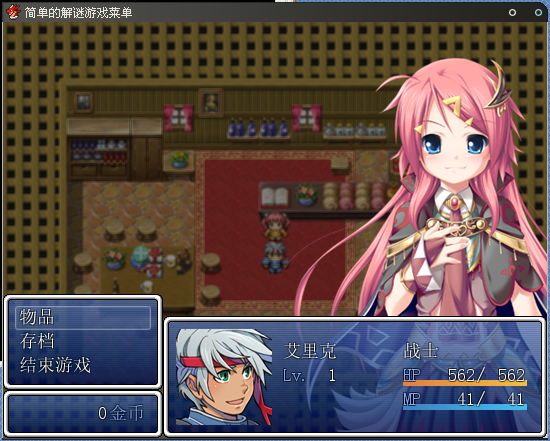
总之,就是我自己比较常用的解谜类菜单模式,
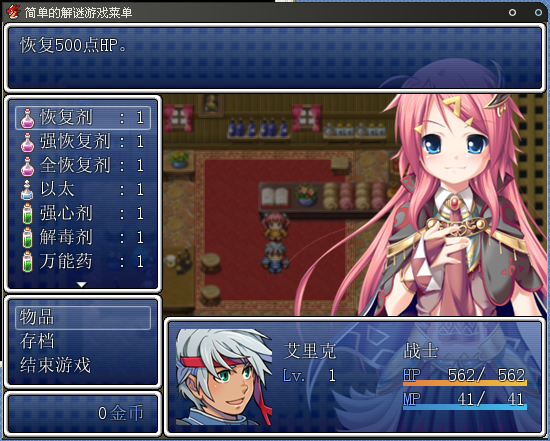
把Scene_Item的物品相关内容都搬到Scene_Menu里了,
因为只是针对普通的解谜设定,
所以物品请单纯地设置为关联公共事件的物品,
虽然是这样的设定,但一般(恢复类药品之类的需要选择对象)的物品还是可以使用的,
只不过,你需要自己设定后面的排版了(我才不是因为懒……)。
脚本如下(略长):
点击展开/收起- =begin
- ===============================================================================
- 显示立绘以及简易的解谜菜单 By.椎名 2014-09-09
- ===============================================================================
- 【使用说明】
-
- 一个简单的解谜游戏菜单,基本都是默认的窗口,
- 至于坐标宽度和列数之类的设置,请自行修改。
-
- 直接main前insert可用。
- 与其他菜单类脚本冲突可能性极大,
- 不提供整合和兼容服务。
-
-
- 脚本中搜索:
- ·“设置部分”开始设定各个项目
- 你可以在这里设定包含字号,立绘等一系列有关的项目。
-
- ·“脚本部分-Scene”查看Scene的修改内容
- 这里可以调整一部分窗口的坐标和宽度等。
-
- ·“脚本部分-Window”查看各个窗口的修改内容
- 这里只是对某些窗口内容的重新定义。
-
- ·“脚本部分-立绘”为新增的显示立绘脚本
- 立绘的窗口,默认设定是滑动和淡入,关闭滑动不淡入。
- 你也可以通过在这里设定坐标来达到从下方滑入画面的效果。
-
-
- 发现BUG欢迎随时回报。
-
- =end
- #####################################
- # 设置部分
- #####################################
- module SHIINA
- # 调整字号
- FONT_SIZE = 18
-
- # 是否显示立绘
- IMAGE = true
-
- # 固定的立绘(为false时立绘滚动效果)
- LOCK_IMAGE = false
-
- # 立绘的滑动速度(立绘不固定时生效)
- IMAGE_SLIDE_SPD = 10
-
- # 立绘文件名(放在picture文件夹内,赋值nil的话将使用队伍第一个角色的名字为名的图片)
- IMAGE_NAME = "CS003CYA"
-
- # 是否使用物品分类选择
- ITEM_TYPE = false
-
- # 加入武器和防具分类?(使用物品分类为true时生效)
- WEAPON_ARMOR = false
-
- # 是否可以整队
- FORMATION = false
-
- # 是否显示金钱窗口
- GOLD = true
-
- # 是否显示人物的状态窗口
- STATUS = true
-
- # 显示状态的情况下,是否显示队友(人物状态显示为true的时候生效)
- PARTY_STATUS = false
-
- # 状态窗口内容高度(设置为false则返回默认高度)
- STATUS_HEIGHT = 98
-
- # 状态窗口的显示项目,不显示的项目改为false或者nil,
- STATUS_ITEM = [true, # 脸图
- true, # 名字
- true, # 等级
- true, # 状态图标
- true, # 职业
- true, # HP
- true # MP
- ]
- end
-
- # 重置整体字号
- Font.default_size = SHIINA::FONT_SIZE
- #----------------------设置部分结束----------------------#
- #####################################
- # 脚本部分-Scene
- #####################################
- #==============================================================================
- # ■ Scene_MenuBase
- #==============================================================================
- class Scene_MenuBase < Scene_Base
- #--------------------------------------------------------------------------
- # ● 生成帮助窗口
- #--------------------------------------------------------------------------
- def create_help_window
- @help_window = Window_Help.new
- @help_window.visible = false
- @help_window.viewport = @viewport
- end
- #--------------------------------------------------------------------------
- # ● 生成角色窗口
- #--------------------------------------------------------------------------
- def create_actor_window
- @actor_window = Window_MenuActor.new
- @actor_window.set_handler(:ok, method(:on_actor_ok))
- @actor_window.set_handler(:cancel, method(:on_actor_cancel))
- end
- #--------------------------------------------------------------------------
- # ● 获取当前选中的物品
- #--------------------------------------------------------------------------
- def item
- @item_window.item
- end
- #--------------------------------------------------------------------------
- # ● 获取物品的使用者
- #--------------------------------------------------------------------------
- def user
- $game_party.movable_members.max_by {|member| member.pha }
- end
- #--------------------------------------------------------------------------
- # ● 显示子窗口
- #--------------------------------------------------------------------------
- def show_sub_window(window)
- width_remain = Graphics.width - window.width
- window.x = 0
- @viewport.rect.x = window.width
- @viewport.rect.width = Graphics.width - window.width
- window.show.activate
- end
- #--------------------------------------------------------------------------
- # ● 隐藏子窗口
- #--------------------------------------------------------------------------
- def hide_sub_window(window)
- @viewport.rect.x = @viewport.ox = 0
- @viewport.rect.width = Graphics.width
- window.hide.deactivate
- activate_item_window
- end
- #--------------------------------------------------------------------------
- # ● 角色“确定”
- #--------------------------------------------------------------------------
- def on_actor_ok
- if item_usable?
- use_item
- else
- Sound.play_buzzer
- end
- end
- #--------------------------------------------------------------------------
- # ● 角色“取消”
- #--------------------------------------------------------------------------
- def on_actor_cancel
- hide_sub_window(@actor_window)
- end
- #--------------------------------------------------------------------------
- # ● 确定物品
- #--------------------------------------------------------------------------
- def determine_item
- if item.for_friend?
- show_sub_window(@actor_window)
- @actor_window.select_for_item(item)
- else
- use_item
- activate_item_window
- end
- end
- #--------------------------------------------------------------------------
- # ● 启用物品窗口
- #--------------------------------------------------------------------------
- def activate_item_window
- @item_window.refresh
- @item_window.activate
- end
- #--------------------------------------------------------------------------
- # ● 获取物品的使用目标数组
- #--------------------------------------------------------------------------
- def item_target_actors
- if !item.for_friend?
- []
- elsif item.for_all?
- $game_party.members
- else
- [$game_party.members[@actor_window.index]]
- end
- end
- #--------------------------------------------------------------------------
- # ● 判定物品是否可以使用
- #--------------------------------------------------------------------------
- def item_usable?
- user.usable?(item) && item_effects_valid?
- end
- #--------------------------------------------------------------------------
- # ● 判定物品的效果是否有效
- #--------------------------------------------------------------------------
- def item_effects_valid?
- item_target_actors.any? do |target|
- target.item_test(user, item)
- end
- end
- #--------------------------------------------------------------------------
- # ● 对角色使用物品
- #--------------------------------------------------------------------------
- def use_item_to_actors
- item_target_actors.each do |target|
- item.repeats.times { target.item_apply(user, item) }
- end
- end
- #--------------------------------------------------------------------------
- # ● 使用物品
- #--------------------------------------------------------------------------
- def use_item
- play_se_for_item
- user.use_item(item)
- use_item_to_actors
- check_common_event
- check_gameover
- @actor_window.refresh
- end
- #--------------------------------------------------------------------------
- # ● 公共事件预定判定
- # 如果预约了事件的调用,则切换到地图画面。
- #--------------------------------------------------------------------------
- def check_common_event
- SceneManager.goto(Scene_Map) if $game_temp.common_event_reserved?
- end
- end
- #==============================================================================
- # ■ Scene_Menu
- #==============================================================================
- class Scene_Menu < Scene_MenuBase
- #--------------------------------------------------------------------------
- # ● 开始处理
- #--------------------------------------------------------------------------
- def start
- super
- create_image
- create_gold_window if SHIINA::GOLD
- create_command_window
- create_status_window if SHIINA::STATUS
- create_help_window
- create_category_window
- create_item_window
- create_actor_window
- end
-
- def create_image
- @image = Image.new
- end
-
- #--------------------------------------------------------------------------
- # ● 生成指令窗口
- #--------------------------------------------------------------------------
- def create_command_window
- @command_window = Window_MenuCommand.new
- @command_window.y = SHIINA::GOLD ?
- @gold_window.y - @command_window.height :
- Graphics.height - @command_window.height
-
- @command_window.set_handler(:item, method(:command_item))
- @command_window.set_handler(:formation, method(:command_formation)) if SHIINA::FORMATION
- @command_window.set_handler(:save, method(:command_save))
- @command_window.set_handler(:game_end, method(:command_game_end))
- @command_window.set_handler(:cancel, method(:return_scene))
- end
- #--------------------------------------------------------------------------
- # ● 生成金钱窗口
- #--------------------------------------------------------------------------
- def create_gold_window
- @gold_window = Window_Gold.new
- @gold_window.x = 0
- @gold_window.y = Graphics.height - @gold_window.height
- end
- #--------------------------------------------------------------------------
- # ● 生成状态窗口
- #--------------------------------------------------------------------------
- def create_status_window
- @status_window = Window_MenuStatus.new(@command_window.width, 0)
- @status_window.y = Graphics.height - @status_window.height
- end
- #--------------------------------------------------------------------------
- # ● 生成分类窗口
- #--------------------------------------------------------------------------
- def create_category_window
- @category_window = Window_ItemCategory.new
- @category_window.viewport = @viewport
- @category_window.help_window = @help_window
- @category_window.y = @help_window.height
- @category_window.deactivate
- @category_window.visible = false
- @category_window.set_handler(:ok, method(:on_category_ok))
- @category_window.set_handler(:cancel, method(:on_category_cancel))
- end
- #--------------------------------------------------------------------------
- # ● 生成物品窗口
- #--------------------------------------------------------------------------
- def create_item_window
- item_window_y = @category_window.y + (SHIINA::ITEM_TYPE ? @category_window.height : 0)
- item_window_height = Graphics.height - item_window_y - (Graphics.height - @command_window.y)
- @item_window = Window_ItemList.new(@category_window.x, item_window_y, @command_window.width, item_window_height)
- @item_window.viewport = @viewport
- @item_window.help_window = @help_window
- @item_window.deactivate
- @item_window.visible = false
- @item_window.set_handler(:ok, method(:on_item_ok))
- @item_window.set_handler(:cancel, method(:on_item_cancel))
- @category_window.item_window = @item_window
- end
- #--------------------------------------------------------------------------
- # ● 指令“物品”
- #--------------------------------------------------------------------------
- def command_item
- if SHIINA::ITEM_TYPE
- @category_window.activate
- @category_window.visible = true
- @item_window.visible = true
- else
- @item_window.category = :item
- @item_window.activate
- @item_window.select_last
- @item_window.visible = true
- @help_window.visible = @item_window.visible
- end
- end
- #--------------------------------------------------------------------------
- # ● 指令“整队”
- #--------------------------------------------------------------------------
- def command_formation
- return unless SHIINA::STATUS
- @status_window.select_last
- @status_window.activate
- @status_window.set_handler(:ok, method(:on_formation_ok))
- @status_window.set_handler(:cancel, method(:on_formation_cancel))
- end
- #--------------------------------------------------------------------------
- # ● 指令“存档”
- #--------------------------------------------------------------------------
- def command_save
- SceneManager.call(Scene_Save)
- end
- #--------------------------------------------------------------------------
- # ● 指令“结束游戏”
- #--------------------------------------------------------------------------
- def command_game_end
- SceneManager.call(Scene_End)
- end
- #--------------------------------------------------------------------------
- # ● 整队“确定”
- #--------------------------------------------------------------------------
- def on_formation_ok
- if @status_window.pending_index >= 0
- $game_party.swap_order(@status_window.index,
- @status_window.pending_index)
- @status_window.pending_index = -1
- @status_window.redraw_item(@status_window.index)
- else
- @status_window.pending_index = @status_window.index
- end
- @status_window.activate
- end
- #--------------------------------------------------------------------------
- # ● 整队“取消”
- #--------------------------------------------------------------------------
- def on_formation_cancel
- if @status_window.pending_index >= 0
- @status_window.pending_index = -1
- @status_window.activate
- else
- @status_window.unselect
- @command_window.activate
- end
- end
- #--------------------------------------------------------------------------
- # ● 分类“确定”
- #--------------------------------------------------------------------------
- def on_category_ok
- @item_window.activate
- @item_window.select_last
- @help_window.visible = @item_window.visible
- end
- #--------------------------------------------------------------------------
- # ● 分类“取消”
- #--------------------------------------------------------------------------
- def on_category_cancel
- @category_window.deactivate
- @category_window.visible = false
- @item_window.visible = false
- @help_window.visible = @item_window.visible
- @command_window.activate
- end
- #--------------------------------------------------------------------------
- # ● 物品“确定”
- #--------------------------------------------------------------------------
- def on_item_ok
- $game_party.last_item.object = item
- determine_item
- end
- #--------------------------------------------------------------------------
- # ● 物品“取消”
- #--------------------------------------------------------------------------
- def on_item_cancel
- @item_window.unselect
- if SHIINA::ITEM_TYPE
- @category_window.activate
- @help_window.visible = false
- else
- @item_window.visible = false
- @help_window.visible = @item_window.visible
- @command_window.activate
- end
- end
- #--------------------------------------------------------------------------
- # ● 播放使用物品声效
- #--------------------------------------------------------------------------
- def play_se_for_item
- Sound.play_use_item
- end
- #--------------------------------------------------------------------------
- # ● 使用物品
- #--------------------------------------------------------------------------
- def use_item
- super
- @item_window.redraw_current_item
- end
- end
- #----------------------Scene部分结束----------------------#
- #####################################
- # 脚本部分-Window
- #####################################
- #==============================================================================
- # ■ Window_MenuCommand
- #------------------------------------------------------------------------------
- # 菜单画面中显示指令的窗口
- #==============================================================================
- class Window_MenuCommand < Window_Command
- #--------------------------------------------------------------------------
- # ● 向指令列表添加主要的指令
- #--------------------------------------------------------------------------
- def add_main_commands
- add_command(Vocab::item, :item, main_commands_enabled)
- end
- #--------------------------------------------------------------------------
- # ● 添加整队指令
- #--------------------------------------------------------------------------
- def add_formation_command
- return unless SHIINA::FORMATION
- add_command(Vocab::formation, :formation, formation_enabled)
- end
- end
- #==============================================================================
- # ■ Window_ItemCategory
- #------------------------------------------------------------------------------
- # 物品画面和商店画面中,显示装备、所持物品等项目列表的窗口。
- #==============================================================================
- class Window_ItemCategory < Window_HorzCommand
- #--------------------------------------------------------------------------
- # ● 生成指令列表
- #--------------------------------------------------------------------------
- def make_command_list
- add_command(Vocab::item, :item)
- add_command(Vocab::weapon, :weapon) if SHIINA::WEAPON_ARMOR
- add_command(Vocab::armor, :armor) if SHIINA::WEAPON_ARMOR
- add_command(Vocab::key_item, :key_item)
- end
- end
- #==============================================================================
- # ■ Window_ItemList
- #------------------------------------------------------------------------------
- # 物品画面中,显示持有物品的窗口。
- #==============================================================================
- class Window_ItemList < Window_Selectable
- #--------------------------------------------------------------------------
- # ● 获取列数
- #--------------------------------------------------------------------------
- def col_max
- return 1
- end
- end
- #==============================================================================
- # ■ Window_MenuStatus
- #------------------------------------------------------------------------------
- # 菜单画面中,显示队伍成员状态的窗口
- #==============================================================================
- class Window_MenuStatus < Window_Selectable
- #--------------------------------------------------------------------------
- # ● 获取窗口的宽度
- #--------------------------------------------------------------------------
- def window_width
- Graphics.width - 160
- end
- #--------------------------------------------------------------------------
- # ● 最大数目
- #--------------------------------------------------------------------------
- def item_max
- if SHIINA::PARTY_STATUS
- return $game_party.members.size
- else
- return 1
- end
- end
- #--------------------------------------------------------------------------
- # ● 获取窗口的高度
- #--------------------------------------------------------------------------
- def window_height
- item_max * item_height + standard_padding * 2
- end
- #--------------------------------------------------------------------------
- # ● 绘制项目
- #--------------------------------------------------------------------------
- def draw_item(index)
- unless SHIINA::PARTY_STATUS
- return if index > 0
- end
- actor = $game_party.members[index]
- enabled = $game_party.battle_members.include?(actor)
- rect = item_rect(index)
- draw_item_background(index)
- draw_actor_face(actor, rect.x + 1, rect.y + 1, enabled) if SHIINA::STATUS_ITEM[0]
- draw_actor_simple_status(actor, rect.x + 108, rect.y + line_height / 2)
- end
- #--------------------------------------------------------------------------
- # ● 绘制简单的状态
- #--------------------------------------------------------------------------
- def draw_actor_simple_status(actor, x, y)
- draw_actor_name(actor, x, y) if SHIINA::STATUS_ITEM[1]
- draw_actor_level(actor, x, y + line_height * 1) if SHIINA::STATUS_ITEM[2]
- draw_actor_icons(actor, x, y + line_height * 2) if SHIINA::STATUS_ITEM[3]
- draw_actor_class(actor, x + 120, y) if SHIINA::STATUS_ITEM[4]
- draw_actor_hp(actor, x + 120, y + line_height * 1) if SHIINA::STATUS_ITEM[5]
- draw_actor_mp(actor, x + 120, y + line_height * 2) if SHIINA::STATUS_ITEM[6]
- end
- #--------------------------------------------------------------------------
- # ● 获取项目的高度
- #--------------------------------------------------------------------------
- def item_height
- if SHIINA::STATUS_HEIGHT
- return SHIINA::STATUS_HEIGHT
- else
- return (Graphics.height - standard_padding * 2) / 4
- end
- end
- end
- #----------------------Window部分结束----------------------#
- #####################################
- # 脚本部分-立绘
- #####################################
- class Image < Window_Base
-
- def initialize(x=get_x, y=Graphics.height)
- super(x, y, 24, 24)
- @image = Sprite.new
- @image.bitmap = Cache.picture(get_pic_name)
- @image.ox = @image.bitmap.width/2
- @image.oy = @image.bitmap.height
- self.opacity = 0
- self.contents_opacity = 0 unless SHIINA::LOCK_IMAGE
- self.x = x
- self.y = y
- set
- setn(Graphics.width - 32 * 4)
- end
-
- def get_pic_name
- SHIINA::IMAGE_NAME.nil? ? $game_party.members[0].name.to_s : SHIINA::IMAGE_NAME
- end
-
- def get_x
- SHIINA::LOCK_IMAGE ? Graphics.width - 32 * 4 : Graphics.width
- end
-
- def spd
- SHIINA::IMAGE_SLIDE_SPD
- end
-
- def set(x=self.x, y=self.y)
- self.x = x
- self.y = y
- @nx = x
- @ny = y
- end
-
- def setn(x=self.x, y=self.y)
- @nx = x
- @ny = y
- end
-
- def x=(n); super(n); @image.x=n; end
- def y=(n); super(n); @image.y=n; end
- def z=(n); super(n); @image.z=n; end
- def visible=(n); super(n); @image.visible=n; end
- def contents_opacity=(n); super(n); @image.opacity=n; end
- def dispose; super; @image.dispose; end
-
- def update
- super
- return if SHIINA::LOCK_IMAGE
- update_slide
- end
-
- def slide_over?
- return (self.x==@nx && self.y=@ny)
- end
-
- def update_slide
- self.contents_opacity += 20 unless SHIINA::LOCK_IMAGE
- return if slide_over?
- if self.x + spd < @nx
- self.x += spd
- elsif self.x - spd > @nx
- self.x -= spd
- elsif self.x != @nx
- self.x = @nx
- end
- if self.y + spd < @ny
- self.y += spd
- elsif self.y - spd > @ny
- self.y -= spd
- elsif self.y != @ny
- self.y = @ny
- end
- end
-
- end
- #----------------------立绘部分结束----------------------#
※2015-11-15更新:
·增加了队友LR键(也就是pageup/pagedown)切换功能,取消了状态窗口多层显示队友功能。
·更改立绘类为Sprite并兼并进Window_MenuCommand里刷新和更新。
·修改了一处变量书写错误(手残。。)
V2版脚本如下(依然略长)- =begin
- ===============================================================================
- 显示立绘以及简易的解谜菜单 By.椎名 2015-11-15
- ===============================================================================
- 【使用说明】
-
- 一个简单的解谜游戏菜单,基本都是默认的窗口,
- 至于坐标宽度和列数之类的设置,请自行修改。
-
- 直接main前insert可用。
- 与其他菜单类脚本冲突可能性极大,
- 不提供整合和兼容服务。
-
-
- 脚本中搜索:
- ·“设置部分”开始设定各个项目
- 你可以在这里设定包含字号,立绘等一系列有关的项目。
-
- ·“脚本部分-Scene”查看Scene的修改内容
- 这里可以调整一部分窗口的坐标和宽度等。
-
- ·“脚本部分-Window”查看各个窗口的修改内容
- 这里只是对某些窗口内容的重新定义。
-
- ·“脚本部分-立绘”为新增的显示立绘脚本
- 立绘的窗口,默认设定是滑动和淡入,关闭滑动不淡入。
- 你也可以通过在这里设定坐标来达到从下方滑入画面的效果。
-
-
- 发现BUG欢迎随时回报。
-
- =end
- #####################################
- # 设置部分
- #####################################
- module SHIINA
- # 调整字号
- FONT_SIZE = 18
-
- # 是否显示立绘
- IMAGE = true
-
- # 固定的立绘(为false时立绘滚动和淡入效果)
- LOCK_IMAGE = false
-
- # 立绘左右翻转(没错这是窝偷懒用的)(← ←结果偷懒不成。。但是还是留着吧)
- IMAGE_MIRROR = false
-
- # 立绘的滑动速度(立绘不固定时生效)
- IMAGE_SLIDE_SPD = 10
-
- # 立绘文件名(放在picture文件夹内,赋值nil的话将使用菜单当前角色的名字为名的图片)
- IMAGE_NAME = nil
-
- # 是否使用物品分类选择
- ITEM_TYPE = false
-
- # 加入武器和防具分类?(使用物品分类为true时生效)
- WEAPON_ARMOR = false
-
- # 是否可以整队
- FORMATION = false
-
- # 是否显示金钱窗口
- GOLD = true
-
- # 是否显示人物的状态窗口
- STATUS = true
-
- # 状态窗口内容高度(设置为false则返回默认高度)
- STATUS_HEIGHT = 98
-
- # 状态窗口的显示项目,不显示的项目改为false或者nil,
- STATUS_ITEM = [true, # 脸图
- true, # 名字
- true, # 等级
- true, # 状态图标
- true, # 职业
- true, # HP
- true # MP
- ]
- end
-
- # 重置整体字号
- Font.default_size = SHIINA::FONT_SIZE
- #----------------------设置部分结束----------------------#
- #####################################
- # 脚本部分-Scene
- #####################################
- #==============================================================================
- # ■ Scene_MenuBase
- #==============================================================================
- class Scene_MenuBase < Scene_Base
- #--------------------------------------------------------------------------
- # ● 生成帮助窗口
- #--------------------------------------------------------------------------
- def create_help_window
- @help_window = Window_Help.new
- @help_window.visible = false
- @help_window.viewport = @viewport
- end
- #--------------------------------------------------------------------------
- # ● 生成角色窗口
- #--------------------------------------------------------------------------
- def create_actor_window
- @actor_window = Window_MenuActor.new
- @actor_window.set_handler(:ok, method(:on_actor_ok))
- @actor_window.set_handler(:cancel, method(:on_actor_cancel))
- end
- #--------------------------------------------------------------------------
- # ● 获取当前选中的物品
- #--------------------------------------------------------------------------
- def item
- @item_window.item
- end
- #--------------------------------------------------------------------------
- # ● 获取物品的使用者(直接指向当前角色)
- #--------------------------------------------------------------------------
- def user
- return @actor
- #~ $game_party.movable_members.max_by {|member| member.pha }
- end
- #--------------------------------------------------------------------------
- # ● 显示子窗口
- #--------------------------------------------------------------------------
- def show_sub_window(window)
- width_remain = Graphics.width - window.width
- window.x = 0
- @viewport.rect.x = window.width
- @viewport.rect.width = Graphics.width - window.width
- window.show.activate
- end
- #--------------------------------------------------------------------------
- # ● 隐藏子窗口
- #--------------------------------------------------------------------------
- def hide_sub_window(window)
- @viewport.rect.x = @viewport.ox = 0
- @viewport.rect.width = Graphics.width
- window.hide.deactivate
- activate_item_window
- end
- #--------------------------------------------------------------------------
- # ● 角色“确定”
- #--------------------------------------------------------------------------
- def on_actor_ok
- if item_usable?
- use_item
- else
- Sound.play_buzzer
- end
- end
- #--------------------------------------------------------------------------
- # ● 角色“取消”
- #--------------------------------------------------------------------------
- def on_actor_cancel
- hide_sub_window(@actor_window)
- end
- #--------------------------------------------------------------------------
- # ● 确定物品
- #--------------------------------------------------------------------------
- def determine_item
- if item.for_friend?
- show_sub_window(@actor_window)
- @actor_window.select_for_item(item)
- else
- use_item
- activate_item_window
- end
- end
- #--------------------------------------------------------------------------
- # ● 启用物品窗口
- #--------------------------------------------------------------------------
- def activate_item_window
- @item_window.refresh
- @item_window.activate
- end
- #--------------------------------------------------------------------------
- # ● 获取物品的使用目标数组
- #--------------------------------------------------------------------------
- def item_target_actors
- if !item.for_friend?
- []
- elsif item.for_all?
- $game_party.members
- else
- [$game_party.members[@actor_window.index]]
- end
- end
- #--------------------------------------------------------------------------
- # ● 判定物品是否可以使用
- #--------------------------------------------------------------------------
- def item_usable?
- user.usable?(item) && item_effects_valid?
- end
- #--------------------------------------------------------------------------
- # ● 判定物品的效果是否有效
- #--------------------------------------------------------------------------
- def item_effects_valid?
- item_target_actors.any? do |target|
- target.item_test(user, item)
- end
- end
- #--------------------------------------------------------------------------
- # ● 对角色使用物品
- #--------------------------------------------------------------------------
- def use_item_to_actors
- item_target_actors.each do |target|
- item.repeats.times { target.item_apply(user, item) }
- end
- end
- #--------------------------------------------------------------------------
- # ● 使用物品
- #--------------------------------------------------------------------------
- def use_item
- play_se_for_item
- user.use_item(item)
- use_item_to_actors
- check_common_event
- check_gameover
- @actor_window.refresh
- end
- #--------------------------------------------------------------------------
- # ● 公共事件预定判定
- # 如果预约了事件的调用,则切换到地图画面。
- #--------------------------------------------------------------------------
- def check_common_event
- SceneManager.goto(Scene_Map) if $game_temp.common_event_reserved?
- end
- end
- #==============================================================================
- # ■ Scene_Menu
- #==============================================================================
- class Scene_Menu < Scene_MenuBase
- #--------------------------------------------------------------------------
- # ● 开始处理
- #--------------------------------------------------------------------------
- def start
- super
- create_image
- create_gold_window if SHIINA::GOLD
- create_command_window
- create_status_window if SHIINA::STATUS
- create_help_window
- create_category_window
- create_item_window
- create_actor_window
- end
-
- #--------------------------------------------------------------------------
- # ● 生成立绘
- #--------------------------------------------------------------------------
- def create_image
- @image = Image.new(@actor)
- end
-
- #--------------------------------------------------------------------------
- # ● 生成指令窗口
- #--------------------------------------------------------------------------
- def create_command_window
- @command_window = Window_MenuCommand.new
- @command_window.y = SHIINA::GOLD ?
- @gold_window.y - @command_window.height :
- Graphics.height - @command_window.height
-
- @command_window.set_handler(:item, method(:command_item))
- @command_window.set_handler(:formation, method(:command_formation)) if SHIINA::FORMATION
- @command_window.set_handler(:save, method(:command_save))
- @command_window.set_handler(:game_end, method(:command_game_end))
- @command_window.set_handler(:cancel, method(:return_scene))
- @command_window.set_handler(:pageup, method(:prev_actor))
- @command_window.set_handler(:pagedown, method(:next_actor))
- # 立绘塞进指令窗口
- @command_window.image = @image
- end
- #--------------------------------------------------------------------------
- # ● 生成金钱窗口
- #--------------------------------------------------------------------------
- def create_gold_window
- @gold_window = Window_Gold.new
- @gold_window.x = 0
- @gold_window.y = Graphics.height - @gold_window.height
- end
- #--------------------------------------------------------------------------
- # ● 生成状态窗口
- #--------------------------------------------------------------------------
- def create_status_window
- @status_window = Window_MenuStatus.new(@command_window.width, 0)
- @status_window.refresh_nanikore(@actor)
- @status_window.y = Graphics.height - @status_window.height
- end
- #--------------------------------------------------------------------------
- # ● 生成分类窗口
- #--------------------------------------------------------------------------
- def create_category_window
- @category_window = Window_ItemCategory.new
- @category_window.viewport = @viewport
- @category_window.help_window = @help_window
- @category_window.y = @help_window.height
- @category_window.deactivate
- @category_window.visible = false
- @category_window.set_handler(:ok, method(:on_category_ok))
- @category_window.set_handler(:cancel, method(:on_category_cancel))
- end
- #--------------------------------------------------------------------------
- # ● 生成物品窗口
- #--------------------------------------------------------------------------
- def create_item_window
- item_window_y = @category_window.y + (SHIINA::ITEM_TYPE ? @category_window.height : 0)
- item_window_height = Graphics.height - item_window_y - (Graphics.height - @command_window.y)
- @item_window = Window_ItemList.new(@category_window.x, item_window_y, @command_window.width, item_window_height)
- @item_window.viewport = @viewport
- @item_window.help_window = @help_window
- @item_window.deactivate
- @item_window.visible = false
- @item_window.set_handler(:ok, method(:on_item_ok))
- @item_window.set_handler(:cancel, method(:on_item_cancel))
- @category_window.item_window = @item_window
- end
- #--------------------------------------------------------------------------
- # ● 指令“物品”
- #--------------------------------------------------------------------------
- def command_item
- if SHIINA::ITEM_TYPE
- @category_window.activate
- @category_window.visible = true
- @item_window.visible = true
- else
- @item_window.category = :item
- @item_window.activate
- @item_window.select_last
- @item_window.visible = true
- @help_window.visible = @item_window.visible
- end
- end
- #--------------------------------------------------------------------------
- # ● 指令“整队”
- #--------------------------------------------------------------------------
- def command_formation
- return unless SHIINA::STATUS
- @status_window.select_last
- @status_window.activate
- @status_window.set_handler(:ok, method(:on_formation_ok))
- @status_window.set_handler(:cancel, method(:on_formation_cancel))
- end
- #--------------------------------------------------------------------------
- # ● 指令“存档”
- #--------------------------------------------------------------------------
- def command_save
- SceneManager.call(Scene_Save)
- end
- #--------------------------------------------------------------------------
- # ● 指令“结束游戏”
- #--------------------------------------------------------------------------
- def command_game_end
- SceneManager.call(Scene_End)
- end
- #--------------------------------------------------------------------------
- # ● 整队“确定”
- #--------------------------------------------------------------------------
- def on_formation_ok
- if @status_window.pending_index >= 0
- $game_party.swap_order(@status_window.index,
- @status_window.pending_index)
- @status_window.pending_index = -1
- @status_window.redraw_item(@status_window.index)
- else
- @status_window.pending_index = @status_window.index
- end
- @status_window.activate
- end
- #--------------------------------------------------------------------------
- # ● 整队“取消”
- #--------------------------------------------------------------------------
- def on_formation_cancel
- if @status_window.pending_index >= 0
- @status_window.pending_index = -1
- @status_window.activate
- else
- @status_window.unselect
- @command_window.activate
- end
- end
- #--------------------------------------------------------------------------
- # ● 分类“确定”
- #--------------------------------------------------------------------------
- def on_category_ok
- @item_window.activate
- @item_window.select_last
- @help_window.visible = @item_window.visible
- end
- #--------------------------------------------------------------------------
- # ● 分类“取消”
- #--------------------------------------------------------------------------
- def on_category_cancel
- @category_window.deactivate
- @category_window.visible = false
- @item_window.visible = false
- @help_window.visible = @item_window.visible
- @command_window.activate
- end
- #--------------------------------------------------------------------------
- # ● 物品“确定”
- #--------------------------------------------------------------------------
- def on_item_ok
- $game_party.last_item.object = item
- determine_item
- end
- #--------------------------------------------------------------------------
- # ● 物品“取消”
- #--------------------------------------------------------------------------
- def on_item_cancel
- @item_window.unselect
- if SHIINA::ITEM_TYPE
- @category_window.activate
- @help_window.visible = false
- else
- @item_window.visible = false
- @help_window.visible = @item_window.visible
- @command_window.activate
- end
- end
- #--------------------------------------------------------------------------
- # ● 播放使用物品声效
- #--------------------------------------------------------------------------
- def play_se_for_item
- Sound.play_use_item
- end
- #--------------------------------------------------------------------------
- # ● 使用物品
- #--------------------------------------------------------------------------
- def use_item
- super
- @item_window.redraw_current_item
- end
- #--------------------------------------------------------------------------
- # ● 添加切换角色定义(刷新立绘和人物信息窗口)
- #--------------------------------------------------------------------------
- # 上一个角色
- alias image_prev_actor prev_actor
- def prev_actor
- image_prev_actor
- @command_window.activate
- @command_window.select_last
- @command_window.refresh_image(@actor)
- @status_window.refresh_nanikore(@actor)
- end
- # 下一个角色
- alias image_next_actor next_actor
- def next_actor
- image_next_actor
- @command_window.activate
- @command_window.select_last
- @command_window.refresh_image(@actor)
- @status_window.refresh_nanikore(@actor)
- end
- end
- #----------------------Scene部分结束----------------------#
- #####################################
- # 脚本部分-Window
- #####################################
- #==============================================================================
- # ■ Window_MenuCommand
- #------------------------------------------------------------------------------
- # 菜单画面中显示指令的窗口
- #==============================================================================
- class Window_MenuCommand < Window_Command
- # 立绘图像
- attr_accessor :image
- #--------------------------------------------------------------------------
- # ● 向指令列表添加主要的指令
- #--------------------------------------------------------------------------
- def add_main_commands
- add_command(Vocab::item, :item, main_commands_enabled)
- end
- #--------------------------------------------------------------------------
- # ● 添加整队指令
- #--------------------------------------------------------------------------
- def add_formation_command
- return unless SHIINA::FORMATION
- add_command(Vocab::formation, :formation, formation_enabled)
- end
- #--------------------------------------------------------------------------
- # ● 刷新立绘
- #--------------------------------------------------------------------------
- def refresh_image(actor)
- @image.refresh(actor)
- end
- #--------------------------------------------------------------------------
- # ● 更新立绘
- #--------------------------------------------------------------------------
- alias image_update update
- def update
- image_update
- @image.update if @image
- end
- #--------------------------------------------------------------------------
- # ● 释放里立绘
- #--------------------------------------------------------------------------
- alias image_dispose dispose
- def dispose
- image_dispose
- @image.dispose
- end
- end
- #==============================================================================
- # ■ Window_ItemCategory
- #------------------------------------------------------------------------------
- # 物品画面和商店画面中,显示装备、所持物品等项目列表的窗口。
- #==============================================================================
- class Window_ItemCategory < Window_HorzCommand
- #--------------------------------------------------------------------------
- # ● 生成指令列表
- #--------------------------------------------------------------------------
- def make_command_list
- add_command(Vocab::item, :item)
- add_command(Vocab::weapon, :weapon) if SHIINA::WEAPON_ARMOR
- add_command(Vocab::armor, :armor) if SHIINA::WEAPON_ARMOR
- add_command(Vocab::key_item, :key_item)
- end
- end
- #==============================================================================
- # ■ Window_ItemList
- #------------------------------------------------------------------------------
- # 物品画面中,显示持有物品的窗口。
- #==============================================================================
- class Window_ItemList < Window_Selectable
- #--------------------------------------------------------------------------
- # ● 获取列数
- #--------------------------------------------------------------------------
- def col_max
- return 1
- end
- end
- #==============================================================================
- # ■ Window_MenuStatus
- #------------------------------------------------------------------------------
- # 菜单画面中,显示队伍成员状态的窗口
- #==============================================================================
- class Window_MenuStatus < Window_Selectable
- #--------------------------------------------------------------------------
- # ● 获取窗口的宽度
- #--------------------------------------------------------------------------
- def window_width
- Graphics.width - 160
- end
- #--------------------------------------------------------------------------
- # ● 最大数目
- #--------------------------------------------------------------------------
- def item_max
- return 1
- end
- #--------------------------------------------------------------------------
- # ● 获取窗口的高度
- #--------------------------------------------------------------------------
- def window_height
- item_max * item_height + standard_padding * 2
- end
- #--------------------------------------------------------------------------
- # ● 刷新角色(为了位置refresh的结构只能另外写个了呢)
- #--------------------------------------------------------------------------
- def refresh_nanikore(actor)
- @actor = actor
- refresh
- end
- #--------------------------------------------------------------------------
- # ● 刷新(直接描绘当前角色信息)
- #--------------------------------------------------------------------------
- def refresh
- contents.clear
- return unless @actor
- index = 0
- rect = item_rect(index)
- draw_item_background(index)
- draw_actor_face(@actor, rect.x + 1, rect.y + 1) if SHIINA::STATUS_ITEM[0]
- draw_actor_simple_status(@actor, rect.x + 108, rect.y + line_height / 2)
- end
- #--------------------------------------------------------------------------
- # ● 绘制项目(没用了呢)
- #--------------------------------------------------------------------------
- def draw_item(index); ; end
- #--------------------------------------------------------------------------
- # ● 绘制简单的状态
- #--------------------------------------------------------------------------
- def draw_actor_simple_status(actor, x, y)
- draw_actor_name(actor, x, y) if SHIINA::STATUS_ITEM[1]
- draw_actor_level(actor, x, y + line_height * 1) if SHIINA::STATUS_ITEM[2]
- draw_actor_icons(actor, x, y + line_height * 2) if SHIINA::STATUS_ITEM[3]
- draw_actor_class(actor, x + 120, y) if SHIINA::STATUS_ITEM[4]
- draw_actor_hp(actor, x + 120, y + line_height * 1) if SHIINA::STATUS_ITEM[5]
- draw_actor_mp(actor, x + 120, y + line_height * 2) if SHIINA::STATUS_ITEM[6]
- end
- #--------------------------------------------------------------------------
- # ● 获取项目的高度
- #--------------------------------------------------------------------------
- def item_height
- if SHIINA::STATUS_HEIGHT
- return SHIINA::STATUS_HEIGHT
- else
- return (Graphics.height - standard_padding * 2) / 4
- end
- end
- end
- #==============================================================================
- # ■ Window_MenuActor
- #------------------------------------------------------------------------------
- # 显示物品使用或技能使用的选择目标的窗口
- #==============================================================================
- class Window_MenuActor < Window_MenuStatus
- #--------------------------------------------------------------------------
- # ● 刷新(父上已经走上奇怪的路线,只能从爷爷那边搬过来→_→)
- #--------------------------------------------------------------------------
- def refresh
- contents.clear
- draw_all_items
- end
- #--------------------------------------------------------------------------
- # ● 获取项目数
- #--------------------------------------------------------------------------
- def item_max
- $game_party.members.size
- end
- #--------------------------------------------------------------------------
- # ● 绘制项目
- #--------------------------------------------------------------------------
- def draw_item(index)
- actor = $game_party.members[index]
- enabled = $game_party.battle_members.include?(actor)
- rect = item_rect(index)
- draw_item_background(index)
- draw_actor_face(actor, rect.x + 1, rect.y + 1) if SHIINA::STATUS_ITEM[0]
- draw_actor_simple_status(actor, rect.x + 108, rect.y + line_height / 2)
- end
- end
- #----------------------Window部分结束----------------------#
- #####################################
- # 脚本部分-立绘
- #####################################
- class Image < Sprite
-
- def initialize(actor, x=get_x, y=Graphics.height)
- super(nil)
- @actor = actor
- self.mirror = SHIINA::IMAGE_MIRROR
- self.bitmap = Cache.picture(get_pic_name)
- self.oy = self.height
- self.opacity = 0 unless SHIINA::LOCK_IMAGE
- self.x = x
- self.y = y
- set
- setn(0)
- end
-
- def get_pic_name
- actor_name = @actor ? @actor.name : $game_party.members[0].name
- return SHIINA::IMAGE_NAME.nil? ? actor_name : SHIINA::IMAGE_NAME
- end
-
- def refresh(actor)
- @actor = actor
- self.bitmap = Cache.picture(get_pic_name)
- return if SHIINA::LOCK_IMAGE
- self.opacity = 0
- set(get_x)
- setn(0)
- end
-
- def get_x
- SHIINA::LOCK_IMAGE ? 0 : 32 * 4
- end
-
- def spd
- SHIINA::IMAGE_SLIDE_SPD
- end
-
- def set(x=self.x, y=self.y)
- self.x = x
- self.y = y
- @nx = x
- @ny = y
- end
-
- def setn(x=self.x, y=self.y)
- @nx = x
- @ny = y
- end
-
- def update
- super
- return if SHIINA::LOCK_IMAGE
- update_slide
- end
-
- def slide_over?
- return (self.x==@nx && self.y=@ny)
- end
-
- def update_slide
- self.opacity += 20 unless SHIINA::LOCK_IMAGE
- return if slide_over?
- if self.x + spd < @nx
- self.x += spd
- elsif self.x - spd > @nx
- self.x -= spd
- elsif self.x != @nx
- self.x = @nx
- end
- if self.y + spd < @ny
- self.y += spd
- elsif self.y - spd > @ny
- self.y -= spd
- elsif self.y != @ny
- self.y = @ny
- end
- end
-
- end
- #----------------------立绘部分结束----------------------#
设置的部分在脚本开头,其他的我就不说什么了,有需要的话就抱走吧!
然后最后是范例一枚……(我能要一毛钱节操吗?……눈_눈,其实只需要脚本就可以的,范例只是来卖萌的……)
 简单的解谜游戏菜单.zip
(1.63 MB, 下载次数: 900)
简单的解谜游戏菜单.zip
(1.63 MB, 下载次数: 900)
※V2版范例一枚……(因为是V2我能要两毛钱节操吗?……눈_눈,依然只需要脚本就可以的,范例依然是来卖萌的……顺便好像范例里的脚本日期没更新……)
简单的解谜游戏菜单v2.zip
(1.68 MB, 下载次数: 1302)
唔~~以上~ |
评分
-
查看全部评分
|


 ←开发中……

 ←暂时弃坑 电脑上资源全没

 想成为触的渣一枚Or觉得自己是渣的渣一枚。



 写轮眼
写轮眼
 发表于 2014-9-9 23:12:25


 提升卡
提升卡 沉默号角
沉默号角 喧嚣号角
喧嚣号角 变色卡
变色卡 升龙剑
升龙剑


