| 赞 | 2 |
| VIP | |
| 好人卡 | |
| 积分 | 14 |
| 经验 | |
| 最后登录 | 2022-9-15 |
| 在线时间 | 1705 小时 |
- 梦石
- 0
- 星屑
- 1428
- 在线时间
- 1705 小时
- 注册时间
- 2011-8-17
- 回帖
- 651
|
加入我们,或者,欢迎回来。
您需要 登录 才可以下载或查看,没有账号?注册会员
×
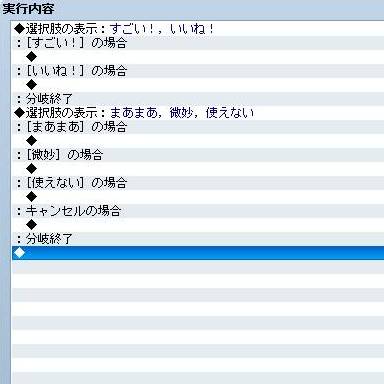
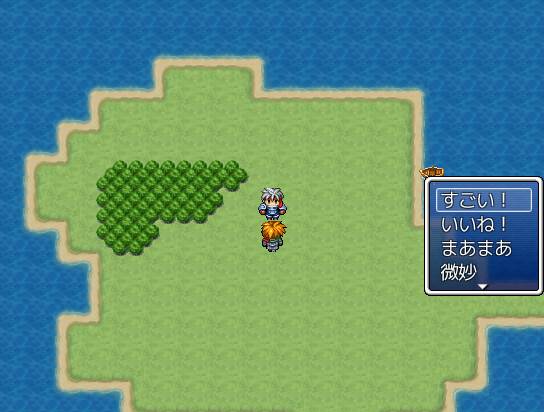
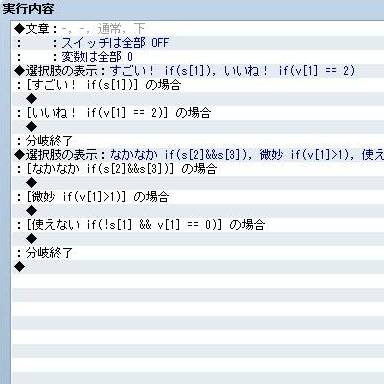
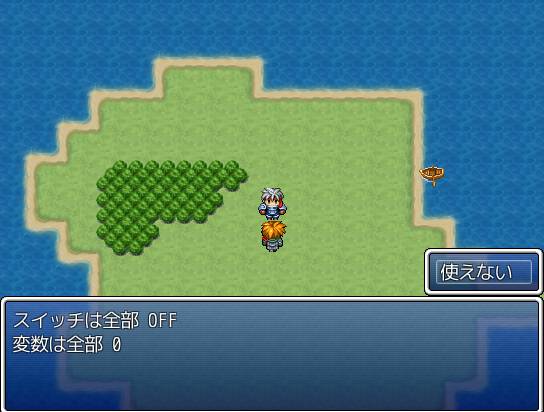
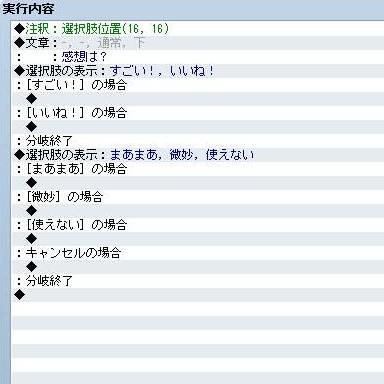
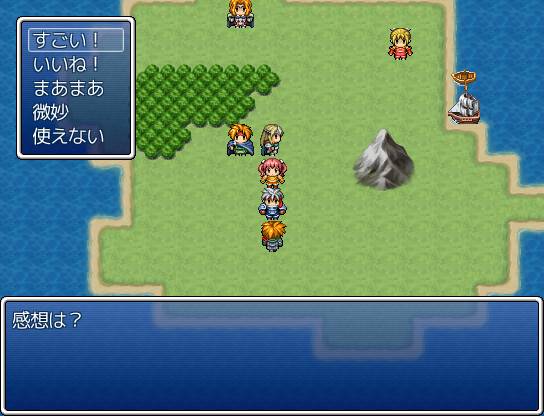
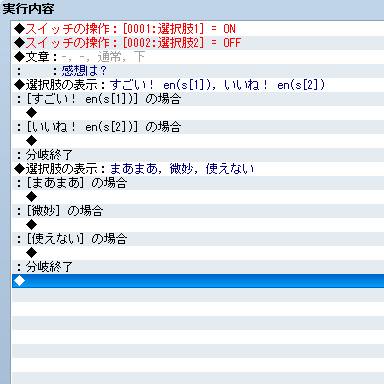
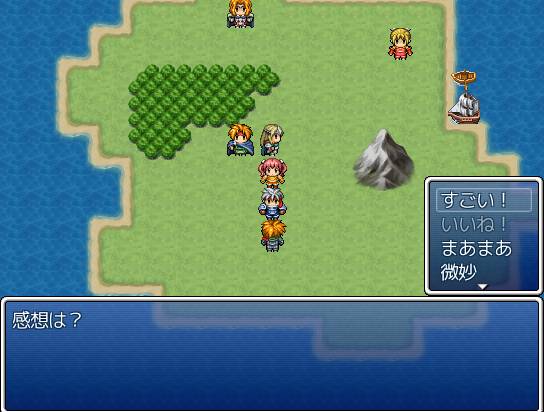
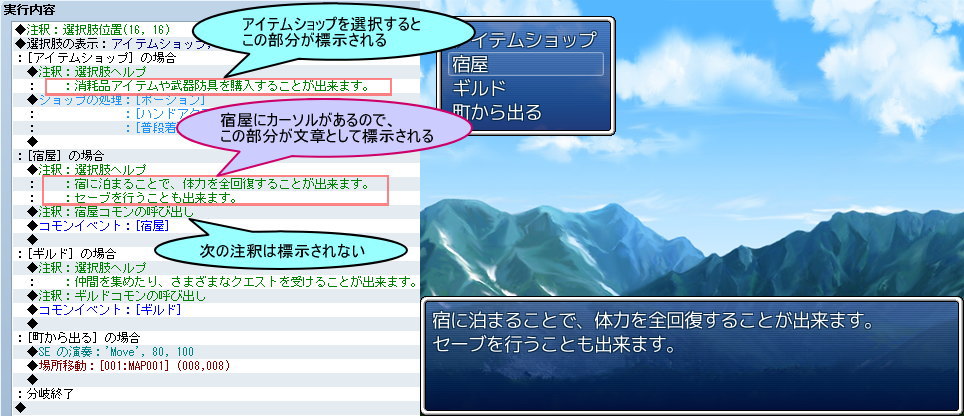
论坛搜索找的类似“选项功能拓展”的脚本,勉强能看的懂它有哪些功能,我就需要它里面的3个功能,1、多选项合并(和VX那个差不多)2、显示选项的说明 3、选项添加条件判断
第一个和VX一样已经会了,后面两个弄了半天也是百撕不得骑姐,别说什么百度翻译,坑爹的机翻只能看大概有什么作用,使用方法就算了。。。。
[pre lang="ruby" line="1"]=begin
▼ 選択肢拡張 ver. 2.3
RPGツクールVXAce用スクリプト
制作 : 木星ペンギン
URL : http://woodpenguin.blog.fc2.com/
------------------------------------------------------------------------------
概要
□ 選択肢を連続して設定した場合、つなげて一つの選択肢にする機能の追加。
□ 条件を設定することで、その項目を表示しない機能の追加。
□ 選択肢内容が前回と同じだった場合、
カーソルの初期位置を前回選んだ項目にする機能の追加。
□ 選択肢ウィンドウの位置を一時的に変更する機能の追加。
□ 条件を設定することで、その項目を半透明にして選択不可にする機能の追加。
□ 選択肢毎にヘルプメッセージを表示できる機能の追加。
------------------------------------------------------------------------------
使い方
□ 選択肢の表示を続けて配置すると、一つの選択肢にまとめられます。
・「キャンセルの場合」の処理は、無効以外を設定したものが適用され、
複数ある場合は後に設定された選択肢のものが適用されます。
□ 選択肢の文章中に if(条件) と入れ、その条件が偽になると項目が表示されなくなります。
・s でスイッチ、v で変数を参照できます。
・「キャンセルの場合」の項目が表示されない場合、無効と同じ処理をします。
□ 注釈に以下の文字列を入れることで、選択肢ウィンドウの表示位置を
一時的に変更することが出来ます。
選択肢位置(x, y[, row])
x : ウィンドウを表示する X 座標。
y : ウィンドウを表示する Y 座標。
row : 選択肢を表示する最大行数。
指定しない場合は、通常の最大行数を無視して
すべての選択肢が表示されます。
□ 選択肢の文章中に en(条件) と入れ、その条件が偽になると項目が半透明で表示されます。
□ 各項目の下に、注釈で以下の文字列を入れると、続きの文章を
項目のヘルプメッセージとしてカーソルを合わせたときに標示することができます。
選択肢ヘルプ
□ 詳細は下記のサイトを参照してください。
http://woodpenguin.web.fc2.com/rgss3/choice_ex.html
=end
module WdTk
module ChoiceEX
#//////////////////////////////////////////////////////////////////////////////
#
# 設定項目
#
#//////////////////////////////////////////////////////////////////////////////
#--------------------------------------------------------------------------
# ● 選択肢の最大行数
# 選択肢を表示するウィンドウの行数の最大数です。
# 選択肢がこの数より小さければ、選択肢の数に合わせます。
#--------------------------------------------------------------------------
RowMax = 4
#--------------------------------------------------------------------------
# ● 選択肢の位置記憶
# 前回表示した選択肢と全く同じ内容の選択肢を表示する場合、
# カーソルの初期位置を前回選んだ項目にする機能です。
# false で無効化できます。
#--------------------------------------------------------------------------
Store = true
#--------------------------------------------------------------------------
# ● 選択肢ヘルプを読み取る文字列
#--------------------------------------------------------------------------
Help = "選択肢ヘルプ"
end
#//////////////////////////////////////////////////////////////////////////////
#
# 以降、変更する必要なし
#
#//////////////////////////////////////////////////////////////////////////////
@material ||= []
@material << :ChoiceEX
def self.include?(sym)
@material.include?(sym)
end
end
#==============================================================================
# ■ Game_Message
#------------------------------------------------------------------------------
# 文章や選択肢などを表示するメッセージウィンドウの状態を扱うクラスです。この
# クラスのインスタンスは $game_message で参照されます。
#==============================================================================
class Game_Message
#--------------------------------------------------------------------------
# ● 公開インスタンス変数
#--------------------------------------------------------------------------
attr_accessor :choice_x # 選択肢ウィンドウの表示 X 座標
attr_accessor :choice_y # 選択肢ウィンドウの表示 Y 座標
attr_accessor :choice_row_max # 選択肢ウィンドウの表示行数
attr_accessor :choice_enables # 選択肢の有効状態
attr_accessor :choice_help # 選択肢のヘルプ
#--------------------------------------------------------------------------
# ○ クリア
#--------------------------------------------------------------------------
alias _wdtk_choice_clear clear
def clear
_wdtk_choice_clear
@choice_x = @choice_y = nil
@choice_row_max = WdTk::ChoiceEX::RowMax
@choice_enables = []
@choice_help = {}
end
end
#==============================================================================
# ■ Game_Interpreter
#==============================================================================
class Game_Interpreter
#--------------------------------------------------------------------------
# ☆ 選択肢のセットアップ
#--------------------------------------------------------------------------
def setup_choices(params)
result = []
add_choices(params, @index, result)
$game_message.choice_enables = $game_message.choices.collect do |c|
!c.slice!(/\s*en\(([^\)]+)\)/i) || choice_eval($1)
end
unless $game_message.choices.empty?
m = result.index($game_message.choice_cancel_type - 1)
$game_message.choice_enables << (!m || $game_message.choice_enables[m])
result << $game_message.choice_cancel_type - 1
$game_message.choice_proc = Proc.new {|n| @branch[@indent] = result[n] }
else
@branch[@indent] = -1
end
end
#--------------------------------------------------------------------------
# ● 選択肢の追加
#--------------------------------------------------------------------------
def add_choices(params, i, result, d = 0)
params[0].each_with_index do |s, n|
choice = s.dup
next if choice.slice!(/\s*if\(([^\)]+)\)/i) && !choice_eval($1)
$game_message.choices << choice
result << n + d
end
if params[1] == 5 || (params[1] > 0 && result.include?(params[1] + d - 1))
$game_message.choice_cancel_type = params[1] + d
end
indent = @list.indent
loop do
i += 1
if @list.indent == indent
case @list.code
when 402 # [**] の場合
m = result.index(@list.parameters[0] + d)
get_help_texts(m, i + 1) if m
when 404 # 分岐終了
break
end
end
end
i += 1
add_choices(@list.parameters, i, result, d + 5) if @list.code == 102
end
#--------------------------------------------------------------------------
# ● 分岐用
#--------------------------------------------------------------------------
def choice_eval(formula)
s, v = $game_switches, $game_variables
begin
Kernel.eval(formula)
rescue
msgbox "以下の条件判定でエラーが出ました。\n\n", formula
true
end
end
#--------------------------------------------------------------------------
# ● ヘルプ用テキストの取得
#--------------------------------------------------------------------------
def get_help_texts(b, i)
if @list.code == 108 && @list.parameters[0] == WdTk::ChoiceEX::Help
$game_message.choice_help = []
loop do
i += 1
break if @list.code != 408
$game_message.choice_help << @list.parameters[0]
end
end
end
#--------------------------------------------------------------------------
# ◯ 注釈
#--------------------------------------------------------------------------
alias _wdtk_choice_command_108 command_108
def command_108
_wdtk_choice_command_108
@comments.each do |comment|
if comment =~ /選択肢位置\((\d+),\s*(\d+),?\s*(\d*)\)/
$game_message.choice_x = $1.to_i
$game_message.choice_y = $2.to_i
$game_message.choice_row_max = ($3.empty? ? 99 : $3.to_i)
end
end
end
#--------------------------------------------------------------------------
# ● 分岐終了の場合
#--------------------------------------------------------------------------
def command_404
if next_event_code == 102
@branch[@indent] -= 5 if @branch.include?(@indent)
@index += 1
command_skip
#~ else
#~ @branch.delete(@indent)
end
end
end
#==============================================================================
# ■ Window_ChoiceList
#==============================================================================
class Window_ChoiceList
#--------------------------------------------------------------------------
# ☆ 入力処理の開始
#--------------------------------------------------------------------------
def start
return unless close?
last_choices = @list.collect {|c| c[:name] }
update_placement
refresh
unless WdTk::ChoiceEX::Store && last_choices == $game_message.choices
select(0)
end
open
activate
end
#--------------------------------------------------------------------------
# ○ ウィンドウ位置の更新
#--------------------------------------------------------------------------
alias _wdtk_choice_update_placement update_placement
def update_placement
_wdtk_choice_update_placement
self.height = [height, fitting_height($game_message.choice_row_max)].min
if @message_window.y >= Graphics.height / 2
self.y = @message_window.y - height
else
self.y = @message_window.y + @message_window.height
end
self.x = $game_message.choice_x if $game_message.choice_x
self.y = $game_message.choice_y if $game_message.choice_y
end
#--------------------------------------------------------------------------
# ☆ コマンドリストの作成
#--------------------------------------------------------------------------
def make_command_list
$game_message.choices.each_with_index do |choice, i|
add_command(choice, :choice, $game_message.choice_enables)
end
end
#--------------------------------------------------------------------------
# ○ 項目の描画
#--------------------------------------------------------------------------
alias _wdtk_choice_draw_item draw_item
def draw_item(index)
@choice_enabled = command_enabled?(index)
_wdtk_choice_draw_item(index)
end
#--------------------------------------------------------------------------
# ● テキスト描画色の変更
#--------------------------------------------------------------------------
def change_color(color, enabled = true)
super(color, enabled && @choice_enabled)
end
#--------------------------------------------------------------------------
# ● キャンセルボタンが押されたときの処理
#--------------------------------------------------------------------------
def process_cancel
if $game_message.choice_enables[item_max]
super
else
Sound.play_buzzer
end
end
#--------------------------------------------------------------------------
# ☆ キャンセルハンドラの呼び出し
#--------------------------------------------------------------------------
def call_cancel_handler
$game_message.choice_proc.call(item_max)
close
end
#--------------------------------------------------------------------------
# ● ウィンドウを閉じる
#--------------------------------------------------------------------------
def close
@message_window.on_show_fast unless $game_message.choice_help.empty?
super
end
#--------------------------------------------------------------------------
# ● ヘルプウィンドウ更新メソッドの呼び出し
#--------------------------------------------------------------------------
def call_update_help
update_help if active && !$game_message.choice_help.empty?
end
#--------------------------------------------------------------------------
# ● ヘルプウィンドウの更新
#--------------------------------------------------------------------------
def update_help
@message_window.force_clear
if $game_message.choice_help.include?(index)
$game_message.texts.replace($game_message.choice_help[index])
else
$game_message.texts.clear
end
end
end
#==============================================================================
# ■ Window_Message
#==============================================================================
class Window_Message
#--------------------------------------------------------------------------
# ● 文章の標示を強制クリア
#--------------------------------------------------------------------------
def force_clear
@gold_window.close
@fiber = nil
close
if WdTk.include?(:MesEff)
@character_sprites.each do |sprite, params|
next if params.empty?
sprite.bitmap.clear
sprite.visible = false
params.clear
end
end
end
#--------------------------------------------------------------------------
# ● 文章を最後まで表示する
#--------------------------------------------------------------------------
def on_show_fast
@show_fast = true
end
end
[/pre] |
|


 写轮眼
写轮眼
 发表于 2014-9-20 12:58:13
 提升卡
提升卡 沉默号角
沉默号角 喧嚣号角
喧嚣号角 变色卡
变色卡 升龙剑
升龙剑


 发表于 2014-9-20 13:24:53