| 赞 | 0 |
| VIP | |
| 好人卡 | |
| 积分 | 1 |
| 经验 | |
| 最后登录 | 2021-10-3 |
| 在线时间 | 1006 小时 |
- 梦石
- 0
- 星屑
- 108
- 在线时间
- 1006 小时
- 注册时间
- 2008-11-9
- 回帖
- 1633
|
 发表于 2015-5-21 17:05:07
|
显示全部楼层
发表于 2015-5-21 17:05:07
|
显示全部楼层
本帖最后由 判约之轮 于 2015-5-21 18:29 编辑
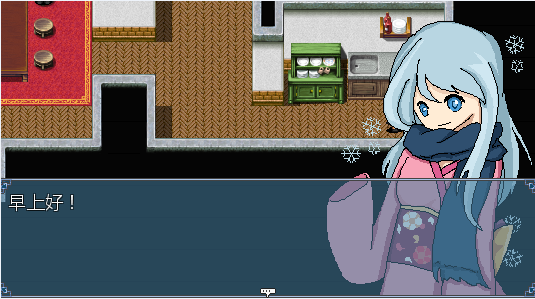
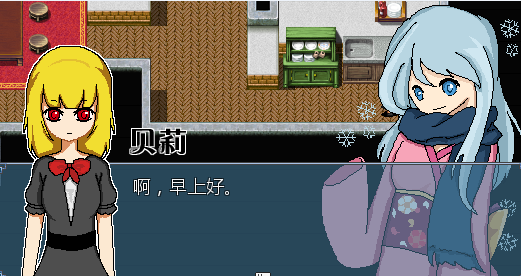
使用方法:主立绘和原脚本设置相同,如果要设置在右边显示,那么就打开$right_flag开关
从立绘需要在$target_face中设置文件名,如Actor4_5,不包括后缀名
注意:如果要把第二立绘关闭,一定要调用$target_face=""把它设回空字符串
修正完毕,直接覆盖[pre lang="ruby"]#encoding:utf-8
#==============================================================================
# ■ 半身像对话框 by LBQ
#------------------------------------------------------------------------------
# 一个简单的半身像对话框罢了= =
#------------------------------------------------------------------------------
# ■ 用法一览
# 1:如何将半身像应用到游戏中?
# ——如果想要把一个脸图替换成半身像,则需要找到这个脸图的编号,比如说拉尔
# 夫,就是Actor1的编号0,之后去在Graphics/Busts这个文件夹里面拷贝一个
# 叫做Actor1_0的图像,这个图像会被当做半身像替换原有图像。
#==============================================================================
# 2013.8.25 => 修复存档不能Bug (感谢小刀
#==============================================================================
$imported ||= {}
$imported[:LBQ_Bust]=true
$right_flag = false
$target_face = ""
module LBQ
module Bust
FOLDER="Busts"
SUB1=[/【/, "\\{\\c[6]-- "]
SUB2=[/】/, " --\\c[0]\\}"]
TEXT_FOR_NEXT="[next]"
TEXT_FOR_END ="[end]"
INDENT=255 #半身像的缩进
end
end
module Cache
def self.busts(filename)
load_bitmap("Graphics/#{LBQ::Bust::FOLDER}/", filename)
end
end
class Sprite_Bust < Sprite_Base
attr_accessor :bust_graphics
attr_accessor :status
def initialize(vp=nil)
super(vp)
@bust_graphics=nil
@status=:nothing
@right_flag = false
end
def slide_in
@status=:sliding_in
end
def slide_out
@status=:sliding_out
if $game_temp.do_not_slide_out
@status=:slided_out
set_pos
end
end
def set_pos(slide_in=true)
if @right_flag
self.x = Graphics.width
else
self.x = -self.bitmap.width
end
self.y=Graphics.height-self.bitmap.height
unless slide_in
if @right_flag
self.x = Graphics.width - self.bitmap.width
else
self.x = 0
end
end
end
def set_right
@right_flag = true
end
def set_graphics(bust_graphics)
self.bitmap=Cache.busts(bust_graphics)
end
def update
super
case @status
when :nothing
# Do Nothing
when :sliding_in
#Slide In
if @right_flag
self.x-=12
else
self.x+=12
end
if ((self.x <= (Graphics.width - self.bitmap.width)) && @right_flag)
self.x = Graphics.width - self.bitmap.width
@status=:slided_in
elsif (self.x>=0 && !@right_flag)
self.x=0
@status=:slided_in
end
when :sliding_out
if @right_flag
self.x+=12
else
self.x-=12
end
if self.x >= Graphics.width && @right_flag
self.x = Graphics.width
@status=:slided_out
elsif self.x <= -self.bitmap.width && !@right_flag
self.x=-self.bitmap.width
@status=:slided_out
end
#Slide Out
when :slided_in
#Slided in
when :slided_out
#Sliede out
end
end
end
class Game_Temp
attr_accessor :bust_name
attr_accessor :bust
attr_accessor :tarface
attr_accessor :have_bust
attr_accessor :do_not_slide_out
alias lbq_bust_shot_game_message_init initialize
def initialize
lbq_bust_shot_game_message_init
@bust_name=""
@bust=nil
@have_bust=false
@do_not_slide_out=false
end
end
class Game_Message
#--------------------------------------------------------------------------
# ● 添加内容
#--------------------------------------------------------------------------
def add(text)
new_text=text.gsub(LBQ::Bust::SUB1[0],LBQ::Bust::SUB1[1])
new_text2=new_text.gsub(LBQ::Bust::SUB2[0],LBQ::Bust::SUB2[1])
if new_text2.include? LBQ::Bust::TEXT_FOR_NEXT
new_text2.delete!(LBQ::Bust::TEXT_FOR_NEXT)
$game_temp.do_not_slide_out=true
end
if new_text2.include? LBQ::Bust::TEXT_FOR_END
new_text2.delete!(LBQ::Bust::TEXT_FOR_END)
$game_temp.do_not_slide_out=false
end
@texts.push(new_text2)
end
end
class Game_Interpreter
alias lbq_bust_shot_command_101 command_101
#--------------------------------------------------------------------------
# ● 显示文字
#--------------------------------------------------------------------------
def command_101
$game_temp.bust=nil
unless @params[0].empty?
if File.exist?("Graphics/#{LBQ::Bust::FOLDER}/#{@params[0]}_#{@params[1]}.png")
$game_temp.have_bust=true
else
$game_temp.have_bust=false
$game_temp.bust_name=""
end
end
unless @params[3] == 2
$game_temp.have_bust=false
end
if $game_temp.have_bust
$game_temp.bust_name="#{@params[0]}_#{@params[1]}"
$game_temp.bust=nil
$game_temp.bust=Sprite_Bust.new
$game_temp.bust.set_graphics($game_temp.bust_name)
$game_temp.bust.z=99999
if $target_face != ""
if File.exist?("Graphics/#{LBQ::Bust::FOLDER}/#{$target_face}.png")
$game_temp.tarface = Sprite_Bust.new
$game_temp.tarface.bitmap = Cache.busts($target_face)
$game_temp.tarface.z=99999
end
end
unless $game_temp.do_not_slide_out
$game_temp.bust.set_right if $right_flag
$game_temp.bust.set_pos
$game_temp.bust.slide_in
if $target_face != ""
$game_temp.tarface.set_right unless $right_flag
$game_temp.tarface.set_pos
$game_temp.tarface.slide_in
end
else
$game_temp.bust.set_right if $right_flag
$game_temp.bust.set_pos(false)
$game_temp.bust.slide_in
if $target_face != ""
$game_temp.tarface.set_right unless $right_flag
$game_temp.tarface.set_pos(false)
$game_temp.tarface.slide_in
end
end
end
lbq_bust_shot_command_101
if $game_temp.have_bust
$game_temp.bust.slide_out
Fiber.yield until $game_temp.bust.status==:slided_out
if $target_face != ""
$game_temp.tarface.slide_out
Fiber.yield until $game_temp.tarface.status==:slided_out
end
end
$game_temp.have_bust=false
$game_temp.bust_name=""
end
alias lbq_bust_int_update update
def update
lbq_bust_int_update
$game_temp.bust.update unless $game_temp.bust.nil?
if $target_face != ""
$game_temp.tarface.update unless $game_temp.tarface.nil?
end
end
end
class Window_Message
#--------------------------------------------------------------------------
# ● 获取换行位置
#--------------------------------------------------------------------------
def new_line_x
# 如果有头像
unless $game_message.face_name.empty?
value=112
value=LBQ::Bust::INDENT unless $game_temp.bust_name.empty?
# 木有
else
value=0
end
return value
end
end
class Window_Message
#--------------------------------------------------------------------------
# ● 翻页处理
#--------------------------------------------------------------------------
def new_page(text, pos)
contents.clear
draw_face($game_message.face_name, $game_message.face_index, 0, 0) if $game_temp.bust_name.empty?
reset_font_settings
if $right_flag && $target_face==""
pos[:x] = 0
pos[:new_x] = 0
else
pos[:x] = LBQ::Bust::INDENT
pos[:new_x] = LBQ::Bust::INDENT
end
pos[:y] = 0
pos[:height] = calc_line_height(text)
clear_flags
end
end
[/pre] |
评分
-
查看全部评分
|


 写轮眼
写轮眼
 提升卡
提升卡 沉默号角
沉默号角 喧嚣号角
喧嚣号角 变色卡
变色卡 升龙剑
升龙剑