| 赞 | 58 |
| VIP | |
| 好人卡 | |
| 积分 | 12 |
| 经验 | |
| 最后登录 | 2023-5-29 |
| 在线时间 | 1017 小时 |
- 梦石
- 0
- 星屑
- 1232
- 在线时间
- 1017 小时
- 注册时间
- 2011-4-30
- 回帖
- 1464
|
 发表于 2015-12-28 11:11:04
|
显示全部楼层
发表于 2015-12-28 11:11:04
|
显示全部楼层
[fold]
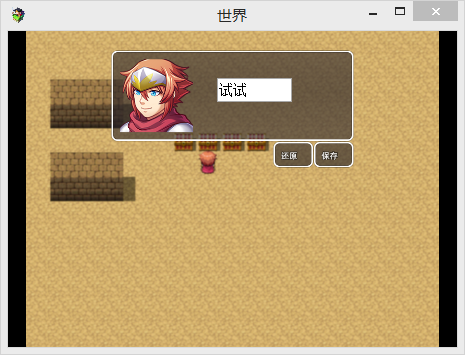
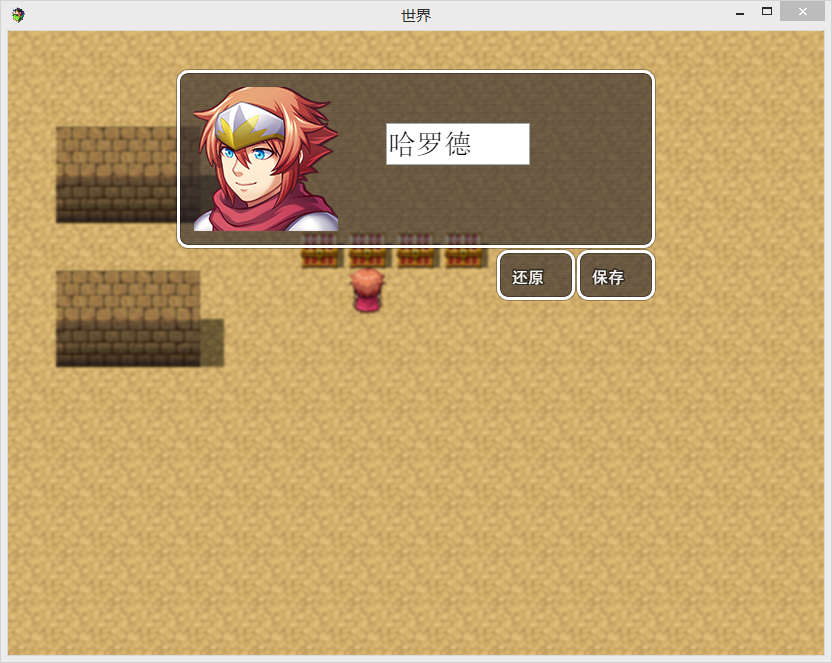
[pre lang="JavaScript" file="NameInput.js"]//=============================================================================
// NameInput.js
//=============================================================================
/*:
* @plugindesc 名字输入
* @author wangwang
*
*
* @help
* 帮助的信息
* 用网页输入代替原本的名字输入
*
*
*
*/
function Window_BC() {
this.initialize.apply(this, arguments);
}
(function() {
Scene_Name.prototype = Object.create(Scene_MenuBase.prototype);
Scene_Name.prototype.constructor = Scene_Name;
//初始化
Scene_Name.prototype.initialize = function() {
Scene_MenuBase.prototype.initialize.call(this);
};
//准备
Scene_Name.prototype.prepare = function(actorId, maxLength) {
this._actorId = actorId;
this._maxLength = maxLength;
};
//创建
Scene_Name.prototype.create = function() {
Scene_MenuBase.prototype.create.call(this);
this._actor = $gameActors.actor(this._actorId);
this.createEditWindow();
this.createBCWindow();
};
//开始
Scene_Name.prototype.start = function() {
Scene_MenuBase.prototype.start.call(this);
this._editWindow.refresh();
};
//创建编辑窗口
Scene_Name.prototype.createEditWindow = function() {
this._editWindow = new Window_NameEdit(this._actor, this._maxLength);
this.addWindow(this._editWindow);
};
Scene_Name.prototype.createBCWindow = function() {
var x = this._editWindow.x + this._editWindow.left()
var y = this._editWindow.y + 54
var width = this._editWindow.charWidth() * this._maxLength
var height = this._editWindow.lineHeight()
Graphics._addInput("text",x,y, width,height, this._editWindow.standardFontSize())
Graphics._input.maxLength = this._maxLength
Graphics._input.value = this._actor.name().slice(0, this._maxLength);
this._bcWindow = new Window_BC("保存");
this._bcWindow.x = this._editWindow.x + this._editWindow.width - this._bcWindow.width
this._bcWindow.y = this._editWindow.y +this._editWindow.height
this._bcWindow.setHandler('dianji', this.onInputOk.bind(this));
this.addWindow(this._bcWindow);
this._csWindow = new Window_BC("还原");
this._csWindow.x = this._editWindow.x + this._editWindow.width - this._bcWindow.width - this._bcWindow.width
this._csWindow.y = this._editWindow.y +this._editWindow.height
this._csWindow.setHandler('dianji', this.oncs.bind(this));
this.addWindow(this._csWindow);
};
//输入初始化
Scene_Name.prototype.oncs = function() {
Graphics._input.value = this._actor.name().slice(0, this._maxLength);
};
//当输入确定
Scene_Name.prototype.onInputOk = function() {
var name="" + Graphics._input.value
this._actor.setName(name);
this.popScene();
Graphics._removeInput()
};
//名称编辑窗口
Window_NameEdit.prototype = Object.create(Window_Base.prototype);
Window_NameEdit.prototype.constructor = Window_NameEdit;
//初始化
Window_NameEdit.prototype.initialize = function(actor, maxLength) {
var width = this.windowWidth();
var height = this.windowHeight();
var x = (Graphics.boxWidth - width) / 2;
var y = (Graphics.boxHeight - (height + this.fittingHeight(9) + 8)) / 2;
Window_Base.prototype.initialize.call(this, x, y, width, height);
this._actor = actor;
this._name = actor.name().slice(0, this._maxLength);
this._index = this._name.length;
this._maxLength = maxLength;
this._defaultName = this._name;
this.deactivate();
this.refresh();
ImageManager.loadFace(actor.faceName());
};
//窗口宽
Window_NameEdit.prototype.windowWidth = function() {
return 480;
};
//窗口高
Window_NameEdit.prototype.windowHeight = function() {
return this.fittingHeight(4);
};
//名称
Window_NameEdit.prototype.name = function() {
return this._name;
};
//脸宽
Window_NameEdit.prototype.faceWidth = function() {
return 144;
};
//字符宽
Window_NameEdit.prototype.charWidth = function() {
var text = '我';
return this.textWidth(text);
};
//左
Window_NameEdit.prototype.left = function() {
var nameCenter = (this.contentsWidth() + this.faceWidth()) / 2;
var nameWidth = (this._maxLength + 1) * this.charWidth();
return Math.min(nameCenter - nameWidth / 2, this.contentsWidth() - nameWidth);
};
//刷新
Window_NameEdit.prototype.refresh = function() {
this.contents.clear();
this.drawActorFace(this._actor, 0, 0);
};
//随便写的点击窗口....
Window_BC.prototype = Object.create(Window_Base.prototype);
Window_BC.prototype.constructor = Window_BC;
//初始化
Window_BC.prototype.initialize = function(text) {
var width = 80
var height = this.fittingHeight(1);
Window_Base.prototype.initialize.call(this, 0, 0, width, height);
this._handlers = {};
this._text = '';
this.setText(text)
};
Window_BC.prototype.standardFontSize = function() {
return 16;
};
Window_BC.prototype.lineHeight = function() {
return 20;
};
Window_BC.prototype.standardPadding = function() {
return 16;
};
Window_BC.prototype.textPadding = function() {
return 0;
};
//设置文本
Window_BC.prototype.setText = function(text) {
if (this._text !== text) {
this._text = text;
this.refresh();
}
};
//清除
Window_BC.prototype.clear = function() {
this.setText('');
};
//刷新
Window_BC.prototype.refresh = function() {
this.contents.clear();
this.drawTextEx(this._text, this.textPadding(), 0);
};
Window_BC.prototype.update = function() {
Window_Base.prototype.update.call(this);
this.dianji()
};
Window_BC.prototype.setHandler = function(symbol, method) {
this._handlers[symbol] = method;
};
Window_BC.prototype.isHandled = function(symbol) {
return !!this._handlers[symbol];
};
Window_BC.prototype.callHandler = function(symbol) {
if (this.isHandled(symbol)) {
this._handlers[symbol]();
}
};
Window_BC.prototype.dianji = function() {
if (this.isOpen()) {
if (TouchInput.isTriggered()) {
var x = this.canvasToLocalX(TouchInput.x);
var y = this.canvasToLocalY(TouchInput.y);
if(x >= 0 && y >= 0 && x < this.width && y < this.height){
this.callHandler("dianji")
}
}
}
};
Graphics._createAllElements = function() {
this._createErrorPrinter();
this._createCanvas();
this._createVideo();
this._createUpperCanvas();
this._createRenderer();
this._createFPSMeter();
this._createModeBox();
this._createGameFontLoader();
this._createInput() //修改
};
/**更新所有成分
* @static
* @method _updateAllElements
* @private
*/
Graphics._updateAllElements = function() {
this._updateRealScale();
this._updateErrorPrinter();
this._updateCanvas();
this._updateVideo();
this._updateUpperCanvas();
this._updateRenderer();
this._updateInput(); //添加
this._paintUpperCanvas();
};
//创建输入
Graphics._createInput = function() {
this._input = document.createElement("input");;
this._input.id = 'Input';
this._input.type ="text"
this._input._sx ={}
var sx = this._input._sx
sx.xs = false
sx.x= 0
sx.y=0
sx.width =100
sx.height= 20
sx.fontSize = 18
//document.body.appendChild(this._input);
};
//添加输入
Graphics._addInput = function(type,x,y,width,height,fontSize) {
this._input.type = type || "text"
var sx = this._input._sx
sx.x= x
sx.y= y
sx.width = width|| 100
sx.height= height|| 20
sx.fontSize = fontSize || 18
this._updateInput()
sx.xs = true
document.body.appendChild(this._input);
};
//移除输入
Graphics._removeInput = function() {
this._input.remove()
this._input.value = null
this._input._xs = false
//document.body.appendChild(this._input);
};
//更新输入
Graphics._updateInput =function () {
this._input.style.zIndex = 12;
var sx = this._input._sx
var x = sx.x * this._realScale + (window.innerWidth - this._width * this._realScale) / 2
var y = sx.y * this._realScale + (window.innerHeight - this._height * this._realScale) / 2
var width = sx.width * this._realScale;
var height = sx.height * this._realScale;
var fontSize = sx.fontSize * this._realScale;
this._input.style.position = 'absolute';
this._input.style.margin = 'auto';
this._input.style.top = y + 'px';
this._input.style.left = x + 'px' ;
this._input.style.width = width + 'px';
this._input.style.height = height + 'px';
this._input.style.fontSize = fontSize + 'px';
}
//防止默认
Input._onKeyDown = function(event) {
//如果 需要避免默认 (键值)
if (this._shouldPreventDefault(event.keyCode)) {
if (Graphics && Graphics._input && Graphics._input._sx && Graphics._input._sx.xs){
//允许默认
}else {
//避免默认
event.preventDefault();
}
}
//键值===144
if (event.keyCode === 144) { // Numlock 数字开关
//清除
this.clear();
}
var buttonName = this.keyMapper[event.keyCode];
//如果 键名
if (buttonName) {
//当前状态 键 =true
this._currentState[buttonName] = true;
}
};
})();[/pre]
[/fold]
|
评分
-
查看全部评分
|


 写轮眼
写轮眼

 提升卡
提升卡 沉默号角
沉默号角 喧嚣号角
喧嚣号角 变色卡
变色卡 升龙剑
升龙剑


