| 赞 | 2 |
| VIP | |
| 好人卡 | |
| 积分 | 1 |
| 经验 | |
| 最后登录 | 2017-11-7 |
| 在线时间 | 388 小时 |
- 梦石
- 0
- 星屑
- 55
- 在线时间
- 388 小时
- 注册时间
- 2009-8-4
- 回帖
- 212
|
 发表于 2016-2-12 19:58:03
|
显示全部楼层
发表于 2016-2-12 19:58:03
|
显示全部楼层
本帖最后由 andrewx 于 2016-2-12 20:07 编辑
我去看了新版这个插件,不是很懂这个作者,为了简化帖子里删去了所有换行,然而还用着单行注释,因此直接复制保存的话所有代码其实都被注释掉了...明明之前的某版本还一切正常,也可能是RMweb论坛改版产生的问题。
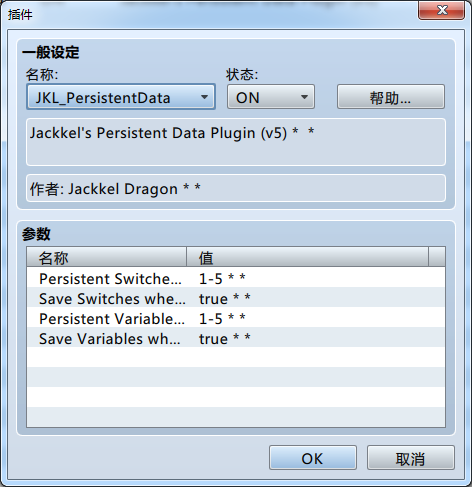
我把现在v5的代码格式整理了下,测试了一下能正常保存变量,不保证无错,请自行测试:
代码
[pre lang="javascript" line="1" file="JKL_PersistentData.js"]
//=============================================================================
// JKL_PersistentData.js
//=============================================================================
/*:
* @plugindesc Jackkel's Persistent Data Plugin (v5)
* @author Jackkel Dragon
*
* @param Persistent Switches
* @desc The ID of the persistent switches. Formatting example: 1-3,5-6,8,10-11,13
* @default 1-5
*
* @param Save Switches when Set
* @desc Whether the persistent switches will be saved to the file the moment any switch is set. [true/false]
* @default true
*
* @param Persistent Variables
* @desc The ID of the persistent variables. Formatting example: 1-3,5-6,8,10-11,13
* @default 1-5
*
* @param Save Variables when Set
* @desc Whether the persistent variables will be saved to the file the moment any variable is set. [true/false]
* @default true
*
* @help
* This plugin provides persistent switches and variables that are saved to the
* "Persistent" save file, allowing you to set switches and variables that are
* not tied to a save game. Uses for this could include designing an ending list
* or creating New Game+ elements without requiring the use of a clear save file.
*
* The value for each switch/variable in configuration is the switch ID in the
* editor, without any leading zeroes ("10" instead of "0010").
*
* Example: Setting the persistent switches to "1-5,7" will set the switches with
* IDs 1, 2, 3, 4, 5, and 7 to be saved to the persistent data file.
*
* Plugin Command: Persistent Save
* Forces a save of the persistent data file.
*
* Plugin Command: Persistent Load
* Forces the game to load from the persistent data file.
*
* Thanks to "ArcherBanish" for writing the general expression parser
* to allow an undefined number of persistent switches and providing
* the plugin commands.
*
* This plugin is free to use, even in commercial projects. Credit "Jackkel * Dragon" or "John Cooley".
*
*/
(function() {
var parameters = PluginManager.parameters('JKL_PersistentData');
var _Game_Switches_setValue = Game_Switches.prototype.setValue;
Game_Switches.prototype.setValue = function(switchId, value, save) {
save = typeof save !== 'undefined' ? save : true;
_Game_Switches_setValue.call(this, switchId, value);
if (save && eval(parameters['Save Switches when Set'])) PersistManager.save();
};
var _Game_Variables_setValue = Game_Variables.prototype.setValue;
Game_Variables.prototype.setValue = function(varId, value, save) {
save = typeof save !== 'undefined' ? save : true;
_Game_Variables_setValue.call(this, varId, value);
if (save && eval(parameters['Save Variables when Set'])) PersistManager.save();
};
var _DataManager_createGameObjects = DataManager.createGameObjects;
DataManager.createGameObjects = function() {
_DataManager_createGameObjects();
PersistManager.load();
};
var _StorageManager_localFilePath = StorageManager.localFilePath;
StorageManager.localFilePath = function(savefileId) {
var name;
if (savefileId === "Persistent") name = StorageManager.localFileDirectoryPath() + "persistent.rpgsave";
else name = _StorageManager_localFilePath.call(this, savefileId);
return name;
};
var _Scene_Load_onLoadSuccess = Scene_Load.prototype.onLoadSuccess;
Scene_Load.prototype.onLoadSuccess = function() {
_Scene_Load_onLoadSuccess.call(this);
PersistManager.load();
}
//-----------------------------------------------------------------------------
// Persistent Data Manager
// The static class that manages the persistent data.
function PersistManager() {
throw new Error('This is a static class');
}
PersistManager.load = function() {
var json;
var persist = {};
try {
json = StorageManager.load("Persistent", json);
} catch (e) {
console.error(e);
}
if (json) {
persist = JSON.parse(json);
}
this.applyData(persist);
};
PersistManager.save = function() {
StorageManager.save("Persistent", JSON.stringify(this.makeData()));
};
PersistManager.makeData = function() {
var persistswexp = parameters['Persistent Switches'];
var switches = XUtil.resolve(persistswexp);
var persistvarexp = parameters['Persistent Variables'];
var variables = XUtil.resolve(persistvarexp);
var persist = {};
persist.switches = [];
persist.variables = [];
for (var x of switches) {
persist.switches[x] = $gameSwitches.value(x);
}
for (var y of variables) {
persist.variables[y] = $gameVariables.value(y);
}
return persist;
};
PersistManager.applyData = function(persist) {
var persistswexp = parameters['Persistent Switches'];
var switches = XUtil.resolve(persistswexp);
var persistvarexp = parameters['Persistent Variables'];
var variables = XUtil.resolve(persistvarexp);
if (typeof switches !== 'undefined' && typeof persist.switches !== 'undefined') {
for (var x of switches) {
if (typeof x !== 'undefined') {
$gameSwitches.setValue(x, persist.switches[x], false);
}
}
}
if (typeof variables !== 'undefined' && typeof persist.variables !== 'undefined') {
for (var y of variables) {
if (typeof y !== 'undefined') {
$gameVariables.setValue(y, persist.variables[y], false);
}
}
}
};
PersistManager.readFlag = function(persist, name) {
return !!persist[name];
};
function XUtil() {
throw new Error('This is a static class');
}
XUtil.resolve = function(regex) {
var allsemiexp = regex.split(',');
var semiexp = null;
var semisemiexp = null;
var indexes = new Array();
var curentindex = 0;
for (semiexp of allsemiexp) {
semisemiexp = semiexp.split('-');
if (semisemiexp.length > 1) {
y = Number(semisemiexp[1]);
for (var x = Number(semisemiexp[0]); x <= y; x++) {
indexes[curentindex] = x;
curentindex++;
}
} else {
indexes[curentindex] = Number(semisemiexp[0]);
curentindex++;
}
}
return indexes;
}
var _Game_Interpreter_pluginCommand = Game_Interpreter.prototype.pluginCommand;
Game_Interpreter.prototype.pluginCommand = function(command, args) {
_Game_Interpreter_pluginCommand.call(this, command, args);
if (command === 'Persistent') {
switch (args[0]) {
case 'Save':
PersistManager.save(parameters);
break;
case 'Load':
PersistManager.load(parameters);
break;
}
}
}
})();[/pre]
另:新开游戏和读取游戏的时候你设定的开关变量都会被替换为已保存的状态。
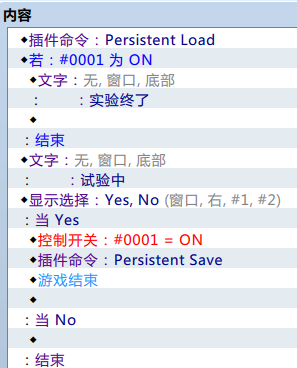
插件里设定两项为true的话游戏内只要修改了变量/开关状态,就会自动保存下来,所以一般情况应该不需要用插件指令。 |
|


 写轮眼
写轮眼

 提升卡
提升卡 沉默号角
沉默号角 喧嚣号角
喧嚣号角 变色卡
变色卡 升龙剑
升龙剑