| 赞 | 0 |
| VIP | |
| 好人卡 | |
| 积分 | 16 |
| 经验 | |
| 最后登录 | 2026-1-15 |
| 在线时间 | 95 小时 |
- 梦石
- 0
- 星屑
- 1564
- 在线时间
- 95 小时
- 注册时间
- 2021-6-20
- 回帖
- 28
|
加入我们,或者,欢迎回来。
您需要 登录 才可以下载或查看,没有账号?注册会员
×
本帖最后由 zkq970413 于 2024-2-13 14:25 编辑
如题,我把一些游戏的Geam.ini文件用笔记本打开把日文编码字符换成了中文编码字符,保存之后窗口缩放就失效了,没更改之前打开是1280*960的窗口大小,但更改了之后就是默认的640*480的大小了,从脚本来看好像是编码的原因?但我试过改成GB2312和UTF-8,但都没用,是什么原因呢?还是我没改到位?System目录下还有个wndsz文件,但打开后就几个字符,然后这个Geam.ini文件和以往的不同,也会保存如音量之类的设置,而其他游戏却很少见这种情况,这是什么原因呢?
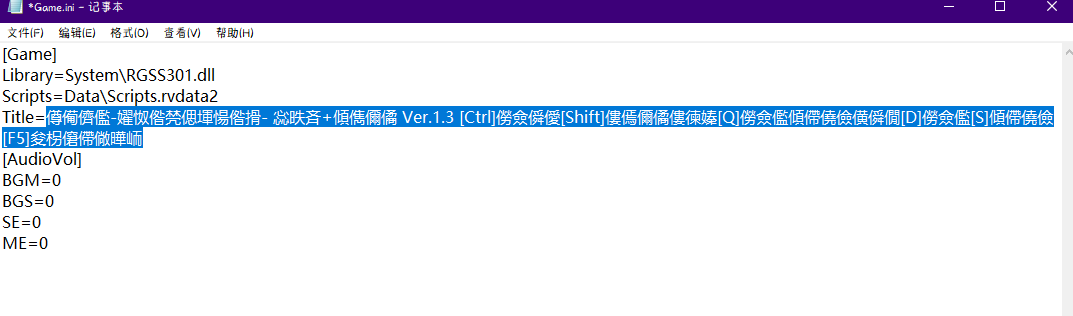
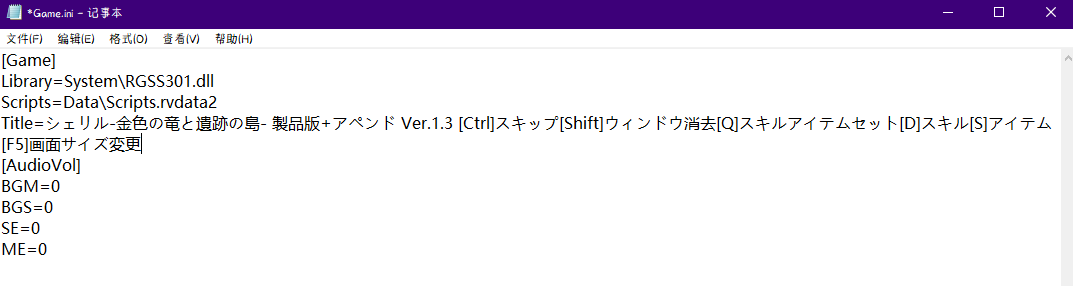
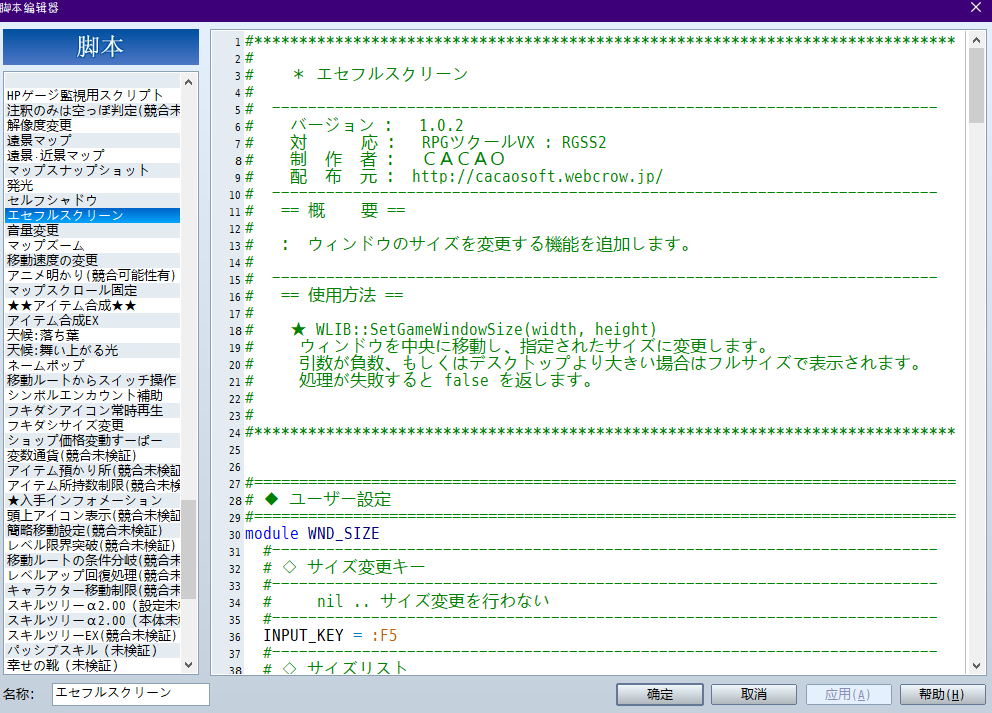
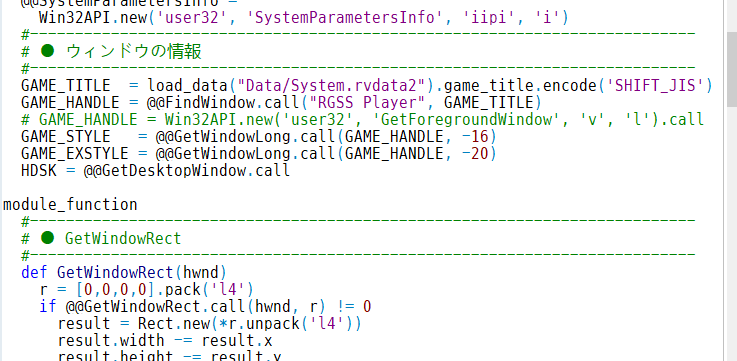
脚本代码如下:
[pre lang="ruby"]#******************************************************************************
#
# * エセフルスクリーン
#
# --------------------------------------------------------------------------
# バージョン : 1.0.2
# 対 応 : RPGツクールVX : RGSS2
# 制 作 者 : CACAO
# 配 布 元 : http://cacaosoft.webcrow.jp/
# --------------------------------------------------------------------------
# == 概 要 ==
#
# : ウィンドウのサイズを変更する機能を追加します。
#
# --------------------------------------------------------------------------
# == 使用方法 ==
#
# ★ WLIB::SetGameWindowSize(width, height)
# ウィンドウを中央に移動し、指定されたサイズに変更します。
# 引数が負数、もしくはデスクトップより大きい場合はフルサイズで表示されます。
# 処理が失敗すると false を返します。
#
#
#******************************************************************************
#==============================================================================
# ◆ ユーザー設定
#==============================================================================
module WND_SIZE
#--------------------------------------------------------------------------
# ◇ サイズ変更キー
#--------------------------------------------------------------------------
# nil .. サイズ変更を行わない
#--------------------------------------------------------------------------
INPUT_KEY = :F5
#--------------------------------------------------------------------------
# ◇ サイズリスト
#--------------------------------------------------------------------------
# [ [横幅, 縦幅], ... ] のような二次元配列で設定します。
# 幅を 0 にするとデスクトップサイズになります。
#--------------------------------------------------------------------------
SIZE_LIST = [ [640,480], [1280,960], [0,0] ]
#--------------------------------------------------------------------------
# ◇ セーブファイル
#--------------------------------------------------------------------------
# ウィンドウサイズの状況を保存するファイル名を設定します。
# nil にすると、サイズを保存しません。
#--------------------------------------------------------------------------
FILE_SAVE = "System/wndsz"
#--------------------------------------------------------------------------
# ◇ 構成設定ファイル
#--------------------------------------------------------------------------
# セクション名 [Window] キー WIDTH=横幅 HEIGHT=縦幅 を読み込みます。
# nil にすると、サイズを保存しません。
#--------------------------------------------------------------------------
FILE_INI = nil
end
#/////////////////////////////////////////////////////////////////////////////#
# #
# 下記のスクリプトを変更する必要はありません。 #
# #
#/////////////////////////////////////////////////////////////////////////////#
module WLIB
#--------------------------------------------------------------------------
# ● 定数
#--------------------------------------------------------------------------
# SystemMetrics
SM_CYCAPTION = 0x04 # タイトルバーの高さ
SM_CXDLGFRAME = 0x07 # 枠の幅
SM_CYDLGFRAME = 0x08 # 枠の高さ
# SetWindowPos
SWP_NOSIZE = 0x01 # サイズ変更なし
SWP_NOMOVE = 0x02 # 位置変更なし
SWP_NOZORDER = 0x04 # 並び変更なし
#--------------------------------------------------------------------------
# ● Win32API
#--------------------------------------------------------------------------
@@FindWindow =
Win32API.new('user32', 'FindWindow', 'pp', 'l')
@@GetDesktopWindow =
Win32API.new('user32', 'GetDesktopWindow', 'v', 'l')
@@SetWindowPos =
Win32API.new('user32', 'SetWindowPos', 'lliiiii', 'i')
@@GetClientRect =
Win32API.new('user32', 'GetClientRect', 'lp', 'i')
@@GetWindowRect =
Win32API.new('user32', 'GetWindowRect', 'lp', 'i')
@@GetWindowLong =
Win32API.new('user32', 'GetWindowLong', 'li', 'l')
@@GetSystemMetrics =
Win32API.new('user32', 'GetSystemMetrics', 'i', 'i')
@@SystemParametersInfo =
Win32API.new('user32', 'SystemParametersInfo', 'iipi', 'i')
#--------------------------------------------------------------------------
# ● ウィンドウの情報
#--------------------------------------------------------------------------
GAME_TITLE = load_data("Data/System.rvdata2").game_title.encode('SHIFT_JIS')
GAME_HANDLE = @@FindWindow.call("RGSS Player", GAME_TITLE)
# GAME_HANDLE = Win32API.new('user32', 'GetForegroundWindow', 'v', 'l').call
GAME_STYLE = @@GetWindowLong.call(GAME_HANDLE, -16)
GAME_EXSTYLE = @@GetWindowLong.call(GAME_HANDLE, -20)
HDSK = @@GetDesktopWindow.call
module_function
#--------------------------------------------------------------------------
# ● GetWindowRect
#--------------------------------------------------------------------------
def GetWindowRect(hwnd)
r = [0,0,0,0].pack('l4')
if @@GetWindowRect.call(hwnd, r) != 0
result = Rect.new(*r.unpack('l4'))
result.width -= result.x
result.height -= result.y
else
result = nil
end
return result
end
#--------------------------------------------------------------------------
# ● GetClientRect
#--------------------------------------------------------------------------
def GetClientRect(hwnd)
r = [0,0,0,0].pack('l4')
if @@GetClientRect.call(hwnd, r) != 0
result = Rect.new(*r.unpack('l4'))
else
result = nil
end
return result
end
#--------------------------------------------------------------------------
# ● GetSystemMetrics
#--------------------------------------------------------------------------
def GetSystemMetrics(index)
@@GetSystemMetrics.call(index)
end
#--------------------------------------------------------------------------
# ● SetWindowPos
#--------------------------------------------------------------------------
def SetWindowPos(hwnd, x, y, width, height, z, flag)
@@SetWindowPos.call(hwnd, z, x, y, width, height, flag) != 0
end
#--------------------------------------------------------------------------
# ● ウィンドウのサイズを取得
#--------------------------------------------------------------------------
def GetGameWindowRect
GetWindowRect(GAME_HANDLE)
end
#--------------------------------------------------------------------------
# ● ウィンドウのクライアントサイズを取得
#--------------------------------------------------------------------------
def GetGameClientRect
GetClientRect(GAME_HANDLE)
end
#--------------------------------------------------------------------------
# ● デスクトップのサイズを取得
#--------------------------------------------------------------------------
def GetDesktopRect
r = [0,0,0,0].pack('l4')
if @@SystemParametersInfo.call(0x30, 0, r, 0) != 0
result = Rect.new(*r.unpack('l4'))
result.width -= result.x
result.height -= result.y
else
result = nil
end
return result
end
#--------------------------------------------------------------------------
# ● ウィンドウのフレームサイズを取得
#--------------------------------------------------------------------------
def GetFrameSize
return [
GetSystemMetrics(SM_CYCAPTION), # タイトルバー
GetSystemMetrics(SM_CXDLGFRAME), # 左右フレーム
GetSystemMetrics(SM_CYDLGFRAME) # 上下フレーム
]
end
#--------------------------------------------------------------------------
# ● ウィンドウの位置を変更
#--------------------------------------------------------------------------
def MoveGameWindow(x, y)
SetWindowPos(GAME_HANDLE, x, y, 0, 0, 0, SWP_NOSIZE|SWP_NOZORDER)
end
#--------------------------------------------------------------------------
# ● ウィンドウの位置を中央へ
#--------------------------------------------------------------------------
def MoveGameWindowCenter
dr = GetDesktopRect()
wr = GetGameWindowRect()
x = (dr.width - wr.width) / 2
y = (dr.height - wr.height) / 2
SetWindowPos(GAME_HANDLE, x, y, 0, 0, 0, SWP_NOSIZE|SWP_NOZORDER)
end
#--------------------------------------------------------------------------
# ● ウィンドウのサイズを変更
#--------------------------------------------------------------------------
def SetGameWindowSize(width, height)
# 各領域の取得
dr = GetDesktopRect() # Rect デスクトップ
wr = GetGameWindowRect() # Rect ウィンドウ
cr = GetGameClientRect() # Rect クライアント
return false unless dr && wr && cr
# フレームサイズの取得
frame = GetFrameSize()
ft = frame[0] + frame[2] # タイトルバーの縦幅
fl = frame[1] # 左フレームの横幅
fs = frame[1] * 2 # 左右フレームの横幅
fb = frame[2] # 下フレームの縦幅
if width <= 0 || height <= 0 || width >= dr.width || height >= dr.height
w = dr.width + fs
h = dr.height + ft + fb
SetWindowPos(GAME_HANDLE, -fl, -ft, w, h, 0, SWP_NOZORDER)
else
w = width + fs
h = height + ft + fb
SetWindowPos(GAME_HANDLE, 0, 0, w, h, 0, SWP_NOMOVE|SWP_NOZORDER)
MoveGameWindowCenter()
end
end
end
class Scene_Base
#--------------------------------------------------------------------------
# ●
#--------------------------------------------------------------------------
@@screen_mode = 0
#--------------------------------------------------------------------------
# ●
#--------------------------------------------------------------------------
def self.screen_mode=(index)
@@screen_mode = index % WND_SIZE::SIZE_LIST.size
end
#--------------------------------------------------------------------------
# ●
#--------------------------------------------------------------------------
def self.screen_mode
@@screen_mode
end
#--------------------------------------------------------------------------
# ○ フレーム更新
#--------------------------------------------------------------------------
alias _cao_update_wndsize update
def update
_cao_update_wndsize
if Input.trigger?(WND_SIZE::INPUT_KEY) && WLIB::GAME_HANDLE != 0
Scene_Base.screen_mode += 1
if WLIB::SetGameWindowSize(*WND_SIZE::SIZE_LIST[@@screen_mode])
if WND_SIZE::FILE_SAVE
save_data(Scene_Base.screen_mode, WND_SIZE::FILE_SAVE)
end
else
Sound.play_buzzer
end
end
end
end
module WND_SIZE
#--------------------------------------------------------------------------
# ● 大きいサイズを除去
#--------------------------------------------------------------------------
def self.remove_large_window
dr = WLIB::GetDesktopRect()
WND_SIZE::SIZE_LIST.reject! do |wsz|
wsz.size != 2 || dr.width < wsz[0] || dr.height < wsz[1]
end
if WND_SIZE::SIZE_LIST.empty?
WND_SIZE::SIZE_LIST << [Graphics.width, Graphics.height]
end
end
#--------------------------------------------------------------------------
# ● 初期サイズの設定
#--------------------------------------------------------------------------
def self.init_window_size
if WND_SIZE::FILE_SAVE && File.file?(WND_SIZE::FILE_SAVE)
# 前回のサイズを復元
Scene_Base.screen_mode = load_data(WND_SIZE::FILE_SAVE)
WLIB::SetGameWindowSize(*WND_SIZE::SIZE_LIST[Scene_Base.screen_mode])
elsif WND_SIZE::FILE_INI
# 構成設定からサイズを読み込む (サイズを記録していない場合のみ)
width = IniFile.read(WND_SIZE::FILE_INI, "Window", "WIDTH", "")
height = IniFile.read(WND_SIZE::FILE_INI, "Window", "HEIGHT", "")
if width != "" && height != ""
WLIB::SetGameWindowSize(width.to_i, height.to_i)
end
end
end
end
WND_SIZE.remove_large_window
WND_SIZE.init_window_size
[/pre]
|
|


 写轮眼
写轮眼
 发表于 2024-2-13 14:15:18
 提升卡
提升卡 沉默号角
沉默号角 喧嚣号角
喧嚣号角 变色卡
变色卡 升龙剑
升龙剑 有没有大佬告知如何解决。
 不止这家社团的游戏有这样的问题吧?我在其它一些社团的游戏也遇到过,英文或者说英文字母或许是世界通用的字符编码了。。。