| 赞 | 0 |
| VIP | |
| 好人卡 | |
| 积分 | 1 |
| 经验 | |
| 最后登录 | 2016-6-8 |
| 在线时间 | 470 小时 |
- 梦石
- 0
- 星屑
- 50
- 在线时间
- 470 小时
- 注册时间
- 2010-6-25
- 回帖
- 294
|
 发表于 2012-4-14 08:46:00
|
显示全部楼层
发表于 2012-4-14 08:46:00
|
显示全部楼层
本帖最后由 腐琴琴 于 2012-4-14 08:50 编辑
理论上应该有……
我只知道一个傻傻的方法:
找一个截图脚本,然后找到执行的命令。
接下来用并行处理的公共事件,当F8被按下时执行。
===================================
这两个东西是截图范例脚本送的,截图必备物:

公共事件用并行处理,游戏的时候打开开关(但我怀疑会卡的囧囧的)
调节分歧的语句嘛也可以随便改的吧?F8改成别的也可以吧……
然后中间是截图脚本范例里面送的执行语句
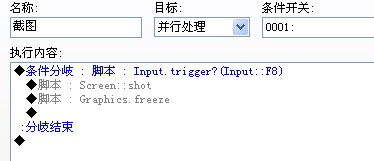
这个是把范例里面的脚本COPY过来然后加上公共事件了
 Project10.rar
(893.56 KB, 下载次数: 149)
Project10.rar
(893.56 KB, 下载次数: 149)
然后这个就是主站上面的脚本了……
[pre lang="php" line="1"]#===============================================================================
#
# Screenshot V2
#
# Screenshot Script v1 & screenshot.dll v1 created by: Andreas21
# Screenshot Script v2 created/edit by: cybersam
# the autor is found on a german board...
# the comments are added by me...
# since the autor didnt want to add any comment...
# so thats it from here...
# have fund with it... ^-^
#
# oh yea.. the needed command line is found in "Scene_Map" in "def update"
#
#===============================================================================
module Screen
@screen = Win32API.new 'screenshot', 'Screenshot', %w(l l l l p l l), ''
@readini = Win32API.new 'kernel32', 'GetPrivateProfileStringA', %w(p p p p l p), 'l'
@findwindow = Win32API.new 'user32', 'FindWindowA', %w(p p), 'l'
module_function
#-----------------------------------------------------------------------------
# here comes the stuff...
# i add here the stuff for automatic change of the number for the screenshot
# so it wont overrite the old one...
# if you want to change so stuff change them in this line below
# or you can change them in your command line... like
# Screen::shot("screenshot", 2)
# this change the name and the type of the screenshot
# (0 = bmp, 1 = jpg and 2 = png)
# ----------------------------------------------------------------------------
def shot(file = "screenshot", typ = 2)
# to add the right extension...
if typ == 0
typname = ".bmp"
elsif typ == 1
typname = ".jpg"
elsif typ == 2
typname = ".png"
end
file_index = 0
dir = "Graphics/Pictures/"
# make the filename....
file_name = dir + file.to_s + typname.to_s
# make the screenshot.... Attention dont change anything from here on....
@screen.call(0,0,640,480,file_name,handel,typ)
end
# find the game window...
def handel
game_name = "\0" * 256
@readini.call('Game','Title','',game_name,255,".\\Game.ini")
game_name.delete!("\0")
return @findwindow.call('RGSS Player',game_name)
end
end[/pre]
那啥截图的位置这里要改就改吧。
dir = "Graphics/Pictures/
|
|




 写轮眼
写轮眼
 提升卡
提升卡 沉默号角
沉默号角 喧嚣号角
喧嚣号角 变色卡
变色卡 升龙剑
升龙剑
