| 赞 | 1 |
| VIP | |
| 好人卡 | |
| 积分 | 7 |
| 经验 | |
| 最后登录 | 2015-2-23 |
| 在线时间 | 1286 小时 |
- 梦石
- 0
- 星屑
- 660
- 在线时间
- 1286 小时
- 注册时间
- 2011-6-14
- 回帖
- 3949
|
 发表于 2012-8-29 16:51:27
|
显示全部楼层
发表于 2012-8-29 16:51:27
|
显示全部楼层
↓截图↓
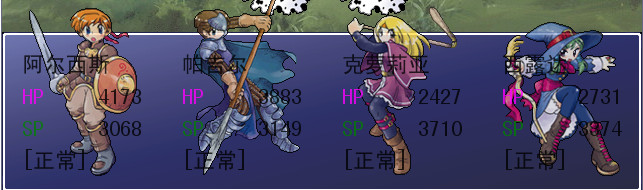
因为我没有那种战斗图,所以我就用默认的测试了,效果就是这样的
换上白的战斗图就知道怎么样了
↓脚本↓
颜色能自己在脚本中改的。
[pre lang="ruby" line="1"]#==============================================================================
# ■ Window_BattleStatus
#------------------------------------------------------------------------------
# 显示战斗画面同伴状态的窗口。
#==============================================================================
$battle_status_color = {
# 所有数值为0~255
# 红 绿 蓝 透明度
:norm => Color.new( 0, 0, 0,200), # 普通文字颜色(角色名等)
:lvup => Color.new(255, 0, 0,255), # 升级(LEVEL UP)文字颜色
:hp => Color.new(255, 0,255,200), # HP(HP)文字颜色
:mp => Color.new( 0,128, 0,200), # SP(SP)文字颜色
:stat => Color.new(255, 0, 0,255), # 战斗不能状态的颜色
:nohm => Color.new(128,128, 0,255), # 血量过少的颜色(HP/MP<MAXHP/MAXMP÷4)
}
class Window_BattleStatus < Window_Base
#--------------------------------------------------------------------------
# ● 刷新
#--------------------------------------------------------------------------
def refresh
self.contents.clear
@item_max = $game_party.actors.size
for i in 0...$game_party.actors.size
actor = $game_party.actors
actor_x = i * 160 + 4
draw_actor_name2(actor,actor_x,0)
draw_actor_hp2(actor,actor_x,32,120)
draw_actor_sp2(actor,actor_x,64,120)
if @level_up_flags
self.contents.font.color = $battle_status_color[:lvup]
self.contents.draw_text(actor_x,96,120,32,"LEVEL UP!")
else
draw_actor_state2(actor,actor_x,96)
end
end
end
#--------------------------------------------------------------------------
# ● 新描画角色名
#--------------------------------------------------------------------------
def draw_actor_name2(actor,x,y)
self.contents.font.color = $battle_status_color[:norm]
self.contents.draw_text(x,y,120,32,actor.name)
end
#--------------------------------------------------------------------------
# ● 新描绘状态
#--------------------------------------------------------------------------
def draw_actor_state2(actor,x,y,width = 120)
text = make_battler_state_text(actor,width,true)
nor = $battle_status_color[:norm]
kno = $battle_status_color[:stat]
self.contents.font.color = (actor.hp == 0 ? kno : nor)
self.contents.draw_text(x,y,width,32,text)
end
#--------------------------------------------------------------------------
# ● 新描绘 HP
#--------------------------------------------------------------------------
def draw_actor_hp2(actor,x,y,width = 144)
# 描绘字符串 "HP"
self.contents.font.color = $battle_status_color[:hp]
self.contents.draw_text(x,y,32,32,$data_system.words.hp)
# 计算描绘 MaxHP 所需的空间
if width - 32 >= 108
hp_x = x + width - 108
flag = true
elsif width - 32 >= 48
hp_x = x + width - 48
flag = false
end
# 描绘 HP
nor = $battle_status_color[:norm]
kno = $battle_status_color[:stat]
cri = $battle_status_color[:nohm]
self.contents.font.color = actor.hp == 0 ? kno :
actor.hp <= actor.maxhp / 4 ? cri : nor
self.contents.draw_text(hp_x,y,48,32,actor.hp.to_s,2)
# 描绘 MaxHP
if flag
self.contents.font.color = nor
self.contents.draw_text(hp_x + 48,y,12,32,"/",1)
self.contents.draw_text(hp_x + 60,y,48,32,actor.maxhp.to_s)
end
end
#--------------------------------------------------------------------------
# ● 新描画 SP
#--------------------------------------------------------------------------
def draw_actor_sp2(actor,x,y,width = 144)
# 描绘字符串 "SP"
self.contents.font.color = $battle_status_color[:mp]
self.contents.draw_text(x,y,32,32,$data_system.words.sp)
# 计算描绘 MaxSP 所需的空间
if width - 32 >= 108
sp_x = x + width - 108
flag = true
elsif width - 32 >= 48
sp_x = x + width - 48
flag = false
end
# 描绘 SP
nor = $battle_status_color[:norm]
kno = $battle_status_color[:stat]
cri = $battle_status_color[:nohm]
self.contents.font.color = actor.sp == 0 ? kno :
actor.sp <= actor.maxsp / 4 ? cri : nor
self.contents.draw_text(sp_x,y,48,32,actor.sp.to_s,2)
# 描绘 MaxSP
if flag
self.contents.font.color = nor
self.contents.draw_text(sp_x + 48,y,12,32,"/",1)
self.contents.draw_text(sp_x + 60,y,48,32,actor.maxsp.to_s)
end
end
end[/pre] |
|



 写轮眼
写轮眼
 因为把主角的战斗图换成了一个背景是白色的人 所以白色的字都看不到了 求改字体颜色的方法...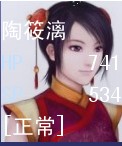
 提升卡
提升卡 沉默号角
沉默号角 喧嚣号角
喧嚣号角 变色卡
变色卡 升龙剑
升龙剑

 我的脚本怎么跟你不一样...我是XP的哦...
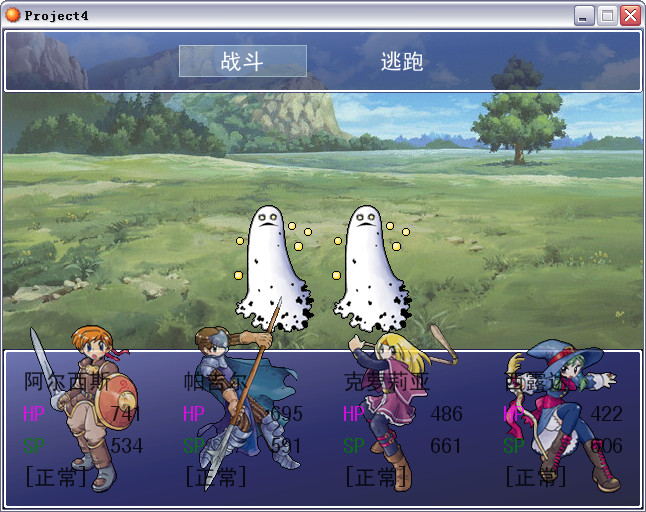

 还是发生错误...
![TKIISRE@8`[RIV29]Q[TEMP.jpg](https://c.moenext.com/project1/data/attachment/forum/201208/30/165538kpz0u2z21p52p1su.jpg "TKIISRE@8`[RIV29]Q[TEMP.jpg")