| 赞 | 0 |
| VIP | |
| 好人卡 | |
| 积分 | 1 |
| 经验 | |
| 最后登录 | 2013-9-21 |
| 在线时间 | 62 小时 |
- 梦石
- 0
- 星屑
- 50
- 在线时间
- 62 小时
- 注册时间
- 2013-3-14
- 回帖
- 44
|
 发表于 2013-4-30 20:37:48
|
显示全部楼层
发表于 2013-4-30 20:37:48
|
显示全部楼层
@lnbayfz
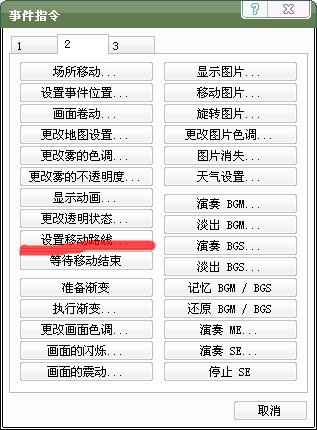
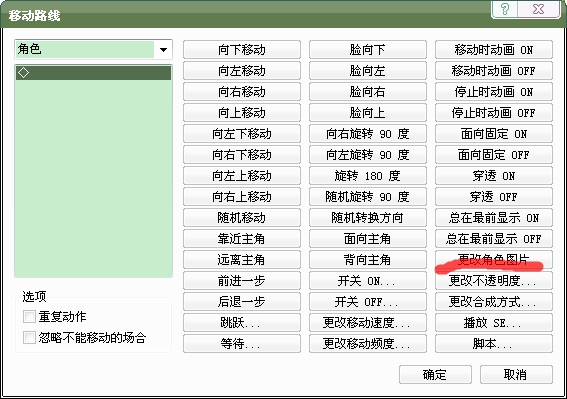
换着不必要脚本,只需要事件
上楼就是,你可以制作上半身或者下半身,来代表穿衣服,或者换装。
横版战斗脚本:
[pre lang="ruby" line="1"]#==============================================================================
# * Animated_Sprite Scripted by: SiR_VaIlHoR
# Edited by: 柳柳
#------------------------------------------------------------------------------
# A class for animated sprites.
#==============================================================================
#66RPG,超级横版战斗脚本简要说明:
#默认情况下,把一张战斗图截成4列,>8行,如果感觉4列4帧的动画还不能满足要求,看
#def pose(number,frame = 4),更改=4,以及相关部分。
#战斗图从上到下:前进图,等待图,防御图,挨打图,普通攻击图(默认的武器),施展魔法,
#倒地不行了,胜利姿势,自定义武器1,自定义武器2……
#这个脚本的模型是老外编写的,其中参考了XMXS的一个方法,我添加了一些功能,去掉素材限制。
#不同职业拥有的图片数可以不一样,参考工程和录像教学
#==============================================================================
# □ RPG::Class
#==============================================================================
module RPG
class Class
def name
name = @name.split(/,/)[0]
return name != nil ? name : ''
end
def name2
name = @name.split(/,/)[1]
return name != nil ? name : ''
end
end
class Weapon
def name
name = @name.split(/,/)[0]
return name != nil ? name : ''
end
def name2
name = @name.split(/,/)[1]
return name != nil ? name : ''
end
end
end
class Game_Actor
#--------------------------------------------------------------------------
# ● 更改名称
# name : 新的名称
#--------------------------------------------------------------------------
def picturephase
name = $data_classes[class_id].name2
return name != nil ? name : "66RPG"
end
end
class Game_Enemy
#--------------------------------------------------------------------------
# ● 获取名称
#--------------------------------------------------------------------------
def name
name = $data_enemies[@enemy_id].name.split(/,/)[0]
return name != nil ? name : ''
end
def picturephase
name = $data_enemies[@enemy_id].name.split(/,/)[1]
return name != nil ? name : "66RPG"
end
end
class Animated_Sprite < RPG::Sprite
#--------------------------------------------------------------------------
# - Accessible instance variables.
#--------------------------------------------------------------------------
attr_accessor :frames # Number of animation frames
attr_accessor :delay # Delay time between frames (speed)
attr_accessor :frame_width # Width of each frame
attr_accessor :frame_height # Height of each frame
attr_accessor :offset_x # X coordinate of the 1st frame
attr_accessor :offset_y # Y coordinate of all frames
attr_accessor :current_frame # Current animation frame
attr_accessor :moving # Is the sprite moving?
#--------------------------------------------------------------------------
# - Initialize an animated sprite
# viewport : Sprite viewport
#--------------------------------------------------------------------------
def initialize(viewport = nil)
super(viewport)
@frame_width, @frame_height = 0, 0
change # A basic change to set initial variables
@old = Graphics.frame_count # For the delay method
@goingup = true # Increasing animation? (if @rm2k_mode is true)
@once = false # Is the animation only played once?
@animated = true # Used to stop animation when @once is true
end
#--------------------------------------------------------------------------
# Comment by RPG
# - Change the source rect (change the animation)
# frames : Number of animation frames
# delay : Frame delay, controls animation speed
# offx : X coordinate of the 1st frame
# offy : Y coordinate of all frames
# startf : Starting frame for animation
# once : Is the animation only played once?
# rm2k_mode : Animation pattern: 1-2-3-2 if true, 1-2-3-1 if false
#
# Comment by cybersam
#
# the rm2k_mode isnt pressent anymore...
# if you want that feature then use rm2k or use RPG's scrîpt...
#--------------------------------------------------------------------------
def change(frames = 0, delay = 0, offx = 0, offy = 0,
startf = 0, once = false)
@frames = frames
@delay = delay
@offset_x, @offset_y = offx, offy
@current_frame = startf
@once = once
x = @current_frame * @frame_width + @offset_x
self.src_rect = Rect.new(x, @offset_y, @frame_width, @frame_height)
@goingup = true
@animated = true
end
#--------------------------------------------------------------------------
# - Update animation and movement
#--------------------------------------------------------------------------
def update
super
if self.bitmap != nil and delay(@delay) and @animated
x = @current_frame * @frame_width + @offset_x
self.src_rect = Rect.new(x, @offset_y, @frame_width, @frame_height)
@current_frame = (@current_frame + 1) unless @frames == 0
@animated = false if @current_frame == @frames and @once
@current_frame %= @frames
end
end
#--------------------------------------------------------------------------
# - Move the sprite
# x : X coordinate of the destination point
# y : Y coordinate of the destination point
# speed : Speed of movement (0 = delayed, 1+ = faster)
# delay : Movement delay if speed is at 0
#--------------------------------------------------------------------------
def move(x, y, speed = 1, delay = 0)
@destx = x
@desty = y
@move_speed = speed
@move_delay = delay
@move_old = Graphics.frame_count
@moving = true
end
#--------------------------------------------------------------------------
# - Move sprite to destx and desty
#--------------------------------------------------------------------------
def update_move
return unless @moving
movinc = @move_speed == 0 ? 1 : @move_speed
if Graphics.frame_count - @move_old > @move_delay or @move_speed != 0
self.x += movinc if self.x < @destx
self.x -= movinc if self.x > @destx
self.y += movinc if self.y < @desty
self.y -= movinc if self.y > @desty
@move_old = Graphics.frame_count
end
if @move_speed > 1 # Check if sprite can't reach that point
self.x = @destx if (@destx - self.x).abs % @move_speed != 0 and
(@destx - self.x).abs <= @move_speed
self.y = @desty if (@desty - self.y).abs % @move_speed != 0 and
(@desty - self.y).abs <= @move_speed
end
if self.x == @destx and self.y == @desty
@moving = false
end
end
#--------------------------------------------------------------------------
# - Pause animation, but still updates movement
# frames : Number of frames
#--------------------------------------------------------------------------
def delay(frames)
update_move
if (Graphics.frame_count - @old >= frames)
@old = Graphics.frame_count
return true
end
return false
end
end
#=============================================================================
#
# here we go...
# this makes the scrîpt very easy to implement
# just add a new scrîpt above the "Main" scrîpt
# and insert this whole thing in there
#
# as you can see the sprite changing code is from the japanese scrîpt
# so the credits for the sprite changin goes to them....
# i edit it a little so it can show more sprites and sprite animations
# and added some other stuff... the next things are player movement...
#
#
#
# i got the battler changing scrîpt in this scrîpt...
# the credits for this goes to the guy who made this...
#
# ▼▲▼ XRXS11. 戦闘・バトラーモーション ver.0 ▼▲▼
#
# since this isnt used anymore... it isnt need for credit anymore...
# but i'll let it here since it helped me a lot...
#
#
# as for the ideas... missy provided me with really good ideas
# that helped me alot when i didnt find a way to some of these features...
#
# here one more Credit to place...
# its RPG's scrîpt...
# not the whole thing here...
# but some snipplet you'll know witch one when read the comments
#
#
# if you want some more explaines about this scrîpt...
# the most stuff are commented... but if you still have questions or
# sugestions then you can contact me
#
# how or where you can contact me...
# at the http://www.rmxp.net forum via pm, email: cybersam@club-anime.de
# or via AIM: cych4n or ICQ: 73130840
#
# remember this is still in testing phase...
# and i'm trying to work on some other additions... like character movements...
# but that wont be added now... couse i need to figure it out first...
#
#
#
# oh hehe.... before i forget...
# sorry for the bad english... ^-^''''
#
#
#==============================================================================
#
# here i'm going to tell you what names you need to give for your chara
# battle sprites....
#
# ok... here... since i'm using RPG's movement scrîpt...
# there are a lot of changes...
#
# when you look at the scrîpt you'll find line with "pose(n)" or "enemy_pose(n)"
# since i want my sprites have different sprites... i added one more option
# to these...
# so now if you add a number after the n (the n stands for witch sprite is used)
# fo example 8... ("pose(4, 8)") this will tell the scrîpt that the 4th animation
# have 8 frames...
# pose is used for the player... and enemy_pose for the enemy...
# there is nothing more to this...
# i used my old sprite numbers... (this time in only one sprite...)
#
# explains about the animation sprites... (the digits)
#
#
# 0 = move (during battle)
# 1 = standby
# 2 = defend
# 3 = hit (being attacked)
# 4 = attack
# 5 = skill use
# 6 = dead
# 7 = winning pose... this idea is from RPG....
#
#
# of course this is just the begining of the code...
# so more animations can be implemented...
# but for now this should be enough...
#
# alot has changed here... and now it looks like it is done...
# of course the fine edit needs to be done so it looks and works great with your
# game too...
#
#
#
# 1st character movement... done
# 2nd character movement during attack... done
# 3rd character apears at the enemy while attacking... done
#
# 4th enemies movement... done
# 5th enemy movement during attack... done
# 6th enemy apears at the enemy while attacking... done
#
# 7th each weapon has its own animation... done
# 8th each skill has its own animation... done
#
#
#
# for the ones interisted... my nex project is an Movie player
# (that actualy plays avi, mpgs and such...
# but dont think this will be done soon... ^-^''
#
# but i'll may be try something else before i begin to code that one...
#==============================================================================
class Game_Actor < Game_Battler
# you dont have to change your game actor to let the characters schows
# from the side...
# this will do it for you... ^-^
def screen_x
if self.index != nil
return self.index * 30 + 430
else
return 0
end
end
def screen_y
return self.index * 40 + 150
end
def screen_z
if self.index != nil
return self.index
else
return 0
end
end
end
# RPG's snipplet...
class Spriteset_Battle
attr_accessor :actor_sprites
attr_accessor :enemy_sprites
alias original_initialize initialize
def initialize
#@start_party_number = $game_party.actors.size
# ビューポートを作成
@viewport0 = Viewport.new(0, 0, 640, 480)
@viewport1 = Viewport.new(0, 0, 640, 320)
@viewport2 = Viewport.new(0, 0, 640, 480)
@viewport3 = Viewport.new(0, 0, 640, 480)
@viewport4 = Viewport.new(0, 0, 640, 480)
@viewport1.z = 50
@viewport2.z = 50
@viewport3.z = 200
@viewport4.z = 5000
@battleback_sprite = Sprite.new(@viewport0)
@enemy_sprites = []
for enemy in $game_troop.enemies #.reverse
@enemy_sprites.push(Sprite_Battler.new(@viewport1, enemy))
end
@actor_sprites = []
@actor_sprites.push(Sprite_Battler.new(@viewport2,$game_party.actors[0]))
@actor_sprites.push(Sprite_Battler.new(@viewport2,$game_party.actors[1]))
@actor_sprites.push(Sprite_Battler.new(@viewport2,$game_party.actors[2]))
@actor_sprites.push(Sprite_Battler.new(@viewport2,$game_party.actors[3]))
@weather = RPG::Weather.new(@viewport1)
@picture_sprites = []
for i in 51..100
@picture_sprites.push(Sprite_Picture.new(@viewport3,
$game_screen.pictures))
end
@timer_sprite = Sprite_Timer.new
update
end
alias original_update update
def update
@viewport1.z = 50 and @viewport2.z = 51 if $actor_on_top == true
@viewport1.z = 51 and @viewport2.z = 50 if $actor_on_top == false
# 刷新角色的活动块 (对应角色的替换)
@actor_sprites[0].battler = $game_party.actors[0]
@actor_sprites[1].battler = $game_party.actors[1]
@actor_sprites[2].battler = $game_party.actors[2]
@actor_sprites[3].battler = $game_party.actors[3]
# 战斗背景的文件名与现在情况有差异的情况下
if @battleback_name != $game_temp.battleback_name
@battleback_name = $game_temp.battleback_name
if @battleback_sprite.bitmap != nil
@battleback_sprite.bitmap.dispose
end
@battleback_sprite.bitmap = RPG::Cache.battleback(@battleback_name)
@battleback_sprite.src_rect.set(0, 0, 640, 480)
end
# 刷新战斗者的活动块
for sprite in @enemy_sprites + @actor_sprites
sprite.update
end
# 刷新天气图形
@weather.type = $game_screen.weather_type
@weather.max = $game_screen.weather_max
@weather.update
# 刷新图片活动块
for sprite in @picture_sprites
sprite.update
end
# 刷新计时器活动块
@timer_sprite.update
# 设置画面的色调与震动位置
@viewport1.tone = $game_screen.tone
@viewport1.ox = $game_screen.shake
# 设置画面的闪烁色
@viewport4.color = $game_screen.flash_color
# 刷新显示端口
@viewport1.update
@viewport2.update
@viewport4.update
end
end
# end
#==============================================================================
# Sprite Battler for the Costum Battle System
#==============================================================================
# here we are making some animations and stuff...
# i know its not the best way...
# but this is the first working way that i found....
# this needs propper understanding how the animation works...
# if you want to change some stuff...
# in this i'll not explain much couse its realy easy if you know what you do
# otherwise it will take you time to understand it, but i think the one who
# is trying to edit this will know what he/she do... ^-^
#
#
#
# here i'll completely replace the "Sprite_Battler" class...
# so if you've changed something in there you need to change it here as well
# (i think... i didnt tested it... so its up to you)
# i'll mark the stuff i added just with --> #
# something that need to be explained have a comment...
# but its not all commented...
# so if you dont know what it means or you just want to know why it is there and
# what it does then you need to contact me or anyone who understand this... ^-^
# how you can contact me see above... at the top of this scrîpt...
class Sprite_Battler < Animated_Sprite
attr_accessor :battler
attr_reader :index
attr_accessor :target_index
attr_accessor :frame_width
def initialize(viewport, battler = nil)
super(viewport)
@battler = battler
@pattern_b = 0 #
@counter_b = 0 #
@index = 0 #
if @battler != nil
tempbitmap = RPG::Cache.battler(@battler.battler_name, @battler.battler_hue)
@frame_width = tempbitmap.width/4
picturephase = @battler.picturephase
if picturephase == "66RPG"
@frame_height = tempbitmap.height/8
else
@frame_height = tempbitmap.height/8.to_i
end
else
@frame_width, @frame_height = 1,1
end
# start sprite
@battler.is_a?(Game_Enemy) ? enemy_pose(1) : pose(1)
@battler_visible = false
if $target_index == nil
$target_index = 0
end
end
def index=(index) #
@index = index #
update #
end #
def dispose
if self.bitmap != nil
self.bitmap.dispose
end
super
end
def enemy #
$target_index += $game_troop.enemies.size
$target_index %= $game_troop.enemies.size
return $game_troop.enemies[$target_index] #
end #
def actor #
$target_index += $game_party.actors.size
$target_index %= $game_party.actors.size
return $game_party.actors[$target_index] #
end
#==============================================================================
# here is a snipplet from RPG's scrîpt...
# i changed only to lines from this...
#
# here you can add more sprite poses... if you have more... ^-^
#==============================================================================
def pose(number, frames = 4)
case number
when 0 # run
change(frames, 5, 0, 0, 0)
when 1 # standby
change(frames, 5, 0, @frame_height)
when 2 # defend
change(frames, 5, 0, @frame_height * 2)
when 3 # Hurt, loops
change(frames, 5, 0, @frame_height * 3)
when 4 # attack no loop
change(frames, 5, 0, @frame_height * 4, 0, true)
when 5 # skill
change(frames, 5, 0, @frame_height * 5)
when 6 # death
change(frames, 5, 0, @frame_height * 6)
when 7 # winning pose
change(frames, 5, 0, @frame_height * 7)
when 8 # no sprite
change(frames, 5, 0, @frame_height * 8)
when 9 # no sprite
change(frames, 5, 0, @frame_height * 9)
when 10 # no sprite
change(frames, 5, 0, @frame_height * 10)
when 11 # no sprite
change(frames, 5, 0, @frame_height * 11)
when 12 # no sprite
change(frames, 5, 0, @frame_height * 12)
when 13 # no sprite
change(frames, 5, 0, @frame_height * 13)
when 14 # no sprite
change(frames, 5, 0, @frame_height * 14)
when 15 # no sprite
change(frames, 5, 0, @frame_height * 15)
when 16 # no sprite
change(frames, 5, 0, @frame_height * 16)
when 17 # no sprite
change(frames, 5, 0, @frame_height * 17)
when 18 # no sprite
change(frames, 5, 0, @frame_height * 18)
when 19 # no sprite
change(frames, 5, 0, @frame_height * 19)
when 20 # no sprite
change(frames, 5, 0, @frame_height * 20)
# ...etc.
else
change(frames, 5, 0, @frame_height * number, 0)
end
end
#--------------------------------------------------------------------------
# - Change the battle pose for an enemy
# number : pose' number
#--------------------------------------------------------------------------
def enemy_pose(number ,enemy_frames = 4)
case number
when 0 # run
change(enemy_frames, 5, 0, 0, 0)
when 1 # standby
change(enemy_frames, 5, 0, @frame_height)
when 2 # defend
change(enemy_frames, 5, 0, @frame_height * 2)
when 3 # Hurt, loops
change(enemy_frames, 5, 0, @frame_height * 3)
when 4 # attack
change(enemy_frames, 5, 0, @frame_height * 4, 0, true)
when 5 # skill
change(enemy_frames, 5, 0, @frame_height * 5)
when 6 # death
change(enemy_frames, 5, 0, @frame_height * 6)
when 7 # no sprite
change(enemy_frames, 5, 0, @frame_height * 7)
# ...etc.
else
change(enemy_frames, 5, 0, @frame_height * number, 0)
end
end
#==============================================================================
# sniplet end...
#==============================================================================
def update
super
if @battler == nil
self.bitmap = nil
loop_animation(nil)
return
end
if @battler.battler_name != @battler_name or
@battler.battler_hue != @battler_hue
@battler_name = @battler.battler_name
@battler_hue = @battler.battler_hue
self.bitmap = RPG::Cache.battler(@battler_name, @battler_hue)
@width = bitmap.width
@height = bitmap.height
self.ox = @frame_width / 2
self.oy = @frame_height
if @battler.dead? or @battler.hidden
self.opacity = 0
end
self.x = @battler.screen_x
self.y = @battler.screen_y
self.z = @battler.screen_z
end
if @battler.damage == nil and
@battler.state_animation_id != @state_animation_id
@state_animation_id = @battler.state_animation_id
loop_animation($data_animations[@state_animation_id])
end
if @battler.is_a?(Game_Actor) and @battler_visible
if $game_temp.battle_main_phase
self.opacity += 3 if self.opacity < 255
else
self.opacity -= 3 if self.opacity > 207
end
end
if @battler.blink
blink_on
else
blink_off
end
unless @battler_visible
if not @battler.hidden and not @battler.dead? and
(@battler.damage == nil or @battler.damage_pop)
appear
@battler_visible = true
end
if not @battler.hidden and
(@battler.damage == nil or @battler.damage_pop) and
@battler.is_a?(Game_Actor)
appear
@battler_visible = true
end
end
if @battler_visible
if @battler.hidden
$game_system.se_play($data_system.escape_se)
escape
@battler_visible = false
end
if @battler.white_flash
whiten
@battler.white_flash = false
end
if @battler.animation_id != 0
animation = $data_animations[@battler.animation_id]
animation(animation, @battler.animation_hit)
@battler.animation_id = 0
end
if @battler.damage_pop
damage(@battler.damage, @battler.critical)
@battler.damage = nil
@battler.critical = false
@battler.damage_pop = false
end
if @battler.damage == nil and @battler.dead?
if @battler.is_a?(Game_Enemy)
$game_system.se_play($data_system.enemy_collapse_se)
collapse
@battler_visible = false
else
$game_system.se_play($data_system.actor_collapse_se) unless @dead
@dead = true
pose(6)
end
else
@dead = false
end
end #
end
end
#==============================================================================
# Scene_Battle Costum Battle System
#==============================================================================
class Scene_Battle
def update_phase4
case @phase4_step
when 1
update_phase4_step1
when 2
update_phase4_step2
when 3
update_phase4_step3
when 4
update_phase4_step4
when 5
update_phase4_step5
when 6
update_phase4_step6
when 7
update_phase4_step7
when 8
update_phase4_step8
end
end
def make_basic_action_result
if @active_battler.is_a?(Game_Actor)
$actor_on_top = true
elsif @active_battler.is_a?(Game_Enemy)
$actor_on_top = false
end
if @active_battler.current_action.basic == 0
#============================================================================
# WEAPONS START...
#============================================================================
#
#================================= Different Weapons with different animations
#
# this is quite simple as you can see...
# if you want to add a weapon to the animation list then look at the scrîpt below...
# and i hope you'll find out how this works...
#
#
# if not...
# here is the way...
# first thing...
# just copy and paste "elseif @active_battler_enemy.weapon_id == ID..."
# just after the last @weapon_sprite....
#
# here the ID is you need to look in you game databse the number that stands before
# your weapon name is the ID you need to input here...
#
# same thing goes for the monster party... ^-^
# monster normaly dont need more sprites for weapons....
#
# if you want to use more... then replace the "@weapon_sprite_enemy = 4"
# with these lines... (but you need to edit them)
#
# if @active_battler.weapon_id == 1 # <-- weapon ID number
# @weapon_sprite_enemy = 4 # <-- battle animation
# elsif @active_battler.weapon_id == 5 # <-- weapon ID number
# @weapon_sprite_enemy = 2 # <-- battle animation
# elsif @active_battler.weapon_id == 9 # <-- weapon ID number
# @weapon_sprite_enemy = 0 # <-- battle animation
# elsif @active_battler.weapon_id == 13 # <-- weapon ID number
# @weapon_sprite_enemy = 6 # <-- battle animation
# else
# @weapon_sprite_enemy = 4
# end
#
#================================= END
if @active_battler.is_a?(Game_Actor)
if $data_weapons[@active_battler.weapon_id] == nil
@weapon_sprite = 4
else
if $data_weapons[@active_battler.weapon_id].name2 == nil or
$data_weapons[@active_battler.weapon_id].name2 == ""
@weapon_sprite = 4
else
@weapon_sprite = $data_weapons[@active_battler.weapon_id].name2.to_i
end
end
# monster section is here... ^-^
else # @active_battler.is_a?(Game_Enemy)
@weapon_sprite_enemy = 4
end
#
#=============================================================================
# WEAPONS END....
#=============================================================================
@animation1_id = @active_battler.animation1_id
@animation2_id = @active_battler.animation2_id
if @active_battler.is_a?(Game_Enemy)
if @active_battler.restriction == 3
target = $game_troop.random_target_enemy
elsif @active_battler.restriction == 2
target = $game_party.random_target_actor
else
index = @active_battler.current_action.target_index
target = $game_party.smooth_target_actor(index)
end
#======== here is the setting for the movement & animation...
x = target.screen_x - RPG::Cache.battler(@active_battler.battler_name, @active_battler.battler_hue).width/6
@spriteset.enemy_sprites[@active_battler.index].enemy_pose(0)
@spriteset.enemy_sprites[@active_battler.index].move(x, target.screen_y, 10)
#========= here if you look at the RPG's movement settings you'll see
#========= that he takes the number 40 for the speed of the animation...
#========= i thing thats too fast so i settet it down to 10 so looks smoother...
end
if @active_battler.is_a?(Game_Actor)
if @active_battler.restriction == 3
target = $game_party.random_target_actor
elsif @active_battler.restriction == 2
target = $game_troop.random_target_enemy
else
index = @active_battler.current_action.target_index
target = $game_troop.smooth_target_enemy(index)
end
#======= the same thing for the player... ^-^
x = target.screen_x + RPG::Cache.battler(@active_battler.battler_name, @active_battler.battler_hue).width/8
@spriteset.actor_sprites[@active_battler.index].pose(0)
@spriteset.actor_sprites[@active_battler.index].move(x, target.screen_y, 10)
end
@target_battlers = [target]
for target in @target_battlers
target.attack_effect(@active_battler)
end
return
end
if @active_battler.current_action.basic == 1
if @active_battler.is_a?(Game_Actor)
@spriteset.actor_sprites[@active_battler.index].pose(2) #defence
else
@spriteset.enemy_sprites[@active_battler.index].enemy_pose(2) #defence
end
@help_window.set_text($data_system.words.guard, 1)
return
end
if @active_battler.is_a?(Game_Enemy) and
@active_battler.current_action.basic == 2
@help_window.set_text("逃走", 1)
@active_battler.escape
return
end
if @active_battler.current_action.basic == 3
$game_temp.forcing_battler = nil
@phase4_step = 1
return
end
if @active_battler.current_action.basic == 4
if $game_temp.battle_can_escape == false
$game_system.se_play($data_system.buzzer_se)
return
end
$game_system.se_play($data_system.decision_se)
update_phase2_escape
return
end
end
#--------------------------------------------------------------------------
# skill aktion...
#--------------------------------------------------------------------------
def make_skill_action_result
@skill = $data_skills[@active_battler.current_action.skill_id]
unless @active_battler.current_action.forcing
unless @active_battler.skill_can_use?(@skill.id)
$game_temp.forcing_battler = nil
@phase4_step = 1
return
end
end
@active_battler.sp -= @skill.sp_cost
@status_window.refresh
@help_window.set_text(@skill.name, 1)
#=============================================================================
# SKILL SPRITES START
#=============================================================================
# this one is the same as the one for the weapons...
# for the one who have this for the first time
# look at the scrîpt i hope it is easy to understand...
#
# the other one that have the earlier versions of this scrîpt they dont need explenation
# ... i think....
# the think that changed is the line where the animation ID is given to the sprite...
# the number after the "pose" is the animation ID... it goes for every other animation as well..
# if you have an animation for a skill that have more frames...
# then just insert the number of frames after the first number...
# so it looks like this.... "pose(5, 8)" <-- 5 is the animation...
# 8 is the max frame (that means your animation have 8 frames...) ^-^
if @active_battler.is_a?(Game_Actor)
if @skill.name != "one of the skills" # <--skill doesn't exist => all the skills have the skill animation!
@spriteset.actor_sprites[@active_battler.index].pose(5) # <-- sprite number
end
else
if @skill.name != "one of the skills" # <-- first skill name
@spriteset.enemy_sprites[@active_battler.index].enemy_pose(5) # <-- sprite number
end
end
#=============================================================================
# SKILL SPRITES END
#=============================================================================
@animation1_id = @skill.animation1_id
@animation2_id = @skill.animation2_id
@common_event_id = @skill.common_event_id
set_target_battlers(@skill.scope)
for target in @target_battlers
target.skill_effect(@active_battler, @skill)
end
end
#--------------------------------------------------------------------------
# how here we make the item use aktions
#--------------------------------------------------------------------------
def make_item_action_result
# sorry i didnt work on this...
# couse i dont have a sprite that uses items....
# so i just added the standby sprite here...
# when i get more time for this i'll try what i can do for this one... ^-^
# its the same as the ones above...
if @active_battler.is_a?(Game_Actor)
@spriteset.actor_sprites[@active_battler.index].pose(1)
else
@spriteset.enemy_sprites[@active_battler.index].enemy_pose(1)
end
@item = $data_items[@active_battler.current_action.item_id]
unless $game_party.item_can_use?(@item.id)
@phase4_step = 1
return
end
if @item.consumable
$game_party.lose_item(@item.id, 1)
end
@help_window.set_text(@item.name, 1)
@animation1_id = @item.animation1_id
@animation2_id = @item.animation2_id
@common_event_id = @item.common_event_id
index = @active_battler.current_action.target_index
target = $game_party.smooth_target_actor(index)
set_target_battlers(@item.scope)
for target in @target_battlers
target.item_effect(@item)
end
end
#==============================================================================
# here again.... snipplet from RPG's scrîpt
#==============================================================================
# this one here is for the winning pose...
# if you happen to use my old costum level scrîpt then you need to add the
# marked line to you "def start_phase5" in "Scene_Battle 2" and delete this one...
# the -> =*****=
# marks the end where you need to delete...
# and -> {=====}
# marks the line you need to copy and paste in the other one...
# you need to add it at the same position...
def start_phase5
@phase = 5
$game_system.me_play($game_system.battle_end_me)
$game_system.bgm_play($game_temp.map_bgm)
exp = 0
gold = 0
treasures = []
for enemy in $game_troop.enemies
unless enemy.hidden
exp += enemy.exp
gold += enemy.gold
if rand(100) < enemy.treasure_prob
if enemy.item_id > 0
treasures.push($data_items[enemy.item_id])
end
if enemy.weapon_id > 0
treasures.push($data_weapons[enemy.weapon_id])
end
if enemy.armor_id > 0
treasures.push($data_armors[enemy.armor_id])
end
end
end
end
treasures = treasures[0..5]
for i in 0...$game_party.actors.size
actor = $game_party.actors
@spriteset.actor_sprites.pose(7) unless actor.dead? # {=====}
if actor.cant_get_exp? == false
last_level = actor.level
actor.exp += exp
if actor.level > last_level
@status_window.level_up(i)
end
end
end
$game_party.gain_gold(gold)
for item in treasures
case item
when RPG::Item
$game_party.gain_item(item.id, 1)
when RPG::Weapon
$game_party.gain_weapon(item.id, 1)
when RPG::Armor
$game_party.gain_armor(item.id, 1)
end
end
@result_window = Window_BattleResult.new(exp, gold, treasures)
@phase5_wait_count = 100
end
# =*****=
#--------------------------------------------------------------------------
# updating the movement
# since RPG isnt used to comments... i'll comment it again...
#--------------------------------------------------------------------------
def update_phase4_step3
if @active_battler.current_action.kind == 0 and
@active_battler.current_action.basic == 0
# in this one... we have our weapon animations... for player and monster
if @active_battler.is_a?(Game_Actor)
@spriteset.actor_sprites[@active_battler.index].pose(@weapon_sprite)
elsif @active_battler.is_a?(Game_Enemy)
@spriteset.enemy_sprites[@active_battler.index].enemy_pose(@weapon_sprite_enemy)
end
end
if @animation1_id == 0
@active_battler.white_flash = true
else
@active_battler.animation_id = @animation1_id
@active_battler.animation_hit = true
end
@phase4_step = 4
end
def update_phase4_step4
# this here is for the hit animation...
for target in @target_battlers
if target.is_a?(Game_Actor) and !@active_battler.is_a?(Game_Actor)
if target.guarding?
@spriteset.actor_sprites[target.index].pose(2)
else
@spriteset.actor_sprites[target.index].pose(3)
end
elsif target.is_a?(Game_Enemy) and !@active_battler.is_a?(Game_Enemy)
if target.guarding?
@spriteset.enemy_sprites[target.index].enemy_pose(2)
else
@spriteset.enemy_sprites[target.index].enemy_pose(3)
end
end
target.animation_id = @animation2_id
target.animation_hit = (target.damage != "Miss")
end
@wait_count = 8
@phase4_step = 5
end
def update_phase4_step5
if @active_battler.hp > 0 and @active_battler.slip_damage?
@active_battler.slip_damage_effect
@active_battler.damage_pop = true
end
@help_window.visible = false
@status_window.refresh
# here comes the guard animations....
if @active_battler.is_a?(Game_Actor)
@spriteset.actor_sprites[@active_battler.index].pose(1)
else
@spriteset.enemy_sprites[@active_battler.index].enemy_pose(1)
end
for target in @target_battlers
if target.damage != nil
target.damage_pop = true
if @active_battler.is_a?(Game_Actor)
@spriteset.actor_sprites[@active_battler.index].pose(1)
else
@spriteset.enemy_sprites[@active_battler.index].enemy_pose(1)
end
end
end
@phase4_step = 6
end
#--------------------------------------------------------------------------
# ● フレーム更新 (メインフェーズ ステップ 6 : リフレッシュ)
#--------------------------------------------------------------------------
def update_phase4_step6
# here we are asking if the player is dead and is a player or an enemy...
# these lines are for the running back and standby animation....
if @active_battler.is_a?(Game_Actor) and !@active_battler.dead?
@spriteset.actor_sprites[@active_battler.index].move(@active_battler.screen_x, @active_battler.screen_y, 20)
@spriteset.actor_sprites[@active_battler.index].pose(0)
elsif !@active_battler.dead?
@spriteset.enemy_sprites[@active_battler.index].move(@active_battler.screen_x, @active_battler.screen_y, 20)
@spriteset.enemy_sprites[@active_battler.index].enemy_pose(0)
end
for target in @target_battlers
if target.is_a?(Game_Actor) and !target.dead?
@spriteset.actor_sprites[target.index].pose(1)
elsif !target.dead?
@spriteset.enemy_sprites[target.index].enemy_pose(1)
end
end
$game_temp.forcing_battler = nil
if @common_event_id > 0
common_event = $data_common_events[@common_event_id]
$game_system.battle_interpreter.setup(common_event.list, 0)
end
@phase4_step = 7
end
def update_phase4_step7
# here we are asking if the player is dead and is a player or an enemy...
# these lines are for the running back and standby animation....
if @active_battler.is_a?(Game_Actor) and !@active_battler.dead?
@spriteset.actor_sprites[@active_battler.index].pose(1)
elsif !@active_battler.dead?
@spriteset.enemy_sprites[@active_battler.index].enemy_pose(1)
end
$game_temp.forcing_battler = nil
if @common_event_id > 0
common_event = $data_common_events[@common_event_id]
$game_system.battle_interpreter.setup(common_event.list, 0)
end
@phase4_step = 1
end
# this one is an extra... without this the animation whill not work correctly...
def update
if $game_system.battle_interpreter.running?
$game_system.battle_interpreter.update
if $game_temp.forcing_battler == nil
unless $game_system.battle_interpreter.running?
unless judge
setup_battle_event
end
end
if @phase != 5
@status_window.refresh
end
end
end
$game_system.update
$game_screen.update
if $game_system.timer_working and $game_system.timer == 0
$game_temp.battle_abort = true
end
@help_window.update
@party_command_window.update
@actor_command_window.update
@status_window.update
@message_window.update
@spriteset.update
if $game_temp.transition_processing
$game_temp.transition_processing = false
if $game_temp.transition_name == ""
Graphics.transition(20)
else
Graphics.transition(40, "Graphics/Transitions/" +
$game_temp.transition_name)
end
end
if $game_temp.message_window_showing
return
end
if @spriteset.effect?
return
end
if $game_temp.gameover
$scene = Scene_Gameover.new
return
end
if $game_temp.to_title
$scene = Scene_Title.new
return
end
if $game_temp.battle_abort
$game_system.bgm_play($game_temp.map_bgm)
battle_end(1)
return
end
if @wait_count > 0
@wait_count -= 1
return
end
# this one holds the battle while the player moves
for actor in @spriteset.actor_sprites
if actor.moving
return
end
end
# and this one is for the enemy...
for enemy in @spriteset.enemy_sprites
if enemy.moving# and $game_system.animated_enemy
return
end
end
if $game_temp.forcing_battler == nil and
$game_system.battle_interpreter.running?
return
end
case @phase
when 1
update_phase1
when 2
update_phase2
when 3
update_phase3
when 4
update_phase4
when 5
update_phase5
end
end
#==============================================================================
# end of the snipplet
# if you want the comments that where here just look at the scene_battle 4...
# i added some comments since RPG hasnt add any....
#==============================================================================
end [/pre]
希望得VIP,我已经很努力了 |
|

 远古之谜 ....<换了N次名
 >
> 无封面
无封面


 写轮眼
写轮眼

 提升卡
提升卡 沉默号角
沉默号角 喧嚣号角
喧嚣号角 变色卡
变色卡 升龙剑
升龙剑