| 赞 | 0 |
| VIP | |
| 好人卡 | |
| 积分 | 1 |
| 经验 | |
| 最后登录 | 2013-8-23 |
| 在线时间 | 45 小时 |
- 梦石
- 0
- 星屑
- 50
- 在线时间
- 45 小时
- 注册时间
- 2011-11-26
- 回帖
- 48
|
加入我们,或者,欢迎回来。
您需要 登录 才可以下载或查看,没有账号?注册会员
×
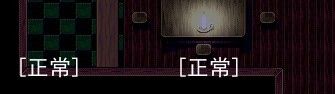
就像这样......但有时他自己也会消失
又有时会一直在那里.......
我装了一个状态颜色的脚本才出现的。。。
自己也不会改啊..........
[pre lang="ruby" line="1"]#============================================================================================
# 本脚本来自www.66RPG.com,由sdxsdx转载。使用请保留此信息
#============================================================================================
#============================================
# 自定义
#============================================
class Window_BattleStatus < Window_Base
STATE_DRAW_FRAME = 20 # 状态框的间隔
STATE_DRAW_X = 160 # X 坐标
STATE_DRAW_Y = 96 # Y 坐标
STATE_DRAW_COLOR_USE = true # 文字颜色是否有效
#--------------------------------------------------------------------------
# ● ステートの文字色設定
# actor : アクター
# text : 描画文字列
#--------------------------------------------------------------------------
def state_font_color(actor, text)
if STATE_DRAW_COLOR_USE
color = normal_color
case text
when "[正常]"
color = normal_color
when "[死亡]"
color = Color.new(255, 0, 0)
when "[灼伤]"
color = Color.new(241, 71, 14, 255)
when "[愤怒]"
color = Color.new(240, 252, 10, 255)
when "[激动]"
color = Color.new(255, 123, 15, 255)
when "[晕血]"
color = Color.new(197, 73, 163, 255)
when "[混乱]"
color = Color.new(200, 255, 140, 255)
when "[睡眠]"
color = Color.new(64, 64, 200, 255)
when "[麻痺]"
color = Color.new(254, 235, 1, 255)
when "[无力]","[干扰]","[濒死]"
color = Color.new(128, 128, 128, 255)
when "[大力]","[疾风]","[热血]"
color = Color.new(128, 128, 255, 255)
when "[冻伤]"
color = Color.new(3, 22, 254, 255)
when "[风毒]"
color = Color.new(117, 130, 140, 255)
when "[水毒]"
color = Color.new(10, 181, 254, 255)
when "[火毒]"
color = Color.new(214, 99, 50, 255)
when "[土毒]"
color = Color.new(191, 165, 72, 255)
when "[雷毒]"
color = Color.new(9, 237, 255, 255)
end
else
# STATE_DRAW_COLOR_USEがfalseの場合はデフォの処理(戦闘不能のみ赤で描画)
color = actor.hp == 0 ? knockout_color : normal_color
end
@state_sprite.bitmap.font.color = color
end
attr_accessor :state_count
alias window_battlestatus_state_draw_initialize initialize
def initialize
window_battlestatus_state_draw_initialize
# ステート表示用のカウンタを作成
@state_count = 0
# ステート表示用のスプライトを作成
@state_sprite = Sprite.new(self.viewport)
@state_sprite.bitmap = Bitmap.new(self.width - 32, self.height - 32)
@state_sprite.x = self.x + 16
@state_sprite.y = self.y + 16
@state_sprite.z = self.z + 2
# ステート表示用スプライトをリフレッシュ
state_draw_refresh
end
alias window_battlestatus_state_draw_dispose dispose
def dispose
window_battlestatus_state_draw_dispose
# ステート表示用スプライトを開放
@state_sprite.dispose
end
#--------------------------------------------------------------------------
# ● 描画用のステート文字列作成
# actor : アクター
# width : 描画先の幅
# need_normal : [正常] が必要かどうか (true / false)
#--------------------------------------------------------------------------
def make_battler_state_text(battler, width, need_normal)
# 括弧の幅を取得
brackets_width = self.contents.text_size("[]").width
# ステート名の文字列を作成
text = ""
# 実際表示するステートの配列作成
show_state = []
for i in battler.states
if $data_states.rating >= 1
show_state.push($data_states.name)
end
end
# 表示ステートの配列が空の場合は "[正常]" にする
if show_state.size == 0
if need_normal
text = "[正常]"
else
text = ""
end
else
# カウントに見合ったステートを文字列に設定
text = show_state[(@state_count / STATE_DRAW_FRAME) % show_state.size]
# 括弧をつける
text = "[" + text + "]"
end
# 完成した文字列を返す
return text
end
def state_draw_refresh
# ステート表示用のカウントを増加
@state_count += 1
# ステート更新間隔でなく、最初の更新時でなければ更新しない
return if @state_count % STATE_DRAW_FRAME != 0 and @state_count != 1
@state_sprite.bitmap.clear
for i in 0...$game_party.actors.size
actor = $game_party.actors
actor_x = i * STATE_DRAW_X + 4
if @level_up_flags
@state_sprite.bitmap.font.color = normal_color
@state_sprite.bitmap.draw_text(actor_x, STATE_DRAW_Y, 120, 32, "升级!")
else
text = make_battler_state_text(actor, 120, true)
state_font_color(actor, text)
@state_sprite.bitmap.draw_text(actor_x, STATE_DRAW_Y, 120, 32, text)
end
end
end
def draw_actor_state(actor, x, y, width = 120)
# 通常のdraw_actor_stateを実行させない為のダミー
end
end
class Scene_Battle
alias scene_battle_state_draw_update update
def update
# update毎にステート表示を更新
@status_window.state_draw_refresh
scene_battle_state_draw_update
end
end[/pre]
求高手解决 |
|



 写轮眼
写轮眼
 发表于 2013-1-27 21:11:19
 提升卡
提升卡 沉默号角
沉默号角 喧嚣号角
喧嚣号角 变色卡
变色卡 升龙剑
升龙剑


