| 赞 | 1 |
| VIP | |
| 好人卡 | |
| 积分 | 1 |
| 经验 | |
| 最后登录 | 2015-1-15 |
| 在线时间 | 323 小时 |
- 梦石
- 0
- 星屑
- 55
- 在线时间
- 323 小时
- 注册时间
- 2010-8-21
- 回帖
- 638
|
 发表于 2013-4-6 15:01:21
|
显示全部楼层
发表于 2013-4-6 15:01:21
|
显示全部楼层
本帖最后由 沙漠点灰 于 2013-4-6 18:37 编辑
又是(??)喜闻乐见的编码问题(以前被害惨了)..
lz竟能用上这样的脚本,那么lz一定是剧情党了,做好游戏请务必通知一下我{:2_270:}
这种问题只要加上转码脚本一般就ok了。
[pre lang="ruby" line="1"]#------------------------------------------------------------------------------
# Moonlight INN
# http://cgi.members.interq.or.jp/aquarius/rasetsu/
# RaTTiE
# rasetsu@aquarius.interq.or.jp
#------------------------------------------------------------------------------
# EasyConv::s2u(text) : S-JIS -> UTF-8
# EasyConv::u2s(text) : UTF-8 -> S-JIS
#==============================================================================
module EasyConv
CP_ACP = 0
CP_UTF8 = 65001
#--------------------------------------------------------------------------
# 转 S-JIS -> UTF-8
#--------------------------------------------------------------------------
def s2u(text)
@@m2w ||= Win32API.new('kernel32', 'MultiByteToWideChar', 'ilpipi', 'i')
@@w2m ||= Win32API.new('kernel32', 'WideCharToMultiByte', 'ilpipipp', 'i')
# S-JIS -> Unicode
len = @@m2w.call(CP_ACP, 0, text, -1, nil, 0);
buf = "\0" * (len*2)
@@m2w.call(CP_ACP, 0, text, -1, buf, buf.size/2);
# Unicode -> UTF-8
len = @@w2m.call(CP_UTF8, 0, buf, -1, nil, 0, nil, nil);
ret = "\0" * len
@@w2m.call(CP_UTF8, 0, buf, -1, ret, ret.size, nil, nil);
return ret
end
module_function :s2u
#--------------------------------------------------------------------------
# 转 UTF-8 -> S-JIS
#--------------------------------------------------------------------------
def u2s(text)
@@m2w ||= Win32API.new('kernel32', 'MultiByteToWideChar', 'ilpipi', 'i')
@@w2m ||= Win32API.new('kernel32', 'WideCharToMultiByte', 'ilpipipp', 'i')
# UTF-8 -> Unicode
len = @@m2w.call(CP_UTF8, 0, text, -1, nil, 0);
buf = "\0" * (len*2)
@@m2w.call(CP_UTF8, 0, text, -1, buf, buf.size/2);
# Unicode -> S-JIS
len = @@w2m.call(CP_ACP, 0, buf, -1, nil, 0, nil, nil);
ret = "\0" * len
@@w2m.call(CP_ACP, 0, buf, -1, ret, ret.size, nil, nil);
return ret
end
module_function :u2s
end[/pre]
上面是转码脚本。
这是原来(External Text)的346行与347行
file.readlines.each_with_index do |v, i|
next if (v =~ /(^\s*(#|\/\/).*|^\s*$)/)
中间加一行
[pre lang="ruby" line="1"] v = EasyConv.s2u(v)[/pre]
即可..
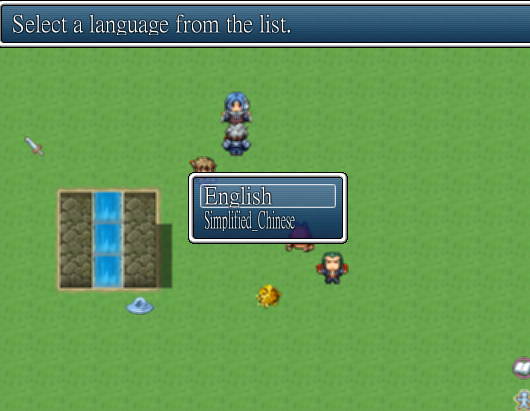
至于语言选择嘛..
那个脚本要插在那个“External Text”的后面
有这么一行(自行搜索)
Languages = ["English", "Simplified_Chinese"]
(原来只有English)修改成你支持的语言,这必须用英文(反正无所谓),
打开Game.ini
加一行
Language=Simplified_Chinese
即可
不过不知道原作者是不是忘了,不会自动生成,要手动改一下。
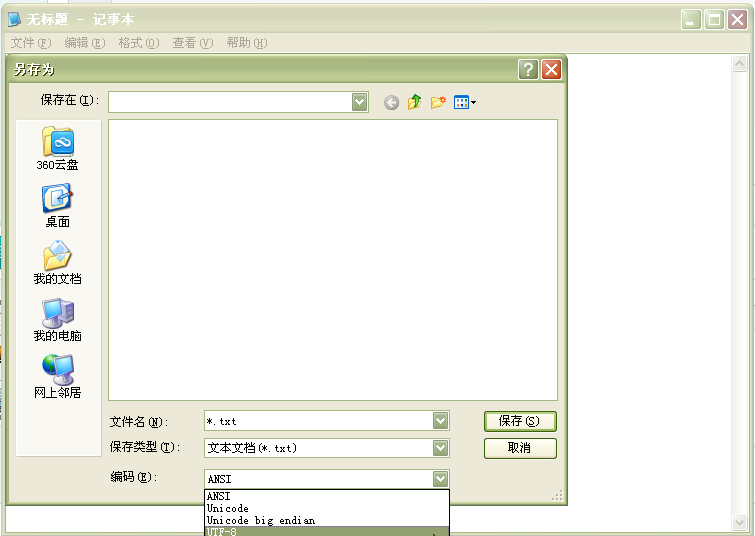
1.
先别用多语言脚本,运行游戏自动生成Text.rvdata2,
2.
加上脚本,
Languages = ["English", "Simplified_Chinese"]
修改这个
3.
打开Game.ini
加一行
Language=Simplified_Chinese
4.把生成的Text.rvdata2改为Simplified_Chinese.rvdata2
多语言重复步骤1,4
5.
完成游戏时,删除所有txt文件
(好麻烦~~~亦或者是我搞错了)
附:修改的External Text:
[pre lang="ruby" line="1"]#═╦═════════════════════════════════════════════════════════════════════════════
# ║ § External Text (v1.8) by Enelvon [License: CC BY-SA 3.0]
# ║ <RMVX Ace>
#═╬═════════════════════════════════════════════════════════════════════════════
# ║ § Change Log
#─╫─────────────────────────────────────────────────────────────────────────────
# ║ v1.0 (November 30th, 2012) - Initial release
# ║ v1.1 (November 31st, 2012) - Fixed a bug with Battle Test not loading text
# ║ v1.2 (November 31st, 2012) - Added nameboxes and a newline tag
# ║ v1.3 (December 6th, 2012) - Fixed a bug with persistent colors
# ║ v1.4 (December 6th, 2012) - Added an additional style for names
# ║ v1.5 (December 7th, 2012) - Added the [FName] tag, made adding tags easier,
# ║ fixed a bug with the namebox, added block text
# ║ call
# ║ v1.6 (December 10th, 2012) - Added in the ability to alter message window
# ║ location and background
# ║ v1.7 (December 11th, 2012) - Added the [get_text] calls and a text code for
# ║ referencing $game_text
# ║ v1.8 (December 12th, 2012) - Added a fix for the choice window
#═╬═════════════════════════════════════════════════════════════════════════════
# ║ § Summary
#─╫─────────────────────────────────────────────────────────────────────────────
# ║ This script allows you to create a text file and use its contents in the
# ║ in-game message windows. It will automatically wrap text, allowing you to
# ║ avoid worrying about whether or not your text will fit in the message
# ║ window. It uses a simple tagging system to divide the file into messages and
# ║ supply them with faces to be displayed (if desired).
# ║
#═╬═════════════════════════════════════════════════════════════════════════════
# ║ § Required Scripts
#─╫─────────────────────────────────────────────────────────────────────────────
# ║ None
# ║
#═╬═════════════════════════════════════════════════════════════════════════════
# ║ § Known Incompatibilities
#─╫─────────────────────────────────────────────────────────────────────────────
# ║ None specifically - though while ordinary text codes (\c, \n, etc) can be
# ║ used, custom ones cannot if they are persistent (like \c is) - they will be
# ║ reset whenever text wraps to a new page. \c is handled so that it will not
# ║ be reset, and it is possible to add handlers for other persistent codes.
# ║
#═╬═════════════════════════════════════════════════════════════════════════════
# ║ § Installation
#─╫─────────────────────────────────────────────────────────────────────────────
# ║ Puts this script below Materials and above Main. The exact location doesn't
# ║ really matter, as every method this uses is either aliased or new.
# ║
#═╬═════════════════════════════════════════════════════════════════════════════
# ║ § Configuration
#─╫─────────────────────────────────────────────────────────────────────────────
# ║ Create a text file in the Data folder. Name it Text. There, you've done the
# ║ hard part! To add text to the file, use this format:
# ║
# ║ [Key] !Key!
# ║ [Face] !File!, !Index!
# ║ !Text!
# ║
# ║ You may omit the [Face] line to have a message without a face, but the [Key]
# ║ line and the text itself are necessary. The replacements you should use with
# ║ the above format are:
# ║
# ║ !Key! with an identifier for the text. Each of these *must* be unique.
# ║ !File! with the name of the faceset you want to display, minus the
# ║ extension.
# ║ !Index! with the index of the face in the file, starting with 0.
# ║ !Text! with the message you want to display. Note that new lines within
# ║ a message have no effect other than adding a space.
# ║
# ║ Note that you must playtest the game before creating an encrypted archive,
# ║ or your changes in Data.txt will not be reflected in the game, as it reads
# ║ data by creating a Data.rvdata2 file from Data.txt - something that it will
# ║ be unable to do after encryption.
# ║
# ║ There are three additional face tags, one of which will require you to
# ║ modify the Faces hash in SES::ExternalText. I'll break them all down here:
# ║
# ║ [AFace] !Index!
# ║
# ║ This is pretty self-explanatory. Replace !Index! with the ID of the actor
# ║ whose face you want to show.
# ║
# ║ [PFace] !Index!
# ║
# ║ Another easy one. Replace !Index! with an index that will correspond to the
# ║ player's party at the time they receive the message. The first slot is 0,
# ║ the second is 1, and so on.
# ║
# ║ [DFace] !Key!
# ║
# ║ This is the one that requires some modification. It's handy for recurring
# ║ NPCs - you define a face in the Faces hash of SES::ExternalText and replace
# ║ !Key! with the name you gave it in the hash. There is an example for Ralph
# ║ already in the hash, as well as format instructions, so this should be easy
# ║ for you to use as well.
# ║
# ║ Another tag you can include is [Name]. It will display a namebox with the
# ║ given name. Text codes will work with it.
# ║
# ║ [Name] \c[15]\n[1]
# ║
# ║ Would use the first actor's name in color 15.
# ║
# ║ [Name] Ralph
# ║
# ║ Would use 'Ralph', and so on. There are actually two styles for names: the
# ║ namebox (which is the default) and in-text names, which are displayed at the
# ║ top of each message page. You can toggle it with the NameStyle constant in
# ║ SES::ExternalText. Set it to :box to use the namebox or :text to use in-text
# ║ names.
# ║
# ║ As of v1.5, there is also the [FName] tag, which works like the [Name] tag
# ║ except it also sets the face to whatever is entered, like [DFace] would.
# ║ This method of setting the name does not allow you to use text codes, unlike
# ║ the normal one, unless you have set up the key in the Faces hash to include
# ║ them.
# ║
# ║ There's the newline tag [Line]. Include it in front of a word to
# ║ force a line break, like this:
# ║
# ║ Text [Line]Text2
# ║
# ║ That would be displayed like this:
# ║
# ║ Text
# ║ Text2
# ║
# ║ Always remember the space before the [Line] tag - it prevents issues.
# ║
# ║ You can comment out lines by beginning them with a # or //. You can use this
# ║ to divide your Text file into sections, to help with organization.
# ║
# ║ v1.5 also alters how text tags are checked - they are now stored in a hash
# ║ in the SES::ExternalText module, making it easy to add your own. The keys
# ║ of the hash should be Regular Expressions, and the values should be strings
# ║ for evaluation.
# ║
# ║ New to v1.6 are the location and background tags. To alter the location of
# ║ the message window, use this tag:
# ║
# ║ [Position] !Pos!
# ║
# ║ !Pos! can be Top, Center, or Bottom. You will likely never need to use the
# ║ Bottom tag, as the default position is Bottom. It is included for the sake
# ║ of completeness.
# ║
# ║ The background tag allows you to choose between Normal, Dim, and Transparent
# ║ backgrounds, like you would for normal text. You use it like this:
# ║
# ║ [Background] !Back!
# ║
# ║ Replace !Back! with Normal, Dim, or Transparent. You will probably never use
# ║ Normal, as it's the default. Much like Bottom for positions, it was included
# ║ solely for the sake of completeness.
# ║
# ║ v1.7 adds in a text code that can be used to call text. I would only bother
# ║ using it if you have a global text codes script of some kind - this script
# ║ does not provide such a function, and I do not intend to add one. Note that
# ║ the text code *will not* auto-wrap text, so you will still have to test
# ║ its length yourself. You can use this alongside a global text codes script
# ║ to make translating your game into multiple languages easy - just use it
# ║ in the names/descriptions of Database objects. You use it like this:
# ║
# ║ \t[!Key!]
# ║
# ║ !Key! is, of course, the key of the text you're referencing.
# ║
#═╬═════════════════════════════════════════════════════════════════════════════
# ║ § Script Calls
#─╫─────────────────────────────────────────────────────────────────────────────
# ║ To display text, place this in an event's script command:
# ║
# ║ text(!Key!)
# ║
# ║ !Key! should be replaced with a string corresponding to the key of the
# ║ text that you want to display. As an example, if I had a text key
# ║ called Intro, I would use this to call it:
# ║
# ║ text("Intro")
# ║
# ║ You can also display multiple sections of text at once with this:
# ║
# ║ block_text(!Key!)
# ║
# ║ !Key should be replaced with either a Regular Expression or a string.
# ║ If you use a regular expression, it will display the text for all
# ║ keys that match it. If you use a string, it will display the text
# ║ for all keys that include it. This is simply a faster way to display
# ║ scenes. As an example, let's say we have a number of messages for
# ║ our introduction. Their keys are called Intro 1 through Intro 12.
# ║ Instead of 12 calls of text("Intro #"), we could use one of these:
# ║
# ║ block_text(/^Intro \d+/)
# ║
# ║ block_text("Intro")
# ║
# ║ The first one is better, of course, but both work. The problem with
# ║ the second comes in if we have another key that's similar - let's
# ║ say Ralph's Introduction. It would be called too, because it contains
# ║ Intro. It would not be called with the first one.
# ║
# ║ As of v1.7, there are two get_text calls. One can be used only in an event,
# ║ and is used like this:
# ║
# ║ get_text(!Key!)
# ║
# ║ I would recommend you use this with variable assignment, as it has no real
# ║ use otherwise. !Key is obviously the key of the text you want to use. You
# ║ can also use a form of this command in your own scripts, by calling this:
# ║
# ║ SES::ExternalText.get_text(key)
# ║
#═╬═════════════════════════════════════════════════════════════════════════════
# ║ § Aliased Methods
#─╫─────────────────────────────────────────────────────────────────────────────
# ║ ● module Data_Manager
# ║ self.load_normal_database
# ║
# ║ ● class Window_ChoiceList
# ║ max_choice_width
# ║
# ║ ● class Scene_Battle
# ║ max_choice_width
# ║
# ║ ● class Scene_Map
# ║ create_all_windows
# ║
# ║ ● class Scene_Battle
# ║ create_all_windows
# ║
#═╬═════════════════════════════════════════════════════════════════════════════
# ║ § New Methods
#─╫─────────────────────────────────────────────────────────────────────────────
# ║ ● module Data_Manager
# ║ self.create_text
# ║
# ║ ● class Game_Message
# ║ get_color(text)
# ║ load_text(data)
# ║ slice_escape_characters(text)
# ║ too_wide?(text)
# ║
# ║ ● class Window_NameBox (new class)
# ║ set_name(name)
# ║
# ║ ● class Game_Interpreter
# ║ text(key)
# ║
# ║ ● class Scene_Map
# ║ create_namebox
# ║
# ║ ● class Scene_Battle
# ║ create_namebox
# ║
#═╬═════════════════════════════════════════════════════════════════════════════
# ║ ▼ module SES::ExternalText
#═╩═════════════════════════════════════════════════════════════════════════════
module SES
module ExternalText
# Enable this if you're not using a choice script like Raizen's and want to
# use text codes in choices. It will force the choice window to evaluate
# escape characters before displaying, causing it to size properly. In
# general, it won't hurt to leave this on as long as this script is above
# any other scripts that affect the choice window.
ChoiceFix = true
# Add faces here. The format is "Name" => ["Faceset", Index],
Faces = {
"Ralph" => ["Actor1", 0],
}
# Set this to either :box or :text. :box uses the name box, :text will
# include the name at the top of each page.
NameStyle = :box
# This is a hash of tags that will be searched for in the Text.txt file. You
# can customize this to add new tags. Scripters can add new tags in their
# scripts by making a new hash and calling SES::ExternalText::Tags.merge!
# with it.
Tags = {
/^\[Key\]\s*(.+)/i =>
%Q{ key = $1.to_s; text[key] = [["",0,nil,nil,""],"",[2,0]] },
/^\[Face\]\s*(.+),(?:\s*)(\d+)/i =>
%Q{ text[key][0][0], text[key][0][1] = $1.to_s, $2.to_i },
/^\[AFace\]\s*(\d+)/i =>
%Q{ text[key][0][2] = $1.to_i },
/^\[PFace\]\s*(\d+)/i =>
%Q{ text[key][0][3] = $1.to_i },
/^\[DFace\]\s*(.+)/i =>
%Q{ text[key][0][0] = SES::ExternalText::Faces[$1.to_s][0]
text[key][0][1] = SES::ExternalText::Faces[$1.to_s][1] },
/^\[Name\]\s*(.+)/i =>
%Q{ text[key][0][4] = $1.to_s },
/^\[FName\]\s*(.+)/ =>
%Q{ text[key][0][4] = $1.to_s
text[key][0][0] = SES::ExternalText::Faces[$1.to_s][0]
text[key][0][1] = SES::ExternalText::Faces[$1.to_s][1] },
/^\[Position\]\s*(Top|Center|Bottom)/i =>
%Q{ text[key][2][0] = if $1.downcase == "top" then 0
elsif $1.downcase == "center" then 1
else 2 end },
/^\[Background\]\s*(Normal|Dim|Transparent)/i =>
%Q{ text[key][2][1] = if $1.downcase == "normal" then 0
elsif $1.downcase == "dim" then 1
else 2 end },
}
# You can call this with SES::ExternalText.get_key(key) to get text and do
# things like store it in a variable.
def self.get_text(key)
return $game_text[key].nil? ? nil : $game_text[key][1]
end
end
end
($imported ||= {})["SES - External Text"] = 1.8
#═╦═════════════════════════════════════════════════════════════════════════════
# ║ ▲ module SES::ExternalText
#─╫─────────────────────────────────────────────────────────────────────────────
# ║ ▼ module DataManager
#═╩═════════════════════════════════════════════════════════════════════════════
module DataManager
class << self
alias en_et_dm_lnd load_normal_database
alias en_et_dm_lbd load_battle_test_database
end
# Creates the Text.rvdata2 file, which is a Ruby-serialized hash created from
# the Text.txt file. This allows it to be read from inside of an encrypted
# archive.
def self.create_text
text = {}
key = ""
File.open("Data/Text.txt", "r") do |file|
file.readlines.each_with_index do |v, i|
v = EasyConv.s2u(v)
next if (v =~ /(^\s*(#|\/\/).*|^\s*$)/)
SES::ExternalText::Tags.each_pair do |k,p|
(eval(p); v = "") if v =~ k
end
text[key][1] << v unless v.empty?
end
end
File.open("Data/Text.rvdata2", "w") do |file|
Marshal.dump(text, file)
end
end
def self.load_normal_database
en_et_dm_lnd
create_text if FileTest.exist?("Data/Text.txt")
$game_text = load_data("Data/Text.rvdata2")
end
def self.load_battle_test_database
en_et_dm_lbd
create_text if FileTest.exist?("Data/Text.txt")
$game_text = load_data("Data/Text.rvdata2")
end
end
#═╦═════════════════════════════════════════════════════════════════════════════
# ║ ▲ module DataManager
#─╫─────────────────────────────────────────────────────────────────────────────
# ║ ▼ class Game_Message
#═╩═════════════════════════════════════════════════════════════════════════════
class Game_Message
attr_reader :name
alias en_et_gm_c clear
def clear
en_et_gm_c
@name = ""
end
# Gets the most recently used text color code and stores it so that it can be
# used on future pages.
def get_color(text)
win, cc = Window_Base.new(0,0,0,0), nil
win.convert_escape_characters(text).gsub(/\eC(\[(\w+)\])?/i) {|s| cc = s}
return cc
end
# Sets up the called text, as well as any face and name data it contains.
def load_text(data)
if data[0][2]
actor = $game_actors[data[0][2]].actor
@face_name, @face_index = actor.face_name, actor.face_index
elsif data[0][3]
actor = $game_party.members[data[0][3]]
@face_name, @face_index = actor.face_name, actor.face_index
else
@face_name, @face_index = data[0][0], data[0][1]
end
@position, @background = data[2][0], data[2][1]
if SES::ExternalText::NameStyle == :box then @name = data[0][4]
else name = data[0][4] << "\\c[0]" end
text = data[1]
new_page
lines, i, cc = [""], 0, ""
(lines[0] = name; i += 1; lines = "") if name
text.split(/\s/).each do |w|
cc = get_color(w) || cc
if too_wide?(lines + w) || w =~ /(.*)\[Line\].*/i
w.gsub!(/\[Line\]/i) { "" }
i += 1; lines = ""
if i % 4 == 0
lines << (name || "") << cc;
(i += 1; lines = "") if name
end
end
lines << "#{w} "
end
@texts = lines
end
# Removes the escape characters from the given text and returns it. Used when
# calculating display width.
def slice_escape_characters(text)
win = Window_Base.new(0,0,0,0)
win.convert_escape_characters(text).gsub(/\e(\w)(\[(\w+)\])?/) {""}
end
# Checks if adding the word would make the line too long to fit in the window.
def too_wide?(text)
win = Window_Base.new(0,0,0,0)
width = Graphics.width - (@face_name.empty? ? 24 : 136)
win.text_size(slice_escape_characters(text)).width > width
end
end
#═╦═════════════════════════════════════════════════════════════════════════════
# ║ ▲ class Game_Message
#─╫─────────────────────────────────────────────────────────────────────────────
# ║ ▼ class Game_Interpreter
#═╩═════════════════════════════════════════════════════════════════════════════
class Game_Interpreter
# Method invoked to call text.
def text(key)
$game_message.load_text($game_text[key] ||
"There is no text for the key #{key}.")
wait_for_message
end
# Allows you to call multiple lines of text at once.
def block_text(key)
$game_text.keys.sort.each do |k|
if key.is_a?(String) then text(k) if k.include?(key)
else text(k) if k =~ key end
end
end
# Allows you to retrieve text by calling get_text(key) in an event's script
# call.
def get_text(key)
SES::ExternalText.get_text(key)
end
end
#═╦═════════════════════════════════════════════════════════════════════════════
# ║ ▲ class Game_Interpreter
#─╫─────────────────────────────────────────────────────────────────────────────
# ║ ▼ class Window_Base
#═╩═════════════════════════════════════════════════════════════════════════════
class Window_Base
alias en_et_wb_cec convert_escape_characters
def convert_escape_characters(*args, &block)
result = en_et_wb_cec(*args, &block)
result.gsub!(/\eT\[(.+)\]/i) { if $game_text.keys.include?($1)
$game_text[$1][1]
else
"Invalid key [#{$1}]. No matching text exists."
end
}
result
end
end
#═╦═════════════════════════════════════════════════════════════════════════════
# ║ ▲ class Window_Base
#─╫─────────────────────────────────────────────────────────────────────────────
# ║ ▼ class Window_ChoiceList
#═╩═════════════════════════════════════════════════════════════════════════════
class Window_ChoiceList
alias en_et_wcl_mcw max_choice_width
def max_choice_width
if SES::ExternalText::ChoiceFix
$game_message.choices.collect {|s|
text_size(convert_escape_characters(s)).width
}.max
else
en_et_wcl_mcw
end
end
end
#═╦═════════════════════════════════════════════════════════════════════════════
# ║ ▲ class Window_ChoiceList
#─╫─────────────────────────────────────────────────────────────────────────────
# ║ ▼ class Window_NameBox
#═╩═════════════════════════════════════════════════════════════════════════════
class Window_NameBox < Window_Base
def initialize
super(0, Graphics.height - 168, 0, 0)
@position = 2
self.visible = false; close
self.height = 48
self.width = 130
@name = ""
self.arrows_visible = false
end
# Passes the window with a name and displays the window
def set_name(name)
@name = name
self.visible = true if !self.visible
if @name.empty?
close if open?
else
if $game_message.position > 0 && $game_message.position != @position
@position = $game_message.position
self.y = @position * (Graphics.height - fitting_height(4)) / 2 -
self.height
else
unless $game_message.position == @position
@position = $game_message.position
self.y = fitting_height(4)
end
end
open if !open?
create_contents
self.draw_text_ex((contents_width - text_size(@name).width) / 2, 0, @name)
end
end
def update
super
set_name($game_message.name) if @name != $game_message.name
end
end
#═╦═════════════════════════════════════════════════════════════════════════════
# ║ ▲ class Window_NameBox
#─╫─────────────────────────────────────────────────────────────────────────────
# ║ ▼ class Scene_Map
#═╩═════════════════════════════════════════════════════════════════════════════
class Scene_Map < Scene_Base
alias en_et_sm_caw create_all_windows
def create_all_windows
en_et_sm_caw
create_namebox
end
def create_namebox
@namebox = Window_NameBox.new
end
end
#═╦═════════════════════════════════════════════════════════════════════════════
# ║ ▲ class Scene_Map
#─╫─────────────────────────────────────────────────────────────────────────────
# ║ ▼ class Scene_Battle
#═╩═════════════════════════════════════════════════════════════════════════════
class Scene_Battle < Scene_Base
alias en_et_sb_caw create_all_windows
def create_all_windows
en_et_sb_caw
create_namebox
end
def create_namebox
@namebox = Window_NameBox.new
end
end
#═╦═════════════════════════════════════════════════════════════════════════════
# ║ ▲ class Scene_Battle
#═╩═════════════════════════════════════════════════════════════════════════════[/pre] |
|


 写轮眼
写轮眼


 提升卡
提升卡 沉默号角
沉默号角 喧嚣号角
喧嚣号角 变色卡
变色卡 升龙剑
升龙剑