| 赞 | 0 |
| VIP | |
| 好人卡 | |
| 积分 | 1 |
| 经验 | |
| 最后登录 | 2025-11-20 |
| 在线时间 | 331 小时 |
- 梦石
- 0
- 星屑
- 93
- 在线时间
- 331 小时
- 注册时间
- 2010-10-24
- 回帖
- 735
|
楼主 |
发表于 2013-4-21 20:06:12
|
显示全部楼层
美丽晨露 发表于 2013-4-21 19:17
看看这个范例怎么样?
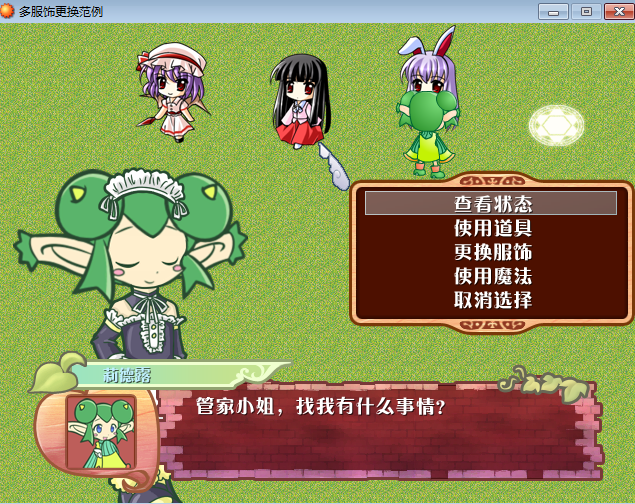
效果图附上:
感谢回答,但出现了冲突,如何解决?
[pre lang="ruby" line="1"] #--------------------------------------------------------------------------
# ● 设置窗口位置与不透明度[再定義]
#--------------------------------------------------------------------------
def reset_window
if @inforesize
RectalCopy.copy(self, INFO_RECT)
elsif self.pop_character != nil and self.pop_character >= 0
update_reset_window
else
RectalCopy.copy(self, DEFAULT_RECT)
#
case ($game_temp.in_battle ? 0 : $game_system.message_position)
when 0 # 上 (戦闘中は上扱い)
self.y = [16, -XRXS9::NAME_WINDOW_OFFSET_Y + 4].max
when 1 # 中
self.y = 160
end
# 自動リサイズ
if DEFAULT_STRETCH_ENABLE and @lines_max >= 4
# 拡張する差分を計算
d = @lines_max * DEFAULT_LINE_SPACE + 32 - self.height
if d > 0
self.height += d
case $game_system.message_position
when 1 # 中
self.y -= d/2
when 2 # 下
self.y -= d
end
end
end
if @face_file != nil
self.width += FACE_WIDTH
self.x -= FACE_WIDTH/2
end
end
if $game_system.message_frame == 0
self.back_opacity = DEFAULT_BACK_OPACITY
@name_window_frame.back_opacity = DEFAULT_BACK_OPACITY unless @name_window_frame.nil?
else
self.opacity = 0
@name_window_frame.back_opacity = 0 unless @name_window_frame.nil?
end
end
#--------------------------------------------------------------------------
# ○ ウィンドウの位置と不透明度の設定 (キャラポップ)
#--------------------------------------------------------------------------
def update_reset_window
#
# 「キャラポップ」
#
if self.pop_character == 0 or $game_map.events[self.pop_character] != nil
character = get_character(self.pop_character)
x = character.screen_x - self.width / 2
case $game_system.message_position
when 0
if @name_window_frame != nil and @name_window_frame.y <= 4
y = 4 - XRXS9::NAME_WINDOW_OFFSET_Y
else
y = character.screen_y - CHARPOP_HEIGHT - self.height
end
else
y = character.screen_y
end
self.x = [[x, 4].max, 636 - self.width ].min
self.y = [[y, 4].max, 476 - self.height].min
if @name_window_frame != nil
@name_window_frame.x = self.x + XRXS9::NAME_WINDOW_OFFSET_X
@name_window_frame.y = self.y + XRXS9::NAME_WINDOW_OFFSET_Y
@name_window_text.x = self.x + XRXS9::NAME_WINDOW_OFFSET_X + 1 + XRXS9::NAME_WINDOW_SPACE/2 - 16
@name_window_text.y = self.y + XRXS9::NAME_WINDOW_OFFSET_Y + 1 + XRXS9::NAME_WINDOW_SPACE/2 - 16
end
end
end
#--------------------------------------------------------------------------
# ○ カーソルの矩形更新 [オーバーライド]
#--------------------------------------------------------------------------
def update_cursor_rect
if @index >= 0
n = $game_temp.choice_start + @index
self.cursor_rect.set(8 + @indent, n * line_height, @cursor_width, line_height)
else
self.cursor_rect.empty
end
end
#--------------------------------------------------------------------------
# ○ キャラクターの取得
# parameter : パラメータ
#--------------------------------------------------------------------------
def get_character(parameter)
# パラメータで分岐
case parameter
when 0 # プレイヤー
return $game_player
else # 特定のイベント
events = $game_map.events
return events == nil ? nil : events[parameter]
end
end
#--------------------------------------------------------------------------
# ○ 現在キースキップが可能か?
#--------------------------------------------------------------------------
def skippable_now?
return ((SKIP_BAN_SWITCH_ID == 0 ? true : !$game_switches[SKIP_BAN_SWITCH_ID]) and
(HISKIP_ENABLE_SWITCH_ID == 0 ? true : $game_switches[HISKIP_ENABLE_SWITCH_ID]))
end
#--------------------------------------------------------------------------
# ○ 可視状態
#--------------------------------------------------------------------------
def visible=(b)
@name_window_frame.visible = b unless @name_window_frame.nil?
@name_window_text.visible = b unless @name_window_text.nil?
@input_number_window.visible = b unless @input_number_window.nil?
super
end
#--------------------------------------------------------------------------
# メソッド テンプレート
#--------------------------------------------------------------------------
def process_ruby
end
def draw_gaiji(x, y, num)
end
def convart_value(option, index)
end
end
#==============================================================================
# □ Air_Text (何も無いところに文字描写 = 枠の無い瞬間表示メッセージウィンドウ)
#==============================================================================
class Air_Text < Window_Base
#--------------------------------------------------------------------------
# ○ オブジェクト初期化
#--------------------------------------------------------------------------
def initialize(x, y, designate_text, size, text_color)
super(x-16, y-16, 32 + designate_text.size * 12, 56)
self.opacity = 0
self.contents = Bitmap.new(self.width - 32, self.height - 32)
w = self.contents.width
h = self.contents.height
self.contents.font.size = size
self.contents.font.color = text_color
self.contents.draw_text(0, 0, w, h, designate_text)
end
end
#==============================================================================
# □ Window_Copy
#------------------------------------------------------------------------------
# 指定のウィンドウのコピーを作成します。
#==============================================================================
class Window_Copy < Window_Base
#--------------------------------------------------------------------------
# ○ オブジェクト初期化
#--------------------------------------------------------------------------
def initialize(window)
super(window.x, window.y, window.width, window.height)
self.contents = window.contents.dup unless window.contents.nil?
self.opacity = window.opacity
self.back_opacity = window.back_opacity
self.z = window.z
end
end
#======================↓双重对话框功能↓====================================
class Window_Copy2 < Window_Base
#--------------------------------------------------------------------------
# ○ オブジェクト初期化
#--------------------------------------------------------------------------
def initialize(window)
super(window.x, window.y, window.width, window.height)
self.contents = window.contents.dup unless window.contents.nil?
self.opacity = window.opacity
self.back_opacity = window.back_opacity
self.z = window.z
end
end
#======================↑双重对话框功能↑=====================================
#==============================================================================
# □ Sprite_Copy
#------------------------------------------------------------------------------
# 指定のスプライトのコピーを作成します。
#==============================================================================
class Sprite_Copy < Sprite
#--------------------------------------------------------------------------
# ○ オブジェクト初期化
#--------------------------------------------------------------------------
def initialize(sprite)
super()
self.bitmap = sprite.bitmap.dup unless sprite.bitmap.nil?
self.opacity = sprite.opacity
self.x = sprite.x
self.y = sprite.y
self.z = sprite.z
self.ox = sprite.ox
self.oy = sprite.oy
end
end
#==============================================================================
# ■ Interpreter
#==============================================================================
class Interpreter
#--------------------------------------------------------------------------
# ● 文章の表示
#--------------------------------------------------------------------------
def command_101
# ほかの文章が message_text に設定済みの場合
if $game_temp.message_text != nil
# 終了
return false
end
# メッセージ終了待機中フラグおよびコールバックを設定
@message_waiting = true
$game_temp.message_proc = Proc.new { @message_waiting = false }
# message_text に 1 行目を設定
$game_temp.message_text = @list[@index].parameters[0] + "\n"
line_count = 1
# ループ
loop do
# 次のイベントコマンドが文章 2 行目以降の場合
if @list[@index+1].code == 401
# message_text に 2 行目以降を追加
$game_temp.message_text += @list[@index+1].parameters[0] + "\n"
line_count += 1
# イベントコマンドが文章 2 行目以降ではない場合
else
# 次のイベントコマンドが文章の表示の場合
if @list[@index+1].code == 101
if (/\\next\Z/.match($game_temp.message_text)) != nil
$game_temp.message_text.gsub!(/\\next/) { "" }
$game_temp.message_text += @list[@index+1].parameters[0] + "\n"
# インデックスを進める
@index += 1
next
end
# 次のイベントコマンドが選択肢の表示の場合
elsif @list[@index+1].code == 102
# 選択肢が画面に収まる場合
if @list[@index+1].parameters[0].size <= 4 - line_count
# インデックスを進める
@index += 1
# 選択肢のセットアップ
$game_temp.choice_start = line_count
setup_choices(@list[@index].parameters)
end
# 次のイベントコマンドが数値入力の処理の場合
elsif @list[@index+1].code == 103
# 数値入力ウィンドウが画面に収まる場合
if line_count < 4
# インデックスを進める
@index += 1
# 数値入力のセットアップ
$game_temp.num_input_start = line_count
$game_temp.num_input_variable_id = @list[@index].parameters[0]
$game_temp.num_input_digits_max = @list[@index].parameters[1]
end
end
# 継続
return true
end
# インデックスを進める
@index += 1
end
end
end
#==============================================================================
# --- メッセージ中移動許可 ---
#==============================================================================
class Game_Player < Game_Character
attr_accessor :messaging_moving
end
#==============================================================================
# --- 範囲コピー ---
#==============================================================================
module RectalCopy
def self.copy(rect1, rect2)
rect1.x = rect2.x
rect1.y = rect2.y
rect1.width = rect2.width
rect1.height = rect2.height
end
end
[/pre]
这是对话脚本,与多选择冲突。 |
|


 写轮眼
写轮眼
 发表于 2013-4-21 17:28:39

 提升卡
提升卡 沉默号角
沉默号角 喧嚣号角
喧嚣号角 变色卡
变色卡 升龙剑
升龙剑


 发表于 2013-4-21 19:17:54