| 赞 | 0 |
| VIP | |
| 好人卡 | |
| 积分 | 4 |
| 经验 | |
| 最后登录 | 2017-9-21 |
| 在线时间 | 117 小时 |
- 梦石
- 0
- 星屑
- 385
- 在线时间
- 117 小时
- 注册时间
- 2012-10-2
- 回帖
- 114
|
楼主 |
发表于 2013-6-9 08:27:14
|
显示全部楼层
喵呜喵5 发表于 2013-6-9 08:02 
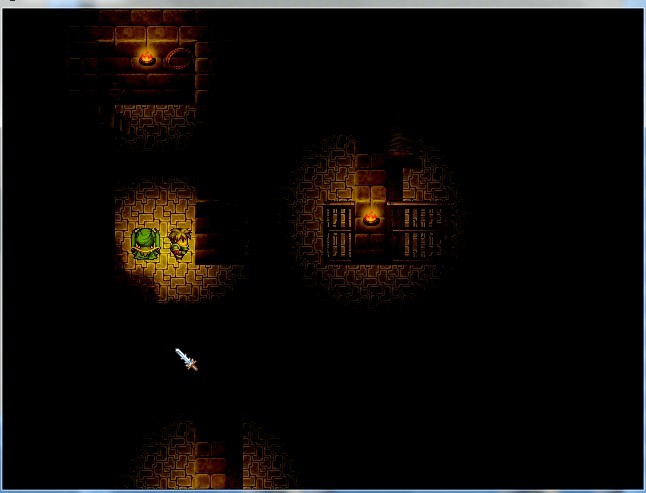
找到灯光脚本中显示视野的那部分,调整它的放大率就好了
新人比较愚笨,不好意思哈
现在就贴出脚本
话说怎么把脚本贴成有框框的样式啊·不会·= =
[pre lang="ruby" line="1"]=begin
HN_Light version 1.0.1.0 for VX Ace
by 半生
要HN_RG_BITMAP(ver 0.1.2.1以降)
2012/01/08 ver 1.0.1.2
队列歩行の仲间に対応
=end
# ----- 在这里设定-----
module HN_Light
# 简略化0:(精细)~2:(粗暴,负荷轻)
SIMPLIFY = 1
# 玩家的烛光类型使用的变量号码
PLAYER_LIGHT_TYPE = 12
# 队友的烛光类型使用的变量号码
FOLLOWER_LIGHT_TYPE = 12
# 黑暗判断上使用的开关
DARK_SWITCH = 13
# 烛光事件识别用的正规表达式
REGEX_LIGHT = /@LIGHT(\d+)/
# 烛光图像的目录
LIGHT_IMG_DIR = "Graphics/Pictures/"
# 烛光Bitmap设定
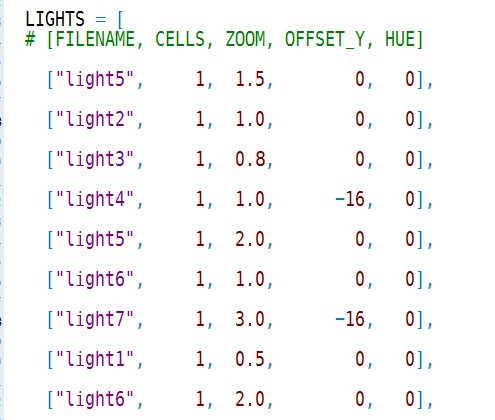
LIGHTS = [
# [FILENAME, CELLS, ZOOM, OFFSET_Y, HUE]
["light5", 1, 1.5, 0, 0],
["light2", 1, 1.0, 0, 0],
["light3", 1, 0.8, 0, 0],
["light4", 1, 1.0, -16, 0],
["light5", 1, 2.0, 0, 0],
["light6", 1, 1.0, 0, 0],
["light7", 1, 3.0, -16, 0],
["light1", 1, 0.5, 0, 0],
["light6", 1, 2.0, 0, 0],
]
end
# ----- 在这里设定 -----
module HN_Light
# 事件mix-in用
module LightEvent
attr_reader :light_type
def initialize
super()
@light_type = 0
end
def check_light
@light_type = 0
return if @list.nil?
@list.each do |command|
break if @light_type > 0
if command.code == 108 or command.code == 408
command.parameters.each do |line|
if line =~ REGEX_LIGHT
@light_type = $1.to_i
break
end
end
end
end # END @list.each
end
end # END module LightEvent
class Light
attr_reader :bitmap
attr_reader :cells
attr_reader :width
attr_reader :height
attr_reader :ox
attr_reader :oy
def initialize(light_type, s_zoom = 1)
light = LIGHTS[light_type - 1]
if light.nil?
# 本来不应该来这里
@bitmap = Bitmap.new(32, 32)
@cels = 1
@zoom = 1.0
@oy = 16
@ox = 16
@width = 32
@height = 32
else
@bitmap = Bitmap.new(LIGHT_IMG_DIR + light[0])
@bitmap.invert()
@cells = light[1].to_i
@cells = 1 if (@cells < 1 or @cells > @bitmap.width)
@zoom = light[2].to_f
@zoom = 1.0 if @zoom <= 0.0
@zoom /= s_zoom
@width = @bitmap.width / @cells
@height = @bitmap.height
# 缩放处理
if @zoom != 1.0
new_width = (@width * @zoom).round
new_height = (@height * @zoom).round
if new_width * new_height < 1
@zoom = 1.0
else
@width = new_width
@height = new_height
new_bitmap = Bitmap.new(@width * @cells, @height)
new_bitmap.stretch_blt(new_bitmap.rect,@bitmap, @bitmap.rect)
@bitmap.dispose
@bitmap = new_bitmap
end
end
@ox = @width / 2
@oy = @height / 2 - light[3].to_i / s_zoom
# 色相変换
if ( (hue = light[4].to_i) != 0)
@bitmap.hue_change(hue)
end
end
end # End def initialize
# 色调转换
def dispose
@bitmap.dispose
@bitmap = nil
end
end
end
class Game_Event
include HN_Light::LightEvent
alias :_hn_light__setup :setup_page unless method_defined?(:_hn_light__setup)
def setup_page(new_page)
_hn_light__setup(new_page)
check_light()
end
end
class Game_Player
def light_type
return $game_variables[HN_Light::PLAYER_LIGHT_TYPE]
end
end
class Game_Follower
def light_type
return 0 if !self.visible?
return $game_variables[HN_Light::FOLLOWER_LIGHT_TYPE]
end
end
class Game_Map
attr_reader :light_events
# 更新烛光事件列表
def refresh_lights
@light_events = []
@events.values.each do |event|
if (event.light_type > 0)
@light_events.push(event)
end
end
end
alias :_hn_light__setup_events :setup_events unless method_defined?(:_hn_light__setup_events)
def setup_events
_hn_light__setup_events()
refresh_lights()
end
alias :_hn_light__refresh :refresh unless method_defined?(:_hn_light__refresh)
def refresh
_hn_light__refresh()
refresh_lights()
end
end
class Sprite_Dark < Sprite
@@base_color = Color.new(255,255,255)
def initialize(viewport = nil)
super(viewport)
@width = Graphics.width
@height = Graphics.height
case HN_Light::SIMPLIFY
when 1
@zoom = 2
when 2
@zoom = 4
else
@zoom = 1
end
@width /= @zoom
@height /= @zoom
self.zoom_x = @zoom.to_f
self.zoom_y = @zoom.to_f
self.bitmap = Bitmap.new(@width, @height)
self.bitmap.fill_rect(self.bitmap.rect, @@base_color)
self.blend_type = 2 # 混合型(减算)
self.z = 500
self.visible = false
@light_cache = {}
end
# 追加烛光
def add_light(charactor)
return if charactor.nil?
light_type = charactor.light_type
return if (light_type < 1 or light_type > HN_Light::LIGHTS.size)
unless @light_cache.key?(light_type)
@light_cache[light_type] = HN_Light::Light.new(light_type, @zoom)
end
light = @light_cache[light_type]
# 画面外什麽都不做
if @zoom == 1
return if (charactor.screen_x < 0 - light.width + light.ox)
return if (charactor.screen_x > @width + light.ox)
return if (charactor.screen_y < 0 - light.height + light.oy)
return if (charactor.screen_y > @height + light.oy)
else
return if (charactor.screen_x < 0 - (light.width + light.ox) * @zoom)
return if (charactor.screen_x > (@width + light.ox) * @zoom)
return if (charactor.screen_y < 0 - (light.height + light.oy) * @zoom)
return if (charactor.screen_y > (@height + light.oy) * @zoom)
end
# 动画判定
if light.cells > 1
index = (Graphics.frame_count / 4) % light.cells
rect = Rect.new(index * light.width , 0, light.width, light.height)
else
rect = light.bitmap.rect
end
if @zoom != 1
p_x = charactor.screen_x / @zoom - light.ox
p_y = (charactor.screen_y - 16) / @zoom - light.oy
else
p_x = charactor.screen_x - light.ox
p_y = charactor.screen_y - 16 - light.oy
end
# 乗算合成(3)
self.bitmap.blend_blt(p_x, p_y, light.bitmap, rect, 3)
end
def refresh
self.bitmap.fill_rect(self.bitmap.rect, @@base_color)
$game_map.light_events.each do |event|
next if HN_Light::LIGHTS[event.light_type - 1].nil?
add_light(event)
end
add_light($game_player)
$game_player.followers.each{|f| add_light(f)}
end
# 更新
def update
super
refresh()
end
#--------------------------------------------------------------------------
# ● 解放
#--------------------------------------------------------------------------
def dispose
self.bitmap.dispose
@light_cache.values.each do |light|
light.dispose
end
super
end
end
class Spriteset_Map
# 动画判定
def create_dark
@dark_sprite = Sprite_Dark.new(@viewport1)
end
# 更新黑暗Sprite
def update_dark
if (@dark_sprite.visible = $game_switches[HN_Light::DARK_SWITCH])
@dark_sprite.update
end
end
# 破弃黑暗Sprite
def dispose_dark
@dark_sprite.dispose
end
# 初期化
alias :_dark__initialize :initialize unless private_method_defined?(:_dark__initialize)
def initialize
_dark__initialize()
create_dark()
update_dark()
end
# 更新
alias :_dark__update :update unless method_defined?(:_dark__update)
def update
_dark__update()
update_dark() if !@dark_sprite.nil? and !@dark_sprite.disposed?
end
# 结束处理
alias :_dark__dispose :dispose unless method_defined?(:_dark__dispose)
def dispose
dispose_dark()
_dark__dispose()
end
end
[/pre] |
|


 写轮眼
写轮眼
 发表于 2013-6-6 08:22:10
 提升卡
提升卡 沉默号角
沉默号角 喧嚣号角
喧嚣号角 变色卡
变色卡 升龙剑
升龙剑