| 赞 | 0 |
| VIP | |
| 好人卡 | |
| 积分 | 1 |
| 经验 | |
| 最后登录 | 2013-8-8 |
| 在线时间 | 14 小时 |
- 梦石
- 0
- 星屑
- 50
- 在线时间
- 14 小时
- 注册时间
- 2012-7-30
- 回帖
- 24
|
加入我们,或者,欢迎回来。
您需要 登录 才可以下载或查看,没有账号?注册会员
×
本帖最后由 1332535 于 2013-7-18 10:16 编辑
我下载了个整合系统,里面的
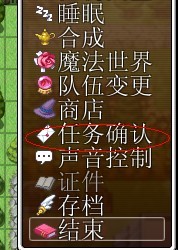 任务系统·看不懂,我换了个简单的,我想修改他的呼出命令,改成现在我要呼出的任务界面,怎么改啊,或者把那个选项去掉,在哪啊,都找遍了
这Window_MenuCommand代码- #==============================================================================
- # ■ Window_MenuCommand
- #------------------------------------------------------------------------------
- # メニュー画面で表示するコマンドウィンドウです。
- #==============================================================================
- class Window_MenuCommand < Window_Command
- #--------------------------------------------------------------------------
- # ● コマンド選択位置の初期化(クラスメソッド)
- #--------------------------------------------------------------------------
- def self.init_command_position
- @@last_command_symbol = nil
- end
- #--------------------------------------------------------------------------
- # ● オブジェクト初期化
- #--------------------------------------------------------------------------
- def initialize
- super(0, 0)
- select_last
- end
- #--------------------------------------------------------------------------
- # ● ウィンドウ幅の取得
- #--------------------------------------------------------------------------
- def window_width
- return 160
- end
- #--------------------------------------------------------------------------
- # ● 表示行数の取得
- #--------------------------------------------------------------------------
- def visible_line_number
- item_max
- end
- #--------------------------------------------------------------------------
- # ● コマンドリストの作成
- #--------------------------------------------------------------------------
- def make_command_list
- add_main_commands
- add_formation_command
- add_original_commands
- add_save_command
- add_game_end_command
- end
- #--------------------------------------------------------------------------
- # ● 主要コマンドをリストに追加
- #--------------------------------------------------------------------------
- def add_main_commands
- add_command(Vocab::item, :item, main_commands_enabled)
- add_command(Vocab::skill, :skill, main_commands_enabled)
- add_command(Vocab::equip, :equip, main_commands_enabled)
- add_command(Vocab::status, :status, main_commands_enabled)
- end
- #--------------------------------------------------------------------------
- # ● 並び替えをコマンドリストに追加
- #--------------------------------------------------------------------------
- def add_formation_command
- add_command(Vocab::formation, :formation, formation_enabled)
- end
- #--------------------------------------------------------------------------
- # ● 独自コマンドの追加用
- #--------------------------------------------------------------------------
- def add_original_commands
- end
- #--------------------------------------------------------------------------
- # ● セーブをコマンドリストに追加
- #--------------------------------------------------------------------------
- def add_save_command
- add_command(Vocab::save, :save, save_enabled)
- end
- #--------------------------------------------------------------------------
- # ● ゲーム終了をコマンドリストに追加
- #--------------------------------------------------------------------------
- def add_game_end_command
- add_command(Vocab::game_end, :game_end)
- end
- #--------------------------------------------------------------------------
- # ● 主要コマンドの有効状態を取得
- #--------------------------------------------------------------------------
- def main_commands_enabled
- $game_party.exists
- end
- #--------------------------------------------------------------------------
- # ● 並び替えの有効状態を取得
- #--------------------------------------------------------------------------
- def formation_enabled
- $game_party.members.size >= 2 && !$game_system.formation_disabled
- end
- #--------------------------------------------------------------------------
- # ● セーブの有効状態を取得
- #--------------------------------------------------------------------------
- def save_enabled
- !$game_system.save_disabled
- end
- #--------------------------------------------------------------------------
- # ● 決定ボタンが押されたときの処理
- #--------------------------------------------------------------------------
- def process_ok
- @@last_command_symbol = current_symbol
- super
- end
- #--------------------------------------------------------------------------
- # ● 前回の選択位置を復帰
- #--------------------------------------------------------------------------
- def select_last
- select_symbol(@@last_command_symbol)
- end
- end
- #==============================================================================
- # ■ Scene_Menu
- #------------------------------------------------------------------------------
- # メニュー画面の処理を行うクラスです。
- #==============================================================================
- class Scene_Menu < Scene_MenuBase
- #--------------------------------------------------------------------------
- # ● 開始処理
- #--------------------------------------------------------------------------
- def start
- super
- create_command_window
- create_gold_window
- create_status_window
- end
- #--------------------------------------------------------------------------
- # ● コマンドウィンドウの作成
- #--------------------------------------------------------------------------
- def create_command_window
- @command_window = Window_MenuCommand.new
- @command_window.set_handler(:item, method(:command_item))
- @command_window.set_handler(:skill, method(:command_personal))
- @command_window.set_handler(:equip, method(:command_personal))
- @command_window.set_handler(:status, method(:command_personal))
- @command_window.set_handler(:formation, method(:command_formation))
- @command_window.set_handler(:save, method(:command_save))
- @command_window.set_handler(:game_end, method(:command_game_end))
- @command_window.set_handler(:cancel, method(:return_scene))
- end
- #--------------------------------------------------------------------------
- # ● ゴールドウィンドウの作成
- #--------------------------------------------------------------------------
- def create_gold_window
- @gold_window = Window_Gold.new
- @gold_window.x = 0
- @gold_window.y = Graphics.height - @gold_window.height
- end
- #--------------------------------------------------------------------------
- # ● ステータスウィンドウの作成
- #--------------------------------------------------------------------------
- def create_status_window
- @status_window = Window_MenuStatus.new(@command_window.width, 0)
- end
- #--------------------------------------------------------------------------
- # ● コマンド[アイテム]
- #--------------------------------------------------------------------------
- def command_item
- SceneManager.call(Scene_Item)
- end
- #--------------------------------------------------------------------------
- # ● コマンド[スキル][装備][ステータス]
- #--------------------------------------------------------------------------
- def command_personal
- @status_window.select_last
- @status_window.activate
- @status_window.set_handler(:ok, method(:on_personal_ok))
- @status_window.set_handler(:cancel, method(:on_personal_cancel))
- end
- #--------------------------------------------------------------------------
- # ● コマンド[並び替え]
- #--------------------------------------------------------------------------
- def command_formation
- @status_window.select_last
- @status_window.activate
- @status_window.set_handler(:ok, method(:on_formation_ok))
- @status_window.set_handler(:cancel, method(:on_formation_cancel))
- end
- #--------------------------------------------------------------------------
- # ● コマンド[セーブ]
- #--------------------------------------------------------------------------
- def command_save
- SceneManager.call(Scene_Save)
- end
- #--------------------------------------------------------------------------
- # ● コマンド[ゲーム終了]
- #--------------------------------------------------------------------------
- def command_game_end
- SceneManager.call(Scene_End)
- end
- #--------------------------------------------------------------------------
- # ● 個人コマンド[決定]
- #--------------------------------------------------------------------------
- def on_personal_ok
- case @command_window.current_symbol
- when :skill
- SceneManager.call(Scene_Skill)
- when :equip
- SceneManager.call(Scene_Equip)
- when :status
- SceneManager.call(Scene_Status)
- end
- end
- #--------------------------------------------------------------------------
- # ● 個人コマンド[終了]
- #--------------------------------------------------------------------------
- def on_personal_cancel
- @status_window.unselect
- @command_window.activate
- end
- #--------------------------------------------------------------------------
- # ● 並び替え[決定]
- #--------------------------------------------------------------------------
- def on_formation_ok
- if @status_window.pending_index >= 0
- $game_party.swap_order(@status_window.index,
- @status_window.pending_index)
- @status_window.pending_index = -1
- @status_window.redraw_item(@status_window.index)
- else
- @status_window.pending_index = @status_window.index
- end
- @status_window.activate
- end
- #--------------------------------------------------------------------------
- # ● 並び替え[キャンセル]
- #--------------------------------------------------------------------------
- def on_formation_cancel
- if @status_window.pending_index >= 0
- @status_window.pending_index = -1
- @status_window.activate
- else
- @status_window.unselect
- @command_window.activate
- end
- end
- end
全局搜索
alias add_original_commands_quest add_original_commands
def add_original_commands
add_original_commands_quest
add_command("任务确认", :questlist, true)
end
end
找到了这个啊啊啊啊啊啊啊啊 "任务确认" => 235, # Menu scene. |
|


 写轮眼

 发表于 2013-7-17 21:00:46
 提升卡
 沉默号角
 喧嚣号角
 变色卡
 升龙剑


 改一下新任务脚本的Class Scene的名字为以前任务脚本的Class Scene名字就可以了


