查看: 3180|回复: 5

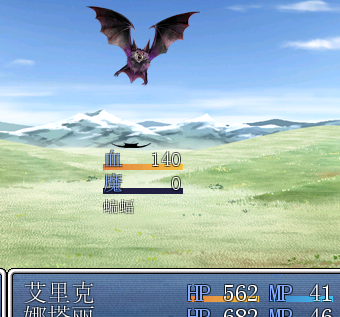
[已经解决] 如何让敌人和自己的hp和mp的名称不一样?

[复制链接]
梦石
0
星屑
50
在线时间
14 小时
注册时间
2013-7-22
回帖
21
发表于 2013-7-27 13:00:00 | 显示全部楼层 |阅读模式

加入我们,或者,欢迎回来。

您需要 登录 才可以下载或查看,没有账号?注册会员

×
本帖最后由 563548341 于 2013-7-29 12:25 编辑

如何让敌人和自己的hp和mp的名称不一样?
我用的是这个脚本:#==============================================================================
# 功能:战斗中显示敌人血和蓝于敌人脚下
# 适用:RMVX Ace
# 作者:殇殃 2012.3.10
# 使用方法:复制整个脚本插入到Main之前
# 注意:由于血条是显示在敌人脚下,所以敌群的位置不能太靠底部,不然会被挡住。
# 可以自行更改坐标修改显示位置、血条的颜色等。
#==============================================================================
# ■ Window_Base
#------------------------------------------------------------------------------
#  游戏中全部窗口的超级类。
#==============================================================================

class Window_Base < Window
#--------------------------------------------------------------------------
# ● 描绘敌人HP
#--------------------------------------------------------------------------
def draw_enemy_hp(enemy, x, y, width = 80)
draw_gauge(x, y, width, enemy.hp_rate, hp_gauge_color1, hp_gauge_color2)
self.contents.font.size = 20
self.contents.font.color = system_color
self.contents.draw_text(x, y, 30, line_height, Vocab::hp_a)
self.contents.font.color = hp_color(enemy)
self.contents.draw_text(x + width - 64, y, 64, line_height, enemy.hp, 2)
#一个数字占16像素
end
def draw_enemy_name(enemy, x, y)
self.contents.font.size = 15
self.contents.font.color = normal_color
self.contents.draw_text(x, y,104, line_height, enemy.name)
end
#--------------------------------------------------------------------------
# ● 绘制敌人MP
#--------------------------------------------------------------------------
def draw_enemy_mp(enemy, x, y, width = 80)
self.contents.font.size = 20
draw_gauge(x, y, width, enemy.mp_rate, mp_gauge_color1, mp_gauge_color2)
self.contents.font.color = system_color
self.contents.draw_text(x, y, 30, line_height, Vocab::mp_a)
self.contents.font.color = mp_color(enemy)
self.contents.draw_text(x + width - 64, y, 64, line_height, enemy.mp, 2)
end
end
#==============================================================================
# ■ Sprite_Battler
#------------------------------------------------------------------------------
#  战斗显示用活动块。Game_Battler 类的实例监视、
# 活动块的状态的监视、活动块状态自动变化。
#==============================================================================

class Sprite_Battler < Sprite_Base
#--------------------------------------------------------------------------
# ● 初始化对象
# viewport : 视区
# battler : 战斗者 (Game_Battler)
#--------------------------------------------------------------------------
def initialize(viewport, battler = nil)
super(viewport)
@battler = battler
@battler_visible = false
@effect_type = nil
@effect_duration = 0
if @battler.is_a?(Game_Enemy)
width = 24 + 80#边距12*2+血条的长度(在draw_enemy_hp中定义)
height = 24 + 24*3 #边距12*2+line_height*2
x = @battler.screen_x - width/2 #screen_x是怪物图片水平方向上的中点位置
y = @battler.screen_y - 12 #边距12,显示HP/MP的窗口无边框
@enemy_hpmp_window = Window_Base.new(x, y, width, height)
@enemy_hpmp_window.opacity = 0
@enemy_hpmp_window.contents = Bitmap.new(width - 24, height - 24)#位图比窗口小24像素取消边框
@enemy_hpmp_window.draw_enemy_hp(@battler, 0, 0)
@old_hp = -1
@enemy_hpmp_window.draw_enemy_mp(@battler, 0, 24)
@old_mp = -1
@enemy_hpmp_window.draw_enemy_name(@battler, 0, 48)
@old_name = nil
end
end
#--------------------------------------------------------------------------
# ● 释放
#--------------------------------------------------------------------------
def dispose
if self.bitmap != nil
self.bitmap.dispose
@enemy_hpmp_window.dispose
end
super
end
#--------------------------------------------------------------------------
# ● 更新画面
#--------------------------------------------------------------------------
def update
super
if @battler == nil
self.bitmap = nil
else
@use_sprite = @battler.use_sprite?
if @use_sprite
update_bitmap
update_origin
update_position
end
setup_new_effect
setup_new_animation
update_effect
if @enemy_hpmp_window != nil and (@old_hp != @battler.hp or @old_mp != @battler.mp)
if @battler.hp == 0
@enemy_hpmp_window.hide
else
@enemy_hpmp_window.contents.clear
@enemy_hpmp_window.draw_enemy_hp(@battler, 0, 0)
@old_hp = @battler.hp
@enemy_hpmp_window.draw_enemy_mp(@battler, 0, 24)
@old_mp = @battler.mp
@enemy_hpmp_window.draw_enemy_name(@battler, 0, 48)
@old_mp = @battler.name
@enemy_hpmp_window.show #怪物死后再被复活
end #if battler.hp == 0
end
end #if @battler == nil
end

end

梦石
1
星屑
23371
在线时间
9572 小时
注册时间
2012-6-19
回帖
7021

开拓者短篇九导演组冠军

发表于 2013-7-27 14:17:44 | 显示全部楼层
TM截图未命名.png

替换掉你原来的脚本

  1. #==============================================================================
  2. # 功能:战斗中显示敌人血和蓝于敌人脚下
  3. # 适用:RMVX Ace
  4. # 作者:殇殃 2012.3.10
  5. # 使用方法:复制整个脚本插入到Main之前
  6. # 注意:由于血条是显示在敌人脚下,所以敌群的位置不能太靠底部,不然会被挡住。
  7. # 可以自行更改坐标修改显示位置、血条的颜色等。
  8. #==============================================================================
  9. # ■ Window_Base
  10. #------------------------------------------------------------------------------
  11. #  游戏中全部窗口的超级类。
  12. #==============================================================================

  13. module Vocab
  14.   
  15.   HPE = "血"
  16.   
  17.   MPE = "魔"

  18.   
  19. end

  20. class Window_Base < Window
  21. #--------------------------------------------------------------------------
  22. # ● 描绘敌人HP
  23. #--------------------------------------------------------------------------

  24.   def draw_enemy_hp(enemy, x, y, width = 80)
  25.     draw_gauge(x, y, width, enemy.hp_rate, hp_gauge_color1, hp_gauge_color2)
  26.     self.contents.font.size = 20
  27.     self.contents.font.color = system_color
  28.     self.contents.draw_text(x, y, 30, line_height, Vocab::HPE)
  29.     self.contents.font.color = hp_color(enemy)
  30.     self.contents.draw_text(x + width - 64, y, 64, line_height, enemy.hp, 2)
  31. #一个数字占16像素
  32.   end

  33.   def draw_enemy_name(enemy, x, y)
  34.     self.contents.font.size = 15
  35.     self.contents.font.color = normal_color
  36.     self.contents.draw_text(x, y,104, line_height, enemy.name)
  37.   end
  38. #--------------------------------------------------------------------------
  39. # ● 绘制敌人MP
  40. #--------------------------------------------------------------------------
  41.   def draw_enemy_mp(enemy, x, y, width = 80)
  42.     self.contents.font.size = 20
  43.     draw_gauge(x, y, width, enemy.mp_rate, mp_gauge_color1, mp_gauge_color2)
  44.     self.contents.font.color = system_color
  45.     self.contents.draw_text(x, y, 30, line_height, Vocab::MPE)
  46.     self.contents.font.color = mp_color(enemy)
  47.     self.contents.draw_text(x + width - 64, y, 64, line_height, enemy.mp, 2)
  48.   end
  49. end
  50. #==============================================================================
  51. # ■ Sprite_Battler
  52. #------------------------------------------------------------------------------
  53. #  战斗显示用活动块。Game_Battler 类的实例监视、
  54. # 活动块的状态的监视、活动块状态自动变化。
  55. #==============================================================================

  56. class Sprite_Battler < Sprite_Base
  57. #--------------------------------------------------------------------------
  58. # ● 初始化对象
  59. # viewport : 视区
  60. # battler : 战斗者 (Game_Battler)
  61. #--------------------------------------------------------------------------
  62. def initialize(viewport, battler = nil)
  63. super(viewport)
  64. [url=home.php?mod=space&uid=133701]@battler[/url] = battler
  65. @battler_visible = false
  66. @effect_type = nil
  67. @effect_duration = 0
  68. if @battler.is_a?(Game_Enemy)
  69. width = 24 + 80#边距12*2+血条的长度(在draw_enemy_hp中定义)
  70. height = 24 + 24*3 #边距12*2+line_height*2
  71. x = @battler.screen_x - width/2 #screen_x是怪物图片水平方向上的中点位置
  72. y = @battler.screen_y - 12 #边距12,显示HP/MP的窗口无边框
  73. @enemy_hpmp_window = Window_Base.new(x, y, width, height)
  74. @enemy_hpmp_window.opacity = 0
  75. @enemy_hpmp_window.contents = Bitmap.new(width - 24, height - 24)#位图比窗口小24像素取消边框
  76. @enemy_hpmp_window.draw_enemy_hp(@battler, 0, 0)
  77. @old_hp = -1
  78. @enemy_hpmp_window.draw_enemy_mp(@battler, 0, 24)
  79. @old_mp = -1
  80. @enemy_hpmp_window.draw_enemy_name(@battler, 0, 48)
  81. @old_name = nil
  82. end
  83. end
  84. #--------------------------------------------------------------------------
  85. # ● 释放
  86. #--------------------------------------------------------------------------
  87. def dispose
  88. if self.bitmap != nil
  89. self.bitmap.dispose
  90. @enemy_hpmp_window.dispose
  91. end
  92. super
  93. end
  94. #--------------------------------------------------------------------------
  95. # ● 更新画面
  96. #--------------------------------------------------------------------------
  97. def update
  98. super
  99. if @battler == nil
  100. self.bitmap = nil
  101. else
  102. @use_sprite = @battler.use_sprite?
  103. if @use_sprite
  104. update_bitmap
  105. update_origin
  106. update_position
  107. end
  108. setup_new_effect
  109. setup_new_animation
  110. update_effect
  111. if @enemy_hpmp_window != nil and (@old_hp != @battler.hp or @old_mp != @battler.mp)
  112. if @battler.hp == 0
  113. @enemy_hpmp_window.hide
  114. else
  115. @enemy_hpmp_window.contents.clear
  116. @enemy_hpmp_window.draw_enemy_hp(@battler, 0, 0)
  117. @old_hp = @battler.hp
  118. @enemy_hpmp_window.draw_enemy_mp(@battler, 0, 24)
  119. @old_mp = @battler.mp
  120. @enemy_hpmp_window.draw_enemy_name(@battler, 0, 48)
  121. @old_mp = @battler.name
  122. @enemy_hpmp_window.show #怪物死后再被复活
  123. end #if battler.hp == 0
  124. end
  125. end #if @battler == nil
  126. end

  127. end
复制代码


(这脚本的排版真蛋疼= =)

评分

参与人数 1梦石 +1 收起 理由
Sion + 1 认可答案

查看全部评分

回复

使用道具 举报

梦石
0
星屑
50
在线时间
14 小时
注册时间
2013-7-22
回帖
21
 楼主| 发表于 2013-7-29 12:22:58 | 显示全部楼层
喵呜喵5 发表于 2013-7-27 14:17
替换掉你原来的脚本

#============================================================================= ...

不行,说70行错误
回复

使用道具 举报

梦石
1
星屑
23371
在线时间
9572 小时
注册时间
2012-6-19
回帖
7021

开拓者短篇九导演组冠军

发表于 2013-7-29 13:51:02 | 显示全部楼层
563548341 发表于 2013-7-29 12:22
不行,说70行错误

把第70行
@battler = battler
改成
@battler = battler


艹,这个是论坛的bug,论坛自动@ 了一个叫battler的用户导致代码出错了

点评

论坛会把@识别为email地址,很坑~  发表于 2013-7-29 17:02
回复

使用道具 举报

梦石
0
星屑
50
在线时间
14 小时
注册时间
2013-7-22
回帖
21
 楼主| 发表于 2013-7-29 17:19:48 | 显示全部楼层
本帖最后由 563548341 于 2013-7-29 17:21 编辑
喵呜喵5 发表于 2013-7-29 13:51
把第70行
@battler = battler
改成


有区别吗?是不是把[/url]去掉

点评

[url=home.php?mod=space&uid=133701]@battler[/url] = battler 改成 @battler = battler  发表于 2013-7-29 20:34
回复

使用道具 举报

梦石
1
星屑
23371
在线时间
9572 小时
注册时间
2012-6-19
回帖
7021

开拓者短篇九导演组冠军

发表于 2013-7-29 18:15:10 来自手机 | 显示全部楼层
563548341 发表于 2013-7-29 17:19
有区别吗?是不是把[/url]去掉

区别大了,
正是论坛自动在那句的前后加上了[url][/url]才会报错的,把url那个中括号整个删掉
回复

使用道具 举报

您需要登录后才可以回帖 登录 | 注册会员

本版积分规则

Powered by Discuz! X5.0 © 2001-2026 Discuz! Team.

在本版发帖返回顶部