| 赞 | 3 |
| VIP | |
| 好人卡 | |
| 积分 | 1 |
| 经验 | |
| 最后登录 | 2018-1-10 |
| 在线时间 | 131 小时 |
- 梦石
- 0
- 星屑
- 55
- 在线时间
- 131 小时
- 注册时间
- 2012-7-3
- 回帖
- 118
|
加入我们,或者,欢迎回来。
您需要 登录 才可以下载或查看,没有账号?注册会员
×
本帖最后由 冰鎮史萊姆 于 2013-8-13 20:21 编辑
可以看到現時角色資訊的圖鑑
PS 有用就拿去吧
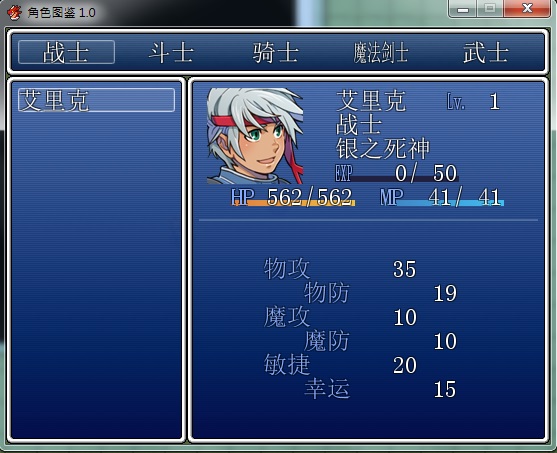
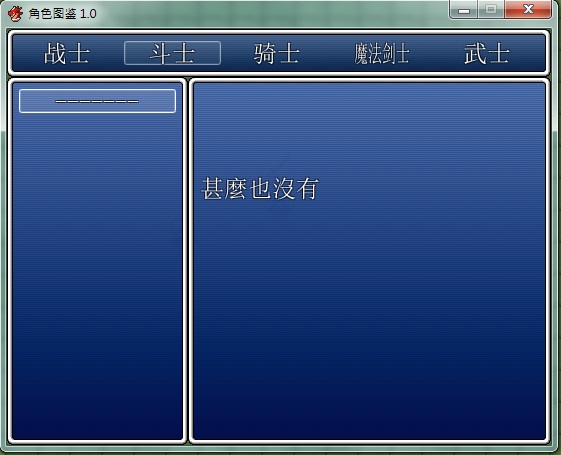
[pre lang="ruby" line="1"]#===========================================================================
# [VA]角色圖鑑 ver.1.0 by 冰鎮史萊姆
#===========================================================================
=begin
使用方法:
開啟角色 $game_switches[x] = true x為角色id+1000
例 開啟角色id 1號 $game_switches[1001] = true
HIDE_ACTOR_ID 為不出現在圖鑑中的角色ID
HIDE_JOB_ID 為不出現在圖鑑中的職業ID
NONE 為未開啟圖鑑中的角色時顯示
EXP 為EXP的名稱
開圖鑑用 SceneManager.call(Scene_CharBook)
=end
module ICE_CharBook
HIDE_ACTOR_ID = []
HIDE_JOB_ID = [6, 7, 8, 9, 10]
NONE = "甚麼也沒有"
EXP = "EXP"
end
class Window_CharBook_List < Window_Selectable
include ICE_CharBook
#-------------------------------------------------------------------------
# ● 公開实例变量
#-------------------------------------------------------------------------
attr_reader :status_window
#-------------------------------------------------------------------------
# ● 初始化对象
#-------------------------------------------------------------------------
def initialize(x, y, width, height)
super(x, y, width, height)
@char_id = []
@data = {}
$data_actors.each do |x|
next if x == nil or ICE_CharBook::HIDE_ACTOR_ID.include?(x.id) or ICE_CharBook::HIDE_JOB_ID.include?(x.class_id)
@char_id.push(x.id)
end
@char_id.each do |x|
@data[$data_actors[x].class_id] = Array.new
end
@char_id.each do |x|
@data[$data_actors[x].class_id].push(x)
end
@current_job = nil
end
#-------------------------------------------------------------------------
# ● 取得項目數
#-------------------------------------------------------------------------
def item_max
@n_data ? @n_data.size : 1
end
#-------------------------------------------------------------------------
# ● 取得項目
#-------------------------------------------------------------------------
def item
$game_actors[@n_data[index]]
end
#-------------------------------------------------------------------------
# ● 取得當前職業
#-------------------------------------------------------------------------
def get_current_job(current_job)
@current_job = current_job
@n_data = @data[current_job]
refresh
end
#--------------------------------------------------------------------------
# ● 刷新
#--------------------------------------------------------------------------
def refresh
create_contents
draw_all_items
end
#--------------------------------------------------------------------------
# ● 項目の描画
#--------------------------------------------------------------------------
def draw_item(index)
item = $game_actors[@n_data[index]]
rect = item_rect(index)
if $game_switches[1000 + item.id]
draw_actor_name(item, rect.x, rect.y, width = 112)
else
draw_text(rect,"-------",1)
end
end
#--------------------------------------------------------------------------
# ● 狀態の設定
#--------------------------------------------------------------------------
def status_window=(status_window)
@status_window = status_window
call_update_help
end
#--------------------------------------------------------------------------
# ● 调用狀態窗口的更新方法
#--------------------------------------------------------------------------
def call_update_help
update_help if active && @status_window
end
#--------------------------------------------------------------------------
# ● 狀態更新
#--------------------------------------------------------------------------
def update_help
@status_window.item = item if @status_window
end
end
#============================================================================
#============================================================================
class Scene_CharBook < Scene_MenuBase
#--------------------------------------------------------------------------
# ● 開始処理
#--------------------------------------------------------------------------
def start
super
create_category_window
create_dummy1_window
create_dummy2_window
create_status_window
create_list_window
end
#--------------------------------------------------------------------------
# ● DUMMY1の作成
#--------------------------------------------------------------------------
def create_dummy1_window
wy = @category_window.height
wh = Graphics.height - wy
@dummy1_window = Window_Base.new(0, wy, 181, wh)
@dummy1_window.viewport = @viewport
end
#--------------------------------------------------------------------------
# ● DUMMY2の作成
#--------------------------------------------------------------------------
def create_dummy2_window
wy = @category_window.height
wh = Graphics.height - wy
@dummy2_window = Window_Base.new(181, wy, 363, wh)
@dummy2_window.viewport = @viewport
end
#--------------------------------------------------------------------------
# ● ステータスウィンドウの作成
#--------------------------------------------------------------------------
def create_status_window
wy = @category_window.height
wh = Graphics.height - wy
@status_window = Window_CharBook_Status.new(181, wy, 363, wh)
@status_window.viewport = @viewport
@status_window.hide
end
#--------------------------------------------------------------------------
# ● アイテムリストウィンドウの作成
#--------------------------------------------------------------------------
def create_list_window
wy = @category_window.height
wh = Graphics.height - wy
@list_window = Window_CharBook_List.new(0, wy, 181, wh)
@list_window.viewport = @viewport
@list_window.status_window = @status_window
@list_window.hide
@list_window.set_handler(:cancel, method(:on_list_cancel))
end
#--------------------------------------------------------------------------
# ● カテゴリウィンドウの作成
#--------------------------------------------------------------------------
def create_category_window
@category_window = Window_CharBook_Category.new
@category_window.viewport = @viewport
@category_window.y = 0
@category_window.width = Graphics.width
@category_window.activate
@category_window.set_handler(:ok, method(:on_category_ok))
@category_window.set_handler(:cancel, method(:return_scene))
end
#--------------------------------------------------------------------------
# ● LIST CANCEL
#--------------------------------------------------------------------------
def on_list_cancel
@category_window.activate
@dummy1_window.show
@dummy2_window.show
@list_window.hide
@status_window.hide
@status_window.item = nil
end
#--------------------------------------------------------------------------
# ● CATEGORY[決定]
#--------------------------------------------------------------------------
def on_category_ok
@list_window.select(0)
@list_window.get_current_job(@category_window.current_symbol.to_i)
@list_window.show.activate
@status_window.show
end
end
#===========================================================================
#===========================================================================
class Window_CharBook_Category < Window_HorzCommand
include ICE_CharBook
#--------------------------------------------------------------------------
# ● 初始化对象
#--------------------------------------------------------------------------
def initialize
super(0, 0)
end
#-------------------------------------------------------------------------
# ● 桁数の取得
#-------------------------------------------------------------------------
def col_max
return @job_id.size
end
#--------------------------------------------------------------------------
# ● 获取窗口的宽度
#--------------------------------------------------------------------------
def window_width
return 544
end
#-------------------------------------------------------------------------
# ● LISTの作成
#-------------------------------------------------------------------------
def make_command_list
@job_id = []
$data_classes.each do |x|
next if x == nil or ICE_CharBook::HIDE_JOB_ID.include?(x.id)
@job_id.push(x.id)
end
@job_id.each do |i|
sym = i.to_s
add_command($data_classes.name, sym )
end
end
end
#===========================================================================
#===========================================================================
class Window_CharBook_Status < Window_Base
#--------------------------------------------------------------------------
# ● 初始化对象
#--------------------------------------------------------------------------
def initialize(x, y, width, height)
super(x, y, width, height)
@actor = nil
refresh
end
#--------------------------------------------------------------------------
# ● 刷新
#--------------------------------------------------------------------------
def refresh
contents.clear
if @actor != nil
if $game_switches[1000 + @actor.id]
draw_block1 (line_height * 0)
draw_horz_line(line_height * 5)
draw_block2 (line_height * 7)
else
draw_text(0, 0, 181, 200, ICE_CharBook::NONE)
end
end
end
#--------------------------------------------------------------------------
# ● アイテムの設定
#--------------------------------------------------------------------------
def item=(item)
@actor = item
refresh
end
#--------------------------------------------------------------------------
# ● 繪畫BLOCK 1
#--------------------------------------------------------------------------
def draw_block1(y)
draw_actor_face(@actor, 8, y)
draw_actor_level(@actor, 248, y + line_height * 0)
draw_actor_icons(@actor, 8, y + line_height * 3)
draw_actor_name(@actor, 136, y + line_height * 0)
draw_actor_class(@actor, 136, y + line_height * 1)
draw_actor_nickname(@actor, 136, y + line_height * 2)
draw_actor_exp(@actor, 136, y + line_height * 3)
draw_actor_hp(@actor, 32, y + line_height * 4)
draw_actor_mp(@actor, 181, y + line_height * 4)
end
#--------------------------------------------------------------------------
# ● 繪畫BLOCK 2
#--------------------------------------------------------------------------
def draw_block2(y)
draw_actor_param(@actor, 64, y + line_height * 0, 2)
draw_actor_param(@actor, 104, y + line_height * 1, 3)
draw_actor_param(@actor, 64, y + line_height * 2, 4)
draw_actor_param(@actor, 104, y + line_height * 3, 5)
draw_actor_param(@actor, 64, y + line_height * 4, 6)
draw_actor_param(@actor, 104, y + line_height * 5, 7)
end
#--------------------------------------------------------------------------
# ● 水平線繪畫
#--------------------------------------------------------------------------
def draw_horz_line(y)
line_y = y + line_height / 2 - 1
contents.fill_rect(0, line_y, contents_width, 2, line_color)
end
#--------------------------------------------------------------------------
# ● 水平線の色を取得
#--------------------------------------------------------------------------
def line_color
color = normal_color
color.alpha = 48
color
end
#--------------------------------------------------------------------------
# ● EXP 繪畫
#--------------------------------------------------------------------------
def draw_actor_exp(actor, x, y, width = 124)
draw_gauge(x, y, width, actor.exp.to_f / actor.next_level_exp,
text_color(28), text_color(29))
change_color(system_color)
draw_text(x, y, 30, line_height, ICE_CharBook::EXP)
draw_current_and_max_values(x, y, width, actor.exp, actor.next_level_exp,
exp_color(actor), normal_color)
end
def exp_color(actor)
return normal_color
end
end[/pre]
範例
 角色图鉴 1.0.rar
(303.92 KB, 下载次数: 104)
角色图鉴 1.0.rar
(303.92 KB, 下载次数: 104)
只收1元 求給糖 |
评分
-
查看全部评分
|

 点击↑
点击↑

 写轮眼
写轮眼
 发表于 2013-8-13 20:17:46

 提升卡
提升卡 沉默号角
沉默号角 喧嚣号角
喧嚣号角 变色卡
变色卡 升龙剑
升龙剑