| 赞 | 300 |
| VIP | |
| 好人卡 | |
| 积分 | 242 |
| 经验 | |
| 最后登录 | 2026-9-9 |
| 在线时间 | 9564 小时 |
- 梦石
- 1
- 星屑
- 23236
- 在线时间
- 9564 小时
- 注册时间
- 2012-6-19
- 回帖
- 7018
 
|
 发表于 2013-9-7 21:13:50
|
显示全部楼层
发表于 2013-9-7 21:13:50
|
显示全部楼层
本帖最后由 喵呜喵5 于 2013-9-8 13:38 编辑
[pre lang="ruby" line="1"]#encoding:utf-8
#==============================================================================
# ■ Message_Advanced
#------------------------------------------------------------------------------
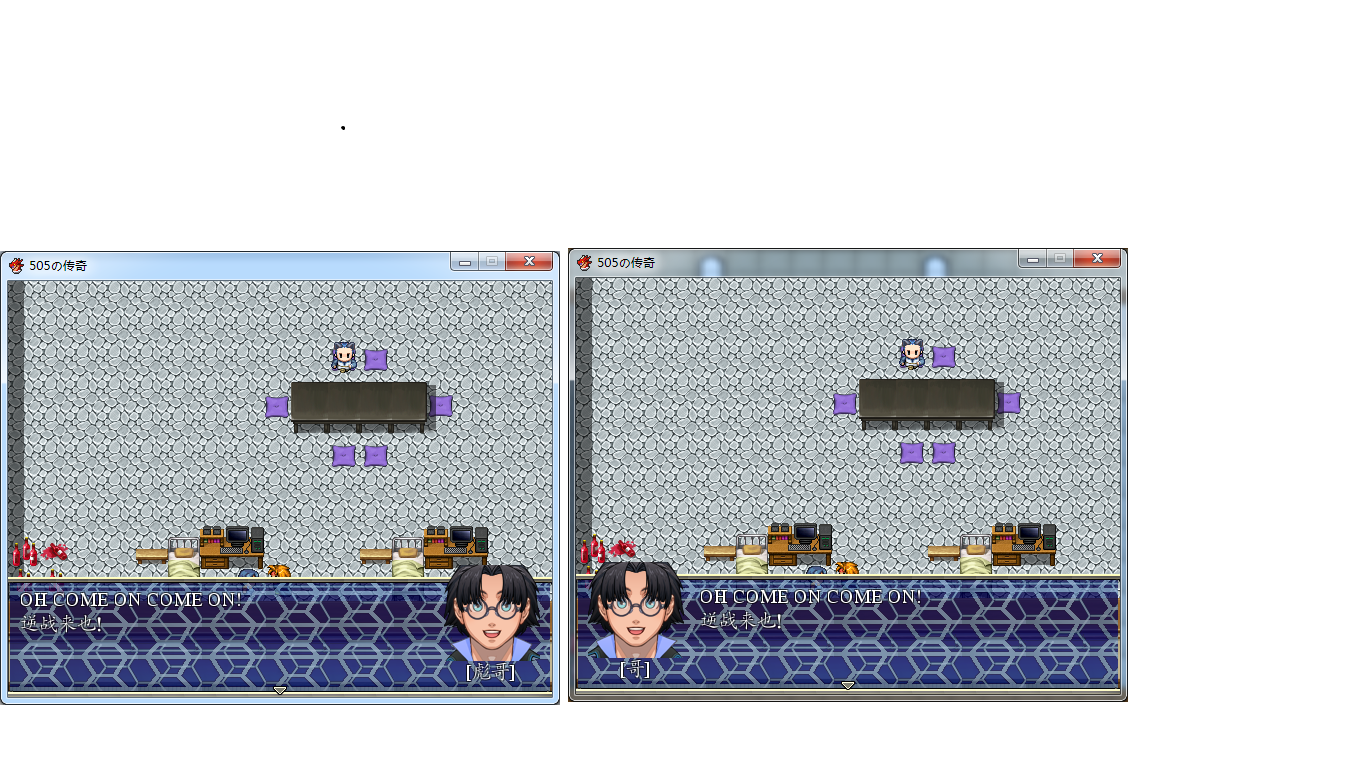
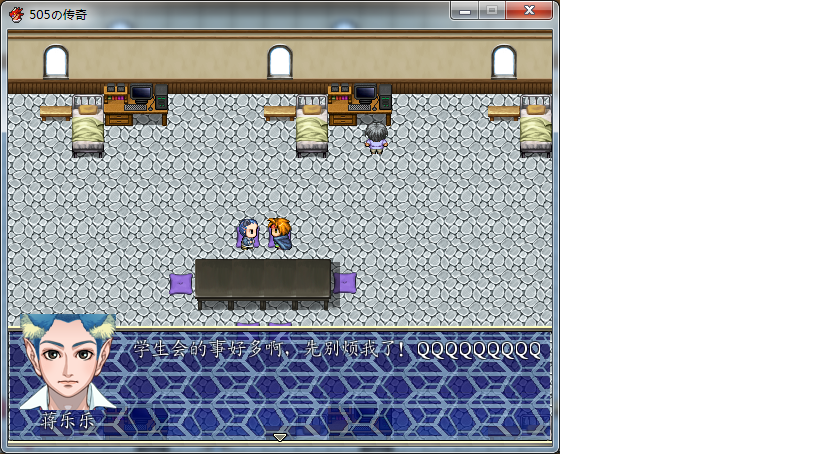
# 使对话框略微美观一点
# 调用方式:在对话内容的第一行输入“l/r”+“对话者姓名”
# l和r表示头像在左边或者右边显示,对话者姓名显示在头像下方
# 第一行输入“no”则为取消使用
#==============================================================================
class Game_Message
#--------------------------------------------------------------------------
# ● 定义实例变量
#--------------------------------------------------------------------------
attr_reader :talker_name # 说话者姓名
attr_reader :talker_mirror # 是否镜象显示
#--------------------------------------------------------------------------
# ● 清除
#--------------------------------------------------------------------------
def clear
@texts = []
@choices = []
# 初始化
@talker_name = ""
@talker_mirror = false
@face_name = ""
@face_index = 0
@background = 0
@position = 2
@choice_cancel_type = 0
@choice_proc = nil
@num_input_variable_id = 0
@num_input_digits_max = 0
@item_choice_variable_id = 0
@scroll_mode = false
@scroll_speed = 2
@scroll_no_fast = false
end
#--------------------------------------------------------------------------
# ● 获取包括换行符的所有内容
#--------------------------------------------------------------------------
def all_text
if @texts.size > 1
# 取出第一个字符
ch = texts[0].slice(0, 1)
if ch == "l" or ch=="r"
# 当右侧显示头像时设置mirror标志
@talker_mirror = true if ch == "r"
@talker_name = "[" + texts[0].slice(1,@texts[0].size - 1) + "]"
# 删除第一行控制内容
@texts.delete_at(0)
end
end
@texts.inject("") {|r, text| r += text + "\n" }
end
end
class Window_Message < Window_Base
#--------------------------------------------------------------------------
# ● 处理纤程的主逻辑
#--------------------------------------------------------------------------
def fiber_main
$game_message.visible = true
update_background
update_placement
loop do
# 生成显示精灵
@face_sprite = Sprite.new
@name_sprite = Sprite.new
process_all_text if $game_message.has_text?
process_input
# 将显示精灵释放
@face_sprite.dispose
@name_sprite.dispose
$game_message.clear
@gold_window.close
Fiber.yield
break unless text_continue?
end
close_and_wait
$game_message.visible = false
@fiber = nil
end
#--------------------------------------------------------------------------
# ● 翻页处理
#--------------------------------------------------------------------------
def new_page(text, pos)
contents.clear
if !$game_message.talker_name.empty?
# 判断左右侧显示
if $game_message.talker_mirror
draw_face_right($game_message.face_name,$game_message.face_index)
draw_name_right($game_message.talker_name)
else
draw_face_left($game_message.face_name,$game_message.face_index)
draw_name_left($game_message.talker_name)
end
else
draw_face($game_message.face_name, $game_message.face_index, 0, 0)
end
reset_font_settings
pos[:x] = new_line_x
pos[:y] = 0
pos[:new_x] = new_line_x
pos[:height] = calc_line_height(text)
clear_flags
end
#--------------------------------------------------------------------------
# ● 显示说话者脸图(左)
#--------------------------------------------------------------------------
def draw_face_left(face_name, face_index)
# 取出图片
source = Cache.face(face_name)
# 找到脸图位置
rect = Rect.new(face_index % 4 * 96, face_index / 4 * 96, 96, 96)
bitmap = Bitmap.new(96, 96)
# 复制到bitmap中
bitmap.blt(0, 0, source, rect)
# 计算精灵位置并显示
@face_sprite.x = standard_padding
@face_sprite.y = Graphics.height - 96 - standard_padding - line_height
@face_sprite.z = 1000
@face_sprite.bitmap = bitmap
end
#--------------------------------------------------------------------------
# ● 显示说话者脸图(右)
#--------------------------------------------------------------------------
def draw_face_right(face_name, face_index)
source = Cache.face(face_name)
rect = Rect.new(face_index % 4 * 96, face_index / 4 * 96, 96, 96)
bitmap = Bitmap.new(96, 96)
bitmap.blt(0, 0, source, rect)
@face_sprite.x = Graphics.width - 96 - standard_padding
@face_sprite.y = Graphics.height - 96 - standard_padding - line_height
@face_sprite.z = 1000
# 设置为右侧显示
@face_sprite.mirror = true
@face_sprite.bitmap = bitmap
end
#--------------------------------------------------------------------------
# ● 显示说话者姓名图(左)
#--------------------------------------------------------------------------
def draw_name_left(talker_name)
bitmap = Bitmap.new(96, line_height)
# 描绘姓名图像
bitmap.draw_text(bitmap.rect, talker_name, 1)
# 计算精灵位置并显示
@name_sprite.x = standard_padding
@name_sprite.y = Graphics.height - standard_padding - line_height
@name_sprite.z = 1000
@name_sprite.bitmap = bitmap
end
#--------------------------------------------------------------------------
# ● 显示说话者姓名图(右)
#--------------------------------------------------------------------------
def draw_name_right(talker_name)
bitmap = Bitmap.new(96, line_height)
bitmap.draw_text(bitmap.rect, talker_name, 1)
@name_sprite.x = Graphics.width - 96 - standard_padding
@name_sprite.y = Graphics.height - standard_padding - line_height
@name_sprite.z = 1000
@name_sprite.bitmap = bitmap
end
#--------------------------------------------------------------------------
# ● 获取换行位置
#--------------------------------------------------------------------------
def new_line_x
if !$game_message.talker_mirror
return $game_message.face_name.empty? ? 0 : 112
# 右侧显示时,换行显示位置为行首
else
return 0
end
end
end[/pre]
顺便给自己的姓名显示脚本打广告:http://rpg.blue/home.php?mod=spa ... o=blog&id=11733 |
评分
-
查看全部评分
|


 写轮眼
写轮眼
 提升卡
提升卡 沉默号角
沉默号角 喧嚣号角
喧嚣号角 变色卡
变色卡 升龙剑
升龙剑