| 赞 | 0 |
| VIP | |
| 好人卡 | |
| 积分 | 1 |
| 经验 | |
| 最后登录 | 2015-8-26 |
| 在线时间 | 439 小时 |
- 梦石
- 0
- 星屑
- 50
- 在线时间
- 439 小时
- 注册时间
- 2013-3-2
- 回帖
- 657
|
加入我们,或者,欢迎回来。
您需要 登录 才可以下载或查看,没有账号?注册会员
×
本帖最后由 guoyq1988 于 2013-9-30 20:24 编辑
用了八方向的行走图和小地图2个脚本
可是在小地图上显示的是4个行走图,想请大神帮忙修改下
怎么让小地图显示的行走图变成一个或者用另一张图片显示
如显示的行走图用一个红点的图片代替这样的。。
求指点,谢谢
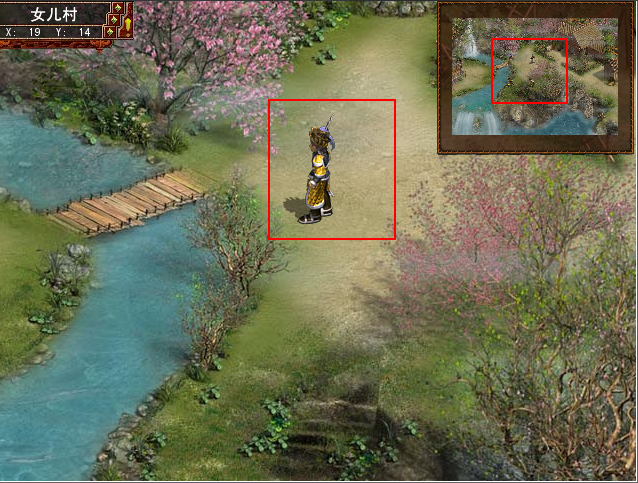
不好意思,中午电脑突然卡死,没把脚本发上,补上脚本
[pre lang="ruby" line="1"]#==============================================================================
# 本脚本来自www.66RPG.com,使用和转载请保留此信息
#==============================================================================
#==============================================================================
# ■ 縮小地图的表示(ver 0.999)
# by ピニョン clum-sea
#==============================================================================
#==============================================================================
# □ 前期定义
#==============================================================================
module PLAN_Map_Window
WIN_X = 440 # 地图的 X 座標
WIN_Y = 0 # 地图的 Y 座標
WIN_WIDTH = 9*22 # 地图的宽度
WIN_HEIGHT = 7*22 # 地图的高度
ZOOM = 9.0 # 地图的放缩比例
WINDOWSKIN = "1.png" # 自定义地图窗口素材,如果留空则是默认的
ON_OFF_KEY = Input::A # 打开地图的按钮,A就是键盘的Z键
SWITCH = 100 # 禁用地图功能的开关,默认这个就是打开100号开关则禁止
# 使用地图功能,关闭则可以使用地图功能
WINDOW_MOVE = false # 窗口中的地图跟随移动,(true:跟随, false:固定)
OVER_X = 632 - WIN_WIDTH # 移動后的 X 座標(初期位置と往復します)
OVER_Y = 8 # 移動后的 Y 座標(初期位置と往復します)
OPACITY = 200 # 窗口的透明度
C_OPACITY = 220 # 地图的透明度
VISIBLE = false # 最初是否可见
end
#==============================================================================
# ■ Game_Temp
#==============================================================================
class Game_Temp
attr_accessor :map_visible # 地图的表示状態
alias plan_map_window_initialize initialize
def initialize
plan_map_window_initialize
@map_visible = false
end
end
#==============================================================================
# ■ Scene_Map
#==============================================================================
class Scene_Map
#--------------------------------------------------------------------------
# ● 主处理
#--------------------------------------------------------------------------
alias plan_map_window_main main
def main
@map_window = Window_Map.new
@map_window.visible = $game_temp.map_visible
plan_map_window_main
@map_window.dispose
end
#--------------------------------------------------------------------------
# ● 更新
#--------------------------------------------------------------------------
alias plan_map_window_update update
def update
$game_temp.map_visible = @map_window.visible
plan_map_window_update
unless $game_switches[PLAN_Map_Window::SWITCH]
if Input.trigger?(PLAN_Map_Window::ON_OFF_KEY)
if @map_window.visible
@map_window.visible = false
else
@map_window.visible = true
end
end
else
if @map_window.visible
@map_window.visible = false
end
end
if @map_window.visible
@map_window.update
end
end
#--------------------------------------------------------------------------
# ● 场所移动的变化
#--------------------------------------------------------------------------
alias plan_map_window_transfer_player transfer_player
def transfer_player
visible = @map_window.visible
@map_window.visible = false
plan_map_window_transfer_player
@map_window.dispose
@map_window = Window_Map.new
@map_window.visible = visible
end
end
#==============================================================================
# ■ Window_Map
#==============================================================================
class Window_Map < Window_Base
#--------------------------------------------------------------------------
# ● 初始化
#--------------------------------------------------------------------------
def initialize
x = PLAN_Map_Window::WIN_X
y = PLAN_Map_Window::WIN_Y
w = PLAN_Map_Window::WIN_WIDTH
h = PLAN_Map_Window::WIN_HEIGHT
super(x, y, w, h)
unless PLAN_Map_Window::WINDOWSKIN.empty?
self.windowskin = RPG::Cache.windowskin(PLAN_Map_Window::WINDOWSKIN)
end
self.contents = Bitmap.new(width - 32, height - 32)
self.opacity = PLAN_Map_Window::OPACITY
self.contents_opacity = PLAN_Map_Window::C_OPACITY
@map_data = $game_map.data
@tileset = RPG::Cache.tileset($game_map.tileset_name)
@autotiles = []
for i in 0..6
autotile_name = $game_map.autotile_names
@autotiles = RPG::Cache.autotile(autotile_name)
end
@old_real_x = $game_player.real_x
@old_real_y = $game_player.real_y
@all_map = make_all_map
self.visible = PLAN_Map_Window::VISIBLE
refresh
end
#--------------------------------------------------------------------------
# ● 缩小图做成
#--------------------------------------------------------------------------
def make_all_map
all_map = Bitmap.new($game_map.width * 32, $game_map.height * 32)
for y in 0...$game_map.height
for x in 0...$game_map.width
for z in 0...3
tile_num = @map_data[x, y, z]
next if tile_num == nil
if tile_num < 384
if tile_num >= 48
tile_num -= 48
src_rect = Rect.new(32, 2 * 32, 32, 32)
all_map.blt(x * 32, y * 32, @autotiles[tile_num / 48], src_rect)
end
else
tile_num -= 384
src_rect = Rect.new(tile_num % 8 * 32, tile_num / 8 * 32, 32, 32)
all_map.blt(x * 32, y * 32, @tileset, src_rect)
end
end
end
end
w = ($game_map.width / PLAN_Map_Window::ZOOM) * 32
h = ($game_map.height / PLAN_Map_Window::ZOOM) * 32
ret_bitmap = Bitmap.new(w, h)
src_rect = Rect.new(0, 0, all_map.width, all_map.height)
dest_rect = Rect.new(0, 0, ret_bitmap.width, ret_bitmap.height)
ret_bitmap.stretch_blt(dest_rect, all_map, src_rect)
all_map.dispose
return ret_bitmap
end
#--------------------------------------------------------------------------
# ● 刷新
#--------------------------------------------------------------------------
def refresh
self.contents.clear
one_tile_size = 32 / PLAN_Map_Window::ZOOM
x = $game_player.real_x - 128 * (self.contents.width / one_tile_size) / 2
y = $game_player.real_y - 128 * (self.contents.height / one_tile_size) / 2
x = x * one_tile_size / 128
y = y * one_tile_size / 128
half_width = self.contents.width * 128 / 2
rest_width = ($game_map.width * 128 - $game_player.real_x) * one_tile_size
rev_x = 0
if @all_map.width < self.contents.width
rev_x = (half_width - $game_player.real_x * one_tile_size) / 128
rev_x -= (self.contents.width - @all_map.width) / 2
x += rev_x
elsif half_width > $game_player.real_x * one_tile_size
rev_x = (half_width - $game_player.real_x * one_tile_size) / 128
x += rev_x
elsif half_width > rest_width
rev_x = -((half_width - rest_width) / 128)
x += rev_x
end
half_height = self.contents.height * 128 / 2
rest_height = ($game_map.height * 128 - $game_player.real_y) * one_tile_size
rev_y = 0
if @all_map.height < self.contents.height
rev_y = (half_height - $game_player.real_y * one_tile_size) / 128
rev_y -= (self.contents.height - @all_map.height) / 2
y += rev_y
elsif half_height > $game_player.real_y * one_tile_size
rev_y = (half_height - $game_player.real_y * one_tile_size) / 128
y += rev_y
elsif half_height > rest_height
rev_y = -((half_height - rest_height) / 128)
y += rev_y
end
src_rect = Rect.new(x, y, self.contents.width, self.contents.height)
self.contents.blt(0, 0, @all_map, src_rect)
if PLAN_Map_Window::WINDOW_MOVE == true
w = self.x..self.x + self.width
h = self.y..self.y + self.height
if w === $game_player.screen_x and h === $game_player.screen_y
if self.x == PLAN_Map_Window::WIN_X and self.y == PLAN_Map_Window::WIN_Y
self.x = PLAN_Map_Window::OVER_X
self.y = PLAN_Map_Window::OVER_Y
else
self.x = PLAN_Map_Window::WIN_X
self.y = PLAN_Map_Window::WIN_Y
end
end
end
if $game_party.actors.size > 0
for i in [2, 1, 0]
tile = @map_data[$game_player.x, $game_player.y, i]
next if tile == 0
return if $game_map.priorities[tile] > 0
end
actor = $game_party.actors[0]
bitmap = RPG::Cache.character(actor.character_name, actor.character_hue)
width = bitmap.width / 4
height = bitmap.height / 4
src_rect = Rect.new(0, 0, width, height)
w = width / PLAN_Map_Window::ZOOM
h = height / PLAN_Map_Window::ZOOM
x = self.contents.width / 2 - w / 2 + one_tile_size / 2 - rev_x
y = self.contents.height / 2 - h / 2 - rev_y
dest_rect = Rect.new(x, y, w, h)
self.contents.stretch_blt(dest_rect, bitmap, src_rect)
end
end
#--------------------------------------------------------------------------
# ● 更新
#--------------------------------------------------------------------------
def update
super
if @old_real_x != $game_player.real_x or @old_real_y != $game_player.real_y
@old_real_x = $game_player.real_x
@old_real_y = $game_player.real_y
refresh
end
end
#--------------------------------------------------------------------------
# ● 解放
#--------------------------------------------------------------------------
def dispose
super
@all_map.dispose
end
end
#==============================================================================
# 本脚本来自www.66RPG.com,使用和转载请保留此信息
#==============================================================================
[/pre]
@弗雷德 结贴,放弃这个功能了, |
|


 写轮眼
写轮眼
 发表于 2013-9-19 14:07:14
 提升卡
提升卡 沉默号角
沉默号角 喧嚣号角
喧嚣号角 变色卡
变色卡 升龙剑
升龙剑

 这个没人来帮忙下么?