| 赞 | 0 |
| VIP | |
| 好人卡 | |
| 积分 | 1 |
| 经验 | |
| 最后登录 | 2014-2-25 |
| 在线时间 | 35 小时 |
- 梦石
- 0
- 星屑
- 50
- 在线时间
- 35 小时
- 注册时间
- 2013-9-16
- 回帖
- 15
|
加入我们,或者,欢迎回来。
您需要 登录 才可以下载或查看,没有账号?注册会员
×
本帖最后由 skyboy1283 于 2013-10-11 16:55 编辑
- #==============================================================================
- # ■ VXAce-RGSS3-41 簡易メッセージ by Claimh
- #------------------------------------------------------------------------------
- # マップ上に簡易メッセージを表示します。
- #------------------------------------------------------------------------------
- # ● 簡易メッセージ表示実行(イベント)
- # show_msg(type, msg, num)
- # type :項目番号
- # 0 .. msgの内容を表示(制御文字も使用可能)
- # 1 .. アイテムを入手(msgにアイテムID、numに個数を指定)
- # 2 .. 武器を入手(msgに武器ID、numに個数を指定)
- # 3 .. 防具を入手(msgに防具ID、numに個数を指定)
- # 4 .. スキルを習得(msgにスキルID, numにアクターIDを指定)
- # 5 .. レベルアップ(msgにアクターIDを指定)
- # 6 .. 加入(msgにアクターIDを指定)
- # 7 .. 離脱(msgにアクターIDを指定)
- # 8 .. お金を入手(msgに金額を入れる)
- # 20 .. クエスト開始(msgにIDを指定) ※「クエストシステム」必須
- # 21 .. クエスト完了(msgにIDを指定) ※「クエストシステム」必須
- # 22 .. 用語登録(msgにカテゴリ、numに用語IDを指定)※「用語辞典」必須
- # msg :表示文字、ID情報(アイテム等)など
- # num :個数(省略可能)
- #------------------------------------------------------------------------------
- # ● メッセージ表示の強制停止(全停止)
- # stop_msg
- # ※強制停止中は解除されるまで簡易メッセージ表示を行いません。
- # 強制停止中にshow_msgが実行された場合はrestart_msg実行まで待たされます
- #------------------------------------------------------------------------------
- # ● メッセージ表示の強制停止解除
- # restart_msg
- #==============================================================================
- module ShtMsg
- # スキンタイプ
- # 0 .. ウィンドウ
- # 1 .. 半透明ブラックボックス
- # 2 .. ピクチャ
- SKIN = 1
- # ウィンドウ背景の不透明度
- OPACITY = 160
- # ピクチャファイル(Graphics/System)
- PICT = "msg_skin"
- # メッセージ矩形サイズ(x,yは未参照)
- RECT = Rect.new(0, 0, 160, 20)
- # 表示矩形(x,widthは未参照。yは最初のy位置, heightは表示する範囲)
- VIEW = Rect.new(0, Graphics.height * 2 / 3, 0, Graphics.height / 3) # 下のほう
- #~ VIEW = Rect.new(0, 0, 0, Graphics.height / 3) # 上のほう
- # 表示位置(高さ)のずらし幅
- OFST = 0
-
- # スライドイン方向(true:左端から / false:右端から)
- SLD_DIR = false
- # スライド時間
- SLD_FRM = 8
- # 表示ウェイト時間
- WAIT = 100
- # 固有名の着色(色index) 0..normal_color
- COLOR = 2
- # フォントサイズ
- FSZ = 14
- # 文字描画開始X位置
- STX = 4
- # SE音(鳴らさない場合はnilにする)
- SE = RPG::SE.new("Chime2")
- # メッセージ表示と同時に本処理(アイテム入手等)を実行する
- EXE = false
- end
- #==============================================================================
- # ■ Game_Interpreter
- #==============================================================================
- class Game_Interpreter
- #--------------------------------------------------------------------------
- # ● 簡易メッセージ表示
- # type : 項目番号
- # msg : メッセージ
- # num : 個数(省略可能)
- #--------------------------------------------------------------------------
- def show_msg(type, msg, num=0)
- if SceneManager.scene_is?(Scene_Map)
- SceneManager.scene.show_msg(type, msg, num)
- end
- end
- #--------------------------------------------------------------------------
- # ● 簡易メッセージの強制停止
- #--------------------------------------------------------------------------
- def stop_msg
- if SceneManager.scene_is?(Scene_Map)
- SceneManager.scene.stop_msg
- end
- end
- #--------------------------------------------------------------------------
- # ● 簡易メッセージの強制停止解除
- #--------------------------------------------------------------------------
- def restart_msg
- if SceneManager.scene_is?(Scene_Map)
- SceneManager.scene.restart
- end
- end
- end
- #==============================================================================
- # ■ ShtMsg::Messenger
- #==============================================================================
- class ShtMsg::Messenger
- #--------------------------------------------------------------------------
- # ● オブジェクト初期化
- #--------------------------------------------------------------------------
- def initialize(type, msg, num)
- @type = type; @msg = msg; @num = num
- end
- #--------------------------------------------------------------------------
- # ● 簡易メッセージ表示内容
- #--------------------------------------------------------------------------
- def text
- exe if ShtMsg::EXE
- c = ShtMsg::COLOR
- n = @num > 1 ? "#{@num}個" : ""
- case @type
- when 0; return @msg
- when 1; return "\\C[#{c}]#{$data_items[@msg].name}\\C[0]を#{n}入手"
- when 2; return "\\C[#{c}]#{$data_weapons[@msg].name}\\C[0]を#{n}入手"
- when 3; return "\\C[#{c}]#{$data_armors[@msg].name}\\C[0]を#{n}入手"
- when 4; return "\\C[#{c}]#{$data_skills[@msg].name}\\C[0]を習得"
- when 5; return "\\C[#{c}]#{$game_actors[@msg].name}\\C[0]がレベルアップ"
- when 6; return "\\C[#{c}]#{$game_actors[@msg].name}\\C[0]が仲間になった"
- when 7; return "\\C[#{c}]#{$game_actors[@msg].name}\\C[0]が離脱した…"
- when 8; return "\\C[#{c}]#{@msg}#{Vocab::currency_unit}\\C[0]入手"
- when 20; return "『\\C[#{c}]#{$game_system.quest[@msg].name}\\C[0]』開始"
- when 21; return "『\\C[#{c}]#{$game_system.quest[@msg].name}\\C[0]』クリア"
- when 22; return "新語『\\C[#{c}]#{$game_system.dictionary[@msg][@num].name}\\C[0]』"
- end
- return "type error<#{@type},#{@msg}>"
- end
- #--------------------------------------------------------------------------
- # ● 本処理実行
- #--------------------------------------------------------------------------
- def exe
- case @type
- when 1; $game_party.gain_item($data_items[@msg], @num) if @num > 0
- when 2; $game_party.gain_item($data_weapons[@msg], @num) if @num > 0
- when 3; $game_party.gain_item($data_armors[@msg], @num) if @num > 0
- when 4; $game_actors[@num].learn_skill(@msg) if @num > 0
- when 5; $game_actors[@msg].level_up
- when 6; $game_party.add_actor(@msg)
- when 7; $game_party.remove_actor(@msg)
- when 8; $game_party.gain_gold(@msg)
- when 20; $game_system.quest[@msg].quest_start
- when 21; $game_system.quest[@msg].quest_clear
- when 22; $game_system.dictionary[@msg][@num].show_flg = true if @num > 0
- end
- end
- end
- #==============================================================================
- # ■ Sprite_ShrtMsgrBack
- #==============================================================================
- class Sprite_ShrtMsgrBack < Sprite
- #--------------------------------------------------------------------------
- # ● オブジェクト初期化
- #--------------------------------------------------------------------------
- def initialize(x, y, z, bitmap)
- super(nil)
- self.bitmap = bitmap
- self.x = x; self.y = y; self.z = z
- end
- end
- #==============================================================================
- # ■ Window_ShrtMsgr
- #==============================================================================
- class Window_ShrtMsgr < Window_Base
- #--------------------------------------------------------------------------
- # ● オブジェクト初期化
- #--------------------------------------------------------------------------
- def initialize(msg, x, y, back)
- @count = 0
- @phase = 0
- super(x, y, ShtMsg::RECT.width, fitting_height(1))
- self.opacity = 0
- self.back_opacity = ShtMsg::OPACITY
- [url=home.php?mod=space&uid=114926]@sprite[/url] = Sprite_ShrtMsgrBack.new(x, y+4, z-1, back) if ShtMsg::SKIN != 0
- refresh(msg)
- end
- #--------------------------------------------------------------------------
- # ● 解放
- #--------------------------------------------------------------------------
- def dispose
- @sprite.dispose if ShtMsg::SKIN != 0
- super
- end
- #--------------------------------------------------------------------------
- # ● X位置の設定
- #--------------------------------------------------------------------------
- def x=(x)
- super(x)
- @sprite.x = x if ShtMsg::SKIN != 0
- end
- #--------------------------------------------------------------------------
- # ● Y位置の設定
- #--------------------------------------------------------------------------
- def y=(y)
- super(y)
- @sprite.y = y if ShtMsg::SKIN != 0
- end
- #--------------------------------------------------------------------------
- # ● 行の高さを取得
- #--------------------------------------------------------------------------
- def line_height
- ShtMsg::RECT.height
- end
- #--------------------------------------------------------------------------
- # ● 標準パディングサイズの取得
- #--------------------------------------------------------------------------
- def standard_padding
- return 4
- end
- #--------------------------------------------------------------------------
- # ● フォント設定のリセット
- #--------------------------------------------------------------------------
- def reset_font_settings
- change_color(normal_color)
- contents.font.size = ShtMsg::FSZ
- contents.font.bold = false
- contents.font.italic = false
- end
- #--------------------------------------------------------------------------
- # ● リフレッシュ
- #--------------------------------------------------------------------------
- def refresh(msg)
- contents.clear
- draw_text_ex(ShtMsg::STX, 0, msg.text)
- end
- #--------------------------------------------------------------------------
- # ● 簡易メッセージの強制停止
- #--------------------------------------------------------------------------
- def stop
- update_phase while @phase == 0
- @count = ShtMsg::WAIT / 2
- end
- #--------------------------------------------------------------------------
- # ● フレーム更新
- #--------------------------------------------------------------------------
- def update
- return if self.disposed?
- super
- update_phase
- end
- #--------------------------------------------------------------------------
- # ● フレーム更新
- #--------------------------------------------------------------------------
- def update_phase
- case @phase
- when 0
- @phase += 1 if update_slidein and update_fadein
- when 1
- @phase += 1 if (@count += 1) >= ShtMsg::WAIT
- when 2
- dispose if update_slideout and update_fadeout
- end
- end
- #--------------------------------------------------------------------------
- # ● フレーム更新 : スライドイン
- #--------------------------------------------------------------------------
- def update_slidein
- w = ShtMsg::RECT.width / ShtMsg::SLD_FRM
- if ShtMsg::SLD_DIR
- return true if self.x >= 0
- self.x += w
- self.x = 0 if self.x >= 0
- else
- xx = Graphics.width - ShtMsg::RECT.width
- return true if self.x <= xx
- self.x -= w
- self.x = xx if self.x <= xx
- end
- return false
- end
- #--------------------------------------------------------------------------
- # ● フレーム更新 : スライドアウト
- #--------------------------------------------------------------------------
- def update_slideout
- w = ShtMsg::RECT.width / ShtMsg::SLD_FRM
- if ShtMsg::SLD_DIR
- xx = 0 - ShtMsg::RECT.width
- return true if self.x <= xx
- self.x -= w
- self.x = xx if self.x <= xx
- else
- return true if self.x >= Graphics.width
- self.x += w
- self.x = Graphics.width if self.x >= Graphics.width
- end
- return false
- end
- #--------------------------------------------------------------------------
- # ● フレーム更新 : フェードイン
- #--------------------------------------------------------------------------
- def update_fadein
- op = 255 / ShtMsg::SLD_FRM
- wp = ShtMsg::OPACITY / ShtMsg::SLD_FRM
- if ShtMsg::SKIN == 0
- return true if self.opacity = 255
- self.opacity += op
- self.opacity = 255 if self.opacity >= 255
- else
- return true
- end
- return false
- end
- #--------------------------------------------------------------------------
- # ● フレーム更新 : フェードアウト
- #--------------------------------------------------------------------------
- def update_fadeout
- op = 255 / ShtMsg::SLD_FRM
- wp = ShtMsg::OPACITY / ShtMsg::SLD_FRM
- if ShtMsg::SKIN == 0
- return true if self.opacity = 0 and self.back_opacity == 0 and self.contents_opacity == 0
- self.opacity -= op
- self.back_opacity -= wp
- self.contents_opacity -= op
- self.opacity = 0 if self.opacity <= 0
- self.back_opacity = 0 if self.back_opacity <= 0
- self.contents_opacity = 0 if self.contents_opacity <= 0
- else
- return true if self.contents_opacity == 0 and @sprite.opacity == 0
- self.contents_opacity -= op
- @sprite.opacity -= wp
- self.contents_opacity = 0 if self.contents_opacity <= 0
- @sprite.opacity = 0 if @sprite.opacity <= 0
- end
- return false
- end
- end
- #==============================================================================
- # ■ ShtMsg::MsgManager
- #==============================================================================
- class ShtMsg::MsgManager
- #--------------------------------------------------------------------------
- # ● オブジェクト初期化
- #--------------------------------------------------------------------------
- def initialize
- @msg = []
- [url=home.php?mod=space&uid=33409]@Stk[/url] = []
- [url=home.php?mod=space&uid=76426]@stop[/url] = false
- create_back_bitmap
- end
- #--------------------------------------------------------------------------
- # ● 解放
- #--------------------------------------------------------------------------
- def dispose
- @msg.each {|m| m.dispose}
- @bitmap.dispose if ShtMsg::SKIN == 1
- end
- #--------------------------------------------------------------------------
- # ● 背景ビットマップの作成
- #--------------------------------------------------------------------------
- def create_back_bitmap
- case ShtMsg::SKIN
- when 1
- width = ShtMsg::RECT.width
- height = ShtMsg::RECT.height
- @bitmap = Bitmap.new(width, height)
- rect1 = Rect.new(0, 0, width, 4)
- rect2 = Rect.new(0, 4, width, height - 8)
- rect3 = Rect.new(0, height - 4, width, 4)
- @bitmap.gradient_fill_rect(rect1, back_color2, back_color1, true)
- @bitmap.fill_rect(rect2, back_color1)
- @bitmap.gradient_fill_rect(rect3, back_color1, back_color2, true)
- when 2
- @bitmap = Cache.system(ShtMsg::PICT)
- end
- end
- #--------------------------------------------------------------------------
- # ● 背景色 1 の取得
- #--------------------------------------------------------------------------
- def back_color1
- Color.new(0, 0, 0, 160)
- end
- #--------------------------------------------------------------------------
- # ● 背景色 2 の取得
- #--------------------------------------------------------------------------
- def back_color2
- Color.new(0, 0, 0, 0)
- end
- #--------------------------------------------------------------------------
- # ● 初期X位置
- #--------------------------------------------------------------------------
- def start_x
- ShtMsg::SLD_DIR ? (0 - ShtMsg::RECT.width) : (Graphics.width)
- end
- #--------------------------------------------------------------------------
- # ● メッセージセットアップ
- #--------------------------------------------------------------------------
- def setup(type, msg, num=0)
- search_y(ShtMsg::Messenger.new(type, msg, num))
- end
- #--------------------------------------------------------------------------
- # ● Y位置サーチ
- #--------------------------------------------------------------------------
- def search_y(msg)
- y = ShtMsg::VIEW.y
- loop do
- break if @stop
- if @msg.all? {|m| m.y != y }
- push_msg(msg, y) # 空き場所へ
- return true
- end
- y += ShtMsg::RECT.height + ShtMsg::OFST
- break if y > (ShtMsg::VIEW.y + ShtMsg::VIEW.height - ShtMsg::RECT.height)
- end
- @stk.push(msg) # 空くまで保持
- return false
- end
- #--------------------------------------------------------------------------
- # ● メッセージ表示開始
- #--------------------------------------------------------------------------
- def push_msg(msg, y)
- @msg.push(Window_ShrtMsgr.new(msg, start_x, y, @bitmap))
- ShtMsg::SE.play unless ShtMsg::SE.nil?
- end
- #--------------------------------------------------------------------------
- # ● ストックの再挿入
- #--------------------------------------------------------------------------
- def shift_stock
- if !@stk.empty? # ストックある場合、空いたらmsg挿入
- loop do
- break unless search_y(@stk.shift)
- break if @stk.empty?
- end
- end
- end
- #--------------------------------------------------------------------------
- # ● フレーム更新
- #--------------------------------------------------------------------------
- def update
- @msg = @msg.each {|m| m.update }.select {|m| !m.disposed? }
- shift_stock unless @stop
- end
- #--------------------------------------------------------------------------
- # ● 簡易メッセージの強制停止
- #--------------------------------------------------------------------------
- def stop
- @msg.each {|m| m.stop }
- @stop = true
- end
- #--------------------------------------------------------------------------
- # ● 簡易メッセージの強制停止解除
- #--------------------------------------------------------------------------
- def restart
- @stop = false
- shift_stock
- end
- end
- #==============================================================================
- # ■ Scene_Map
- #==============================================================================
- class Scene_Map < Scene_Base
- #--------------------------------------------------------------------------
- # ● 開始処理
- #--------------------------------------------------------------------------
- alias start_shrtmsg start
- def start
- start_shrtmsg
- @msgr = ShtMsg::MsgManager.new
- end
- #--------------------------------------------------------------------------
- # ● 終了処理
- #--------------------------------------------------------------------------
- alias terminate_msg terminate
- def terminate
- terminate_msg
- @msgr.dispose
- end
- #--------------------------------------------------------------------------
- # ● 簡易メッセージ表示
- #--------------------------------------------------------------------------
- def show_msg(type, msg, num=0)
- @msgr.setup(type, msg, num)
- end
- #--------------------------------------------------------------------------
- # ● 簡易メッセージの強制停止
- #--------------------------------------------------------------------------
- def stop_msg
- @msgr.stop
- end
- #--------------------------------------------------------------------------
- # ● 簡易メッセージの強制停止解除
- #--------------------------------------------------------------------------
- def restart
- @msgr.restart
- end
- #--------------------------------------------------------------------------
- # ● フレーム更新
- #--------------------------------------------------------------------------
- alias update_msg update
- def update
- update_msg
- @msgr.update
- end
- end
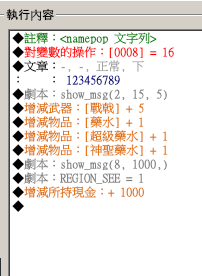
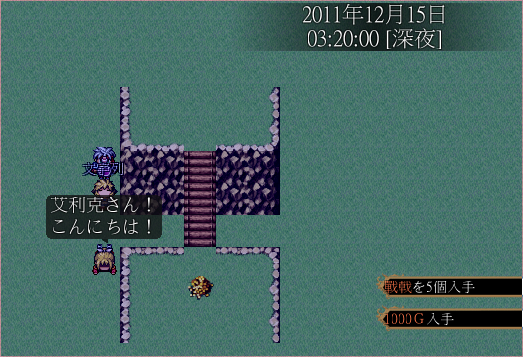
这个是在日本网站上找到的一段简易显示物品获得等信息的脚本,但是不会用,有谁能帮做个工程示范下吗?小弟感激不尽。 |
|



 写轮眼

 发表于 2013-10-11 15:04:58
 提升卡
 沉默号角
 喧嚣号角
 变色卡
 升龙剑