查看: 2092|回复: 5

[已经解决] 如何判断角色存在?

[复制链接]
梦石
0
星屑
50
在线时间
34 小时
注册时间
2013-10-10
回帖
9
发表于 2013-10-13 15:12:45 | 显示全部楼层 |阅读模式

加入我们,或者,欢迎回来。

您需要 登录 才可以下载或查看,没有账号?注册会员

×
1.JPG
[pre lang="ruby" line="1"]  #----------------------------------------------------------------------------
  # * 更新内容
  #----------------------------------------------------------------------------
  def refresh
    self.contents.clear
    self.contents.font.size = 22
    self.contents.font.bold = true
    draw_actor_name($game_party.members[0], 0, 0)
    self.contents.font.size = 18
    self.contents.font.color = Color.new(176, 224, 230)
    self.contents.draw_text(60, 350, self.contents.width - 40, 24, $game_party.members[1].level)
    self.contents.draw_text(143, 350, self.contents.width - 40, 24, $game_party.members[2].level)
    self.contents.draw_text(226, 350, self.contents.width - 40, 24, $game_party.members[3].level)
    self.contents.font.color = Color.new(51, 161, 201)
    self.contents.draw_text(80, 0, 42, 24, "Lv.")
    self.contents.font.color = text_color(0)
    self.contents.draw_text(110, 0, self.contents.width - 40, 24, $game_party.members[0].level)
    draw_actor_icons($game_party.members[0], 0, 86,264)
    draw_actor_icons($game_party.members[1], 0, 328,72)
    draw_actor_icons($game_party.members[2], 83, 328,72)
    draw_actor_icons($game_party.members[3], 166, 328,72)
    draw_actor_hp($game_party.members[0], 0, 20, self.contents.width - 110)
    draw_actor_mp($game_party.members[0], 0, 40, self.contents.width - 110)
    draw_actor_exp($game_party.members[0], 0, 60, self.contents.width - 110)
    self.contents.font.size = 14
    draw_actor_name($game_party.members[1], 0, 350)
    draw_actor_hp($game_party.members[1], 0, 363, self.contents.width - 167)
    draw_actor_mp($game_party.members[1], 0, 378, self.contents.width - 167)
    draw_actor_name($game_party.members[2], 83, 350)
    draw_actor_hp($game_party.members[2], 83, 363, self.contents.width - 167)
    draw_actor_mp($game_party.members[2], 83, 378, self.contents.width - 167)
    draw_actor_name($game_party.members[3], 166, 350)
    draw_actor_hp($game_party.members[3], 166, 363, self.contents.width - 167)
    draw_actor_mp($game_party.members[3], 166, 378, self.contents.width - 167)
    self.contents.font.bold = false
  end
[/pre]
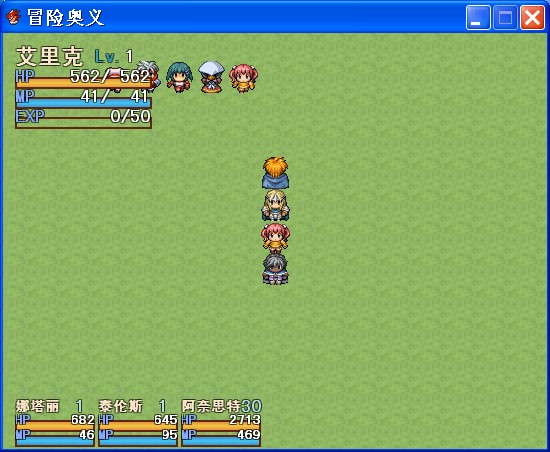
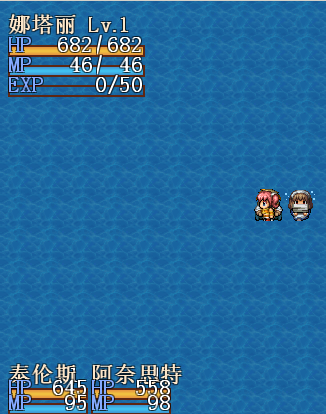
这段脚本在一个窗口中显示4个角色的状态,初始角色是4个的时候执行正常,初始角色小于4个,就出问题了。请问如何修改,是判断初始角色是否存在还是有其他办法。
下面是窗口的刷新判断
[pre lang="ruby" line="1"]  #----------------------------------------------------------------------------
  # * 刷新画面
  #----------------------------------------------------------------------------
  def update
    super
    refresh if $refresh
    $refresh = false
    if $game_player.screen_x >= 0 and $game_player.screen_x <= self.width and
       $game_player.screen_y >= 0 and $game_player.screen_y <= self.height
      self.contents_opacity = 60
    else self.contents_opacity = 255
    end
  end
[/pre]
以及刷新处理
[pre lang="ruby" line="1"]class Game_Actor < Game_Battler
  #----------------------------------------------------------------------------
  # * 重命名方法
  #----------------------------------------------------------------------------
  alias ms_refresh refresh
  alias ms_tp tp=
  alias ms_add_state add_state
  #--------------------------------------------------------------------------
  # * 刷新
  #--------------------------------------------------------------------------
  def refresh
    ms_refresh
    $refresh = true
  end
  #----------------------------------------------------------------------------
  # * 更改 TP
  #----------------------------------------------------------------------------
  def tp=(tp)
    ms_tp(tp)
    $refresh = true
  end
  #----------------------------------------------------------------------------
  # * 附加状态
  #----------------------------------------------------------------------------
  def add_state(state_id)
    ms_add_state(state_id)
    $refresh = true
  end
end

class Game_Party
  #----------------------------------------------------------------------------
  # * 重命名方法
  #----------------------------------------------------------------------------
  alias ms_swap_order swap_order
  #----------------------------------------------------------------------------
  # * 交换顺序
  #----------------------------------------------------------------------------
  def swap_order(index1, index2)
    ms_swap_order(index1, index2)
    $refresh = true
  end
end[/pre]
求高手帮忙修改脚本啊,拜谢!!!

梦石
1
星屑
23241
在线时间
9564 小时
注册时间
2012-6-19
回帖
7018

开拓者短篇九导演组冠军

发表于 2013-10-13 15:33:02 | 显示全部楼层
  1. #----------------------------------------------------------------------------
  2.   # * 更新内容
  3.   #----------------------------------------------------------------------------
  4.   def refresh
  5.    
  6.     self.contents.clear
  7.     self.contents.font.size = 22
  8.     self.contents.font.bold = true
  9.    
  10.     #绘制左上角的内容
  11.     draw_actor_name($game_party.members[0], 0, 0)   
  12.     self.contents.draw_text(110, 0, self.contents.width - 40, 24, $game_party.members[0].level)     
  13.     self.contents.draw_text(80, 0, 42, 24, "Lv.")
  14.     draw_actor_icons($game_party.members[0], 0, 86,264)
  15.     draw_actor_hp($game_party.members[0], 0, 20, self.contents.width - 110)
  16.     draw_actor_mp($game_party.members[0], 0, 40, self.contents.width - 110)
  17.     draw_actor_exp($game_party.members[0], 0, 60, self.contents.width - 110)

  18.     #绘制左下角的内容   
  19.     ($game_party.members.size - 1) times do |i|
  20.       self.contents.draw_text(60+83*i, 350, self.contents.width - 40, 24, $game_party.members[i+1].level)
  21.       draw_actor_icons($game_party.members[i+1], 83*i, 328,72)
  22.       draw_actor_name($game_party.members[i+1], 83*i, 350)
  23.       draw_actor_hp($game_party.members[i+1], 83*i, 363, self.contents.width - 167)
  24.       draw_actor_mp($game_party.members[i+1], 83*i, 378, self.contents.width - 167)
  25.     end
  26.    
  27.   end
复制代码
第一段代码换成这种感觉?(字体大小修改、颜色修改什么的都删掉了,可行的话之后你自己补回去吧……)
回复

使用道具 举报

梦石
0
星屑
50
在线时间
34 小时
注册时间
2013-10-10
回帖
9
 楼主| 发表于 2013-10-13 15:42:37 | 显示全部楼层
我是个整体的窗口,就一个,在左侧
  1. class Window_MapStatus < Window_Base
  2.   #----------------------------------------------------------------------------
  3.   # * 初始化
  4.   #----------------------------------------------------------------------------
  5.   def initialize
  6.     super(0, 0, 271, 426)
  7.     self.opacity = 255
  8.     refresh
  9.   end
复制代码
你这段脚本提示
  1.     ($game_party.members.size - 1) times do |i|
复制代码
出错,我把整个脚本给你看吧
  1. #==============================================================================
  2. # ** Window_MapStatus
  3. #==============================================================================
  4. class Window_MapStatus < Window_Base
  5.   #----------------------------------------------------------------------------
  6.   # * 初始化
  7.   #----------------------------------------------------------------------------
  8.   def initialize
  9.     super(0, 0, 271, 426)
  10.     self.opacity = 0
  11.     refresh
  12.   end
  13.   #----------------------------------------------------------------------------
  14.   # * 刷新画面
  15.   #----------------------------------------------------------------------------
  16.   def update
  17.     super
  18.     refresh if $refresh
  19.     $refresh = false
  20.     if $game_player.screen_x >= 0 and $game_player.screen_x <= self.width and
  21.        $game_player.screen_y >= 0 and $game_player.screen_y <= self.height
  22.       self.contents_opacity = 60
  23.     else self.contents_opacity = 255
  24.     end
  25.   end
  26.   #----------------------------------------------------------------------------
  27.   # * 更新内容
  28.   #----------------------------------------------------------------------------
  29.   def refresh
  30.     self.contents.clear
  31.     self.contents.font.size = 22
  32.     self.contents.font.bold = true
  33.     draw_actor_name($game_party.members[0], 0, 0)
  34.     self.contents.font.size = 18
  35.     self.contents.font.color = Color.new(64, 224, 208)
  36.     self.contents.draw_text(60, 350, self.contents.width - 40, 24, $game_party.members[1].level)
  37.     self.contents.draw_text(143, 350, self.contents.width - 40, 24, $game_party.members[2].level)
  38.     self.contents.draw_text(226, 350, self.contents.width - 40, 24, $game_party.members[3].level)
  39.     self.contents.font.color = Color.new(51, 161, 201)
  40.     self.contents.draw_text(80, 0, 42, 24, "Lv.")
  41.     self.contents.font.color = text_color(0)
  42.     self.contents.draw_text(110, 0, self.contents.width - 40, 24, $game_party.members[0].level)
  43.     draw_actor_icons($game_party.members[0], 0, 86,264)
  44.     draw_actor_icons($game_party.members[1], 0, 328,72)
  45.     draw_actor_icons($game_party.members[2], 83, 328,72)
  46.     draw_actor_icons($game_party.members[3], 166, 328,72)
  47.     draw_actor_hp($game_party.members[0], 0, 20, self.contents.width - 110)
  48.     draw_actor_mp($game_party.members[0], 0, 40, self.contents.width - 110)
  49.     draw_actor_exp($game_party.members[0], 0, 60, self.contents.width - 110)
  50.     self.contents.font.size = 14
  51.     draw_actor_name($game_party.members[1], 0, 350)
  52.     draw_actor_hp($game_party.members[1], 0, 363, self.contents.width - 167)
  53.     draw_actor_mp($game_party.members[1], 0, 378, self.contents.width - 167)
  54.     draw_actor_name($game_party.members[2], 83, 350)
  55.     draw_actor_hp($game_party.members[2], 83, 363, self.contents.width - 167)
  56.     draw_actor_mp($game_party.members[2], 83, 378, self.contents.width - 167)
  57.     draw_actor_name($game_party.members[3], 166, 350)
  58.     draw_actor_hp($game_party.members[3], 166, 363, self.contents.width - 167)
  59.     draw_actor_mp($game_party.members[3], 166, 378, self.contents.width - 167)
  60.     self.contents.font.bold = false
  61.   end
  62.   #----------------------------------------------------------------------------
  63.   # * 描绘EXP槽
  64.   #----------------------------------------------------------------------------
  65.   def draw_actor_exp(actor, x, y, width=124)
  66.     rate = actor.exp.to_f / actor.next_level_exp.to_f
  67.     draw_gauge(x, y, width, rate, Color.new(0, 255, 0), Color.new(100, 255, 100))
  68.     self.contents.font.color = text_color(16)
  69.     self.contents.draw_text(x, y, 56, 24, "EXP")
  70.     self.contents.font.color = Color.new(255, 255, 255)
  71.     en = "#{actor.exp}/#{actor.next_level_exp}"
  72.     self.contents.draw_text(x, y, width, 24, en, 2)
  73.   end
  74.   #----------------------------------------------------------------------------
  75.   # * 描绘值槽
  76.   #----------------------------------------------------------------------------
  77.   def draw_gauge(x, y, width, rate, color1, color2)
  78.     fill_w = (width * rate).to_i
  79.     self.contents.gradient_fill_rect(x, y+12, fill_w, 6, color1, color2, true)
  80.     self.contents.gradient_fill_rect(x, y+18, fill_w, 6, color2, color1, true)
  81.     self.contents.fill_rect(x, y+12, width, 2, Color.new(94, 38, 18))
  82.     self.contents.fill_rect(x, y+22, width, 2, Color.new(94, 38, 18))
  83.     self.contents.fill_rect(x, y+14, 2, 8, Color.new(94, 38, 18))
  84.     self.contents.fill_rect(x+width-2, y+14, 2, 8, Color.new(94, 38, 18))
  85.   end
  86.   #----------------------------------------------------------------------------
  87.   # * 描绘名称
  88.   #----------------------------------------------------------------------------
  89.   def draw_actor_name(actor, x, y, width = 112)
  90.     color = Color.new(252, 230, 201)
  91.     color = crisis_color if actor.hp < actor.mhp /
  92.     color = knockout_color if actor.hp == 0
  93.     change_color(color)
  94.     draw_text(x, y, width, line_height, actor.name)
  95.   end
  96. end
复制代码
回复

使用道具 举报

梦石
0
星屑
50
在线时间
34 小时
注册时间
2013-10-10
回帖
9
 楼主| 发表于 2013-10-13 15:44:29 | 显示全部楼层
喵呜喵5 发表于 2013-10-13 15:33
第一段代码换成这种感觉?(字体大小修改、颜色修改什么的都删掉了,可行的话之后你自己补回去吧……) ...

请看上一楼,忘点回复了,回复成自己了
回复

使用道具 举报

梦石
1
星屑
23241
在线时间
9564 小时
注册时间
2012-6-19
回帖
7018

开拓者短篇九导演组冠军

发表于 2013-10-13 15:49:08 | 显示全部楼层
本帖最后由 喵呜喵5 于 2013-10-13 15:51 编辑
zhangfuzhou 发表于 2013-10-13 15:44
请看上一楼,忘点回复了,回复成自己了


出错那一句改成
  1. ($game_party.members.size - 1).times do |i|
复制代码
刚才漏打了一个点……

TM截图未命名.png

评分

参与人数 1梦石 +1 收起 理由
熊喵酱 + 1 认可答案

查看全部评分

回复

使用道具 举报

梦石
0
星屑
50
在线时间
34 小时
注册时间
2013-10-10
回帖
9
 楼主| 发表于 2013-10-13 15:56:12 | 显示全部楼层
喵呜喵5 发表于 2013-10-13 15:49
出错那一句改成刚才漏打了一个点……

十分感谢,已成功

点评

啊啊啊啊啊~我爱你啊~用大红字表达下感情~  发表于 2013-10-13 19:04
回复

使用道具 举报

您需要登录后才可以回帖 登录 | 注册会员

本版积分规则

Powered by Discuz! X5.0 © 2001-2026 Discuz! Team.

在本版发帖返回顶部