| 赞 | 0 |
| VIP | |
| 好人卡 | |
| 积分 | 1 |
| 经验 | |
| 最后登录 | 2014-2-25 |
| 在线时间 | 35 小时 |
- 梦石
- 0
- 星屑
- 50
- 在线时间
- 35 小时
- 注册时间
- 2013-9-16
- 回帖
- 15
|
加入我们,或者,欢迎回来。
您需要 登录 才可以下载或查看,没有账号?注册会员
×
[pre lang="ruby" line="1"]#==============================================================================
# ■ VXAce-RGSS3-41 簡易メッセージ by Claimh
#------------------------------------------------------------------------------
# マップ上に簡易メッセージを表示します。
#------------------------------------------------------------------------------
# ● 簡易メッセージ表示実行(イベント)
# show_msg(type, msg, num)
# type :項目番号
# 0 .. msgの内容を表示(制御文字も使用可能)
# 1 .. アイテムを入手(msgにアイテムID、numに個数を指定)
# 2 .. 武器获得(msgに武器ID、numに個数を指定)
# 3 .. 防具を入手(msgに防具ID、numに個数を指定)
# 4 .. スキルを習得(msgにスキルID, numにアクターIDを指定)
# 5 .. レベルアップ(msgにアクターIDを指定)
# 6 .. 加入(msgにアクターIDを指定)
# 7 .. 離脱(msgにアクターIDを指定)
# 8 .. お金を入手(msgに金額を入れる)
# 20 .. クエスト開始(msgにIDを指定) ※「クエストシステム」必須
# 21 .. クエスト完了(msgにIDを指定) ※「クエストシステム」必須
# 22 .. 用語登録(msgにカテゴリ、numに用語IDを指定)※「用語辞典」必須
# msg :表示文字、ID情報(アイテム等)など
# num :個数(省略可能)
#------------------------------------------------------------------------------
# ● メッセージ表示の強制停止(全停止)
# stop_msg
# ※強制停止中は解除されるまで簡易メッセージ表示を行いません。
# 強制停止中にshow_msgが実行された場合はrestart_msg実行まで待たされます
#------------------------------------------------------------------------------
# ● メッセージ表示の強制停止解除
# restart_msg
#==============================================================================
module ShtMsg
# スキンタイプ
# 0 .. ウィンドウ
# 1 .. 半透明ブラックボックス
# 2 .. ピクチャ
SKIN = 0
# ウィンドウ背景の不透明度
OPACITY = 160
# ピクチャファイル(Graphics/System)
PICT = "msg_skin"
# メッセージ矩形サイズ(x,yは未参照)
RECT = Rect.new(0, 0, 160, 28)
# 表示矩形(x,widthは未参照。yは最初のy位置, heightは表示する範囲)
VIEW = Rect.new(0, Graphics.height * 2/ 3, 0, Graphics.height / 1) # 下のほう
#~ VIEW = Rect.new(0, 0, 0, Graphics.height / 3) # 上のほう
# 表示位置(高さ)のずらし幅
OFST = 0
# スライドイン方向(true:左端から / false:右端から)
SLD_DIR = false
# スライド時間
SLD_FRM = 8
# 表示ウェイト時間
WAIT = 100
# 固有名の着色(色index) 0..normal_color
COLOR = 14
# フォントサイズ
FSZ = 20
# 文字描画開始X位置
STX = 5
# SE音(鳴らさない場合はnilにする)
SE = RPG::SE.new("Chime2")
# メッセージ表示と同時に本処理(アイテム入手等)を実行する
EXE = false
end
#==============================================================================
# ■ Game_Interpreter
#==============================================================================
class Game_Interpreter
#--------------------------------------------------------------------------
# ● 簡易メッセージ表示
# type : 項目番号
# msg : メッセージ
# num : 個数(省略可能)
#--------------------------------------------------------------------------
def show_msg(type, msg, num=0)
if SceneManager.scene_is?(Scene_Map)
SceneManager.scene.show_msg(type, msg, num)
end
end
#--------------------------------------------------------------------------
# ● 簡易メッセージの強制停止
#--------------------------------------------------------------------------
def stop_msg
if SceneManager.scene_is?(Scene_Map)
SceneManager.scene.stop_msg
end
end
#--------------------------------------------------------------------------
# ● 簡易メッセージの強制停止解除
#--------------------------------------------------------------------------
def restart_msg
if SceneManager.scene_is?(Scene_Map)
SceneManager.scene.restart
end
end
end
#==============================================================================
# ■ ShtMsg::Messenger
#==============================================================================
class ShtMsg::Messenger
#--------------------------------------------------------------------------
# ● オブジェクト初期化
#--------------------------------------------------------------------------
def initialize(type, msg, num)
@type = type; @msg = msg; @num = num
end
#--------------------------------------------------------------------------
# ● 簡易メッセージ表示内容
#--------------------------------------------------------------------------
def text
exe if ShtMsg::EXE
c = ShtMsg::COLOR
n = @num > 1 ? "#{@num}個" : ""
case @type
when 0; return @msg
when 1; return "\\C[#{c}]#{$data_items[@msg].name}\\C[0]#{n}获得"
when 2; return "\\C[#{c}]#{$data_weapons[@msg].name}\\C[0]#{n}获得"
when 3; return "\\C[#{c}]#{$data_armors[@msg].name}\\C[0]#{n}获得"
when 4; return "\\C[#{c}]#{$data_skills[@msg].name}\\C[0]习得"
when 5; return "\\C[#{c}]#{$game_actors[@msg].name}\\C[0]がレベルアップ"
when 6; return "\\C[#{c}]#{$game_actors[@msg].name}\\C[0]が仲間になった"
when 7; return "\\C[#{c}]#{$game_actors[@msg].name}\\C[0]が離脱した…"
when 8; return "\\C[#{c}]#{@msg}#{Vocab::currency_unit}\\C[0]获得"
when 20; return "『\\C[#{c}]#{$game_system.quest[@msg].name}\\C[0]』開始"
when 21; return "『\\C[#{c}]#{$game_system.quest[@msg].name}\\C[0]』クリア"
when 22; return "新語『\\C[#{c}]#{$game_system.dictionary[@msg][@num].name}\\C[0]』"
end
return "type error<#{@type},#{@msg}>"
end
#--------------------------------------------------------------------------
# ● 本処理実行
#--------------------------------------------------------------------------
def exe
case @type
when 1; $game_party.gain_item($data_items[@msg], @num) if @num > 0
when 2; $game_party.gain_item($data_weapons[@msg], @num) if @num > 0
when 3; $game_party.gain_item($data_armors[@msg], @num) if @num > 0
when 4; $game_actors[@num].learn_skill(@msg) if @num > 0
when 5; $game_actors[@msg].level_up
when 6; $game_party.add_actor(@msg)
when 7; $game_party.remove_actor(@msg)
when 8; $game_party.gain_gold(@msg)
when 20; $game_system.quest[@msg].quest_start
when 21; $game_system.quest[@msg].quest_clear
when 22; $game_system.dictionary[@msg][@num].show_flg = true if @num > 0
end
end
end
#==============================================================================
# ■ Sprite_ShrtMsgrBack
#==============================================================================
class Sprite_ShrtMsgrBack < Sprite
#--------------------------------------------------------------------------
# ● オブジェクト初期化
#--------------------------------------------------------------------------
def initialize(x, y, z, bitmap)
super(nil)
self.bitmap = bitmap
self.x = x; self.y = y; self.z = z
end
end
#==============================================================================
# ■ Window_ShrtMsgr
#==============================================================================
class Window_ShrtMsgr < Window_Base
#--------------------------------------------------------------------------
# ● オブジェクト初期化
#--------------------------------------------------------------------------
def initialize(msg, x, y, back)
@count = 0
@phase = 0
super(x, y, ShtMsg::RECT.width, fitting_height(1))
self.opacity = 0
self.back_opacity = ShtMsg::OPACITY
@sprite = Sprite_ShrtMsgrBack.new(x, y+4, z-1, back) if ShtMsg::SKIN != 0
refresh(msg)
end
#--------------------------------------------------------------------------
# ● 解放
#--------------------------------------------------------------------------
def dispose
@sprite.dispose if ShtMsg::SKIN != 0
super
end
#--------------------------------------------------------------------------
# ● X位置の設定
#--------------------------------------------------------------------------
def x=(x)
super(x)
@sprite.x = x if ShtMsg::SKIN != 0
end
#--------------------------------------------------------------------------
# ● Y位置の設定
#--------------------------------------------------------------------------
def y=(y)
super(y)
@sprite.y = y if ShtMsg::SKIN != 0
end
#--------------------------------------------------------------------------
# ● 行の高さを取得
#--------------------------------------------------------------------------
def line_height
ShtMsg::RECT.height
end
#--------------------------------------------------------------------------
# ● 標準パディングサイズの取得
#--------------------------------------------------------------------------
def standard_padding
return 4
end
#--------------------------------------------------------------------------
# ● フォント設定のリセット
#--------------------------------------------------------------------------
def reset_font_settings
change_color(normal_color)
contents.font.size = ShtMsg::FSZ
contents.font.bold = false
contents.font.italic = false
end
#--------------------------------------------------------------------------
# ● リフレッシュ
#--------------------------------------------------------------------------
def refresh(msg)
contents.clear
draw_text_ex(ShtMsg::STX, 0, msg.text)
end
#--------------------------------------------------------------------------
# ● 簡易メッセージの強制停止
#--------------------------------------------------------------------------
def stop
update_phase while @phase == 0
@count = ShtMsg::WAIT / 2
end
#--------------------------------------------------------------------------
# ● フレーム更新
#--------------------------------------------------------------------------
def update
return if self.disposed?
super
update_phase
end
#--------------------------------------------------------------------------
# ● フレーム更新
#--------------------------------------------------------------------------
def update_phase
case @phase
when 0
@phase += 1 if update_slidein and update_fadein
when 1
@phase += 1 if (@count += 1) >= ShtMsg::WAIT
when 2
dispose if update_slideout and update_fadeout
end
end
#--------------------------------------------------------------------------
# ● フレーム更新 : スライドイン
#--------------------------------------------------------------------------
def update_slidein
w = ShtMsg::RECT.width / ShtMsg::SLD_FRM
if ShtMsg::SLD_DIR
return true if self.x >= 0
self.x += w
self.x = 0 if self.x >= 0
else
xx = Graphics.width - ShtMsg::RECT.width
return true if self.x <= xx
self.x -= w
self.x = xx if self.x <= xx
end
return false
end
#--------------------------------------------------------------------------
# ● フレーム更新 : スライドアウト
#--------------------------------------------------------------------------
def update_slideout
w = ShtMsg::RECT.width / ShtMsg::SLD_FRM
if ShtMsg::SLD_DIR
xx = 0 - ShtMsg::RECT.width
return true if self.x <= xx
self.x -= w
self.x = xx if self.x <= xx
else
return true if self.x >= Graphics.width
self.x += w
self.x = Graphics.width if self.x >= Graphics.width
end
return false
end
#--------------------------------------------------------------------------
# ● フレーム更新 : フェードイン
#--------------------------------------------------------------------------
def update_fadein
op = 255 / ShtMsg::SLD_FRM
wp = ShtMsg::OPACITY / ShtMsg::SLD_FRM
if ShtMsg::SKIN == 0
return true if self.opacity = 255
self.opacity += op
self.opacity = 255 if self.opacity >= 255
else
return true
end
return false
end
#--------------------------------------------------------------------------
# ● フレーム更新 : フェードアウト
#--------------------------------------------------------------------------
def update_fadeout
op = 255 / ShtMsg::SLD_FRM
wp = ShtMsg::OPACITY / ShtMsg::SLD_FRM
if ShtMsg::SKIN == 0
return true if self.opacity = 0 and self.back_opacity == 0 and self.contents_opacity == 0
self.opacity -= op
self.back_opacity -= wp
self.contents_opacity -= op
self.opacity = 0 if self.opacity <= 0
self.back_opacity = 0 if self.back_opacity <= 0
self.contents_opacity = 0 if self.contents_opacity <= 0
else
return true if self.contents_opacity == 0 and @sprite.opacity == 0
self.contents_opacity -= op
@sprite.opacity -= wp
self.contents_opacity = 0 if self.contents_opacity <= 0
@sprite.opacity = 0 if @sprite.opacity <= 0
end
return false
end
end
#==============================================================================
# ■ ShtMsg::MsgManager
#==============================================================================
class ShtMsg::MsgManager
#--------------------------------------------------------------------------
# ● オブジェクト初期化
#--------------------------------------------------------------------------
def initialize
@msg = []
@Stk = []
@stop = false
create_back_bitmap
end
#--------------------------------------------------------------------------
# ● 解放
#--------------------------------------------------------------------------
def dispose
@msg.each {|m| m.dispose}
@bitmap.dispose if ShtMsg::SKIN == 1
end
#--------------------------------------------------------------------------
# ● 背景ビットマップの作成
#--------------------------------------------------------------------------
def create_back_bitmap
case ShtMsg::SKIN
when 1
width = ShtMsg::RECT.width
height = ShtMsg::RECT.height
@bitmap = Bitmap.new(width, height)
rect1 = Rect.new(0, 0, width, 4)
rect2 = Rect.new(0, 4, width, height - 8)
rect3 = Rect.new(0, height - 4, width, 4)
@bitmap.gradient_fill_rect(rect1, back_color2, back_color1, true)
@bitmap.fill_rect(rect2, back_color1)
@bitmap.gradient_fill_rect(rect3, back_color1, back_color2, true)
when 2
@bitmap = Cache.system(ShtMsg::PICT)
end
end
#--------------------------------------------------------------------------
# ● 背景色 1 の取得
#--------------------------------------------------------------------------
def back_color1
Color.new(0, 0, 0, 160)
end
#--------------------------------------------------------------------------
# ● 背景色 2 の取得
#--------------------------------------------------------------------------
def back_color2
Color.new(0, 0, 0, 0)
end
#--------------------------------------------------------------------------
# ● 初期X位置
#--------------------------------------------------------------------------
def start_x
ShtMsg::SLD_DIR ? (0 - ShtMsg::RECT.width) : (Graphics.width)
end
#--------------------------------------------------------------------------
# ● メッセージセットアップ
#--------------------------------------------------------------------------
def setup(type, msg, num=0)
search_y(ShtMsg::Messenger.new(type, msg, num))
end
#--------------------------------------------------------------------------
# ● Y位置サーチ
#--------------------------------------------------------------------------
def search_y(msg)
y = ShtMsg::VIEW.y
loop do
break if @stop
if @msg.all? {|m| m.y != y }
push_msg(msg, y) # 空き場所へ
return true
end
y += ShtMsg::RECT.height + ShtMsg::OFST
break if y > (ShtMsg::VIEW.y + ShtMsg::VIEW.height - ShtMsg::RECT.height)
end
@stk.push(msg) # 空くまで保持
return false
end
#--------------------------------------------------------------------------
# ● メッセージ表示開始
#--------------------------------------------------------------------------
def push_msg(msg, y)
@msg.push(Window_ShrtMsgr.new(msg, start_x, y, @bitmap))
ShtMsg::SE.play unless ShtMsg::SE.nil?
end
#--------------------------------------------------------------------------
# ● ストックの再挿入
#--------------------------------------------------------------------------
def shift_stock
if !@stk.empty? # ストックある場合、空いたらmsg挿入
loop do
break unless search_y(@stk.shift)
break if @stk.empty?
end
end
end
#--------------------------------------------------------------------------
# ● フレーム更新
#--------------------------------------------------------------------------
def update
@msg = @msg.each {|m| m.update }.select {|m| !m.disposed? }
shift_stock unless @stop
end
#--------------------------------------------------------------------------
# ● 簡易メッセージの強制停止
#--------------------------------------------------------------------------
def stop
@msg.each {|m| m.stop }
@stop = true
end
#--------------------------------------------------------------------------
# ● 簡易メッセージの強制停止解除
#--------------------------------------------------------------------------
def restart
@stop = false
shift_stock
end
end
#==============================================================================
# ■ Scene_Map
#==============================================================================
class Scene_Map < Scene_Base
#--------------------------------------------------------------------------
# ● 開始処理
#--------------------------------------------------------------------------
alias start_shrtmsg start
def start
start_shrtmsg
@msgr = ShtMsg::MsgManager.new
end
#--------------------------------------------------------------------------
# ● 終了処理
#--------------------------------------------------------------------------
alias terminate_msg terminate
def terminate
terminate_msg
@msgr.dispose
end
#--------------------------------------------------------------------------
# ● 簡易メッセージ表示
#--------------------------------------------------------------------------
def show_msg(type, msg, num=0)
@msgr.setup(type, msg, num)
end
#--------------------------------------------------------------------------
# ● 簡易メッセージの強制停止
#--------------------------------------------------------------------------
def stop_msg
@msgr.stop
end
#--------------------------------------------------------------------------
# ● 簡易メッセージの強制停止解除
#--------------------------------------------------------------------------
def restart
@msgr.restart
end
#--------------------------------------------------------------------------
# ● フレーム更新
#--------------------------------------------------------------------------
alias update_msg update
def update
update_msg
@msgr.update
end
end[/pre]
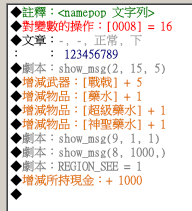
如上,这个脚本可以提示队员加入队伍、物品获得、技能习得等信息,请问下怎么提示物品失去、技能遗忘等这种负数的提示。 |
|



 写轮眼
写轮眼
 发表于 2013-10-16 10:22:50
 提升卡
提升卡 沉默号角
沉默号角 喧嚣号角
喧嚣号角 变色卡
变色卡 升龙剑
升龙剑