| 赞 | 3 |
| VIP | |
| 好人卡 | |
| 积分 | 2 |
| 经验 | |
| 最后登录 | 2018-5-25 |
| 在线时间 | 248 小时 |
- 梦石
- 0
- 星屑
- 199
- 在线时间
- 248 小时
- 注册时间
- 2012-4-29
- 回帖
- 313
|
 发表于 2013-11-1 15:49:21
|
显示全部楼层
本帖最后由 魔力的觉醒 于 2013-11-1 15:50 编辑
tan12345 发表于 2013-11-1 15:34 
MOG有脚本是箭头的,MOG_Battle_Cursor这个脚本就是在战斗时可以用箭头选择敌人,不过他的箭头在底部,可 ...
请问是这个吗? 我插进去 没效果怎么回事!!- #==============================================================================
- # +++ MOG - Animated Cursor (V1.2) +++
- #==============================================================================
- # By Moghunter
- # [url]http://www.atelier-rgss.com/[/url]
- #==============================================================================
- # Adiciona um cursor animado nos menus de comandos.
- #==============================================================================
- # Será necessário ter a imagem
- #
- # Menu_Cursor.png
- #
- # gravado na pasta GRAPHICS/SYSTEM/
- #==============================================================================
- # Ativando a animação do cursor
- #
- # Basta criar uma imagem que tenha a largura com no minimo o dobro de altura da
- # imagem do cursor.
- #
- # EX
- # largura 32 pixel (width) altura 32 pixel = 1 frames de animação.(Sem animação)
- # largura 64 pixel (width) altura 32 pixel = 2 frames de animação.
- # largura 128 pixel (width) altura 32 pixel = 4 frames de animação.
- # largura 256 pixel (width) altura 32 pixel = 8 frames de animação
- # Etc...
- #
- # NOTA
- # Não há limite para quantidade de frames de animação, se não quiser a animação
- # basta criar uma imagem com a altura proporcional a largura da imagem.
- #
- #==============================================================================
- # ● Histórico (Version History)
- #==============================================================================
- # v 1.1 - Correção da posição do cursor na cena de batalha.
- #==============================================================================
- module MOG_MENU_CURSOR
- #Ativar animação do cursor se movimentando para os lados.
- SIDE_ANIMATION = true
- #Definição da posição do cursor. (Ajustes na posição)
- CURSOR_POSITION = [0,0]
- #Definição da velocidade da animação de frames.
- CURSOR_ANIMATION_SPEED = 6
- end
- #==============================================================================
- # ■ Game_System
- #==============================================================================
- class Game_System
-
- attr_accessor :menu_cursor_name
-
- #--------------------------------------------------------------------------
- # ● Initialize
- #--------------------------------------------------------------------------
- alias mog_menu_cursor_initialize initialize
- def initialize
- mog_menu_cursor_initialize
- @menu_cursor_name = "Menu_Cursor"
- end
-
- end
- #==============================================================================
- # ■ Game_Temp
- #==============================================================================
- class Game_Temp
-
- attr_accessor :menu_cursor
-
- #--------------------------------------------------------------------------
- # ● Initialize
- #--------------------------------------------------------------------------
- alias mog_cursor_sprite_initialize initialize
- def initialize
- mog_cursor_sprite_initialize
- @menu_cursor = [false,0,0,0]
- end
-
- end
- #==============================================================================
- # ■ Sprite Cursor
- #==============================================================================
- class Sprite_Cursor < Sprite
-
- include MOG_MENU_CURSOR
-
- #--------------------------------------------------------------------------
- # ● Initialize
- #--------------------------------------------------------------------------
- def initialize(viewport = nil , x , y)
- super(viewport)
- @cursor_image = Cache.system($game_system.menu_cursor_name.to_s)
- @frame_max = (@cursor_image.width / @cursor_image.height) rescue 1
- @frame_range = @frame_max > 0 ? (@cursor_image.width / @frame_max) : 1
- @frame = 0
- @ca_speed = CURSOR_ANIMATION_SPEED
- self.bitmap = Bitmap.new(@frame_range,@frame_range)
- self.z = 10000
- self.opacity = 0
- @cw = self.bitmap.width / 2
- @c_p = [-@cw + CURSOR_POSITION[0],CURSOR_POSITION[1]]
- [url=home.php?mod=space&uid=287812]@mx[/url] = [0,0,0]
- refresh_animation(true)
- update_move
- end
-
- #--------------------------------------------------------------------------
- # ● Dispose
- #--------------------------------------------------------------------------
- def dispose
- self.bitmap.dispose
- self.bitmap = nil
- @cursor_image.dispose
- super
- end
-
- #--------------------------------------------------------------------------
- # ● Update
- #--------------------------------------------------------------------------
- def update
- if cursor_visible?
- self.visible = true
- update_move
- refresh_animation(false)
- else
- self.visible = false
- end
- end
- #--------------------------------------------------------------------------
- # ● Initialize
- #--------------------------------------------------------------------------
- def refresh_animation(start = false)
- @ca_speed += 1
- return if @frame_max == 1 and !start
- return if @ca_speed < CURSOR_ANIMATION_SPEED
- @ca_speed = 0
- self.bitmap.clear
- scr_rect = Rect.new(@frame_range * @frame,0,@frame_range,@frame_range)
- self.bitmap.blt(0,0,@cursor_image, scr_rect)
- @frame += 1
- @frame = 0 if @frame >= @frame_max
- end
-
- #--------------------------------------------------------------------------
- # ● Cursor Visible?
- #--------------------------------------------------------------------------
- def cursor_visible?
- px = $game_temp.menu_cursor[2]
- py = $game_temp.menu_cursor[3]
- return false if $game_temp.menu_cursor[1] == 0
- return false if px < 0 or py < 0 or (px == 0 and py == 0)
- return true
- end
-
- #--------------------------------------------------------------------------
- # ● Update Move
- #--------------------------------------------------------------------------
- def update_move
- self.opacity += 25
- @new_pos = [$game_temp.menu_cursor[2],$game_temp.menu_cursor[3]]
- execute_animation_s
- execute_move(0,self.x, @new_pos[0] + @mx[1] + @c_p[0])
- execute_move(1,self.y, @new_pos[1] + @c_p[1])
- end
-
- #--------------------------------------------------------------------------
- # ● Execute Animation S
- #--------------------------------------------------------------------------
- def execute_animation_s
- return if !SIDE_ANIMATION
- @mx[2] += 1
- return if @mx[2] < 4
- @mx[2] = 0
- @mx[0] += 1
- case @mx[0]
- when 1..7; @mx[1] += 1
- when 8..14; @mx[1] -= 1
- else
- @mx[0] = 0
- @mx[1] = 0
- end
- end
-
- #--------------------------------------------------------------------------
- # ● Execute Move
- #--------------------------------------------------------------------------
- def execute_move(type,cp,np)
- sp = 5 + ((cp - np).abs / 5)
- if cp > np
- cp -= sp
- cp = np if cp < np
- elsif cp < np
- cp += sp
- cp = np if cp > np
- end
- self.x = cp if type == 0
- self.y = cp if type == 1
- end
-
- end
- #==============================================================================
- # ■ CURSOR_MENU SPRITE
- #==============================================================================
- module CURSOR_MENU_SPRITE
-
- #--------------------------------------------------------------------------
- # ● Cursor Sprite Enable
- #--------------------------------------------------------------------------
- def cursor_sprite_enable
- return if self.index == nil rescue return
- create_cursor_sprite
- update_cursor_sprite
- update_cusor_position
- if !self.active
- $game_temp.menu_cursor[1] -= 1 if $game_temp.menu_cursor[1] > 0
- end
- end
-
- #--------------------------------------------------------------------------
- # ● Create Cursor Sprite
- #--------------------------------------------------------------------------
- def create_cursor_sprite
- return if @cursor != nil
- return if $game_temp.menu_cursor[0]
- $game_temp.menu_cursor[0] = true
- reset_cursor_position
- @cursor = Sprite_Cursor.new(nil,x,y)
- @cursor_name = $game_system.menu_cursor_name
- end
-
- #--------------------------------------------------------------------------
- # ● Dispose Cursor Sprite
- #--------------------------------------------------------------------------
- def dispose_cursor_sprite
- return if @cursor == nil
- $game_temp.menu_cursor[0] = false
- reset_cursor_position
- @cursor.dispose
- @cursor = nil
- end
- #--------------------------------------------------------------------------
- # ● Reset Cursor Position
- #--------------------------------------------------------------------------
- def reset_cursor_position
- $game_temp.menu_cursor[1] = 0
- $game_temp.menu_cursor[2] = -32
- $game_temp.menu_cursor[3] = -32
- end
-
- #--------------------------------------------------------------------------
- # ● Update Cursor
- #--------------------------------------------------------------------------
- def update_cursor_sprite
- return if @cursor == nil
- @cursor.update
- refresh_cursor_sprite if @cursor_name != $game_system.menu_cursor_name
- end
-
- #--------------------------------------------------------------------------
- # ● Refresh Cursor Sprite
- #--------------------------------------------------------------------------
- def refresh_cursor_sprite
- @cursor_name = $game_system.menu_cursor_name
- dispose_cursor_sprite
- create_cursor_sprite
- end
-
- #--------------------------------------------------------------------------
- # ● Update Cursor Position
- #--------------------------------------------------------------------------
- def update_cusor_position
- return if !can_update_cursor_position?
- x_v = [0,0]
- if SceneManager.scene_is?(Scene_Battle)
- if self.viewport != nil
- x_v = [-self.viewport.ox, self.viewport.rect.y]
- end
- end
- x_e = (self.cursor_rect.x + self.x) - self.ox
- $game_temp.menu_cursor[2] = x_e + x_v[0]
- y_e = (self.cursor_rect.y + self.y + self.cursor_rect.height / 2) - self.oy
- $game_temp.menu_cursor[3] = y_e + x_v[1]
- $game_temp.menu_cursor[1] = 13
- end
-
- #--------------------------------------------------------------------------
- # ● Can Update Cursor
- #--------------------------------------------------------------------------
- def can_update_cursor_position?
- return false if !self.active
- return false if self.index < 0
- return false if !self.visible
- return true
- end
- end
- #==============================================================================
- # ■ Window Base
- #==============================================================================
- class Window_Base < Window
- include CURSOR_MENU_SPRITE
-
- #--------------------------------------------------------------------------
- # ● Dispose
- #--------------------------------------------------------------------------
- alias mog_menu_cursor_base_dispose dispose
- def dispose
- mog_menu_cursor_base_dispose
- dispose_cursor_sprite
- end
- #--------------------------------------------------------------------------
- # ● Update
- #--------------------------------------------------------------------------
- alias mog_cursor_update update
- def update
- mog_cursor_update
- cursor_sprite_enable
- end
-
- end
- $mog_rgss3_animated_cursor = true
|
|


 写轮眼


 提升卡
 沉默号角
 喧嚣号角
 变色卡
 升龙剑


 箭头选定敌人!!!
 偶去试试
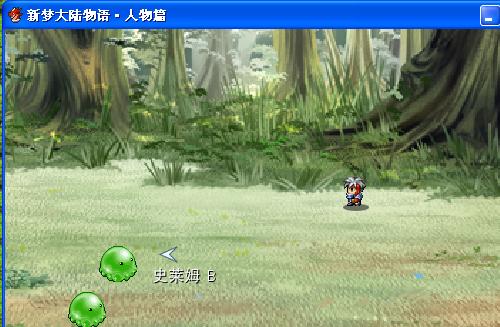
 好吧好吧!!!我的离狂拽炫酷吊炸天永远那么远!!谢谢帮忙啊!