| 赞 | 0 |
| VIP | |
| 好人卡 | |
| 积分 | 2 |
| 经验 | |
| 最后登录 | 2026-3-2 |
| 在线时间 | 104 小时 |
- 梦石
- 0
- 星屑
- 219
- 在线时间
- 104 小时
- 注册时间
- 2014-2-23
- 回帖
- 29
|
加入我们,或者,欢迎回来。
您需要 登录 才可以下载或查看,没有账号?注册会员
×
- =begin
- ■ Information ╒═════════════════════════════════════════════════════════╛
- EST - LIVING STATUS MENU v1.2
- by Estriole
-
- ■ License ╒═════════════════════════════════════════════════════════╛
- Free to use in all project (except the one containing pornography)
- as long as i credited (ESTRIOLE).
-
- ■ Support ╒═════════════════════════════════════════════════════════╛
- While I'm flattered and I'm glad that people have been sharing and asking
- support for scripts in other RPG Maker communities, I would like to ask that
- you please avoid posting my scripts outside of where I frequent because it
- would make finding support and fixing bugs difficult for both of you and me.
-
- If you're ever looking for support, I can be reached at the following:
- ╔═════════════════════════════════════════════╗
- ║ [url=http://www.rpgmakervxace.net/]http://www.rpgmakervxace.net/[/url] ║
- ╚═════════════════════════════════════════════╝
- pm me : Estriole.
-
- ■ Introduction ╒═════════════════════════════════════════════════════════╛
- This script is requested by Furrari fullbuster from [url=http://www.rpgmakervxace.net/]http://www.rpgmakervxace.net/[/url]
- it change status menu to be more lively and beautiful. first... it will
- use potrait as the actor picture in status (you need to provide your own). if
- the actor didnt have pictures. then it will use rescue picture.
- second... you can use as many pictures of the same actor as you want to make it
- animated. (require the basic knowledge on how to animate pictures and graphic
- editing skills too). all the animating things is done with notetags (will fill
- your notetags if you use a lot of pictures so not recommended for symphony user).
- third... you can make the animation only run once or make it looped.
- fourth... i give you some actor sound feature too. this script will play random
- sound of the actor (you need to put notetags on how many sound this actor has).
- else it will not play sound. combination of ANIMATED and SOUND make me name this
- script LIVING STATUS MENU :D.
- last one... use background image as status menu background.
-
- also... although this script is making your status menu COOL... you have to
- remember that it have potential to increase your project size by quite a lot
- (if you animate the potrait complexly. heck. even rotating magic circle take
- me 12 images to make it not to choppy)
-
- so... WARNING FOR LAZY PEOPLE... don't use this script !!!!
-
- ■ Features ╒═════════════════════════════════════════════════════════╛
- * use potrait
- * infinite number of potrait per actor to make it animated or just slideshow
- * can do one time only animation or looped animation
- * can play random sound of the actor
- * use image as background
-
- ■ Changelog ╒═════════════════════════════════════════════════════════╛
- v1.0 2013.05.16 Initial Release
- v1.1 2013.05.23 add compatibility to custom resolution. just change the
- DESCRIPTION_LINE_MOD in module estriole to change where
- the description drawn. for images you just need to resize it.
- v1.2 2014.01.01 Happy New Year! add ability to have different background each actor
- just add another background.jpg (or .png) inside the
- living_status/actor_x/ folder
- change x to id of the actor using that background
-
- ■ Compatibility ╒═════════════════════════════════════════════════════════╛
- Definitely not compatible with YANFLY status menu script. :D.
- tell me if another script not. since this have lots of overwrite in window_status
- this script is expected to not compatible with script that modify that window.
-
- ■ How to use ╒═════════════════════════════════════════════════════════╛
- i will try to explain how to use this script. this is quite confusing if you
- don't understand basic animation.
-
- >>>> Graphic related <<<<<<
- -1) set background image.
- put the image of your status menu background in folder
- /Graphics/Pictures/living_status/
- name it "background"
-
- from below... it's better to use png for potraits since it contain transparency.
- 0) set rescue potrait (so the game won't crash when you still didn't have
- complete actor potrait).
- put the image in
- /graphics/pictures/living_status/
- name the image "rescue.png"
- now your game won't crash when you're developing it. so you can slowly adding
- potrait one by one. also when you missing some image when animating. this picture
- will also shown to tell you that image is missing.
-
- 1) set actor potrait
- create image size with the max width 325 pixel. (best result is 200 or 325 pixel)
- put it in folder
- /graphics/pictures/living_status/actor_x/
- (change _x to _actorid)
- name the image "1.png" (since png has transparency)
- example
- /graphics/pictures/living_status/actor_1/1.png
- will set that picture as the 'first' picture of the actor 1.
-
- by doing so you already have potrait status menu. if you want it animated
- another step must be done. BUT if you don't understand basic animation/frame/etc
- Stop at this point rather than boiling your head. your status menu is already
- pretty at this point if you done it right...
-
- 2) animating actor potrait
- basically you create another image which slightly different from first picture.
- name it in sequence such as 2.png, 3.png, 4.png, etc.
- put the images in they same folder as the 1.png.
- now you have to understand frames before executing this section.
- first define frame max for that actor potrait. by giving the actor notetags:
-
- <frame_max: 60>
-
- it will set the frame 0 to 60. so the animation will occur in 60 frames.
- if you don't set the notetags by default frame max is what you set in module ESTRIOLE.
-
- second define how many pictures that actor animate. give actor notetags:
-
- <anim_max: 12>
-
- it means that actor have 12 pictures to animate
-
- third set the timing of the animation change. give notetags to actor
- <frame_anim_1: 0, 5>
- means 1.png will shown from 0 to 5 frame
- <frame_anim_2: 5, 10>
- means 2.png will shown from 5 to 10 frame
- <frame_anim_3: 10, 15>
- means 3.png will shown from 10 to 15 frame
- <frame_anim_4: 15, 20>
- means 4.png will shown from 15 to 20 frame
- done that until all your pictures given animation set.
- warning... the first number in notetags must be lower than second number.
- also one picture can only used once. (still thinking another way to prevent that
- i have a way already using array and another for. but will make user hard to use).
- also if at that frame no image specified... it will automatically use 1.png.
-
- now you got yourself animated picture.
-
- 3) making looped animation
- after setting above. you could give notetags to loop animation. give the actor:
- <loop_to: x>
- x -> frame number
- <loop_to: 0>
- will loop it back to frame 0 continuosly.
- <loop_to: 100>
- will loop it back to frame 100 continuosly. useful when you want to make actor
- talking animation + another animation. then loop without the talking animation.
-
- >>>> Sound related <<<<<<
- 1) put the actor voice files in
- /Audio/SE/living_status/actor_#/
- name it sequentialy.
- ex:
- /Audio/SE/living_status/actor_1/1.ogg
- /Audio/SE/living_status/actor_1/2.ogg
- /Audio/SE/living_status/actor_1/3.ogg
- will give the actor 3 sounds.
- 2) set the notetags telling that this actor has three sounds
- <op_voices_num: 3>
- here you go... now your actor will tell random sound everytime you view their
- status menu :D.
-
- if you're confused. just look at the demo project folder.
-
- ■ Author's Notes ╒═════════════════════════════════════════════════════════╛
- This script is quite hard to use. need to understand basic of animating
- pictures. also only one layer provided so it's limited animation.
- future patch plan (if i'm not busy)
- - sound effect in animation
- - tell me...
-
- =end
-
- ### CONFIGURATION ##################################################
- module ESTRIOLE
- module STATUS
- USE_DESCRIPTION = true #true will show actor description
- DEFAULT_FRAME_MAX = 300 #default frame max of actor animation
- DESCRIPTION_LINE_MOD = 14 #change this if you're using custom resolution.
- #if not 14 is ok. 14 means you draw the description
- #at 14th line
- end
- end
-
- class RPG::Actor < RPG::BaseItem
- def frame_max
- return nil if !note[/<frame_max:(.*)>/i]
- a = note[/<frame_max:(.*)>/i].scan(/:(.*)/).flatten[0].scan(/(?:"(.*?)"| (\w+)|(\w+),|,(\w+))/).flatten.compact
- return noteargs = a[0].to_i
- end
- def anim_max
- return 1 if !note[/<anim_max:(.*)>/i]
- a = note[/<anim_max:(.*)>/i].scan(/:(.*)/).flatten[0].scan(/(?:"(.*?)"| (\w+)|(\w+),|,(\w+))/).flatten.compact
- return noteargs = a[0].to_i
- end
- def frame_change(index)
- return nil if !note[/<frame_anim_#{index}:(.*)>/i]
- a = note[/<frame_anim_#{index}:(.*)>/i].scan(/:(.*)/).flatten[0].scan(/(?:"(.*?)"| (\w+)|(\w+),|,(\w+))/).flatten.compact
- return noteargs = [a[0].to_i,a[1].to_i]
- end
- def anim_loop_to?
- return nil if !note[/<loop_to:(.*)>/i]
- a = note[/<loop_to:(.*)>/i].scan(/:(.*)/).flatten[0].scan(/(?:"(.*?)"| (\w+)|(\w+),|,(\w+))/).flatten.compact
- return noteargs = a[0].to_i
- end
- def voices_num
- return nil if !note[/<op_voices_num:(.*)>/i]
- a = note[/<op_voices_num:(.*)>/i].scan(/:(.*)/).flatten[0].scan(/(?:"(.*?)"| (\w+)|(\w+),|,(\w+))/).flatten.compact
- return noteargs = a[0].to_i
- end
- end
-
- class Scene_Status < Scene_MenuBase
- include ESTRIOLE::STATUS
- alias est_living_status_start start
- def start
- est_living_status_start
- @frame_count = 0
- play_random_actor_sound
- end
- alias est_living_status_next_actor next_actor
- def next_actor
- @status_window.actor_anim_index = 1
- @frame_count = 0
- est_living_status_next_actor
- 4.times do update end
- RPG::SE.stop
- play_random_actor_sound
- end
- alias est_living_status_prev_actor prev_actor
- def prev_actor
- @status_window.actor_anim_index = 1
- @frame_count = 0
- est_living_status_prev_actor
- 4.times do update end
- RPG::SE.stop
- play_random_actor_sound
- end
- def play_random_actor_sound
- return unless @actor.actor.voices_num
- a = ([email]1..@actor.actor.voices_num[/email]).to_a.sample
- RPG::SE.new("/living_status/actor_#{@actor.actor.id}/#{a}", 100, 100).play
- end
-
- def update
- super
- frame_max = DEFAULT_FRAME_MAX
- frame_max = @actor.actor.frame_max if @actor.actor.frame_max
- old_index = @status_window.actor_anim_index
- @frame_count = @actor.actor.anim_loop_to? if @frame_count == frame_max && @actor.actor.anim_loop_to?
- @frame_count += 1
- @frame_count = [@frame_count,frame_max].min
- @status_window.actor_anim_index = 1
- anim_max = 3
- anim_max = @actor.actor.anim_max if @actor.actor.anim_max
- for i in 1..anim_max
- @status_window.actor_anim_index = i if @actor.actor.frame_change(i) &&
- @frame_count >= @actor.actor.frame_change(i)[0] &&
- @frame_count <= @actor.actor.frame_change(i)[1]
- end
- @status_window.refresh if old_index != @status_window.actor_anim_index
- end
- end
-
- class Window_Status < Window_Selectable
- include ESTRIOLE::STATUS
- attr_accessor :actor_anim_index
- attr_reader :actor_potrait
- def initialize(actor)
- super(0, 0, Graphics.width, Graphics.height)
- @actor = actor
- create_background
- create_potrait
- refresh
- activate
- end
- def terminate
- super
- dispose_background
- dispose_potrait
- end
- def create_potrait
- @actor_potrait = Sprite.new
- @actor_potrait.x = 304 - 50
- @actor_potrait.y = line_height * 3
- @actor_potrait.z = self.z if !USE_DESCRIPTION
- @actor_anim_index = 1
- end
- def create_background
- @background_sprite = Sprite.new
- @background_sprite.bitmap = Cache.picture("/living_status/actor_#{@actor.actor.id}/background") rescue Cache.picture("/living_status/background") rescue nil
- self.opacity = 0 if @background_sprite.bitmap
- @background_sprite.bitmap = SceneManager.background_bitmap if @background_sprite.bitmap == nil
- end
- def dispose_background
- @background_sprite.dispose
- end
- def dispose_potrait
- @actor_potrait.dispose
- end
- def actor=(actor)
- return if @actor == actor
- @actor = actor
- dispose_background
- create_background
- refresh
- end
- def refresh
- contents.clear
- draw_block1 (line_height * 0)
- draw_horz_line(line_height * 2)
- draw_block2 (line_height * 3)
- draw_custom_horz_line(line_height * 6,200)
- draw_block3 (line_height * 7)
- draw_horz_line(line_height * (DESCRIPTION_LINE_MOD-1)) if USE_DESCRIPTION
- draw_block4 (line_height * DESCRIPTION_LINE_MOD) if USE_DESCRIPTION
- end
- def draw_actor_name(actor, x, y, width = 325)
- change_color(system_color)
- draw_text(x, y, width, line_height, "Name ")
- change_color(normal_color)
- draw_text(x+80, y, width-80, line_height, actor.name)
- end
- def draw_actor_class(actor, x, y, width = 325)
- text = actor.class.name
- change_color(system_color)
- draw_text(x, y, width, line_height, "Class ")
- change_color(normal_color)
- draw_text(x+80, y, width-80, line_height, text)
- end
- def draw_basic_info(x, y)
- draw_actor_level(@actor, x, y + line_height * 0)
- draw_actor_icons(@actor, x + 70, y + line_height * 0)
- draw_actor_hp(@actor, x, y + line_height * 1,170)
- draw_actor_mp(@actor, x, y + line_height * 2,170)
- end
- def draw_exp_info(x, y)
- s1 = @actor.max_level? ? "-------" : @actor.exp
- s2 = @actor.max_level? ? "-------" : @actor.next_level_exp - @actor.exp
- change_color(system_color)
- draw_text(x, y + line_height * 0, 180, line_height, "EXP")
- draw_text(x, y + line_height * 1, 180, line_height, "Next")
- change_color(normal_color)
- draw_text(x, y + line_height * 0, 180, line_height, s1, 2)
- draw_text(x, y + line_height * 1, 180, line_height, s2, 2)
- end
- def draw_parameters(x, y)
- 6.times {|i| draw_actor_param(@actor, x, y + line_height * i, i + 2) }
- end
- def draw_actor_param(actor, x, y, param_id)
- change_color(system_color)
- draw_text(x, y, 120, line_height, Vocab::param(param_id))
- change_color(normal_color)
- draw_text(x + 100, y, 36, line_height, actor.param(param_id), 2)
- end
- def draw_block1(y)
- draw_actor_name(@actor, 20, y)
- draw_actor_class(@actor, 20, y + line_height)
- draw_exp_info(304, y)
- end
- def draw_block2(y)
- draw_basic_info(20, y)
- draw_potraits(288, y)
- end
- def draw_potraits(x,y)
- @actor_potrait.bitmap = Cache.picture("/living_status/actor_#{@actor.actor.id}/#{@actor_anim_index}") rescue rescue_potrait
- end
- def rescue_potrait
- Cache.picture("/living_status/rescue")
- end
- def draw_block3(y)
- draw_parameters(20, y)
- end
- def draw_block4(y)
- draw_description(4, y)
- end
- def draw_horz_line(y)
- line_y = y + line_height / 2 - 1
- contents.fill_rect(0, line_y, contents_width, 2, line_color)
- end
- def draw_custom_horz_line(y,w)
- line_y = y + line_height / 2 - 1
- contents.fill_rect(0, line_y, w, 2, line_color)
- end
- def line_color
- color = normal_color
- color.alpha = 48
- color
- end
- def draw_description(x, y)
- draw_text_ex(x, y, @actor.description)
- end
- end
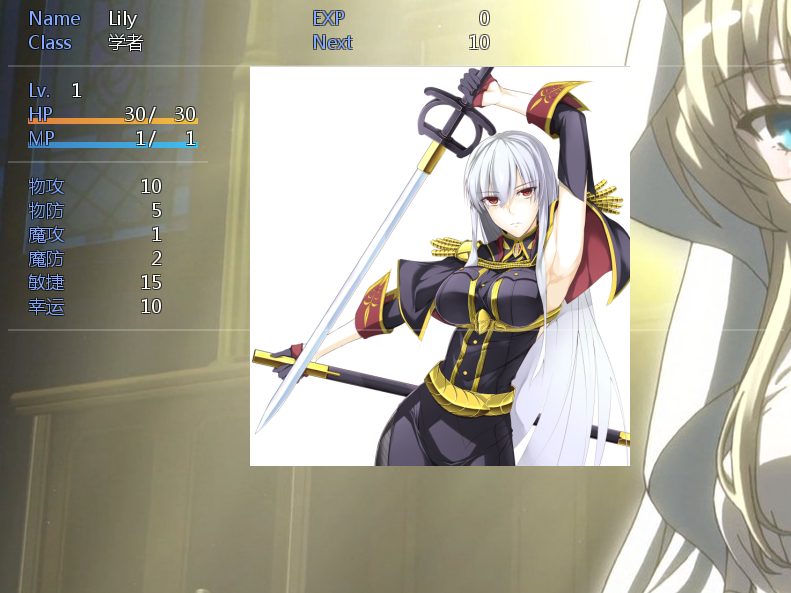
目前图片靠左上角,看着实在蛋疼
|
|


 写轮眼

 发表于 2014-2-26 16:11:17
 提升卡
 沉默号角
 喧嚣号角
 变色卡
 升龙剑

