| 赞 | 0 |
| VIP | |
| 好人卡 | |
| 积分 | 2 |
| 经验 | |
| 最后登录 | 2020-3-17 |
| 在线时间 | 341 小时 |
- 梦石
- 0
- 星屑
- 240
- 在线时间
- 341 小时
- 注册时间
- 2010-9-5
- 回帖
- 66
|
加入我们,或者,欢迎回来。
您需要 登录 才可以下载或查看,没有账号?注册会员
×
最近看到不少求人物血条的提问,就从外站找了一个比较精美,且简单实用的HUD,分享给大家!
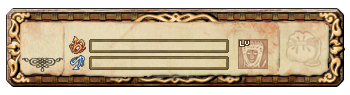
使用方法,将脚本插在main前,并且将以下图片保存在名为Hud的文件夹下,然后保存在Graphics下。
效果图:
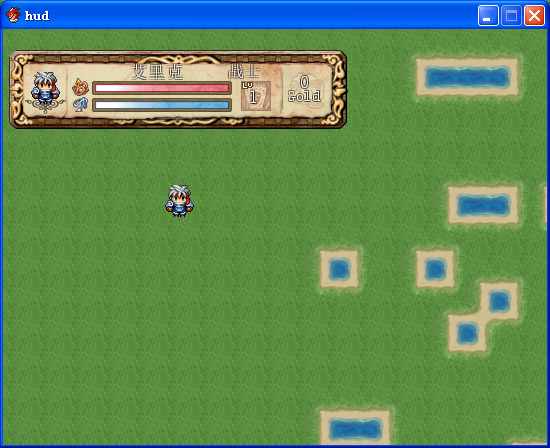
人物进入hud遮挡中时,还会透明化
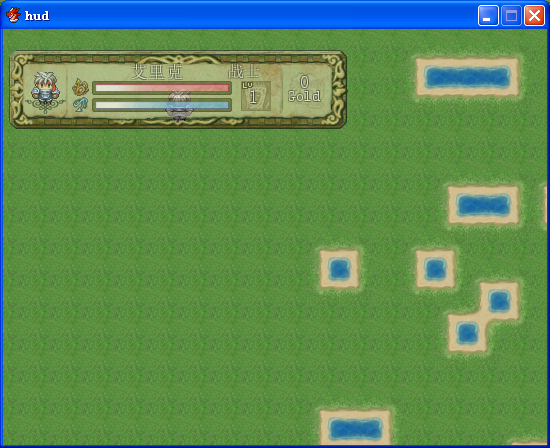
@wind
代码:
[pre lang="ruby" line="1"]#================================================#
# ¦ ReinoRPG HUD v0.6
# Script: LB
# Translated: Bravo2Kilo
# Toggle key: Kal
#================================================#
puts "HUD Loaded"
module PR_RRPG_HUD
#================================================#
#============= General Settings ===============#
#================================================#
# Post nil if you want to center on screen
# Place a minus sign in front of value to refer to the opposite side.
Position_X = 0
Position_Y = -308
Bottom_of_the_HUD = "Back.png"
Bar_HP = "HP.png"
Bar_MP = "MP.png"
Using_transparency_in_the_entrance = true # Makes the HUD fade when go under it
Using_transparency_in_the_exit = true # FadeOut to disappear in just
Speed = 3 # Speed to FadeIn/FadeOut
Final_Opacity = 255 # Final 0pacity of the HUD
Opacity_Final_Element = 255 # Opacity of the final elements of the HUD
Character_Opacity = 150 # Opacity if the character is under
Opacity_Character_Element = 160 # Opacity of the elements
Switch_Control = 1 # Switch that controls whether the HUD is active or not
# HUD to be active ON and OFF to turn it off.
Number_Character = 1 # The number of character in order according to menu
HUD_Toggle_Show_Key = Input::L # Press this key to show/hide the HUD
# L is the Q key on a keyboard.
# Press F1 in a game to see what the default
# key mappings are.
#==============================================#
#=============== HUD Elements ================#
#==============================================#
# Set to true to display graphic charset (false to not display)
Char_Show = true
Char_X = 46
Char_Y = 66
# Set true to show the character's name (false to not display)
Name_Show = true
Name_Alignment = 1 # 0 = Left | 1 = Center | 2 = Right
Name_X = 92
Name_Y = 25
Name_Width = 134
Name_Color = Color.new(255,255,255)
Name_Font = nil # Font to use, write nil to use the default
Name_Size_of_Font = 17 # Size_of Font
# Set true to show the character's class (false to not display)
Class_Show = true
Class_Alignment = 0 # 0 = Left | 1 = Center | 2 = Right
Class_X = 229
Class_Y = 25
Class_Width = 60
Class_Color = Color.new(255,255,255)
Class_Font = nil # Font to use, write nil to use the default
Class_Size_of_Font = 16 # Size_of Font
# Set true to show the bar that represents the character's HP (false to not display)
HP_Show = true
HP_X = 92
HP_Y = 42
# Set true to show the bar that represents the character's MP (false to not display)
MP_Show = true
MP_X = 92
MP_Y = 59
# Set true to show the value of Current HP bar (false to not display)
Values_HP_Show_Current = false
# Set true to show the maximum value of the HP bar (false to not display)
Values_HP_Show_Total = false
Values_HP_Color = Color.new(255,255,255)
Values_HP_Font = nil # Font to use, write nil to use the default
Values_HP_Size_of_Font = 14 # Size_of Font
Values_HP_X = 92
Values_HP_Y = 38
# Set true to show the value of Current MP bar (false to not display)
Values_MP_Show_Current = false
# Set true to show the maximum value of the MP bar (false to not display)
Values_MP_Show_Total = false
Values_MP_Color = Color.new(255,255,255)
Values_MP_Font = nil # Font to use, write nil to use the default
Values_MP_Size_of_Font = 14 # Size_of Font
Values_MP_X = 92
Values_MP_Y = 55
# Set true to show the character's level (false to not display)
LV_Show = true
LV_Color = Color.new(255,255,255)
LV_Font = nil # Font to use, write nil to use the default
LV_Size_of_Font = 19 # Size_of Font
LV_Width = 30
LV_X = 241
LV_Y = 49
# Set true to show the character of money (false to not display)
Gold_Show = true
Gold_Color = Color.new(255,255,255)
Gold_Font = nil # Font to use, write nil to use the default
Gold_Size_of_Font = 18 # Size_of Font
Gold_X = 281
Gold_Y = 35
Gold_Width = 50
# Set true to show the suffix of play money (false to not display)
Text_Show = true
Text_Color = Color.new(255,255,255)
Text_Font = nil # Font to use, write nil to use the default
Text_Size_of_Font = 15 # Size_of Font
Text_X = 281
Text_Y = 50
Text_Width = 50
Text = "Gold" # Name of game currency
end
#===============================================#
#============ End of Settings ================#
#===============================================#
#============ Top of Script ==================#
#===============================================#
module Cache
#--------------------------------------------------------------------------
# * Get HUD Graphic
# filename : Filename
#--------------------------------------------------------------------------
def self.hud(filename)
load_bitmap("Graphics/Hud/", filename)
end
end
class Scene_Map < Scene_Base
include PR_RRPG_HUD
alias hud_start start
alias hud_update update
alias hud_terminate terminate
def start
active_hud
hud_start
end
def active_hud
unless @hud_has_run_before
$game_switches[Switch_Control] = true
@hud_has_run_before = true
end
@animation_hud1 = Using_transparency_in_the_entrance
@animation_hud2 = Using_transparency_in_the_entrance
@animation_hud_1 = Using_transparency_in_the_exit
@animation_hud_2 = Using_transparency_in_the_exit
@back = Sprite.new
@back.bitmap = Cache.hud(Bottom_of_the_HUD)
@back.opacity = 0 if @animation_hud1 == true
x = Position_X
y = Position_Y
w = @back.width
h = @back.height
x = ( x == nil ? ( 544 - w ) / 2 : ( x < 0 ? ( 544 + x - w ) : x ) )
y = ( y == nil ? ( 416 - h ) / 2 : ( y < 0 ? ( 416 + y - h ) : y ) )
@back.x = x
@back.y = y
@back.z = 190
@wind = Window_Base.new(x-16,y-16,w+32,h+32)
@wind.opacity = 0
@wind.contents_opacity = 0 if @animation_hud2 == true
@wind.z = 195
@wind.contents.font.shadow = false
@id = Number_Character-1
@info = []
@hp = Sprite.new
@hp.bitmap = Bitmap.new(32,32)
@mp = Sprite.new
@mp.bitmap = Bitmap.new(32,32)
@hp.x = HP_X + x
@mp.x = MP_X + x
@hp.y = HP_Y + y
@mp.y = MP_Y + y
@hp.z = 192
@mp.z = 193
@hp.opacity = 0 if @animation_hud2 == true
@mp.opacity = 0 if @animation_hud2 == true
hud_real_update if status_update
end
def terminate
if @animation_hud_1 == true
@back.bitmap.dispose
@back.dispose
end
if @animation_hud_2 == true
@hp.bitmap.dispose
@hp.dispose
@mp.bitmap.dispose
@mp.dispose
@wind.contents.dispose
@wind.dispose
end
hud_terminate
end
def update
if $game_switches[Switch_Control] == true and @hud_keyboard_switch
if @back != nil
if @back.opacity < Final_Opacity and @animation_hud1 == true
@back.opacity += Speed
else
@back.opacity = Final_Opacity
@animation_hud1 = false
end
if @wind.contents_opacity < Opacity_Final_Element and @animation_hud2 == true
@wind.contents_opacity += Speed
@hp.opacity += Speed
@mp.opacity += Speed
else
@wind.contents_opacity = Opacity_Final_Element
@hp.opacity = Opacity_Final_Element
@mp.opacity = Opacity_Final_Element
@animation_hud2 = false
end
else
active_hud
end
else
if @back != nil
if @back.opacity > Speed-1 and @animation_hud_1 == true
@back.opacity -= Speed
else
@back.bitmap.dispose
@back.dispose
@back = nil
@animation_hud_1 = false
end
if @wind.contents_opacity > Speed-1 and @animation_hud_2 == true
@wind.contents_opacity -= Speed
@hp.opacity -= Speed
@mp.opacity -= Speed
else
if @animation_hud_2 == true
@hp.bitmap.dispose
@hp.dispose
@hp = nil
@mp.bitmap.dispose
@mp.dispose
@mp = nil
@wind.contents.dispose
@wind.dispose
@wind = nil
@animation_hud_2 = false
end
end
end
end
if @back != nil
if $game_player.screen_x >= @back.x and $game_player.screen_x <= @back.x + @back.width and
$game_player.screen_y >= @back.y and $game_player.screen_y <= @back.y + @back.height
@back.opacity = Character_Opacity
@hp.opacity = Opacity_Character_Element
@mp.opacity = Opacity_Character_Element
@wind.contents_opacity = Opacity_Character_Element
end
end
hud_real_update if status_update
hud_check_key_toggle
hud_update
end
def hud_real_update
a = $game_party.members[@id]
@wind.contents.clear
@wind.draw_character(a.character_name, a.character_index, Char_X, Char_Y) if Char_Show
if Name_Show
@wind.contents.font.name = Name_Font if Name_Font != nil
@wind.contents.font.color = Name_Color
@wind.contents.font.size = Name_Size_of_Font
@wind.contents.draw_text(Name_X, Name_Y, Name_Width, Name_Size_of_Font, a.name, Name_Alignment)
end
if Class_Show
@wind.contents.font.name = Class_Font if Class_Font != nil
@wind.contents.font.color = Class_Color
@wind.contents.font.size = Class_Size_of_Font
@wind.contents.draw_text(Class_X, Class_Y, Class_Width, Class_Size_of_Font, a.class.name, Class_Alignment)
end
if HP_Show
@hp.bitmap.dispose
@hp.bitmap = Cache.hud(Bar_HP)
@hp.bitmap.clear_rect(Rect.new((@hp.width*a.hp/a.mhp),0,@hp.width,@hp.height))
end
if MP_Show
@mp.bitmap.dispose
@mp.bitmap = Cache.hud(Bar_MP)
@mp.bitmap.clear_rect(Rect.new((@mp.width*a.mp/a.mmp),0,@mp.width,@mp.height))
end
if Values_HP_Show_Current
text = a.hp.to_s
end
if Values_HP_Show_Total
text = a.mhp.to_s
end
if Values_HP_Show_Current and Values_HP_Show_Total
text = a.hp.to_s + "/" + a.mhp.to_s
end
if text != nil
@wind.contents.font.name = Values_HP_Font if Values_HP_Font != nil
@wind.contents.font.color = Values_HP_Color
@wind.contents.font.size = Values_HP_Size_of_Font
@wind.contents.draw_text(Values_HP_X, Values_HP_Y, @hp.width, Values_HP_Size_of_Font, text, 2)
end
text = nil
if Values_MP_Show_Current
text = a.mp.to_s
end
if Values_MP_Show_Total
text = a.mmp.to_s
end
if Values_MP_Show_Current and Values_MP_Show_Total
text = a.mp.to_s + "/" + a.mmp.to_s
end
if text != nil
@wind.contents.font.name = Values_MP_Font if Values_MP_Font != nil
@wind.contents.font.color = Values_MP_Color
@wind.contents.font.size = Values_MP_Size_of_Font
@wind.contents.draw_text(Values_MP_X, Values_MP_Y, @hp.width, Values_MP_Size_of_Font, text, 2)
end
if LV_Show
@wind.contents.font.name = LV_Font if LV_Font != nil
@wind.contents.font.color = LV_Color
@wind.contents.font.size = LV_Size_of_Font
@wind.contents.draw_text(LV_X, LV_Y, LV_Width, LV_Size_of_Font, a.level, 1)
end
if Gold_Show
@wind.contents.font.name = Gold_Font if Gold_Font != nil
@wind.contents.font.color = Gold_Color
@wind.contents.font.size = Gold_Size_of_Font
@wind.contents.draw_text(Gold_X, Gold_Y, Gold_Width, Gold_Size_of_Font, $game_party.gold, 1)
end
if Text_Show
@wind.contents.font.name = Text_Font if Text_Font != nil
@wind.contents.font.color = Text_Color
@wind.contents.font.size = Text_Size_of_Font
@wind.contents.draw_text(Text_X, Text_Y, Text_Width, Text_Size_of_Font, Text, 1)
end
end
def status_update
return false if @wind == nil
a = $game_party.members[@id]
return update_infos if a.id != @info[0]
return update_infos if a.character_name != @info[1]
return update_infos if a.character_index != @info[2]
return update_infos if a.name != @info[3]
return update_infos if a.class_id != @info[4]
return update_infos if a.class.name != @info[5]
return update_infos if a.hp != @info[6]
return update_infos if a.mhp != @info[7]
return update_infos if a.mp != @info[8]
return update_infos if a.mmp != @info[9]
return update_infos if a.level != @info[10]
return update_infos if $game_party.gold != @info[11]
return false
end
def update_infos
a = $game_party.members[@id]
@info[0] = a.id
@info[1] = a.character_name
@info[2] = a.character_index
@info[3] = a.name
@info[4] = a.class_id
@info[5] = a.class.name
@info[6] = a.hp
@info[7] = a.mhp
@info[8] = a.mp
@info[9] = a.mmp
@info[10] = a.level
@info[11] = $game_party.gold
return true
end
def hud_check_key_toggle
@hud_keyboard_switch = true if @hud_keyboard_switch.nil?
if Input.trigger?(HUD_Toggle_Show_Key)
@hud_keyboard_switch = !@hud_keyboard_switch
end
end
end[/pre]
其中,174行为: @wind = Window_Base.new(x-16,y-16,w+32,h+32)
需要保存的图片:


另外,给出一个范例:
 hud.rar
(1.48 MB, 下载次数: 115)
hud.rar
(1.48 MB, 下载次数: 115)
|
评分
-
查看全部评分
|




 写轮眼
写轮眼
 发表于 2014-6-9 12:25:32


 提升卡
提升卡 沉默号角
沉默号角 喧嚣号角
喧嚣号角 变色卡
变色卡 升龙剑
升龙剑