| 赞 | 2 |
| VIP | |
| 好人卡 | |
| 积分 | 2 |
| 经验 | |
| 最后登录 | 2017-7-18 |
| 在线时间 | 2070 小时 |
Mr.Gandum
- 梦石
- 0
- 星屑
- 226
- 在线时间
- 2070 小时
- 注册时间
- 2007-1-31
- 回帖
- 2982

|
加入我们,或者,欢迎回来。
您需要 登录 才可以下载或查看,没有账号?注册会员
×
本帖最后由 feizhaodan 于 2015-10-22 20:43 编辑
让角色移动更加细腻!
这个脚本让VA默认的格子单位移动改为像素单位移动,顺便让通行度可以用区域来控制。
[fold=脚本内容][pre lang="ruby" line="1"]#encoding:utf-8
#==============================================================================
# ☆ 像素移动系统
# 作者:feizhaodan
# 版本:1.1.0
#==============================================================================
# ☆ 使用说明
# 将脚本插入到插件脚本下方Main上方。
# 然后在GraphData模块内根据行走图需要来设置行走图的实际判定大小。
# 在地图的备注栏内输入来令特定区域ID的图块有特别的碰撞大小。
# id是区域ID,n1,n2,n3,n4分别是图块的左侧,右侧,上侧,下侧的碰撞位置。
# 在事件的第一个指令使用添加注释,然后在里面输入`offx=n'`offy=n'`offz=n'
# 来调整事件的初始XY坐标和Z坐标
#==============================================================================
# ☆ 行走图判定设置方法
# 在行走图文件名后面添加字符来设置各行走图的判定大小
# 例:Actor1-1[W28][H28]
# [WXX]为行走图判定宽度,用数字替换XX
# [HXX]为行走图判定高度,用数字替换XX
# 实际碰撞矩形为以角色行走图底部的中心为基准,向左右移动宽度/2,
# 向上移动高度分的矩形
# 这些若没有设置的情况下使用RM默认值(即行走图的宽度和高度)
#==============================================================================
# ☆ 注意事项
# 使用地图循环将会使滚动暴走,不要使用循环。
#==============================================================================
# ☆ 更新内容
# 1.1.0: ·大幅度修改判定方法,从像素判定改为矩形判定。预期可以大幅度改善运行速度
# ·取消脚本内设置判定的方法,改为利用文件名进行设置,方便制作
# 1.0.1: ·添加移动指令功能,在移动指令内的脚本输入`@rountine_count=n'来让之后的
# 移动类指令自动重复n次(如@routine_count=10之后,一个向下移动会自动让
# 事件移动10个单位。使用@routine_count指定的次数不会受到移动频率影响。
# ·一大堆BUG修正(多到我忘了有哪些)
#==============================================================================
# ■ Kien::PixelMove
#------------------------------------------------------------------------------
# 提供脚本的一些可更改内容
#==============================================================================
module Kien
module PixelMove
# 滚动锁定控制开关ID
# 打开时锁定移动时的滚动
SCROLL_LOCK_SWITCH_ID = 101
# 玩家初始位置调整量
# x坐标 Y坐标
PLAYER_OFFSETS = [ 16, 16]
# 对地形标记使用精密判定
# 对梯子等地形判断使用精密判定
# 即角色所在的所有格子必须都是指定的地形才算为在该判定内
# 使用长宽大于32的行走图时请关闭来获得更好的游戏体验
USE_PRECISE_TILETAG = true
end
end
#==============================================================================
# 设定内容结束
#==============================================================================
$imported ||= {}
$imported[:kien_pixel_move] = true
#==============================================================================
# ■ Rect
#------------------------------------------------------------------------------
# 表达矩形的类
# 添加一些泛用函数。
#==============================================================================
class Rect
#--------------------------------------------------------------------------
# ● 是否包含某个点
#--------------------------------------------------------------------------
def inside?(tx,ty)
return tx.between?(x,x+width) && ty.between?(y,y+height)
end
#--------------------------------------------------------------------------
# ● 是否与其他矩形重叠
# 允许两种参数:
# 1. collide?(rect)
# 判断是否与rect相重叠
# 2. collide?(x,y,width,height,center=false)
# 判断是否与由x,y,width,height组成的矩形想重叠
# 当center为true时,表示x,y表达的是矩形的中心坐标
#--------------------------------------------------------------------------
def collide?(tx,ty=nil,twidth=nil,theight=nil,convertc=nil)
if (ty == nil)
ty = tx.cy
twidth = tx.width
theight = tx.height
tx = tx.cx
elsif convertc != true
tx = tx+(twidth/2)
ty = ty+(theight/2)
end
return (cx-tx).abs < (twidth+width)/2 && (cy-ty).abs < (theight+height)/2
end
#--------------------------------------------------------------------------
# ● 矩形的中心x坐标
#--------------------------------------------------------------------------
def cx
return x+(width/2)
end
#--------------------------------------------------------------------------
# ● 矩形的中心y坐标
#--------------------------------------------------------------------------
def cy
return y+(height/2)
end
#--------------------------------------------------------------------------
# ● 矩形的左上和右下坐标
#--------------------------------------------------------------------------
def getpoints
return [x,y,x+width,y+height]
end
alias collide collide?
#--------------------------------------------------------------------------
# ● 矩形的矩形
#--------------------------------------------------------------------------
def boundbox
return self
end
end
#==============================================================================
# ■ RPG::Map
#------------------------------------------------------------------------------
# 保存地图数据的数据结构。
#==============================================================================
class RPG::Map
def region_data(id)
@note.each_line do |line|
case line
when /\<R[ ]*(\d+)\|((\d+)\,(\d+)\,(\d+)\,(\d+))\>/
if $1.to_i == id
return [$3.to_i,$4.to_i,$5.to_i,$6.to_i]
end
end
end
return []
end
def region_data_rect(id)
arr = region_data(id)
unless arr.empty?
return Rect.new(arr[0],arr[1],arr[2]-arr[0],arr[3]-arr[1])
end
return Rect.new(0,0,0,0)
end
def region_data_f(id)
@note.each_line do |line|
case line
when /\<Rs[ ]*(\d+)\|(\w+)\>/
if $1.to_i == id
return $2
end
end
end
return nil
end
end
#==============================================================================
# ■ Game_CharacterBase
#------------------------------------------------------------------------------
# キャラクターを扱う基本のクラスです。全てのキャラクターに共通する、座標やグ
# ラフィックなどの基本的な情報を保持します。
#==============================================================================
class Game_CharacterBase
#--------------------------------------------------------------------------
# ● 非公開メンバ変数の初期化
#--------------------------------------------------------------------------
alias pixel_move_init_private_members init_private_members
def init_private_members
@move_count = 0
@target_move_count = 0
@last_move = []
# @character_data = [宽,高]
# 笔记: 角色坐标与显示部分
# 角色坐标表示角色的脚的中心
# 角色的碰撞矩形X坐标则为X坐标-宽/2
# Y坐标则为Y坐标-高
@character_data = [0,0]
pixel_move_init_private_members
end
#--------------------------------------------------------------------------
# ● 碰撞矩形
# 所有判定都使用这个矩形来进行判定
#--------------------------------------------------------------------------
def boundbox
return Rect.new(@x-@character_data[0]/2,# x
@y-@character_data[1],# y
@character_data[0],# width
@character_data[1])# height
end
#--------------------------------------------------------------------------
# ● 移动矩形
#--------------------------------------------------------------------------
def move_box(tx,ty,rect=boundbox)
rect.x = tx - rect.width/2
rect.y = ty - rect.height
return rect
end
#--------------------------------------------------------------------------
# ● 从矩形提取坐标
#--------------------------------------------------------------------------
def extract_pos_from_box(rect)
return [rect.x+rect.width/2,rect.y+rect.height]
end
#--------------------------------------------------------------------------
# ● 梯子判定
#--------------------------------------------------------------------------
def ladder?
return $game_map.ladder_rect?(boundbox)
end
#--------------------------------------------------------------------------
# ● 移動速度の取得(ダッシュを考慮)
#--------------------------------------------------------------------------
def real_move_speed
@move_speed + (dash? ? @move_speed/2 : 0)
end
#--------------------------------------------------------------------------
# ● 座標一致判定
#--------------------------------------------------------------------------
def pos?(x, y)
return boundbox.inside?(x,y)
end
#--------------------------------------------------------------------------
# ● 与矩形重叠判定
#--------------------------------------------------------------------------
def collide_with?(rect)
return boundbox.collide?(rect)
end
#--------------------------------------------------------------------------
# ● 更新跳跃
#--------------------------------------------------------------------------
def update_jump
@jump_count -= 1
@real_x = (@real_x * @jump_count + @x) / (@jump_count + 1.0)
@real_y = (@real_y * @jump_count + @y) / (@jump_count + 1.0)
update_bush_depth
if @jump_count == 0
@x = @real_x = $game_map.round_x(@x)
@y = @real_y = $game_map.round_y(@y)
end
end
#--------------------------------------------------------------------------
# ● イベントIDを獲得
#--------------------------------------------------------------------------
def event_id
return 0
end
#--------------------------------------------------------------------------
# ● 获取区域 ID
#--------------------------------------------------------------------------
def region_id
$game_map.region_id(@real_x/32,@real_y/32)
end
#--------------------------------------------------------------------------
# ● 获取区域 ID
#--------------------------------------------------------------------------
def region_id_rect
$game_map.region_id_rect(boundbox)
end
#--------------------------------------------------------------------------
# ● 画面 X 座標の取得
#--------------------------------------------------------------------------
def screen_x
$game_map.adjust_x(@real_x)
end
#--------------------------------------------------------------------------
# ● 获取偏移的坐标量
#--------------------------------------------------------------------------
def shift_y
object_character? ? -1 : 0
end
#--------------------------------------------------------------------------
# ● 画面 Y 座標の取得
#--------------------------------------------------------------------------
def screen_y
$game_map.adjust_y(@real_y) - shift_y - jump_height
end
#--------------------------------------------------------------------------
# ● 计算跳跃的高度
#--------------------------------------------------------------------------
def jump_height
(@jump_peak * @jump_peak - (@jump_count - @jump_peak).abs ** 2) / 4
end
#--------------------------------------------------------------------------
# ● まっすぐに移動
# d : 方向(2,4,6,8)
# turn_ok : その場での向き変更を許可
#--------------------------------------------------------------------------
alias pixelmove_move_straight move_straight
def move_straight(d, turn_ok = true)
max = distance_per_frame
cx,cy = @x,@y
(1..max).to_a.reverse.each do |dis|
@move_succeed = passable?(@x, @y, d, dis)
if @move_succeed
set_direction(d)
@x = round_x(x_with_direction(@x, d, dis))
@y = round_y(y_with_direction(@y, d, dis))
@real_x = x_with_direction(@x,reverse_dir(d), dis)
@real_y = y_with_direction(@y,reverse_dir(d), dis)
increase_steps
break
else
@x,@y = cx,cy
end
end
if !@move_succeed && turn_ok
set_direction(d)
check_event_trigger_touch_front
end
end
#--------------------------------------------------------------------------
# ● 斜めに移動
# horz : 横方向(4 or 6)
# vert : 縦方向(2 or 8)
#--------------------------------------------------------------------------
def move_diagonal(horz, vert)
dir = @direction
cx,cy = @x,@y
# first try
move_straight(horz)
if @move_succeed
move_straight(vert)
if @move_succeed
return
end
end
@x,@y = cx,cy
move_straight(vert)
if @move_succeed
move_straight(horz)
if @move_succeed
return
end
end
@x,@y = cx,cy
@direction = dir
end
#--------------------------------------------------------------------------
# ● X座標のループ補正
#--------------------------------------------------------------------------
def round_x(x)
$game_map.loop_horizontal? ? (x+$game_map.width*32) % ($game_map.width*32) : x
end
#--------------------------------------------------------------------------
# ● Y座標のループ補正
#--------------------------------------------------------------------------
def round_y(y)
$game_map.loop_vertical? ? (y+$game_map.height*32) % ($game_map.height*32) : y
end
#--------------------------------------------------------------------------
# ● X座標に移動量を追加
#--------------------------------------------------------------------------
def x_with_direction(x,d,dis = distance_per_frame)
return x + (d==4 ? -dis : d==6 ? dis : 0)
end
#--------------------------------------------------------------------------
# ● Y座標に移動量を追加
#--------------------------------------------------------------------------
def y_with_direction(y,d,dis = distance_per_frame)
return y +(d==2 ? dis : d==8 ? -dis : 0)
end
#--------------------------------------------------------------------------
# ● 通行判定の方向
#--------------------------------------------------------------------------
def dir_for_pass(d)
return (5 - @direction - d).abs
end
#--------------------------------------------------------------------------
# ● 判定是否地图人物的实例
#--------------------------------------------------------------------------
def object_character?
@tile_id > 0 || @character_name[0, 1] == '!' || @character_name.empty?
end
#--------------------------------------------------------------------------
# ● 通行可能判定
# d : 方向(2,4,6,8)
#--------------------------------------------------------------------------
def passable?(x, y, d, dis = distance_per_frame)
# 笔记:判定方法
# 获取当前的判定矩形和移动后的判定矩形
# 比较两个矩形所占有的格子,获取移动后离开的格子和进入的格子
# 对离开的格子判断是否可以离开,进入的格子是否可以进入
# 都被允许的情况下返回true,否则false
# 获取移动后矩形
rect_after = move_box(x_with_direction(x,d,dis),
y_with_direction(y,d,dis))
# 矩形是否在地图有小范围内
return false unless $game_map.valid_rect?(rect_after)
# 是否允许穿透
return true if @through || debug_through?
tiles_before = $game_map.tiles_in(boundbox)
tiles_after = $game_map.tiles_in(rect_after)
tiles_in = tiles_after - tiles_before
# 判定所有要进入的格子是否可以进入
return false unless tiles_in.all? {|xy| map_passable?(*xy,reverse_dir(d)) }
tiles_out = tiles_before - tiles_after
# 判定所有要离开的格子是否可以离开
return false unless tiles_out.all? {|xy| map_passable?(*xy,d) }
# 判断是否与其他角色相接触
return false if collide_with_characters?(rect_after)
return true
end
#--------------------------------------------------------------------------
# ● 判定是否可以斜向通行
# horz : 横向(4 or 6)
# vert : 纵向(2 or 8)
#--------------------------------------------------------------------------
def diagonal_passable?(x, y, horz, vert)
x2 = round_x(x_with_direction(x, horz))
y2 = round_y(y_with_direction(y, vert))
(passable?(x, y, vert) && passable?(x, y2, horz)) ||
(passable?(x, y, horz) && passable?(x2, y, vert))
end
#--------------------------------------------------------------------------
# ● 正面の接触イベントの起動判定
#--------------------------------------------------------------------------
def check_event_trigger_touch_front
x3,y3 = x_with_direction(@real_x,@direction),y_with_direction(@real_y,@direction)
check_event_trigger_touch(x3,y3)
end
#--------------------------------------------------------------------------
# ● 判定是否与玩家人物碰撞
#--------------------------------------------------------------------------
def collide_with_characters?(boundbox)
collide_with_events?(boundbox) || collide_with_vehicles?(boundbox)
end
#--------------------------------------------------------------------------
# ● イベントとの衝突判定
#--------------------------------------------------------------------------
def collide_with_events?(boundbox)
$game_map.events_collide_nt(boundbox).any? do |event|
event.normal_priority? || self.is_a?(Game_Event)
end
end
#--------------------------------------------------------------------------
# ● 判定是否与载具碰撞
#--------------------------------------------------------------------------
def collide_with_vehicles?(boundbox)
$game_map.boat.collide_with?(boundbox) || $game_map.ship.collide_with?(boundbox)
end
#--------------------------------------------------------------------------
# ● 1 フレームあたりの移動距離を計算
#--------------------------------------------------------------------------
def distance_per_frame
real_move_speed
end
#--------------------------------------------------------------------------
# ● 指定位置に移動
#--------------------------------------------------------------------------
def moveto(x, y)
@x = x*32+16
@y = y*32
@y += 31
@real_x = @x
@real_y = @y
@prelock_direction = 0
straighten
update_bush_depth
end
#--------------------------------------------------------------------------
# ● 指定位置に移動
#--------------------------------------------------------------------------
def moveto32(x, y)
@x = x
@y = y
@real_x = @x
@real_y = @y
@prelock_direction = 0
straighten
update_bush_depth
end
#--------------------------------------------------------------------------
# ● 更新动画图案
#--------------------------------------------------------------------------
def update_anime_pattern
if !@step_anime && @stop_count > 0
@pattern = @original_pattern
else
@pattern = (@pattern + 1) % 4
end
end
#--------------------------------------------------------------------------
# ● 更改图像
# character_name : 新的行走图文件名
# character_index : 新的行走图索引
#--------------------------------------------------------------------------
alias pixel_move_set_graphic set_graphic
def set_graphic(character_name, character_index)
pixel_move_set_graphic(character_name,character_index)
if @character_name =~ /\[W(\d+)\]/
@character_data[0] = $1.to_i
else
@character_data[0] = 32
end
if @character_name =~ /\[H(\d+)\]/
@character_data[1] = $1.to_i
else
@character_data[1] = 32
end
end
end
#==============================================================================
# ■ Game_Character
#------------------------------------------------------------------------------
# 主に移動ルートなどの処理を追加したキャラクターのクラスです。Game_Player、
# Game_Follower、GameVehicle、Game_Event のスーパークラスとして使用されます。
#==============================================================================
class Game_Character < Game_CharacterBase
#--------------------------------------------------------------------------
# ● 非公開メンバ変数の初期化
#--------------------------------------------------------------------------
alias pixel_move_init_private_members2 init_private_members
def init_private_members
pixel_move_init_private_members2
@routine_move = nil
@routine_count = 1
@old_routine_count = 1
@by_user = true
end
#--------------------------------------------------------------------------
# ● X 方向の距離計算
#--------------------------------------------------------------------------
def distance_x_from(x)
result = @x - x
if $game_map.loop_horizontal? && result.abs > $game_map.width*32 / 2
if result < 0
result += $game_map.width*32
else
result -= $game_map.width*32
end
end
result
end
#--------------------------------------------------------------------------
# ● Y 方向の距離計算
#--------------------------------------------------------------------------
def distance_y_from(y)
result = @y - y
if $game_map.loop_vertical? && result.abs > $game_map.height*32 / 2
if result < 0
result += $game_map.height*32
else
result -= $game_map.height*32
end
end
result
end
#--------------------------------------------------------------------------
# ● 距離計算
#--------------------------------------------------------------------------
def distance_from(character)
dx = distance_x_from(character.x)
dy = distance_y_from(character.y)
return Math.hypot(dx,dy)
end
#--------------------------------------------------------------------------
# ● ジャンプ
# x_plus : X 座標加算値
# y_plus : Y 座標加算値
#--------------------------------------------------------------------------
def jump(x_plus, y_plus)
x_plus,y_plus = x_plus,y_plus
if x_plus.abs > y_plus.abs
set_direction(x_plus < 0 ? 4 : 6) if x_plus != 0
else
set_direction(y_plus < 0 ? 8 : 2) if y_plus != 0
end
@x += x_plus
@y += y_plus
distance = Math.sqrt((x_plus/2 + y_plus/2).abs).round
@jump_peak = 10 + distance - @move_speed
@jump_count = @jump_peak * 2
@stop_count = 0
straighten
end
#--------------------------------------------------------------------------
# ● ルートに沿った移動の更新
#--------------------------------------------------------------------------
alias pixel_move_update_routine_move update_routine_move
def update_routine_move
if @routine_move == nil
pixel_move_update_routine_move
end
unless @wait_count > 0
if @routine_move != nil
if @routine_move[0].size == 1
if @routine_move[0][0] == 0
move_toward_character($game_player)
elsif @routine_move[0][0] == -1
move_away_from_character($game_player)
else
move_straight(*@routine_move[0])
end
elsif @routine_move[0].size == 2
move_diagonal(*@routine_move[0])
end
if @move_succeed || @move_route.skippable
@routine_move[1] -= 1
if @routine_move[1] == 0
if @routine_move[2].is_a?(Proc)
Proc.call
end
@routine_move = nil
else
return
end
else
return
end
end
end
end
#--------------------------------------------------------------------------
# ● 移動コマンドの処理
#--------------------------------------------------------------------------
def process_move_command(command)
params = command.parameters
case command.code
when ROUTE_END; process_route_end
when ROUTE_MOVE_DOWN; @routine_move = [[2],@routine_count]
when ROUTE_MOVE_LEFT; @routine_move = [[4],@routine_count]
when ROUTE_MOVE_RIGHT; @routine_move = [[6],@routine_count]
when ROUTE_MOVE_UP; @routine_move = [[8],@routine_count]
when ROUTE_MOVE_LOWER_L; @routine_move = [[4,2],@routine_count]
when ROUTE_MOVE_LOWER_R; @routine_move = [[6,2],@routine_count]
when ROUTE_MOVE_UPPER_L; @routine_move = [[4,8],@routine_count]
when ROUTE_MOVE_UPPER_R; @routine_move = [[6,8],@routine_count]
when ROUTE_MOVE_RANDOM; @routine_move = [[2 + rand(4) * 2],@routine_count]
when ROUTE_MOVE_TOWARD; @routine_move = [[0],@routine_count]
when ROUTE_MOVE_AWAY; @routine_move = [[-1],@routine_count]
when ROUTE_MOVE_FORWARD; @routine_move = [[@direction],@routine_count]
when ROUTE_MOVE_BACKWARD; @routine_move = [[reverse_dir(@direction)],@routine_count,Proc.new{@direction_fix=@direction_fix}] ; @direction_fix = true
when ROUTE_JUMP; jump(params[0], params[1])
when ROUTE_WAIT; @wait_count = params[0] - 1
when ROUTE_TURN_DOWN; set_direction(2)
when ROUTE_TURN_LEFT; set_direction(4)
when ROUTE_TURN_RIGHT; set_direction(6)
when ROUTE_TURN_UP; set_direction(8)
when ROUTE_TURN_90D_R; turn_right_90
when ROUTE_TURN_90D_L; turn_left_90
when ROUTE_TURN_180D; turn_180
when ROUTE_TURN_90D_R_L; turn_right_or_left_90
when ROUTE_TURN_RANDOM; turn_random
when ROUTE_TURN_TOWARD; turn_toward_player
when ROUTE_TURN_AWAY; turn_away_from_player
when ROUTE_SWITCH_ON; $game_switches[params[0]] = true
when ROUTE_SWITCH_OFF; $game_switches[params[0]] = false
when ROUTE_CHANGE_SPEED; @move_speed = params[0]
when ROUTE_CHANGE_FREQ; @move_frequency = params[0]
when ROUTE_WALK_ANIME_ON; @walk_anime = true
when ROUTE_WALK_ANIME_OFF; @walk_anime = false
when ROUTE_STEP_ANIME_ON; @step_anime = true
when ROUTE_STEP_ANIME_OFF; @step_anime = false
when ROUTE_DIR_FIX_ON; @direction_fix = true
when ROUTE_DIR_FIX_OFF; @direction_fix = false
when ROUTE_THROUGH_ON; @through = true
when ROUTE_THROUGH_OFF; @through = false
when ROUTE_TRANSPARENT_ON; @transparent = true
when ROUTE_TRANSPARENT_OFF; @transparent = false
when ROUTE_CHANGE_GRAPHIC; set_graphic(params[0], params[1])
when ROUTE_CHANGE_OPACITY; @opacity = params[0]
when ROUTE_CHANGE_BLENDING; @blend_type = params[0]
when ROUTE_PLAY_SE; params[0].play
when ROUTE_SCRIPT; eval(params[0])
end
end
end
#==============================================================================
# ■ Game_Player
#------------------------------------------------------------------------------
# プレイヤーを扱うクラスです。イベントの起動判定や、マップのスクロールなどの
# 機能を持っています。このクラスのインスタンスは $game_player で参照されます。
#==============================================================================
class Game_Player < Game_Character
#--------------------------------------------------------------------------
# ● 移動時の更新
#--------------------------------------------------------------------------
alias pixel_move_update_move update_move
def update_move
@move_count += 0.5
pixel_move_update_move
end
#--------------------------------------------------------------------------
# ● まっすぐに移動
#--------------------------------------------------------------------------
def move_straight(d, turn_ok = true)
super
@followers.move if @move_succeed
end
#--------------------------------------------------------------------------
# ● フレーム更新
#--------------------------------------------------------------------------
def update
last_real_x = @real_x
last_real_y = @real_y
last_moving = moving?
last_succeed = @move_succeed
@move_succeed = false
move_by_input
super
update_scroll(last_real_x, last_real_y) unless $game_switches[Kien::PixelMove::SCROLL_LOCK_SWITCH_ID]
update_vehicle
update_encounter if $game_switches[100] && last_succeed && @move_count%10==0
update_encounter if !$game_switches[100] && last_moving && !moving?
update_nonmoving(last_succeed) unless @move_succeed
@followers.update
end
#--------------------------------------------------------------------------
# ● 处理卷动
#--------------------------------------------------------------------------
def update_scroll(last_real_x, last_real_y)
ax1 = $game_map.adjust_x(last_real_x)
ay1 = $game_map.adjust_y(last_real_y)
ax2 = $game_map.adjust_x(@real_x)
ay2 = $game_map.adjust_y(@real_y)
$game_map.scroll_down (ay2 - ay1) if ay2 > ay1 && ay2 > center_y
$game_map.scroll_left (ax1 - ax2) if ax2 < ax1 && ax2 < center_x
$game_map.scroll_right(ax2 - ax1) if ax2 > ax1 && ax2 > center_x
$game_map.scroll_up (ay1 - ay2) if ay2 < ay1 && ay2 < center_y
end
#--------------------------------------------------------------------------
# ● ルートに沿った移動の更新
#--------------------------------------------------------------------------
def update_routine_move
if @routine_move == nil
pixel_move_update_routine_move
end
unless @wait_count > 0
@move_count = real_move_speed
if @routine_move != nil
if @routine_move[0].size == 1
if @routine_move[0][0] == 0
move_toward_character($game_player)
elsif @routine_move[0][0] == -1
move_away_from_character($game_player)
else
move_straight(*@routine_move[0])
end
elsif @routine_move[0].size == 2
move_diagonal(*@routine_move[0])
end
if @move_succeed || @move_route.skippable
@routine_move[1] -= 1
if @routine_move[1] == 0
@routine_move = nil
else
return
end
else
return
end
end
end
end
#--------------------------------------------------------------------------
# ● 1 フレームあたりの移動距離を計算
#--------------------------------------------------------------------------
def distance_per_frame
dash? ? (real_move_speed*1.2).round : [real_move_speed + [@move_count - real_move_speed,0].min, 1].max
end
#--------------------------------------------------------------------------
# ● 移動中でない場合の処理
# last_moving : 直前に移動中だったか
#--------------------------------------------------------------------------
alias pixel_move_update_nonmoving update_nonmoving
def update_nonmoving(last_moving)
@move_count = 0 unless last_moving
return pixel_move_update_nonmoving(last_moving)
end
#--------------------------------------------------------------------------
# ● 由方向键移动
#--------------------------------------------------------------------------
def move_by_input
return if !movable? || $game_map.interpreter.running?
if Input.dir8 > 0
if Input.dir8%2 == 0
move_straight(Input.dir8)
else
vert = Input.dir8 > 5 ? 8 : 2
horz = Input.dir8%3 == 0 ? 6 : 4
@move_diag = true
move_diagonal(horz,vert)
@move_diag = false
unless @move_succeed
@move_diag = true
move_straight(horz)
@move_diag = false
unless @move_succeed
@move_diag = true
move_straight(vert)
@move_diag = false
end
end
end
end
end
#--------------------------------------------------------------------------
# ● 正面のイベント起動判定
#--------------------------------------------------------------------------
def check_event_trigger_there(triggers)
dir = @direction
x2,y2 = x_with_direction(@real_x,dir),y_with_direction(@real_y,dir)
rect_front = move_box(x2,y2)
start_map_event(rect_front, triggers, true)
return if $game_map.any_event_starting?
return unless $game_map.counter_rect?(rect_front)
x2,y2 = x_with_direction(x2,dir,32),y_with_direction(y2,dir,32)
rect_front = move_box(x2,y2)
start_map_event(rect_front, triggers, true)
end
#--------------------------------------------------------------------------
# ● 同位置のイベント起動判定
#--------------------------------------------------------------------------
def check_event_trigger_here(triggers)
start_map_event(boundbox, triggers, false)
end
#--------------------------------------------------------------------------
# ● 接触事件的启动判定
#--------------------------------------------------------------------------
def check_event_trigger_touch(x, y)
triggers = [1,2]
dir = @direction
x2,y2 = x_with_direction(x,dir),y_with_direction(y,dir)
rect_front = move_box(x2,y2)
start_map_event(rect_front, triggers, true)
end
#--------------------------------------------------------------------------
# ● 画面中央の X 座標
#--------------------------------------------------------------------------
def center_x
(Graphics.width - 1) / 2.0
end
#--------------------------------------------------------------------------
# ● 画面中央の Y 座標
#--------------------------------------------------------------------------
def center_y
(Graphics.height - 1) / 2.0
end
#--------------------------------------------------------------------------
# ● 指定位置に移動
#--------------------------------------------------------------------------
def moveto(x, y)
super
center(x*32, y*32)
make_encounter_count
vehicle.refresh if vehicle
@followers.synchronize(x, y, direction)
end
#--------------------------------------------------------------------------
# ● 指定位置に移動
#--------------------------------------------------------------------------
def moveto32(x, y)
super
center(x, y)
make_encounter_count
vehicle.refresh if vehicle
@followers.synchronize(x, y, direction)
end
#--------------------------------------------------------------------------
# ● 启动地图事件
# triggers : 启动方式的数组
# normal : 优先级“与人物一样”还是其他
#--------------------------------------------------------------------------
def start_map_event(boundbox, triggers, normal)
$game_map.events_collide(boundbox).each do |event|
if event.trigger_in?(triggers) && event.normal_priority? == normal
event.start
end
end
end
#--------------------------------------------------------------------------
# ● 判定是否伤害地形
#--------------------------------------------------------------------------
def on_damage_floor?
$game_map.damage_floor_rect?(boundbox) && !in_airship?
end
#--------------------------------------------------------------------------
# ● 刷新
#--------------------------------------------------------------------------
alias pixel_move_refresh refresh
def refresh
pixel_move_refresh
if @character_name =~ /\[W(\d+)\]/
@character_data[0] = $1.to_i
else
@character_data[0] = 32
end
if @character_name =~ /\[H(\d+)\]/
@character_data[1] = $1.to_i
else
@character_data[1] = 32
end
end
#--------------------------------------------------------------------------
# ● 判定是否碰撞(包含跟随角色)
#--------------------------------------------------------------------------
def collide?(boundbox)
!@through && (collide_with?(boundbox) || followers.collide?(boundbox))
end
end
#==============================================================================
# ■ Game_Event
#------------------------------------------------------------------------------
# イベントを扱うクラスです。条件判定によるイベントページ切り替えや、並列処理
# イベント実行などの機能を持っており、Game_Map クラスの内部で使用されます。
#==============================================================================
class Game_Event < Game_Character
#--------------------------------------------------------------------------
# ● オブジェクト初期化
# event : RPG::Event
#--------------------------------------------------------------------------
def initialize(map_id, event)
super()
@map_id = map_id
@event = event
@id = @event.id
@offx = 0
@offy = 0
@offz = 0
refresh
obtain_initial_offset
moveto(@event.x, @event.y)
end
#--------------------------------------------------------------------------
# ● 设置事件页的设置
#--------------------------------------------------------------------------
alias pixel_move_setup_page_settings setup_page_settings
def setup_page_settings
pixel_move_setup_page_settings
if @character_name =~ /\[W(\d+)\]/
@character_data[0] = $1.to_i
else
@character_data[0] = 32
end
if @character_name =~ /\[H(\d+)\]/
@character_data[1] = $1.to_i
else
@character_data[1] = 32
end
end
#--------------------------------------------------------------------------
# ● 初期位置補正を獲得
#--------------------------------------------------------------------------
def obtain_initial_offset
return unless @list
@list.each do |command|
break if ![108,408].include?(command.code)
if command.parameters[0] =~ /offx=([+-]*\d+)/i
@offx += $1.to_i
elsif command.parameters[0] =~ /offy=([+-]*\d+)/i
@offy += $1.to_i
elsif command.parameters[0] =~ /offz=([+-]*\d+)/i
@offz += $1.to_i
end
end
end
#--------------------------------------------------------------------------
# ● 获取画面 Z 坐标
#--------------------------------------------------------------------------
def screen_z
super + @offz
end
#--------------------------------------------------------------------------
# ● 指定位置に移動
#--------------------------------------------------------------------------
def moveto(x, y)
super
@x = @real_x = @x+@offx
@y = @real_y = @y+@offy
@offx = 0
@offy = 0
end
#--------------------------------------------------------------------------
# ● 画面の可視領域付近にいるか判定
# dx : 画面中央から左右何マス以内を判定するか
# dy : 画面中央から上下何マス以内を判定するか
#--------------------------------------------------------------------------
def near_the_screen?(dx = 12, dy = 8)
dx,dy = dx*32,dy*32
ax = $game_map.adjust_x(@real_x) - Graphics.width / 2
ay = $game_map.adjust_y(@real_y) - Graphics.height / 2
ax >= -dx && ax <= dx && ay >= -dy && ay <= dy
end
#--------------------------------------------------------------------------
# ● プレイヤーの近くにいるか判定
#--------------------------------------------------------------------------
def near_the_player?
sx = distance_x_from($game_player.x).abs
sy = distance_y_from($game_player.y).abs
sx + sy < (20*32)
end
#--------------------------------------------------------------------------
# ● イベントIDを獲得
#--------------------------------------------------------------------------
def event_id
return @id
end
#--------------------------------------------------------------------------
# ● 接触事件的启动判定
#--------------------------------------------------------------------------
def check_event_trigger_touch(x, y)
return if $game_map.interpreter.running?
rect = boundbox
rect.x = x
rect.y = y
if @trigger == 2 && !jumping? && normal_priority? && !empty?
return start if $game_player.collide_with?(rect)
end
end
#--------------------------------------------------------------------------
# ● イベントとの衝突判定
#--------------------------------------------------------------------------
def collide_with_events?(boundbox)
$game_map.events_collide_nt(boundbox).any? do |event|
event.priority_type == self.priority_type && event.event_id != self.event_id
end
end
#--------------------------------------------------------------------------
# ● 判定是否与人物碰撞
#--------------------------------------------------------------------------
def collide_with_characters?(bondbox)
super || collide_with_player_characters?(boundbox)
end
#--------------------------------------------------------------------------
# ● 判定是否与玩家碰撞(包括跟随角色)
#--------------------------------------------------------------------------
def collide_with_player_characters?(boundbox)
normal_priority? && $game_player.collide?(boundbox)
end
#--------------------------------------------------------------------------
# ● 自动移动的更新
#--------------------------------------------------------------------------
def update_self_movement
if near_the_screen? && (@stop_count > stop_count_threshold || @routine_move != nil)
case @move_type
when 1; move_type_random
when 2; move_type_toward_player
when 3; move_type_custom
end
end
end
end
#==============================================================================
# ■ Game_Follower
#------------------------------------------------------------------------------
# フォロワーを扱うクラスです。フォロワーとは、隊列歩行で表示する、先頭以外の
# 仲間キャラクターのことです。Game_Followers クラスの内部で参照されます。
#==============================================================================
class Game_Follower < Game_Character
#--------------------------------------------------------------------------
# ● 先導キャラクターを追う
#--------------------------------------------------------------------------
def chase_preceding_character
unless moving?
sx = distance_x_from(@preceding_character.x)
sy = distance_y_from(@preceding_character.y)
sd = distance_from(@preceding_character)
if sd > 32
move_toward_character(@preceding_character)
end
end
end
end
#==============================================================================
# ■ Game_Followers
#------------------------------------------------------------------------------
# 包装跟随角色的数组的外壳。本类在 Game_Player 类的内部使用。
#==============================================================================
class Game_Followers
#--------------------------------------------------------------------------
# ● 碰撞的判定
#--------------------------------------------------------------------------
def collide?(boundbox)
visible_folloers.any? {|follower| follower.collide_with?(boundbox) }
end
end
#==============================================================================
# ■ Game_Map
#------------------------------------------------------------------------------
# マップを扱うクラスです。スクロールや通行可能判定などの機能を持っています。
# このクラスのインスタンスは $game_map で参照されます。
#==============================================================================
class Game_Map
#--------------------------------------------------------------------------
# ● 计算显示坐标的剩余 X 坐标
#--------------------------------------------------------------------------
def adjust_x(x)
if loop_horizontal? && x < @display_x - (width - screen_tile_x) / 2
x - @display_x + @map.width*32
else
x - @display_x
end
end
#--------------------------------------------------------------------------
# ● 计算显示坐标的剩余 Y 坐标
#--------------------------------------------------------------------------
def adjust_y(y)
if loop_vertical? && y < @display_y - (height - screen_tile_y) / 2
y - @display_y + @map.height*32
else
y - @display_y
end
end
#--------------------------------------------------------------------------
# ● 计算循环修正后的 X 坐标
#--------------------------------------------------------------------------
def round_x(x)
loop_horizontal? ? (x + width*32) % (width*32) : x
end
#--------------------------------------------------------------------------
# ● 计算循环修正后的 Y 坐标
#--------------------------------------------------------------------------
def round_y(y)
loop_vertical? ? (y + height*32) % (height*32) : y
end
#--------------------------------------------------------------------------
# ● 下にスクロール
#--------------------------------------------------------------------------
def scroll_down(distance)
if loop_vertical?
@display_y += distance
@display_y %= @map.height*32
@parallax_y += distance if @parallax_loop_y
else
last_y = @display_y
@display_y = [@display_y + distance, (height - screen_tile_y)*32].min
@parallax_y += @display_y - last_y
end
end
#--------------------------------------------------------------------------
# ● 左にスクロール
#--------------------------------------------------------------------------
def scroll_left(distance)
if loop_horizontal?
@display_x += @map.width*32 - distance
@display_x %= @map.width*32
@parallax_x -= distance if @parallax_loop_x
else
last_x = @display_x
@display_x = [@display_x - distance, 0].max
@parallax_x += @display_x - last_x
end
end
#--------------------------------------------------------------------------
# ● 右にスクロール
#--------------------------------------------------------------------------
def scroll_right(distance)
if loop_horizontal?
@display_x += distance
@display_x %= @map.width*32
@parallax_x += distance if @parallax_loop_x
else
last_x = @display_x
@display_x = [@display_x + distance, (width - screen_tile_x)*32].min
@parallax_x += @display_x - last_x
end
end
#--------------------------------------------------------------------------
# ● 上にスクロール
#--------------------------------------------------------------------------
def scroll_up(distance)
if loop_vertical?
@display_y += @map.height*32 - distance
@display_y %= @map.height*32
@parallax_y -= distance if @parallax_loop_y
else
last_y = @display_y
@display_y = [@display_y - distance, 0].max
@parallax_y += @display_y - last_y
end
end
#--------------------------------------------------------------------------
# ● 遠景表示の原点 X 座標の計算
#--------------------------------------------------------------------------
def parallax_ox(bitmap)
if @parallax_loop_x
@parallax_x
else
w1 = [bitmap.width - Graphics.width, 0].max
w2 = [width * 32 - Graphics.width, 1].max
@parallax_x * w1 / w2
end
end
#--------------------------------------------------------------------------
# ● 遠景表示の原点 Y 座標の計算
#--------------------------------------------------------------------------
def parallax_oy(bitmap)
if @parallax_loop_y
@parallax_y
else
h1 = [bitmap.height - Graphics.height, 0].max
h2 = [height * 32 - Graphics.height, 1].max
@parallax_y * h1 / h2
end
end
#--------------------------------------------------------------------------
# ● 表示位置の設定
#--------------------------------------------------------------------------
def set_display_pos(x, y)
x = [0, [x, width*32 - screen_tile_x*32].min].max unless loop_horizontal?
y = [0, [y, height*32 - screen_tile_y*32].min].max unless loop_vertical?
@display_x = (x + width*32) % (width*32)
@display_y = (y + height*32) % (height*32)
@parallax_x = x
@parallax_y = y
end
#--------------------------------------------------------------------------
# ● 通行检查
# bit : 判断通行禁止与否的字节(请参照二进制运算)
#--------------------------------------------------------------------------
def check_passage(x, y, bit)
x32,y32 = x/32,y/32
lx,ly = x%32,y%32
rid = region_id(x,y)
data = @map.region_data(rid)
if !data.empty?
return true if lx >= data[0] && lx <= data[1] && ly >= data[2] && ly <= data[3]
end
all_tiles(x, y).each do |tile_id|
flag = tileset.flags[tile_id]
next if flag & 0x10 != 0 # [☆] : 不影响通行
return true if flag & bit == 0 # [○] : 可以通行
return false if flag & bit == bit # [×] : 不能通行
end
return false # 不能通行
end
#--------------------------------------------------------------------------
# ● 有效坐标判定
#--------------------------------------------------------------------------
def valid_rect?(rect)
rect.x >= 0 && rect.x+rect.width < width*32 &&
rect.y >= 0 && rect.y+rect.height < height*32
end
#--------------------------------------------------------------------------
# ● 获取矩形所包括的地图坐标数组
#--------------------------------------------------------------------------
def tiles_in(rect)
xs = (rect.x/32)
xe = (rect.x+rect.width)/32
ys = (rect.y/32)
ye = (rect.y+rect.height)/32
arr = []
(xs..xe).each do |x|
(ys..ye).each do |y|
arr.push([x,y])
end
end
return arr
end
#--------------------------------------------------------------------------
# ● 判定指定坐标处所有层次的标志
#--------------------------------------------------------------------------
def layered_tiles_rect_flag?(rect, bit)
arr = tiles_in(rect)
emu = nil
if Kien::PixelMove::USE_PRECISE_TILETAG
return arr.all? {|xy| layered_tiles(*xy).any? {|tile_id| tileset.flags[tile_id] & bit != 0 }}
else
return arr.any? {|xy| layered_tiles(*xy).any? {|tile_id| tileset.flags[tile_id] & bit != 0 }}
end
end
#--------------------------------------------------------------------------
# ● 判定是否梯子
#--------------------------------------------------------------------------
def ladder_rect?(boundbox)
valid_rect?(boundbox) && layered_tiles_rect_flag?(boundbox, 0x20)
end
#--------------------------------------------------------------------------
# ● 判定是否柜台属性
#--------------------------------------------------------------------------
def counter_rect?(boundbox)
valid_rect?(boundbox) && layered_tiles_rect_flag?(boundbox, 0x80)
end
#--------------------------------------------------------------------------
# ● 判定是否有害地形
#--------------------------------------------------------------------------
def damage_floor_rect?(boundbox)
valid_rect?(boundbox) && layered_tiles_rect_flag?(boundbox, 0x100)
end
#--------------------------------------------------------------------------
# ● 获取地形标志
#--------------------------------------------------------------------------
def terrain_tag(x, y)
return 0 unless valid_rect?(x, y)
layered_tiles(x, y).each do |tile_id|
tag = tileset.flags[tile_id] >> 12
return tag if tag > 0
end
return 0
end
#--------------------------------------------------------------------------
# ● 获取区域 ID 数组
#--------------------------------------------------------------------------
def region_id_rect(boundbox)
if valid_rect?(boundbox)
arr = tiles_in(boundbox)
hash = {}
arr.each do |xy|
hash[xy] = @map.data[*xy, 3] >> 8
end
return hash
end
return {}
end
#--------------------------------------------------------------------------
# ● 获取与指定矩形重叠的事件的数组
#--------------------------------------------------------------------------
def events_collide(boundbox)
@events.values.select {|event| event.collide_with?(boundbox) }
end
#--------------------------------------------------------------------------
# ● 获取指定坐标处存在的事件(穿透以外)的数组
#--------------------------------------------------------------------------
def events_collide_nt(boundbox)
@events.values.select {|event| event.collide_with?(boundbox) && !event.through }
end
#--------------------------------------------------------------------------
# ● 获取指定坐标处存在的图块事件(穿透以外)的数组
#--------------------------------------------------------------------------
def tile_events_collide(boundbox)
@tile_events.select {|event| event.collide_with?(boundbox) && !event.through }
end
#--------------------------------------------------------------------------
# ● 获取指定坐标处存在的事件的 ID (仅一个)
#--------------------------------------------------------------------------
def event_id_collide(boundbox)
list = events_xy(boundbox)
list.empty? ? 0 : list[0].id
end
end
#==============================================================================
# ■ Spriteset_Map
#------------------------------------------------------------------------------
# マップ画面のスプライトやタイルマップなどをまとめたクラスです。このクラスは
# Scene_Map クラスの内部で使用されます。
#==============================================================================
class Spriteset_Map
#--------------------------------------------------------------------------
# ● タイルマップの更新
#--------------------------------------------------------------------------
def update_tilemap
@tilemap.map_data = $game_map.data
@tilemap.ox = $game_map.display_x
@tilemap.oy = $game_map.display_y
@tilemap.update
end
end
#==============================================================================
# ■ Sprite_Character
#------------------------------------------------------------------------------
# 地图人物的精灵。根据 Game_Character 类的实例自动变化。
#==============================================================================
class Sprite_Character < Sprite_Base
#--------------------------------------------------------------------------
# ● 设置图块的位图
#--------------------------------------------------------------------------
def set_tile_bitmap
sx = (@tile_id / 128 % 2 * 8 + @tile_id % 8) * 32;
sy = @tile_id % 256 / 8 % 16 * 32;
self.bitmap = tileset_bitmap(@tile_id)
self.src_rect.set(sx, sy, 32, 32)
self.ox = 16
self.oy = 32
end
#--------------------------------------------------------------------------
# ● 设置角色的位图
#--------------------------------------------------------------------------
def set_character_bitmap
self.bitmap = Cache.character(@character_name)
sign = @character_name[/^[\!\$]./]
if sign && sign.include?('$')
@cw = bitmap.width / 3
@ch = bitmap.height / 4
else
@cw = bitmap.width / 12
@ch = bitmap.height / 8
end
self.ox = @cw/2
self.oy = @ch
end
end[/pre][/fold]
注意,这个脚本基本把所有Game_Map和Game_CharacterBase与其继承类改的面目全非,与其他地图类脚本基本无法共存(因该),如果有冲突问题请放弃这个脚本,毕竟对实际游戏内容基本没有改变。另外脚本的说明请看脚本内容的开头的注释,除了那些就没有啥可以动的了。
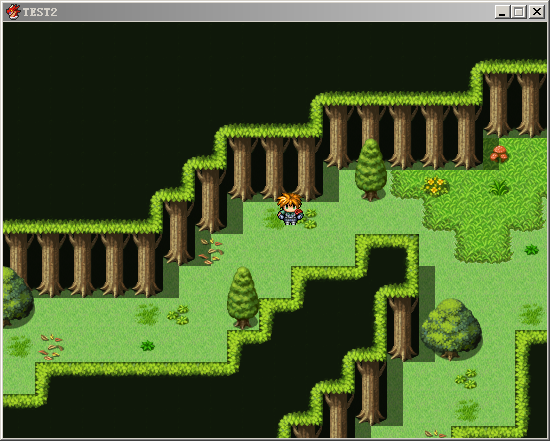
事件里的移动路线里的各种移动指令将只会令事件移动一定像素(不是一整格),移动像素量是在事件设置里面的移动速度。另外为了移动频率需要设置成最大来保证事件移动的流畅。
这脚本其实是去年完成的囧 |
评分
-
查看全部评分
|




 写轮眼
写轮眼
 发表于 2014-6-11 22:21:22


 提升卡
提升卡 沉默号角
沉默号角 喧嚣号角
喧嚣号角 变色卡
变色卡 升龙剑
升龙剑
 感觉很强大的脚本