查看: 2546|回复: 4

[已经解决] 怎么用脚本修改菜单命令窗口的高度?

[复制链接]
梦石
0
星屑
99
在线时间
114 小时
注册时间
2012-7-23
回帖
29
发表于 2014-8-1 09:04:50 | 显示全部楼层 |阅读模式

加入我们,或者,欢迎回来。

您需要 登录 才可以下载或查看,没有账号?注册会员

×
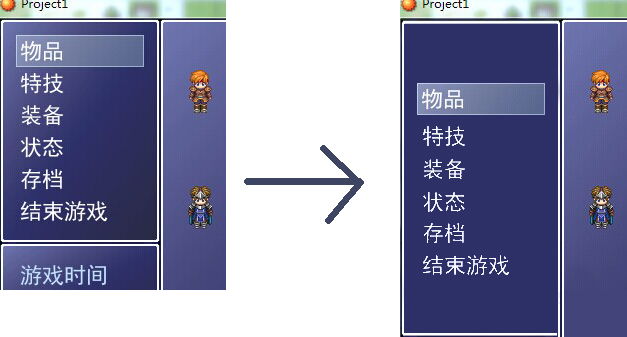
RT,脚本废快哭了_(:з」∠)_,,改个菜单折腾了一整天,别的都差不多了,就这个实在弄不出来。
默认脚本是用命令个数决定高度的,我想其他命令窗口不改,只把菜单画面的那个上下加长一点,指令居中
大概是这种感觉→ 1.jpg
求指点_(:з」∠)_
梦石
0
星屑
68
在线时间
585 小时
注册时间
2013-5-25
回帖
1484
发表于 2014-8-1 09:13:54 | 显示全部楼层
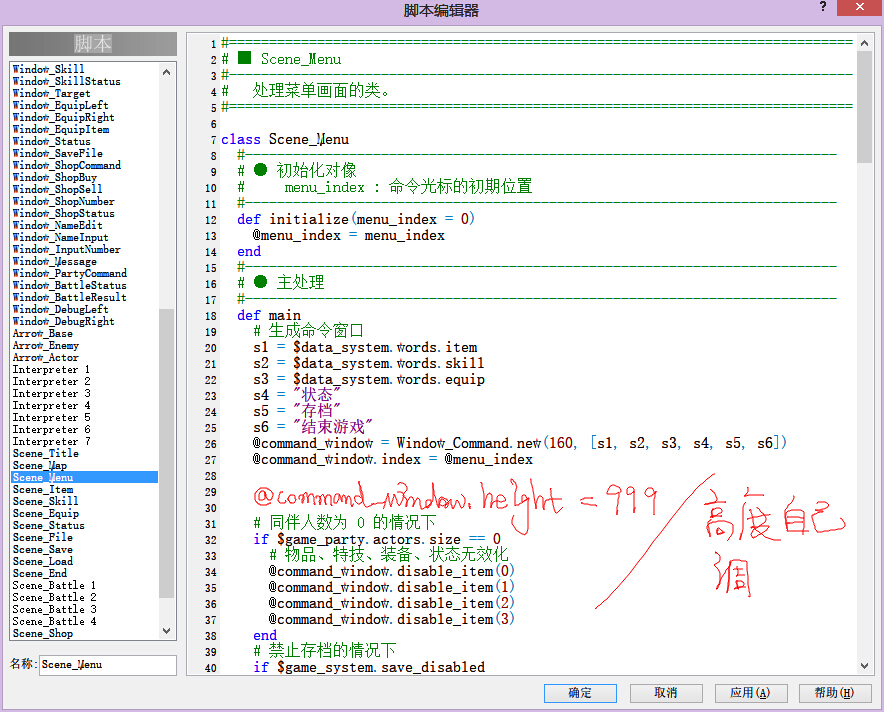
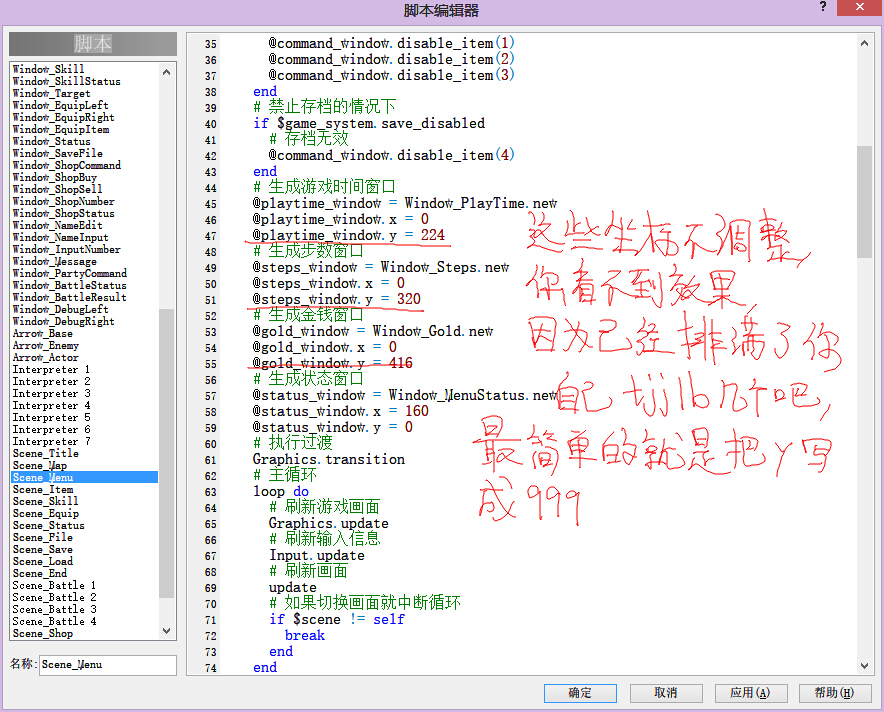
QQ截图20140801091142.jpg
QQ截图20140801091403.jpg

点评

谢谢!!没想到这么快就有回帖……窗口布局解决了,不过还是不知道怎么把内容居中诶……试了半天还是有BUG,继续求教_(:з」∠)_  发表于 2014-8-1 13:41
回复

使用道具 举报

梦石
0
星屑
170
在线时间
809 小时
注册时间
2013-8-23
回帖
773

开拓者

发表于 2014-8-1 09:14:21 | 显示全部楼层
建立一个新的窗口,def initialize(width, commands)
super( )
确定窗口大小坐标

然后调整项目坐标
最后调整光标坐标

点评

谢谢!不过这对我来说太进阶了OTL,,,求把葫芦再画详细点,我看我能不能描个瓢  发表于 2014-8-1 13:44
遗失的签名。。。
回复

使用道具 举报

梦石
0
星屑
68
在线时间
585 小时
注册时间
2013-5-25
回帖
1484
发表于 2014-8-1 14:05:21 | 显示全部楼层
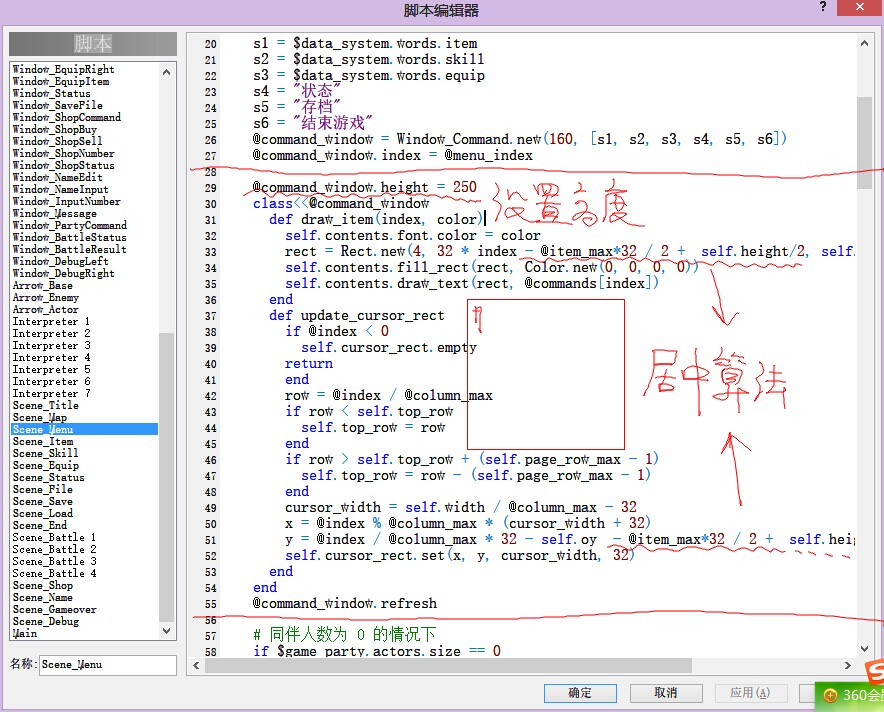
Window_Command 本身不允许居中显示
  1.     @command_window.height = 250
  2.     class<<@command_window
  3.       def draw_item(index, color)
  4.         self.contents.font.color = color
  5.         rect = Rect.new(4, 32 * index - @item_max*32 / 2 +  self.height/2, self.contents.width - 8, 32)
  6.         self.contents.fill_rect(rect, Color.new(0, 0, 0, 0))
  7.         self.contents.draw_text(rect, @commands[index])
  8.       end
  9.       def update_cursor_rect
  10.         if @index < 0
  11.           self.cursor_rect.empty
  12.         return
  13.         end
  14.         row = @index / @column_max
  15.         if row < self.top_row
  16.           self.top_row = row
  17.         end
  18.         if row > self.top_row + (self.page_row_max - 1)
  19.           self.top_row = row - (self.page_row_max - 1)
  20.         end
  21.         cursor_width = self.width / @column_max - 32
  22.         x = @index % @column_max * (cursor_width + 32)
  23.         y = @index / @column_max * 32 - self.oy  - @item_max*32 / 2 +  self.height/2
  24.         self.cursor_rect.set(x, y, cursor_width, 32)
  25.       end
  26.     end
  27.     @command_window.refresh
复制代码
QQ图片20140801140517.jpg

点评

辛苦!不过最后一行的命令看不见了,而且在存档或退出界面返回菜单的会有一瞬间光标向上偏移,在新工程里也是一样,怎么破……  发表于 2014-8-1 17:07
回复

使用道具 举报

梦石
0
星屑
68
在线时间
585 小时
注册时间
2013-5-25
回帖
1484
发表于 2014-8-1 17:17:41 | 显示全部楼层
上下各开一个洞
  1.     @command_window.height = 350
  2.     @command_window.contents = Bitmap.new(@command_window.width-32,@command_window.height-32)
  3.     class<<@command_window
  4.       def draw_item(index, color)
  5.         self.contents.font.color = color
  6.         rect = Rect.new(4, 32 * index - @item_max*32 / 2 +  self.height/2-16, self.contents.width - 8, 32)
  7.         self.contents.fill_rect(rect, Color.new(0, 0, 0, 0))
  8.         self.contents.draw_text(rect, @commands[index])
  9.       end
  10.       def update_cursor_rect
  11.         if @index < 0
  12.           self.cursor_rect.empty
  13.         return
  14.         end
  15.         row = @index / @column_max
  16.         if row < self.top_row
  17.           self.top_row = row
  18.         end
  19.         if row > self.top_row + (self.page_row_max - 1)
  20.           self.top_row = row - (self.page_row_max - 1)
  21.         end
  22.         cursor_width = self.width / @column_max - 32
  23.         x = @index % @column_max * (cursor_width + 32)
  24.         y = @index / @column_max * 32 - self.oy  - @item_max*32 / 2 +  self.height/2 - 16
  25.         self.cursor_rect.set(x, y, cursor_width, 32)
  26.       end
  27.     end
  28.     @command_window.refresh
  29.     @command_window.update_cursor_rect
复制代码

点评

谢谢!ok了!等级太低无法塞糖,总之大感谢!  发表于 2014-8-1 18:24

评分

参与人数 1梦石 +1 收起 理由
myownroc + 1 认可答案

查看全部评分

回复

使用道具 举报

您需要登录后才可以回帖 登录 | 注册会员

本版积分规则

Powered by Discuz! X5.0 © 2001-2026 Discuz! Team.

在本版发帖返回顶部