| 赞 | 168 |
| VIP | |
| 好人卡 | |
| 积分 | 229 |
| 经验 | |
| 最后登录 | 2025-4-1 |
| 在线时间 | 8598 小时 |
- 梦石
- 0
- 星屑
- 22879
- 在线时间
- 8598 小时
- 注册时间
- 2011-12-31
- 回帖
- 3270
|
 发表于 2014-8-9 14:09:33
|
显示全部楼层
发表于 2014-8-9 14:09:33
|
显示全部楼层
本帖最后由 tseyik 于 2014-8-9 14:52 编辑
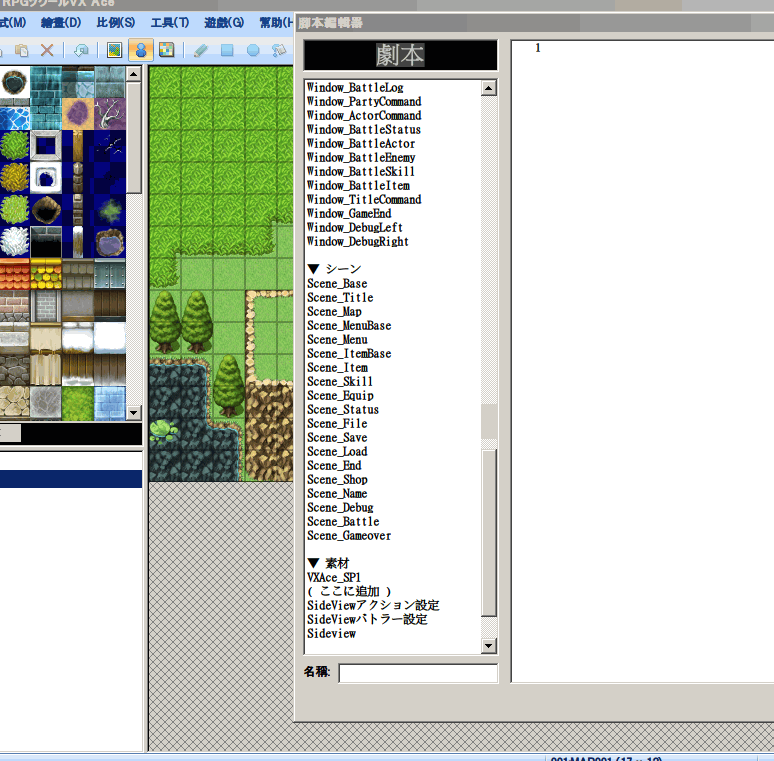
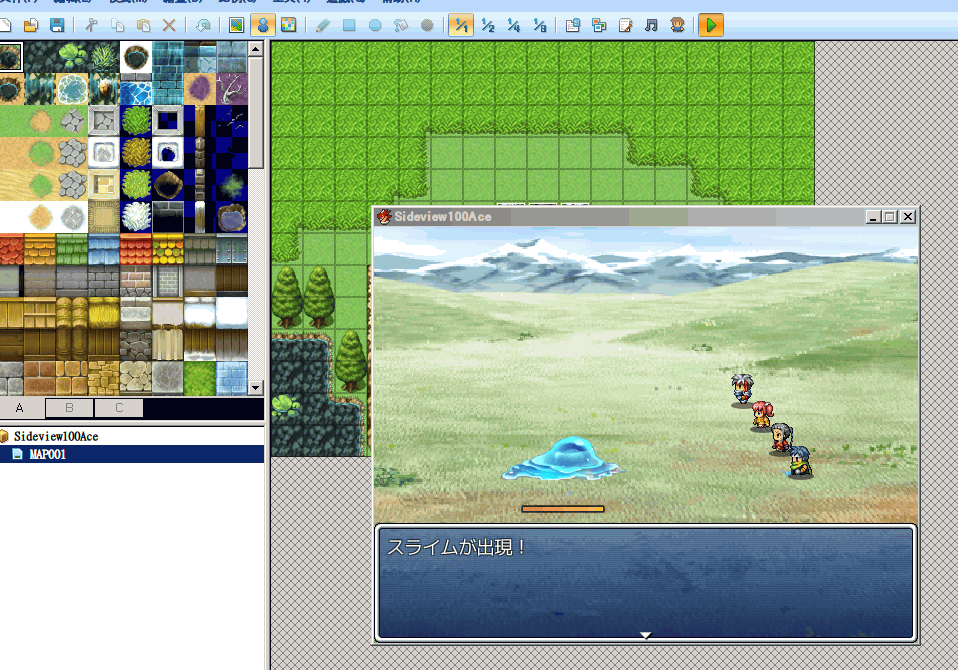
gauge_bg.png導入到Graphics\System

[pre lang="ruby" line="1"]#==============================================================================
# ■ 敵のHP表示
# @version 0.9 14/06/23
# @author さば缶
#------------------------------------------------------------------------------
# 敵キャラの状態を表示します
# 表示したくないステートは、メモ欄に
# <非表示>
# と入力してください
#==============================================================================
module Saba
module SesUi
# テキストカラーやHPバーカラーにシステムカラーを使う場合、true に設定します。
USE_SYSTEM_COLOR = true
# HP表示ボックスのy座標です。
CONTAINER_Y = 265
# 基準点の座標を敵の上部にする場合true に設定します
# デフォルトは敵の下部の座標
# その場合、↑の CONTAINER_Y の値分だけ下に表示されます
ANCHOR_TOP = false
# これ以上、上には表示されません
MIN_POS_Y = 60
# HPのy座標を敵の座標にあわせて変化させる場合true
# その場合、↑の CONTAINER_Y の値分だけ敵の下に表示されます
RELATIVE_POS = false
# これ以上、下には表示されません
MAX_POS_Y = 270
#--------------------------------------------------------------------------
# ● テキスト関係
#--------------------------------------------------------------------------
# HPテキストを表示する場合true、表示しない場合false
SHOW_HP_TEXT = false
# HPラベルのテキストです。
LABEL = "HP"
# HPラベルの色です。システムカラーを使う場合無視されます。
LABEL_COLOR = Color.new(180, 180, 255)
# HPラベルのフォントサイズです。
LABEL_FONT_SIZE = 25
# HPの値の色です。システムカラーを使う場合無視されます。
VALUE_COLOR = Color.new(255, 255, 255)
# HPの値のフォントサイズです。
VALUE_FONT_SIZE = 25
# HPの値の基準点です。0=左揃え 1=中央揃え 2=右揃え
VALUE_ALIGN = 1
# コンテナの中心からの、HPラベルのX座標の相対位置です。
TEXT_OFFSET_X = -35
# コンテナの中心からの、HPラベルのY座標の相対位置です。
TEXT_OFFSET_Y = 0
# HPラベルの横幅です。
TEXT_WIDTH = 40
# コンテナの中心からの、HPの値のX座標の相対位置です。
VALUE_OFFSET_X = -5
# コンテナの中心からの、HPの値のY座標の相対位置です。
VALUE_OFFSET_Y = 0
# HPの値の横幅です。
VALUE_WIDTH = 40
#--------------------------------------------------------------------------
# ● HP MPバー関係
#--------------------------------------------------------------------------
# HPバーを表示する場合true、表示しない場合false
SHOW_HP_BAR = true
# MPバーを表示する場合true、表示しない場合false
SHOW_MP_BAR = false
# 最大MPが0の敵のMPバーを表示する場合true、表示しない場合false
SHOW_MMP0_MP_BAR = false
# MPバーの座標
MP_OFFSET_Y = 9
# 背景に画像を使う場合 true に設定します。
# true の場合、Graphics/System/gauge_bg.png が使われます。
USE_BACKGROUND_IMAGE = true
BACKGROUND_IMAGE_FILE = "gauge_bg"
# 背景画像の、左端からゲージ本体までの幅です。
MARGIN_LEFT = 3
# 背景画像の、右端からゲージ本体までの幅です。
MARGIN_RIGHT = 3
# 背景画像の y の相対値です。
BG_OFFSET_Y = -3
# Z深度です。この値が大きいほど、手前に表示されます。
Z_DEPTH = 10
# HPバーの背景色です。システムカラーを使う場合無視されます。
BAR_BG_COLOR = Color.new(50, 50, 50, 70)
BAR_BORDER_COLOR = Color.new(0, 0, 0)
# HPバーの前景色です。システムカラーを使う場合無視されます。
BAR_FG_COLOR_1 = Color.new(155, 110, 30)
# HPバーの前景色です。システムカラーを使う場合無視されます。
BAR_FG_COLOR_2 = Color.new(255, 200, 120)
# MPバーの前景色です。システムカラーを使う場合無視されます。
BAR_FG_MP_COLOR_1 = Color.new(155, 110, 30)
# MPバーの前景色です。システムカラーを使う場合無視されます。
BAR_FG_MP_COLOR_2 = Color.new(255, 200, 120)
# コンテナの中心からの、HPバーのY座標の相対位置です。
BAR_OFFSET_Y = 15
# HPバーの横幅です。
BAR_WIDTH = 80
# HPバーの高さです。
BAR_HEIGHT = 4
# HPバーの最低の長さです。HPが1でも最低この長さが表示されます。
BAR_MIN_WIDTH = 2
# バーが重なっていた場合にずらす y の値です。
SHIFT_Y = -15
#--------------------------------------------------------------------------
# ● ステート関係
#--------------------------------------------------------------------------
# ステートが2ページ以上にわたるとき、それが切り替わるフレーム数
STATE_PAGE_CHANGE_INTERVAL = 60
# ステートを表示する場合true、表示しない場合false
SHOW_STATE = true
# ステートアイコンの最大表示数です。
MAX_NUM_STATE = 4
# コンテナの中心からの、ステートのX座標の相対位置です。
STATE_OFFSET_X = -42
# コンテナの中心からの、ステートのY座標の相対位置です。
STATE_OFFSET_Y = -11
end
module SesSys
# この文字列を敵のメモ欄に入れると、その敵のHPが表示されなくなります。
HIDE_HP_MARKER = "<HIDE_HP>"
def define_note?(item, name)
return false if item == nil
return item.note.include?(HIDE_HP_MARKER)
end
end
end
#==============================================================================
# ここから実装です。
#==============================================================================
$imported = {} if $imported == nil
$imported["ShowEnemyStatus"] = true
class Game_Temp
#--------------------------------------------------------------------------
# ● 公開インスタンス変数
#--------------------------------------------------------------------------
attr_accessor :saba_lock_hp_view
#--------------------------------------------------------------------------
# ● オブジェクト初期化
#--------------------------------------------------------------------------
alias saba_enemyhp_initialize initialize
def initialize
saba_enemyhp_initialize
@saba_lock_hp_view = false
end
end
class Window_BattleLog
#--------------------------------------------------------------------------
# ● クリティカルヒットの表示
#--------------------------------------------------------------------------
alias saba_enemyhp_display_critical display_critical
def display_critical(target, item)
$game_temp.saba_lock_hp_view = true if target.result.critical
saba_enemyhp_display_critical(target, item)
$game_temp.saba_lock_hp_view = false
end
end
class Sprite_EnemyStatus < Sprite_Base
include Saba::SesSys
include Saba::SesUi
WLH = 24 # 行の高さ基準値 (Window Line Height)
#--------------------------------------------------------------------------
# ● オブジェクト初期化
# viewport : ビューポート
#--------------------------------------------------------------------------
def initialize(viewport, enemy_sprites)
super(viewport)
@enemy_sprites = enemy_sprites
@page_change_wait = 0
@page_count = 0
self.bitmap = Bitmap.new(Graphics.width, Graphics.height)
self.bitmap.font.size = 25
@windowskin = Cache.system("Window")
end
#--------------------------------------------------------------------------
# ● 使用したリソースを解放します。
#--------------------------------------------------------------------------
def dispose
self.bitmap.dispose
super
end
#--------------------------------------------------------------------------
# ● ステータス情報を更新します。
#--------------------------------------------------------------------------
def update
super
return if $game_temp.saba_lock_hp_view
if no_change?
@page_change_wait += 1
return if @page_change_wait < STATE_PAGE_CHANGE_INTERVAL
@page_change_wait = 0
@page_count += 1
else
@page_change_wait = 0
end
save_enemy_status
self.bitmap.clear
draw_status
end
#--------------------------------------------------------------------------
# ● ステートのページ数取得
#--------------------------------------------------------------------------
def state_page_count
n = 1
@enemy_sprites.size.times do |i|
n = [(@enemy_states.size + @enemy_buff_icons.size) / MAX_NUM_STATE, n].max
end
return n
end
#--------------------------------------------------------------------------
# ● 敵のHPに変化があったかどうかを調べます。毎回描画するのを防ぐためです。
# @return 変化があった場合 true、なかった場合 false
#--------------------------------------------------------------------------
def no_change?
return false if @enemy_hps == nil
@enemy_sprites.size.times do |i|
enemy = @enemy_sprites.battler
return false unless @enemy_hps == enemy.hp
return false unless @enemy_mps == enemy.mp
return false unless @enemy_exists == enemy.exist?
return false unless @enemy_states == enemy.states
return false unless @enemy_buff_icons == enemy.buff_icons
end
return true
end
#--------------------------------------------------------------------------
# ● 敵のHPと状態を覚えておきます。
#--------------------------------------------------------------------------
def save_enemy_status
@enemy_hps ||= []
@enemy_mps ||= []
@enemy_exists ||= []
@enemy_states ||= []
@enemy_buff_icons ||= []
@enemy_sprites.size.times do |i|
enemy = @enemy_sprites.battler
@enemy_hps = enemy.hp
@enemy_mps = enemy.mp
@enemy_exists = enemy.exist?
@enemy_states = enemy.states
@enemy_buff_icons = enemy.buff_icons
end
end
#--------------------------------------------------------------------------
# ● ステータス情報を描画します。
#--------------------------------------------------------------------------
def draw_status
old_x = 0
can_shift = false
enemies = @enemy_sprites.clone.sort{|a, b| a.x <=> b.x}
enemies.size.times do |index|
enemy_sprite = enemies[index]
next_enemy = enemies[index + 1]
next_enemy_x = next_enemy == nil ? 1000 : next_enemy.x
enemy = enemy_sprite.battler
if (! enemy.exist?) || enemy.dead?
old_x = enemy_sprite.x
can_shift = ! can_shift
next
end
next if define_note?(enemy.enemy, HIDE_HP_MARKER)
shift = false
if SHOW_HP_BAR || SHOW_MP_BAR
shift = draw_hp_mp_bar(enemy_sprite, old_x, next_enemy_x, can_shift)
end
if SHOW_STATE
draw_state(enemy_sprite, shift)
end
if SHOW_HP_TEXT
draw_hp_label(enemy_sprite)
draw_hp_value(enemy_sprite)
end
old_x = enemy_sprite.x
can_shift = ! can_shift
end
end
def container_y(enemy_sprite)
if RELATIVE_POS
return [CONTAINER_Y + enemy_sprite.y, MAX_POS_Y].min
elsif ANCHOR_TOP
return [CONTAINER_Y + enemy_sprite.y - enemy_sprite.height, MIN_POS_Y].max
else
return CONTAINER_Y
end
end
#--------------------------------------------------------------------------
# ● 指定のエネミーのHPラベルを描画します。
# Sprite enemy_sprite : HPラベルを描画するエネミースプライト
#--------------------------------------------------------------------------
def draw_hp_label(enemy_sprite)
x = enemy_sprite.x
y = container_y(enemy_sprite)
offset_x = Saba::SesUi::TEXT_OFFSET_X
offset_y = Saba::SesUi::TEXT_OFFSET_Y
x += offset_x
y += offset_y
width = Saba::SesUi::TEXT_WIDTH
self.bitmap.font.size = Saba::SesUi::LABEL_FONT_SIZE
self.bitmap.font.color = label_color
label = Saba::SesUi::LABEL
self.bitmap.draw_text(x, y, width, WLH, label)
end
#--------------------------------------------------------------------------
# ● 指定のエネミーのHPの値を描画します。
# Sprite enemy_sprite : HPの値を描画するエネミースプライト
#--------------------------------------------------------------------------
def draw_hp_value(enemy_sprite)
x = enemy_sprite.x
y = container_y(enemy_sprite)
offset_x = Saba::SesUi::VALUE_OFFSET_X
offset_y = Saba::SesUi::VALUE_OFFSET_Y
x += offset_x
y += offset_y
width = Saba::SesUi::VALUE_WIDTH
self.bitmap.font.size = VALUE_FONT_SIZE
self.bitmap.font.color = value_color
enemy = enemy_sprite.battler
align = Saba::SesUi::VALUE_ALIGN
self.bitmap.draw_text(x, y, width, WLH, enemy.hp.to_s, align)
end
#--------------------------------------------------------------------------
# ● 指定のエネミーのHPとMPのバーを描画します。
# Sprite enemy_sprite : HPのバーを描画するエネミースプライト
#--------------------------------------------------------------------------
def draw_hp_mp_bar(enemy_sprite, old_x, next_x, can_shift)
x = enemy_sprite.x
y = container_y(enemy_sprite)
width = BAR_WIDTH
offset_x = -width / 2
offset_y = BAR_OFFSET_Y
if can_shift
if USE_BACKGROUND_IMAGE
margin = MARGIN_LEFT + MARGIN_RIGHT
else
margin = 4
end
if x + width + margin > next_x || old_x + width + margin > x
y += SHIFT_Y
shift = true
end
else
shift = false
end
x += offset_x
y += offset_y
height = BAR_HEIGHT
enemy = enemy_sprite.battler
if SHOW_HP_BAR
draw_background(x, y, width, height)
width = width * enemy.hp / enemy.mhp
width = BAR_MIN_WIDTH if width < BAR_MIN_WIDTH
self.bitmap.gradient_fill_rect(x, y, width, height, hp_gauge_color1, hp_gauge_color2)
end
if SHOW_MP_BAR
if enemy.mmp == 0 && ! SHOW_MMP0_MP_BAR
return shift
end
y += MP_OFFSET_Y
width = BAR_WIDTH
draw_background(x, y, width, height)
if enemy.mmp > 0
width = width * enemy.mp / enemy.mmp
else
width = 0
end
self.bitmap.gradient_fill_rect(x, y, width, height, mp_gauge_color1, mp_gauge_color2)
end
return shift
end
def draw_state(enemy_sprite, shift)
x = enemy_sprite.x
y = container_y(enemy_sprite)
offset_x = Saba::SesUi::STATE_OFFSET_X
offset_y = Saba::SesUi::STATE_OFFSET_Y
x += offset_x
y += offset_y
enemy_battler = enemy_sprite.battler
max_page = (enemy_battler.states.size + enemy_battler.buff_icons.size-1) / MAX_NUM_STATE + 1
max_page = [max_page, 1].max
page = @page_count % max_page
start = page * MAX_NUM_STATE
index = 0
count = 0
y += SHIFT_Y if shift
for state in enemy_battler.states
next if state.saba_invisible?
return if count == MAX_NUM_STATE
if index < start
index += 1
next
end
draw_icon(state.icon_index, x + 21 * count, y)
count += 1
end
for buff in enemy_battler.buff_icons
return if count == MAX_NUM_STATE
if index < start
index += 1
next
end
draw_icon(buff, x + 21 * count, y)
count += 1
end
end
#--------------------------------------------------------------------------
# ● アイコンの描画
# icon_index : アイコン番号
# x : 描画先 X 座標
# y : 描画先 Y 座標
# enabled : 有効フラグ。false のとき半透明で描画
#--------------------------------------------------------------------------
def draw_icon(icon_index, x, y, enabled = true)
bitmap = Cache.system("Iconset")
rect = Rect.new(icon_index % 16 * 24, icon_index / 16 * 24, 24, 24)
self.bitmap.blt(x, y, bitmap, rect, enabled ? 255 : 128)
end
def draw_background(x, y, width, height)
if Saba::SesUi::USE_BACKGROUND_IMAGE
margin_l = Saba::SesUi::MARGIN_LEFT
margin_r = Saba::SesUi::MARGIN_RIGHT
x -= margin_l
y += Saba::SesUi::BG_OFFSET_Y
image = Cache.system(Saba::SesUi::BACKGROUND_IMAGE_FILE)
self.bitmap.blt(x, y, image, Rect.new(0, 0, margin_l, image.height))
self.bitmap.stretch_blt(Rect.new(x + margin_l, y, width, image.height), image, Rect.new(margin_l, 0, image.width - margin_l - margin_r, image.height))
self.bitmap.blt(x + width + margin_l, y, image, Rect.new(image.width - margin_r, 0, margin_r, image.height))
else
color = Saba::SesUi::BAR_BORDER_COLOR
self.bitmap.fill_rect(x - 1, y - 1, width + 2, height + 2, color)
color = Saba::SesUi::BAR_BG_COLOR
self.bitmap.fill_rect(x, y, width, height, color)
end
end
#--------------------------------------------------------------------------
# ● HP ゲージの色 1 を返します。
#--------------------------------------------------------------------------
def hp_gauge_color1
if USE_SYSTEM_COLOR
return text_color(20)
else
return BAR_FG_COLOR_1
end
end
#--------------------------------------------------------------------------
# ● HP ゲージの色 2 を返します。
#--------------------------------------------------------------------------
def hp_gauge_color2
if USE_SYSTEM_COLOR
return text_color(21)
else
return BAR_FG_COLOR_2
end
end
#--------------------------------------------------------------------------
# ● MP ゲージの色 1 を返します。
#--------------------------------------------------------------------------
def mp_gauge_color1
if USE_SYSTEM_COLOR
return text_color(22)
else
return BAR_FG_MP_COLOR_1
end
end
#--------------------------------------------------------------------------
# ● MP ゲージの色 2 を返します。
#--------------------------------------------------------------------------
def mp_gauge_color2
if USE_SYSTEM_COLOR
return text_color(23)
else
return BAR_FG_MP_COLOR_2
end
end
#--------------------------------------------------------------------------
# ● HPラベルの文字色を返します。
#--------------------------------------------------------------------------
def label_color
if Saba::SesUi::USE_SYSTEM_COLOR
return text_color(16)
else
return Saba::SesUi::LABEL_COLOR
end
end
#--------------------------------------------------------------------------
# ● HPの値の文字色を返します。
#--------------------------------------------------------------------------
def value_color
if Saba::SesUi::USE_SYSTEM_COLOR
return text_color(0)
else
return Saba::SesUi::VALUE_COLOR
end
end
#--------------------------------------------------------------------------
# ● 文字色を返します。
# n : 文字色番号 (0~31)
#--------------------------------------------------------------------------
def text_color(n)
x = 64 + (n % 8) * 8
y = 96 + (n / 8) * 8
return @windowskin.get_pixel(x, y)
end
end
#==============================================================================
# Sprite_EnemyStatusを使うように設定
#==============================================================================
class Spriteset_Battle
#--------------------------------------------------------------------------
# ● エネミーステータススプライトを作成します。
# createEnemies と update の間に呼ばれる必要があるため、
# タイマー作成時に一緒に作成しています。
#--------------------------------------------------------------------------
alias create_timer_SabaEnemyStatus create_timer
def create_timer
@saba_enemyStatusSprite = Sprite_EnemyStatus.new(@saba_enemyStatusViewport, @enemy_sprites)
create_timer_SabaEnemyStatus
end
#--------------------------------------------------------------------------
# ● エネミーステータススプライトを破棄します。
# 同じくタイマー破棄時に一緒に破棄しています。
#--------------------------------------------------------------------------
alias dispose_timer_SabaEnemyStatus dispose_timer
def dispose_timer
@saba_enemyStatusSprite.dispose
dispose_timer_SabaEnemyStatus
end
#--------------------------------------------------------------------------
# ● エネミーステータスビューポートを作成します。
#--------------------------------------------------------------------------
alias create_viewports_SabaEnemyStatus create_viewports
def create_viewports
@saba_enemyStatusViewport = Viewport.new(0, 0, Graphics.width, Graphics.height)
@saba_enemyStatusViewport.z = Saba::SesUi::Z_DEPTH
create_viewports_SabaEnemyStatus
end
#--------------------------------------------------------------------------
# ● エネミーステータスビューポートを破棄します。
#--------------------------------------------------------------------------
alias dispose_viewports_SabaEnemyStatus dispose_viewports
def dispose_viewports
dispose_viewports_SabaEnemyStatus
@saba_enemyStatusViewport.dispose
end
#--------------------------------------------------------------------------
# ● エネミーステータスを更新します。
#--------------------------------------------------------------------------
alias update_viewports_SabaEnemyStatus update_viewports
def update_viewports
update_viewports_SabaEnemyStatus
@saba_enemyStatusSprite.update
end
#--------------------------------------------------------------------------
# ● ビューポートの更新
#--------------------------------------------------------------------------
alias saba_hp_update_viewports update_viewports
def update_viewports
saba_hp_update_viewports
@saba_enemyStatusSprite.ox = $game_troop.screen.shake
end
end
class RPG::State
def saba_invisible?
@saba_invisible ||= self.note.include?("<非表示>")
end
end[/pre] |
评分
-
查看全部评分
|




 写轮眼
写轮眼
 ……RT 求一个这样的脚本

 提升卡
提升卡 沉默号角
沉默号角 喧嚣号角
喧嚣号角 变色卡
变色卡 升龙剑
升龙剑


