加入我们,或者,欢迎回来。
您需要 登录 才可以下载或查看,没有账号?注册会员
×
本帖最后由 kuerlulu 于 2014-10-1 18:22 编辑
你问我为什么不发到素材分享区, 因为那里触手太多了麻麻怕我被粗掉>///<
再说了重点是代码嘛【啥
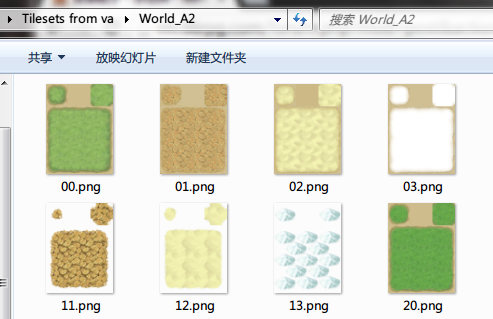
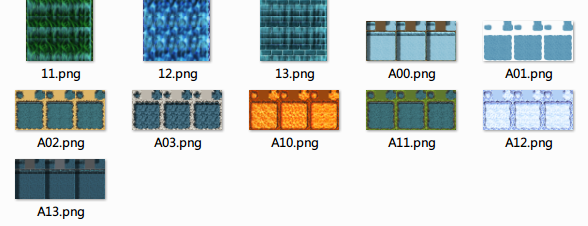
 Tilesets from va 1.rar
(2.99 MB, 下载次数: 132)
Tilesets form va 2.rar
(2.67 MB, 下载次数: 120)
别问我为什么少了一些图
CACAO 的 save_png (手抽把作者声明删了)- class Bitmap
- #--------------------------------------------------------------------------
- # ● 保存成 png 格式
- # filename : 文件名
- # alpha : 透明通道有效
- #--------------------------------------------------------------------------
- def save_png(filename, alpha = true)
- sgnt = "\x89PNG\r\n\x1a\n"
- ihdr = _chunk('IHDR', [width,height,8,(alpha ? 6 : 2),0,0,0].pack('N2C5'))
- data = []
- height.times do |y|
- data << 0
- width.times do |x|
- color = self.get_pixel(x, y)
- data << color.red << color.green << color.blue
- data << color.alpha if alpha
- end
- end
- idat = _chunk('IDAT', Zlib::Deflate.deflate(data.pack('C*')))
- iend = _chunk('IEND', "")
- File.open(filename, 'wb') do |file|
- file.write(sgnt)
- file.write(ihdr)
- file.write(idat)
- file.write(iend)
- end
- end
- private
- #--------------------------------------------------------------------------
- # ● チャンクの作成
- # name : チャンク名
- # data : チャンクデータ
- #--------------------------------------------------------------------------
- def _chunk(name, data)
- return [data.size, name, data, Zlib.crc32(name + data)].pack('NA4A*N')
- end
- end
主代码- def make_tileset(b)
- ani = b.width == 64 ? false : true
- if ani
- as = Bitmap.new(b.width*3/2, 128) # nx4
- for i in 0...(b.width / 64)
- c = Bitmap.new 64, 96 # 2x3
- a = Bitmap.new 96, 128 # 3x4
- c.blt(0, 0, b, Rect.new(i * 64, 0, 64, 96))
- a.blt(0, 0, c, Rect.new(0, 0, 32, 32)) # A
- a.blt(64, 0, c, Rect.new(32, 0, 32, 32)) # C
- a.blt(0, 32, c, Rect.new(0, 32, 16, 16)) # ↖
- a.blt(80, 32, c, Rect.new(48, 32, 16, 16)) # ↗
- a.blt(0, 112, c, Rect.new(0, 80, 16, 16)) # ↙
- a.blt(80, 112, c, Rect.new(48, 80, 16, 16)) # ↘
- a.blt(16, 32, c, Rect.new(16, 32, 32, 16)) # D^
- a.blt(48, 32, c, Rect.new(16, 32, 32, 16)) # D ^
- a.blt(0, 48, c, Rect.new(0, 48, 16, 32)) # D<
- a.blt(0, 80, c, Rect.new(0, 48, 16, 32)) # D <
- a.blt(80, 48, c, Rect.new(48, 48, 16, 32)) # D>
- a.blt(80, 80, c, Rect.new(48, 48, 16, 32)) # D >
- a.blt(16, 112, c, Rect.new(16, 80, 32, 16)) # D_
- a.blt(48, 112, c, Rect.new(16, 80, 32, 16)) # D _
- a.blt(16, 48, c, Rect.new(16, 48, 32, 32)) # D<^
- a.blt(48, 48, c, Rect.new(16, 48, 32, 32)) # D^>
- a.blt(48, 80, c, Rect.new(16, 48, 32, 32)) # D_>
- a.blt(16, 80, c, Rect.new(16, 48, 32, 32)) # D<_
- a.fill_rect(32, 0, 32, 32, c.get_pixel(0, 0))# B
- as.blt(i * 96, 0, a, a.rect)
- end
- return as
- else
- c = b
- a = Bitmap.new 96, 128 # 3x4
- a.blt(0, 0, c, Rect.new(0, 0, 32, 32)) # A
- a.blt(64, 0, c, Rect.new(32, 0, 32, 32)) # C
- a.blt(0, 32, c, Rect.new(0, 32, 16, 16)) # ↖
- a.blt(80, 32, c, Rect.new(48, 32, 16, 16)) # ↗
- a.blt(0, 112, c, Rect.new(0, 80, 16, 16)) # ↙
- a.blt(80, 112, c, Rect.new(48, 80, 16, 16)) # ↘
- a.blt(16, 32, c, Rect.new(16, 32, 32, 16)) # D^
- a.blt(48, 32, c, Rect.new(16, 32, 32, 16)) # D ^
- a.blt(0, 48, c, Rect.new(0, 48, 16, 32)) # D<
- a.blt(0, 80, c, Rect.new(0, 48, 16, 32)) # D <
- a.blt(80, 48, c, Rect.new(48, 48, 16, 32)) # D>
- a.blt(80, 80, c, Rect.new(48, 48, 16, 32)) # D >
- a.blt(16, 112, c, Rect.new(16, 80, 32, 16)) # D_
- a.blt(48, 112, c, Rect.new(16, 80, 32, 16)) # D _
- a.blt(16, 48, c, Rect.new(16, 48, 32, 32)) # D<^
- a.blt(48, 48, c, Rect.new(16, 48, 32, 32)) # D^>
- a.blt(48, 80, c, Rect.new(16, 48, 32, 32)) # D_>
- a.blt(16, 80, c, Rect.new(16, 48, 32, 32)) # D<_
- a.fill_rect(32, 0, 32, 32, c.get_pixel(0, 0))# B
- return a
- end
- end
- def conv_a_tileset(path, ani = false)
- filename = File.basename(path, ".*")
- Dir.mkdir(filename) unless FileTest.directory?(filename)
- b = Bitmap.new path
- s = Sprite.new # 一听雪碧
- if ani
- for x in 0...2
- for y in 0...4
- c = Bitmap.new 192, 96 # 3x2x3
- c.blt(0, 0, b, Rect.new(x * 256, y * 96, 192, 96))
- a = make_tileset(c)
- s.bitmap = a
- s.update
- Graphics.update
- a.save_png("#{filename}/A#{x}#{y}.png")
- c.clear
- c = Bitmap.new 64, 96 # 2x3
- c.blt(0, 0, b, Rect.new(x * 256 + 192, y * 96, 64, 96))
- a = make_tileset(c)
- s.bitmap = a
- s.update
- Graphics.update
- a.save_png("#{filename}/#{x}#{y}.png")
- c.clear
- end
- end
- else
- for x in 0...8
- for y in 0...4
- c = Bitmap.new 64, 96 # 2x3
- c.blt(0, 0, b, Rect.new(x * 64, y * 96, 64, 96))
- a = make_tileset(c)
- s.bitmap = a
- s.update
- Graphics.update
- a.save_png("#{filename}/#{x}#{y}.png")
- c.clear
- end
- end
- end
- end
- def conv_tileset(path)
- filename = File.basename(path, ".*")
- Dir.mkdir(filename) unless FileTest.directory?(filename)
- b = Bitmap.new path
- a = Bitmap.new 256, 1024
- a.blt(0, 0, b, Rect.new(0, 0, 256, 512))
- a.blt(0, 512, b, Rect.new(256, 0, 256, 512))
- a.save_png("#{filename}/#{filename}.png")
- end
- Dir["./Tilesets/*.png"].each do |path|
- next if path.include?('A5') || path.include?('A4') || path.include?('A3')
- if path.include?('A')
- conv_a_tileset(path, path.include?('A1'))
- else
- conv_tileset(path)
- end
- end
- exit
|
 -azogi:





 写轮眼


 发表于 2014-10-1 18:18:06

 提升卡
 沉默号角
 喧嚣号角
 变色卡
 升龙剑


 发表于 2014-10-1 18:20:45


