| 赞 | 0 |
| VIP | |
| 好人卡 | |
| 积分 | 1 |
| 经验 | |
| 最后登录 | 2019-4-8 |
| 在线时间 | 60 小时 |
- 梦石
- 0
- 星屑
- 55
- 在线时间
- 60 小时
- 注册时间
- 2014-8-28
- 回帖
- 88
|
加入我们,或者,欢迎回来。
您需要 登录 才可以下载或查看,没有账号?注册会员
×
表示今天使用了一个任务脚本
就是这茬
[pre lang="ruby" line="1"]=begin
--------------------------------------------------------------------------
详尽任务显示界面 v2.1
--------------------------------------------------------------------------
By 叶子
日期与更新
3-29-2006 -v1.0
4-3-2006 -v2.0
-可以改变文字颜色,显示变量,显示图标,显示图片
-大幅简化了编写任务内容的过程,加入自动换行功能
-精简了窗口,使其还可以用作图鉴系统、日记系统等等
4-6-2006 -v2.1
-增加了获得全部任务与删除全部任务命令
-改正通假字,修改了示例任务3
--------------------------------------------------------------------------
顾名思义,就是显示任务资料的界面
任务资料要预先在这里设定好
下载范例工程,能帮助你更快更好地掌握使用方法
--------------------------------------------------------------------------
使用方法:
1、召唤任务显示界面:$scene = Scene_Task.new
可以在事件中的“脚本”指令加入这段东西,又或者修改 Scene_Menu 来增加一个显示
任务的选项。如果是修改 Scene_Menu 增加选项的话,在脚本倒数第30行左右,
把 $scene = Scene_Map.new 修改成 $scene = Scene_Menu.new(任务界面index)
2、设置任务资料
2.1、相关内容解析
所有内容文字必须用双引号括住
名称:任务的名字(显示在左边窗口中),大小为208×32,如果全部为文字的话,
够放九个全角字符
简介:任务的介绍(显示在右边窗口中),宽368,高不限
文字可以自动换行
2.1.1、控制码解析
名称和内容均可用控制码,注意两条反斜线都要打!
\\v[n] 显示n号变量
\\c[n] 改变字体颜色。
n=1~7 时同“显示文章”的\c[n],n=8 时为半透明色,n=9 时为系统色(青色)
\\n 显示i号角色名字
\\i[文件名] 显示图标
\\p[文件名] 显示图片
2.1.2、高级:内嵌表达式
请参考帮助-脚本入门-字符串-内嵌表达式相关内容。
它可以用来在任务的名称和简介那里显示变量。
常用的表达式(注意不要漏了井号和大括号):
#{$game_variables[n]} ——插入n号变量的值
#{$game_party.item_number(n)} ——插入持有n号物品数量
同理还有weapon_number,armor_number
还可以预先定义一个变量,再插入(例子见示例任务3-灵魂线)
2.2、注意事项
2.2.1、括号、逗号和双引号 [ ] , " 必须使用半角符号(英文输入),
引号内的内容则没有关系
2.2.2、单引号 ' 和双引号 " 的区别:
为了不出错误,全部用双引号吧!当然如果你对Ruby很熟悉,那就没所谓了
2.3、开始设置吧!
从107行开始设置任务资料,可以参考示例任务来设置,请仔细阅读附加讲解
3、接受任务
事件里的“脚本”指令输入:get_task(任务ID)
例如 get_task(1) 就是接受1号任务
3.1、获得全部任务
事件里的“脚本”指令输入:get_all_task
这个功能基本上是用来在编写好所有任务资料后测试排版的
4、完成/删除任务
事件里的“脚本”指令输入:finish_task(任务ID)
例如 finish_task(1) 就是完成1号任务
注意:本脚本不负责完成任务后的奖励之类的东西,请自行在事件中判断,
这里的完成任务指的是从任务列表中删去此任务
4.1、删除全部任务
事件里的“脚本”指令输入:finish_all_task
作为获得全部任务的对应功能存在,似乎不会怎么用到
=end
class Scene_Task
# 这里设置任务内容翻页音效
CHANGE_PAGE_SE = "Audio/SE/046-Book01"
end
class Game_Party
#--------------------------------------------------------------------------
# ● 设置任务资料
#--------------------------------------------------------------------------
def get_tasks_info
@tasks_info = []
#-讲解-
# 三个示例任务由浅入深,其实只要看懂第一个就可以使用了。
# 任务的写法多种多样,不限于这三个任务的方法
#----
#-----------------------------
# 示例任务1:沙漠中的五叶花
#-----------------------------
名称 = "\\c[6]沙漠中的五叶花"
#-讲解-
# 注意!脚本编辑器的变色功能并不是非常完善,所以换行后字变黑了,但仍然是字符
# 串的一部分,所以不要忘记在内容最后打一个双引号
# 按回车是强制换行
#----
简介 = "\\c[6]沙漠中的五叶花
\\c[9]任务目标:
获得5朵五叶花,交给西露达
\\c[0]五叶花数目:\\v[1]/5
西露达:
人家等着你的花哦~"
#-讲解-
# 每个任务最后一定要加上:
# @tasks_info[任务ID] = Game_Task.new(名称, 简介)
# 接受任务和完成任务都是用这个任务ID来索引
#----
@tasks_info[1] = Game_Task.new(名称, 简介)
#-----------------------------
# 示例任务2:克萝莉亚的药瓶
#-----------------------------
名称 = "\\c[6]克萝莉亚的药瓶"
#-讲解-
# 这里使用了字符串相加,例如 s = "a" + "b" ,s 就是 "ab"
# 还用了内嵌表达式,$game_party.item_number(38) 就是38号物品的数量
#----
简介 = 名称 + "
\\c[9]任务目标:
问克萝莉亚要一个药瓶,交给西露达
\\c[0]药瓶:#{$game_party.item_number(38)}/1
西露达:
克萝莉亚就在西边的屋子里"
@tasks_info[2] = Game_Task.new(名称, 简介)
#-----------------------------
# 示例任务3:灵魂线
#-----------------------------
#-讲解-
# 这里用了条件判断,当3号变量大于等于1时,加上“完成”字样,同时变色
#----
if $game_variables[3] >= 1
名称 = "\\c[8]灵魂线(完成)"
item = "\\c[8]灵魂线:#{$game_variables[3]}/1 (完成)"
else
名称 = "\\c[2]灵魂线"
item = "\\c[0]灵魂线:#{$game_variables[3]}/1"
end
#-讲解-
# 预先定义变量,用内嵌表达式插入
# 最后用了显示图标
#----
简介 = "#{名称}
\\c[9]任务目标:
找到埋起来的灵魂线,交给克萝莉亚
#{item}
\\c[0]克萝莉亚:
灵魂线就埋在其中一棵树下,给我好好找\\i[046-Skill03]"
@tasks_info[3] = Game_Task.new(名称, 简介)
end
end
#==============================================================================
# ■ Interpreter
#------------------------------------------------------------------------------
# 执行事件命令的解释器。本类在 Game_System 类
# 与 Game_Event 类的内部使用。
#==============================================================================
class Interpreter
#--------------------------------------------------------------------------
# ● 接受任务
#--------------------------------------------------------------------------
def get_task(id)
task = $game_party.tasks_info[id]
return true if (task.nil? or $game_party.current_tasks.include?(task.id))
$game_party.current_tasks.unshift(task.id)
return true
end
#--------------------------------------------------------------------------
# ● 获得全部任务
#--------------------------------------------------------------------------
def get_all_task
# 清空当前任务
$game_party.current_tasks.clear
for task in $game_party.tasks_info
next if task.nil?
$game_party.current_tasks.unshift(task.id)
end
return true
end
#--------------------------------------------------------------------------
# ● 完成/放弃任务
#--------------------------------------------------------------------------
def finish_task(id)
task = $game_party.tasks_info[id]
return true if task.nil?
$game_party.current_tasks.delete(task.id)
return true
end
#--------------------------------------------------------------------------
# ● 删除全部任务
#--------------------------------------------------------------------------
def finish_all_task
$game_party.current_tasks.clear
return true
end
end
#==============================================================================
# ■ Game_Party
#------------------------------------------------------------------------------
# 处理同伴的类。包含金钱以及物品的信息。本类的实例
# 请参考 $game_party。
#==============================================================================
class Game_Party
#--------------------------------------------------------------------------
# ● 定义实例变量
#--------------------------------------------------------------------------
attr_writer :latest_task # 上次查看的任务
#--------------------------------------------------------------------------
# ● 取得任务资料
#--------------------------------------------------------------------------
def tasks_info
if @tasks_info.nil?
get_tasks_info
end
return @tasks_info
end
#--------------------------------------------------------------------------
# ● 取得当前任务
#--------------------------------------------------------------------------
def current_tasks
if @current_tasks.nil?
@current_tasks = []
end
return @current_tasks
end
#--------------------------------------------------------------------------
# ● 上次查看的任务
#--------------------------------------------------------------------------
def latest_task
if !current_tasks.include?(@latest_task)
@latest_task = current_tasks[0]
end
return @latest_task
end
end
#==============================================================================
# ■ Game_Task
#------------------------------------------------------------------------------
# 处理任务的类。包含任务的信息。
#==============================================================================
class Game_Task
attr_accessor :name # 名称
attr_accessor :briefing # 简介
def initialize(name, briefing)
@name = name
@briefing = briefing
end
def height
text = @briefing.clone
x = 0
y = 64
min_y = 0
# 限制文字处理
begin
last_text = text.clone
text.gsub!(/\\[Vv]\[([0-9]+)\]/) { $game_variables[$1.to_i] }
end until text == last_text
text.gsub!(/\\[Nn]\[([0-9]+)\]/) do
$game_actors[$1.to_i] != nil ? $game_actors[$1.to_i].name : ""
end
# 为了方便、将 "\\\\" 变换为 "\000"
text.gsub!(/\\\\/) { "\000" }
# "\C" 变为 "\001"
text.gsub!(/\\[Cc]\[([0-9]+)\]/) { "\001[#{$1}]" }
# "\I" 变为 "\002"
text.gsub!(/\\[Ii]/) { "\002" }
# "\P" 变为 "\003"
text.gsub!(/\\[Pp]/) { "\003" }
# c 获取 1 个字 (如果不能取得文字就循环)
while ((c = text.slice!(/./m)) != nil)
# \\ 的情况下
if c == "\000"
# 还原为本来的文字
c = "\\"
end
# \C[n] 的情况下
if c == "\001"
# 更改文字色
text.sub!(/\[([0-9]+)\]/, "")
# 下面的文字
next
end
# 图标的情况下
if c == "\002"
icon_name = ''
while ((cha = text.slice!(/./m)) != ']')
next if cha == '['
icon_name += cha
end
icon = RPG::Cache.icon(icon_name)
if x + icon.width > 368
x = 0
y += [32, min_y].max
min_y = 0
end
x += 28
next
end
# 图片的情况下
if c == "\003"
pic_name = ''
while ((cha = text.slice!(/./m)) != ']')
next if cha == '['
pic_name += cha
end
pic = RPG::Cache.picture(pic_name)
if x + pic.width > 368
x = 0
y += [32, min_y].max
min_y = 0
end
x += pic.width
min_y = [pic.height, 32].max
next
end
# 另起一行文字的情况下
if c == "\n"
y += [32, min_y].max
min_y = 0
x = 0
# 下面的文字
next
end
# 自动换行处理
if x + 22 > 368
y += [32, min_y].max
min_y = 0
x = 0
end
# x 为要描绘文字的加法运算
x += 22
end
return (y + [32, min_y].max)
end
def id
return $game_party.tasks_info.index(self)
end
end
#==============================================================================
# ■ Window_Task_Name
#------------------------------------------------------------------------------
# 任务名称显示窗口。
#==============================================================================
class Window_Task_Name < Window_Selectable
#--------------------------------------------------------------------------
# ● 初始化对像
#--------------------------------------------------------------------------
def initialize(tasks)
super(0, 0, 240, 480)
@tasks = []
for id in tasks
@tasks.push($game_party.tasks_info[id])
end
@item_max = tasks.size
self.contents = Bitmap.new(
self.width - 32, @item_max == 0 ? 32 : @item_max * 32)
refresh
self.index = 0
end
#--------------------------------------------------------------------------
# ● 刷新
#--------------------------------------------------------------------------
def refresh
self.contents.clear
if @tasks != []
for task in @tasks
draw_item(task)
end
else
draw_blank
end
end
#--------------------------------------------------------------------------
# ● 描绘项目
#--------------------------------------------------------------------------
def draw_item(task)
text = task.name.clone
x = 0
y = @tasks.index(task) * 32
# 限制文字处理
begin
last_text = text.clone
text.gsub!(/\\[Vv]\[([0-9]+)\]/) { $game_variables[$1.to_i] }
end until text == last_text
text.gsub!(/\\[Nn]\[([0-9]+)\]/) do
$game_actors[$1.to_i] != nil ? $game_actors[$1.to_i].name : ""
end
# 为了方便、将 "\\\\" 变换为 "\000"
text.gsub!(/\\\\/) { "\000" }
# "\\C" 变为 "\001"
text.gsub!(/\\[Cc]\[([0-9]+)\]/) { "\001[#{$1}]" }
# "\I" 变为 "\002"
text.gsub!(/\\[Ii]/) { "\002" }
# "\P" 变为 "\003"
text.gsub!(/\\[Pp]/) { "\003" }
# c 获取 1 个字 (如果不能取得文字就循环)
while ((c = text.slice!(/./m)) != nil)
# \\ 的情况下
if c == "\000"
# 还原为本来的文字
c = "\\"
end
# \C[n] 的情况下
if c == "\001"
# 更改文字色
text.sub!(/\[([0-9]+)\]/, "")
color = $1.to_i
if color >= 0 and color <= 7
self.contents.font.color = text_color(color)
elsif color == 8
self.contents.font.color = disabled_color
elsif color == 9
self.contents.font.color = system_color
end
# 下面的文字
next
end
# 图标的情况下
if c == "\002"
icon_name = ''
while ((cha = text.slice!(/./m)) != ']')
next if cha == '['
icon_name += cha
end
icon = RPG::Cache.icon(icon_name)
if x + icon.width > self.contents.width
x = 0
y += [32, min_y].max
min_y = 0
end
self.contents.blt(x + 4, y + 4, icon, Rect.new(0, 0, 24, 24))
x += 28
next
end
# 图片的情况下
if c == "\003"
pic_name = ''
while ((cha = text.slice!(/./m)) != ']')
next if cha == '['
pic_name += cha
end
pic = RPG::Cache.picture(pic_name)
if x + pic.width > self.contents.width
x = 0
y += [32, min_y].max
min_y = 0
end
self.contents.blt(x + 4, y, pic, Rect.new(0, 0, pic.width, pic.height))
x += pic.width
next
end
# 描绘文字
self.contents.draw_text(4 + x, y, 40, 32, c)
# x 为要描绘文字的加法运算
x += self.contents.text_size(c).width
end
end
#--------------------------------------------------------------------------
# ● 描绘空行
#--------------------------------------------------------------------------
def draw_blank
self.contents.font.color = disabled_color
rect = Rect.new(4, 0, self.contents.width - 8, 32)
self.contents.fill_rect(rect, Color.new(0, 0, 0, 0))
self.contents.draw_text(rect, '当前没有任何任务')
end
#--------------------------------------------------------------------------
# ● 获取任务
#--------------------------------------------------------------------------
def task
return @tasks[self.index]
end
end
#==============================================================================
# ■ Window_Task
#------------------------------------------------------------------------------
# 任务内容显示窗口。
#==============================================================================
class Window_Task < Window_Base
#--------------------------------------------------------------------------
# ● 初始化对像
#--------------------------------------------------------------------------
def initialize(task_id)
super(240, 0, 400, 480)
refresh(task_id)
end
#--------------------------------------------------------------------------
# ● 刷新内容
#--------------------------------------------------------------------------
def refresh(task_id)
self.oy = 0
self.visible = true
return if task_id.nil?
task = $game_party.tasks_info[task_id]
if !task.nil?
self.contents = Bitmap.new(self.width - 32, task.height)
else
self.contents = Bitmap.new(self.width - 32, self.height - 32)
return
end
self.contents.font.color = normal_color
# 描绘任务内容
draw_task_info(task)
end
#--------------------------------------------------------------------------
# ● 描绘任务内容
#--------------------------------------------------------------------------
def draw_task_info(task)
# 记录文字x坐标
x = 0
# 记录文字y坐标
y = 0
# 记录换行时y坐标最小加值
min_y = 0
self.contents.font.color = normal_color
# 描绘任务简介
text = task.briefing.clone
# 限制文字处理
begin
last_text = text.clone
text.gsub!(/\\[Vv]\[([0-9]+)\]/) { $game_variables[$1.to_i] }
end until text == last_text
text.gsub!(/\\[Nn]\[([0-9]+)\]/) do
$game_actors[$1.to_i] != nil ? $game_actors[$1.to_i].name : ""
end
# 为了方便、将 "\\\\" 变换为 "\000"
text.gsub!(/\\\\/) { "\000" }
# "\C" 变为 "\001"
text.gsub!(/\\[Cc]\[([0-9]+)\]/) { "\001[#{$1}]" }
# "\I" 变为 "\002"
text.gsub!(/\\[Ii]/) { "\002" }
# "\P" 变为 "\003"
text.gsub!(/\\[Pp]/) { "\003" }
# c 获取 1 个字 (如果不能取得文字就循环)
while ((c = text.slice!(/./m)) != nil)
# \\ 的情况下
if c == "\000"
# 还原为本来的文字
c = "\\"
end
# \C[n] 的情况下
if c == "\001"
# 更改文字色
text.sub!(/\[([0-9]+)\]/, "")
color = $1.to_i
if color >= 0 and color <= 7
self.contents.font.color = text_color(color)
elsif color == 8
self.contents.font.color = disabled_color
elsif color == 9
self.contents.font.color = system_color
end
# 下面的文字
next
end
# 图标的情况下
if c == "\002"
icon_name = ''
while ((cha = text.slice!(/./m)) != ']')
next if cha == '['
icon_name += cha
end
icon = RPG::Cache.icon(icon_name)
if x + icon.width > self.contents.width
x = 0
y += [32, min_y].max
min_y = 0
end
self.contents.blt(x + 4, y + 4, icon, Rect.new(0, 0, 24, 24))
x += 28
next
end
# 图片的情况下
if c == "\003"
pic_name = ''
while ((cha = text.slice!(/./m)) != ']')
next if cha == '['
pic_name += cha
end
pic = RPG::Cache.picture(pic_name)
if x + pic.width > self.contents.width
x = 0
y += [32, min_y].max
min_y = 0
end
self.contents.blt(x + 4, y, pic, Rect.new(0, 0, pic.width, pic.height))
x += pic.width
min_y = [pic.height, 32].max
next
end
# 另起一行文字的情况下
if c == "\n"
y += [32, min_y].max
min_y = 0
x = 0
# 下面的文字
next
end
# 自动换行处理
if x + self.contents.text_size(c).width > self.contents.width
y += [32, min_y].max
min_y = 0
x = 0
end
# 描绘文字
self.contents.draw_text(4 + x, y, 40, 32, c)
# x 为要描绘文字的加法运算
x += self.contents.text_size(c).width
end
end
end
#==============================================================================
# ■ Scene_Task
#------------------------------------------------------------------------------
# 处理任务画面的类。
#==============================================================================
class Scene_Task
#--------------------------------------------------------------------------
# ● 主处理
#--------------------------------------------------------------------------
def main
# 刷新任务资料
$game_party.get_tasks_info
# 生成任务名称窗口
@task_names_window = Window_Task_Name.new($game_party.current_tasks)
@task_names_window.active = true
if $game_party.current_tasks != []
@task_names_window.index = $game_party.current_tasks.index($game_party.latest_task)
end
# 生成任务内容窗口
@task_info_window = Window_Task.new($game_party.latest_task)
@task_info_window.active = true
# 执行过渡
Graphics.transition
# 主循环
loop do
# 刷新游戏画面
Graphics.update
# 刷新输入信息
Input.update
# 刷新画面
update
# 如果画面被切换的话就中断循环
if $scene != self
break
end
end
# 准备过渡
Graphics.freeze
# 释放窗口
@task_names_window.dispose
@task_info_window.dispose
end
#--------------------------------------------------------------------------
# ● 刷新画面
#--------------------------------------------------------------------------
def update
# 刷新窗口
@task_names_window.update
@task_info_window.update
update_task_names_window
end
#--------------------------------------------------------------------------
# ● 刷新任务名称窗口
#--------------------------------------------------------------------------
def update_task_names_window
# 按下 B 键的情况下
if Input.trigger?(Input::B)
# 演奏取消 SE
$game_system.se_play($data_system.cancel_se)
# 这里设置返回的场景,返回地图是Scene_Map.new,菜单是Scene_Menu.new(任务界面index)
$scene = Scene_Map.new
return
end
# 按下 C 键的情况下
if Input.trigger?(Input::C)
# 无任务可显示的话
if @task_names_window.task == nil
# 演奏冻结 SE
$game_system.se_play($data_system.buzzer_se)
return
end
# 如果光标没有移动的话,翻页
if $game_party.latest_task == @task_names_window.task.id
if @task_info_window.oy + @task_info_window.height - 32 > @task_info_window.contents.height
@task_info_window.oy = 0
else
@task_info_window.oy += 480-32
end
if @task_info_window.contents.height > @task_info_window.height - 32
# 演奏翻页 SE
Audio.se_play(CHANGE_PAGE_SE)
end
else
@task_info_window.refresh(@task_names_window.task.id)
$game_party.latest_task = @task_names_window.task.id
# 演奏确定 SE
$game_system.se_play($data_system.decision_se)
end
end
end
end[/pre]
使用之后出现如图情况,求大神解决
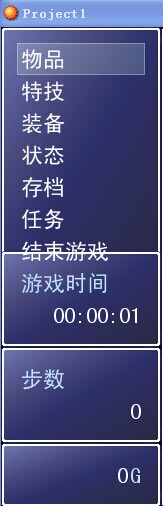
看看结束游戏出现的地方
求解决啊,我是小白一个,最好附上修改教程
谢谢
|
|



 写轮眼
写轮眼
 发表于 2014-10-24 20:46:11
 提升卡
提升卡 沉默号角
沉默号角 喧嚣号角
喧嚣号角 变色卡
变色卡 升龙剑
升龙剑


 (Created by