| 赞 | 1 |
| VIP | |
| 好人卡 | |
| 积分 | 1 |
| 经验 | |
| 最后登录 | 2016-1-18 |
| 在线时间 | 1269 小时 |
薄凉看客
- 梦石
- 0
- 星屑
- 50
- 在线时间
- 1269 小时
- 注册时间
- 2010-6-20
- 回帖
- 1223
|
加入我们,或者,欢迎回来。
您需要 登录 才可以下载或查看,没有账号?注册会员
×
本帖最后由 恐惧剑刃 于 2014-11-6 12:28 编辑
一点小东西,不敢在大神面前摆弄。
方法大多新定义,兼容性很高
超级容易整合(调整刷新)
 QTE.zip
(230.93 KB, 下载次数: 86)
QTE.zip
(230.93 KB, 下载次数: 86)
整合主站上的菜鸟横版,最下方
[pre lang="ruby" line="1"]class Scene_Battle
#--------------------------------------------------------------------------
# ● フレーム更新 (メインフェーズ ステップ 2 : アクション開始)
#--------------------------------------------------------------------------
def update_phase4_step2(*arg)
#========================================================================
if QTE::Switch and @active_battler.is_a?(Game_Actor) and @qte_window.ko == nil
if (@active_battler.current_action.kind == 0 and
@active_battler.current_action.basic == 0) or
@active_battler.current_action.kind == 1 or
@active_battler.current_action.kind == 2
@qte_window.x = $game_party.actors.index(@active_battler) * 160
@qte_window.visible = true
@qte_window.start
@phase4_step = 7
@active_battler.blink = true
return
end
end
#========================================================================
battler = convert_battler2(*arg)
battler.action
side_view_update_phase4_step2(*arg)
end
end[/pre]
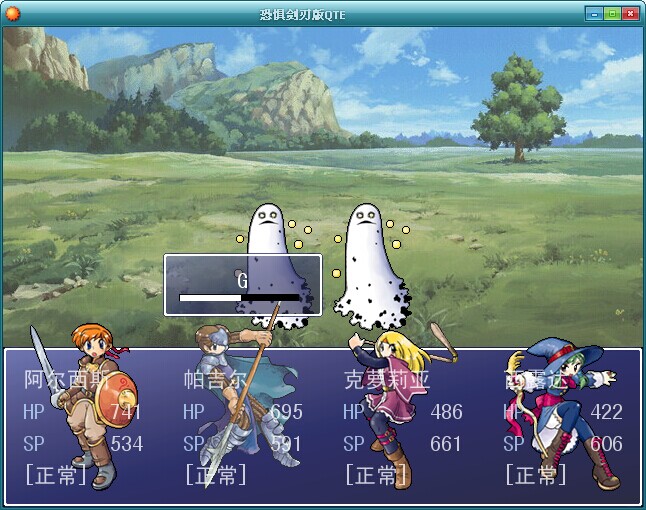
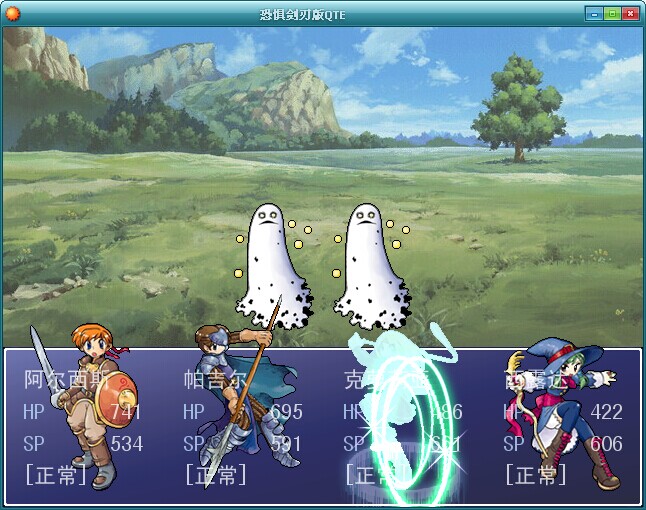
注释
[pre lang="ruby" line="1"]# - 要应用QTE只需:
# - 1.(主方法)生成窗口
# - 2.(主回合)回合1的时候初始化需要的数据
# - 3.(主回合)插入一个新回合用来刷新QTE
# - 4.(主回合)在生成行动结果之前插入QTE
# - 4.(主回合)返回回合2继续执行其他内容
#----------------------------------------------------------------------------
# - 设置示范:
# - 找到 make_basic_action_result
# - if @active_battler.current_action.basic == 0 以下
# - 添加
# - if QTE::Switch and @active_battler.is_a?(Game_Actor) and @qte_window.ko == nil
# - @qte_window.x = $game_party.actors.index(@active_battler) * 160
# - @qte_window.visible = true
# - @qte_window.start
# - @phase4_step = 7
# - @active_battler.blink = true
# - return
# - end
# -
# - @qte_window.ko 记录胜败
# - if @qte_window.ko == "success"
# - if @qte_window.ko == "fail"[/pre]
核心
[pre lang="ruby" line="1"]#----------------------------------------------------------------------------
# - 快速反应事件(必要组件,夏娜全键盘)
#----------------------------------------------------------------------------
# - QTE设置
#--------------------------------------------------------------------------
module QTE
#--------------------------------------------------------------------------
# - 启动开关
#--------------------------------------------------------------------------
Switch = true
#--------------------------------------------------------------------------
# - 时限(秒钟) * 不是很精确
#--------------------------------------------------------------------------
Time = 2
#--------------------------------------------------------------------------
# - 动画
#--------------------------------------------------------------------------
Ani = []
Ani[0] = 20 # 胜利
Ani[1] = 19 # 失败
#--------------------------------------------------------------------------
# - 可使用键(需设置键码)
# - %w|A B C| 等同于 ["A", "B", "C"]
#--------------------------------------------------------------------------
Key = %w|A B C D E F G H I G K L M N O P Q R S T U V W X Y Z|
#--------------------------------------------------------------------------
# - 输入数量(范围表示)
#--------------------------------------------------------------------------
Number = 5..9
end
#------------------------------------------------------------------------------
# - 在战斗场景中应用QTE
#------------------------------------------------------------------------------
class Scene_Battle
#----------------------------------------------------------------------------
# - 主处理
#----------------------------------------------------------------------------
# - @qte_window - 展示命令及进度的窗口
#----------------------------------------------------------------------------
alias main_qte_old main
def main
@qte_window = Window_BattleQTE.new
main_qte_old
@qte_window.dispose
end
#----------------------------------------------------------------------------
# - 初始化胜败记录
#----------------------------------------------------------------------------
# - update_phase4_step1 - 主回合 - 准备行动
#----------------------------------------------------------------------------
alias update_phase4_step1_qte_old update_phase4_step1
def update_phase4_step1
@qte_window.ko = nil
update_phase4_step1_qte_old
end
#----------------------------------------------------------------------------
# - update_phase4 - 主回合 - 刷新(刷新QTE)
#----------------------------------------------------------------------------
alias update_phase4_qte_old update_phase4
def update_phase4
if @phase4_step == 7
update_phase4_step_qte
end
update_phase4_qte_old
end
#----------------------------------------------------------------------------
# - 刷新QTE
#----------------------------------------------------------------------------
# - QTE::Time * Graphics.frame_rate - 刷新次数 * 每秒种的刷新次数
# - blink - 能周期地反复使精灵亮白的闪烁。是针对指令输入中的角色使用的效果
# - animation_id - 播放一次动画
# - phase4_step - 主回合 - 开始行动
#----------------------------------------------------------------------------
def update_phase4_step_qte
if @qte_window.count > QTE::Time * Graphics.frame_rate
@active_battler.blink = false
@active_battler.animation_id = QTE::Ani[1]
@phase4_step = 2
@qte_window.ko = "fail"
@qte_window.visible = false
return
else
if Kboard.trigger?(rkey(@qte_window.command))
@qte_window.count = 0
@qte_window.index += 1
end
if @qte_window.command == nil
@active_battler.animation_id = QTE::Ani[0]
@active_battler.blink = false
@phase4_step = 2
@qte_window.ko = "success"
@qte_window.visible = false
return
end
end
@qte_window.count += 1
@qte_window.update
@qte_window.refresh
end
#----------------------------------------------------------------------------
# - 字符转键码
#----------------------------------------------------------------------------
# - 还可在这里添加更多键码
# - “;”只是为了把when和return放在一行
#----------------------------------------------------------------------------
def rkey(key)
case key
when "A" ; return 0x41
when "B" ; return 0x42
when "C" ; return 0x43
when "D" ; return 0x44
when "E" ; return 0x45
when "F" ; return 0x46
when "G" ; return 0x47
when "H" ; return 0x48
when "I" ; return 0x49
when "J" ; return 0x4A
when "K" ; return 0x4B
when "L" ; return 0x4C
when "M" ; return 0x4D
when "N" ; return 0x4E
when "O" ; return 0x4F
when "P" ; return 0x50
when "Q" ; return 0x51
when "R" ; return 0x52
when "S" ; return 0x53
when "T" ; return 0x54
when "U" ; return 0x55
when "V" ; return 0x56
when "W" ; return 0x57
when "X" ; return 0x58
when "Y" ; return 0x59
when "Z" ; return 0x5A
end
end
end
#------------------------------------------------------------------------------
# - 展示命令及进度的窗口
#------------------------------------------------------------------------------
class Window_BattleQTE < Window_Base
#----------------------------------------------------------------------------
# - 定义实例变量
#----------------------------------------------------------------------------
# index : 当前位置
# count : 限时计数
# ko : 记录胜败
#----------------------------------------------------------------------------
attr_accessor :index, :count, :ko
#----------------------------------------------------------------------------
# - 初始化窗口
#----------------------------------------------------------------------------
def initialize
super(0, 256-30, 160, 64)
self.back_opacity = 160
self.contents = Bitmap.new(width - 32, height - 32)
self.visible = false
end
#----------------------------------------------------------------------------
# - 初始化实例变量
#----------------------------------------------------------------------------
def clear
@keys = []
@index = 0
@count = 0
end
#----------------------------------------------------------------------------
# - 新事件
#----------------------------------------------------------------------------
def start
clear
@keys = []
max = [*QTE::Number][rand(QTE::Number.begin - QTE::Number.end)]
while @keys.size < max
key = QTE::Key[rand(QTE::Key.size)]
@keys << key if !@keys.include?(key)
end
refresh
end
#----------------------------------------------------------------------------
# - 内容
#----------------------------------------------------------------------------
def refresh
self.contents.clear
self.contents.draw_text(4, 0, self.width - 40, 22, @keys[@index], 1)
self.contents.fill_rect(Rect.new(0, 25, self.width - 40, 8), Color.new(0, 0, 0))
w = ((self.width - 40) * @count) / (QTE::Time * Graphics.frame_rate)
rect = Rect.new(1, 1+25, w, 6)
self.contents.fill_rect(rect, Color.new(255, 255, 255))
end
#----------------------------------------------------------------------------
# - 当前命令
#----------------------------------------------------------------------------
def command
return @keys[@index]
end
end[/pre]
夏娜全键盘
[pre lang="ruby" line="1"]#----------------------------------------------------------------------------
# - 夏娜全键盘(已用可删)
#----------------------------------------------------------------------------
module Kboard
module_function
@R_Key_Hash = {}
@R_Key_Repeat = {}
GetKeyState = Win32API.new("user32","GetAsyncKeyState",['I'],'I')
def press?(rkey)
return GetKeyState.call(rkey) != 0
end
def repeat?(rkey)
result = GetKeyState.call(rkey)
if result != 0
if @R_Key_Repeat[rkey].nil?
@R_Key_Repeat[rkey] = 0
return true
end
@R_Key_Repeat[rkey] += 1
else
@R_Key_Repeat[rkey] = nil
@R_Key_Hash[rkey] = 0
end
if !@R_Key_Repeat[rkey].nil? and @R_Key_Repeat[rkey] > 4
@R_Key_Repeat[rkey] = 0
return true
else
return false
end
end
def trigger?(rkey)
result = GetKeyState.call(rkey)
if @R_Key_Hash[rkey] == 1 and result != 0
return false
end
if result != 0
@R_Key_Hash[rkey] = 1
return true
else
@R_Key_Hash[rkey] = 0
return false
end
end
end[/pre] |
评分
-
查看全部评分
|


 写轮眼
写轮眼
 发表于 2014-11-5 01:50:18


 提升卡
提升卡 沉默号角
沉默号角 喧嚣号角
喧嚣号角 变色卡
变色卡 升龙剑
升龙剑


 发表于 2014-11-5 10:27:24


