| 赞 | 7 |
| VIP | |
| 好人卡 | |
| 积分 | 7 |
| 经验 | |
| 最后登录 | 2023-4-20 |
| 在线时间 | 511 小时 |
- 梦石
- 0
- 星屑
- 701
- 在线时间
- 511 小时
- 注册时间
- 2012-4-8
- 回帖
- 193
|
加入我们,或者,欢迎回来。
您需要 登录 才可以下载或查看,没有账号?注册会员
×
本帖最后由 黑白界 于 2015-2-9 23:12 编辑
https://rpg.blue/thread-376385-1-1.html新版
——————————————————————————————————————————————
首先拜谢@945127391。昨天早上我还是一个清澈的脚本盲,跟他的4篇脚本教程学了1整天后(抱歉第4篇实在学不下来太长了),感觉可以出师了!
但毕竟新手,代码许多是教程里抓下来的,知其然不知其所以然,望有大神改进,我会更新。
好了,回到正题。
这个随身背包系统有两个前置脚本:
一个是sion神的鼠标https://rpg.blue/forum.php?mod=v ... D368%26typeid%3D368
还有装备帮助增强(抱歉原帖找不到了)
特点:
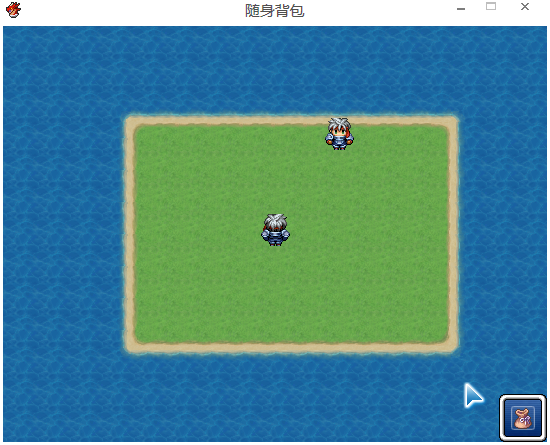
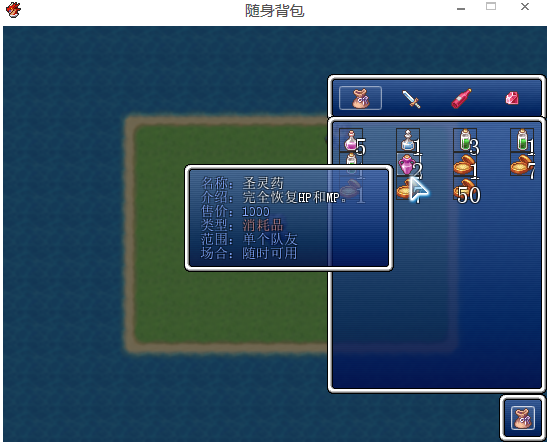
随时打开背包(游戏不得不暂停),再次点击背包或者点击右键都能关闭。
完全不影响原来的系统。
收一点经验用于计数,可以喵{:2_257:}
脚本特别乱,毕竟是凑得
[pre lang="ruby" line="1"]#=========================================================================
#======随身背包============================================================
#============================================================================
$icon_wupin= 260 #物品图标的编号
$icon_wuqi= 386 #武器图标的编号
$icon_hujia= 308 #护甲图标的编号
$icon_guizhong= 358 #贵重物品图标的编号
#==============================================================================
# ** Window_MapStatus
#==============================================================================
class Window_MapStatus < Window_Command
#----------------------------------------------------------------------------
# * 初始化
#----------------------------------------------------------------------------
def initialize
@command_icon_index = [$icon_wupin]
super(Graphics.width-48, Graphics.height-48)
end
#----------------------------------------------------------------------------
# * 获取窗口宽度
#----------------------------------------------------------------------------
def window_width
return 48
end
#----------------------------------------------------------------------------
# * 创建命令列表
#----------------------------------------------------------------------------
def make_command_list
add_command(Vocab::item,:item, true)
end
def draw_item(index)
rect = item_rect_for_text(index)
draw_icon(@command_icon_index[index], rect.x-5, rect.y)
end
end
#==============================================================================
# ** Scene_Map
#==============================================================================
class Scene_Map<Scene_Base
#----------------------------------------------------------------------------
# * 重命名方法
#----------------------------------------------------------------------------
alias o_start start
#----------------------------------------------------------------------------
# * 开始处理
#----------------------------------------------------------------------------
def start
o_start
create_menu_window
end
def create_menu_window
@menu_command = Window_MapStatus.new
@menu_command.set_handler(:item , method(:item_ok))
end
def item_ok
SceneManager.call(Scene_NewItem)
end
end
#------------------------------------------------------------------------------
# 物品画面和商店画面中,显示装备、所持物品等项目列表的窗口。
#==============================================================================
class Window_NewItemCategory < Window_HorzCommand
#--------------------------------------------------------------------------
# ● 定义实例变量
#--------------------------------------------------------------------------
attr_reader :item_window
#--------------------------------------------------------------------------
# ● 初始化对象
#--------------------------------------------------------------------------
def initialize
@command_icon_index = [$icon_wupin,$icon_wuqi,$icon_hujia,$icon_guizhong]
super(Graphics.width-220, Graphics.height-368)
end
#--------------------------------------------------------------------------
# ● 获取窗口的宽度
#--------------------------------------------------------------------------
def window_width
220
end
#--------------------------------------------------------------------------
# ● 获取列数
#--------------------------------------------------------------------------
def col_max
return 4
end
#--------------------------------------------------------------------------
# ● 更新画面
#--------------------------------------------------------------------------
def update
super
@item_window.category = current_symbol if @item_window
end
#--------------------------------------------------------------------------
# ● 生成指令列表
#--------------------------------------------------------------------------
def make_command_list
add_command(Vocab::item, :item)
add_command(Vocab::weapon, :weapon)
add_command(Vocab::armor, :armor)
add_command(Vocab::key_item, :key_item)
end
#--------------------------------------------------------------------------
# ● 设置物品窗口
#--------------------------------------------------------------------------
def item_window=(item_window)
@item_window = item_window
update
end
def draw_item(index)
rect = item_rect_for_text(index)
draw_icon(@command_icon_index[index], rect.x+5, rect.y)
end
end
#encoding:utf-8
#==============================================================================
# ■ Window_NewItemList
#------------------------------------------------------------------------------
# 物品画面中,显示持有物品的窗口。
#==============================================================================
class Window_NewItemList < Window_Selectable
#--------------------------------------------------------------------------
# ● 初始化对象
#--------------------------------------------------------------------------
def initialize(x, y, width, height)
super(Graphics.width-220,Graphics.height-326,220,278)
@category = :none
@data = []
end
#--------------------------------------------------------------------------
# ● 设置分类
#--------------------------------------------------------------------------
def category=(category)
return if @category == category
@category = category
refresh
self.oy = 0
end
#--------------------------------------------------------------------------
# ● 获取列数
#--------------------------------------------------------------------------
def col_max
return 4
end
#--------------------------------------------------------------------------
# ● 获取项目数
#--------------------------------------------------------------------------
def item_max
@data ? @data.size : 1
end
#--------------------------------------------------------------------------
# ● 获取物品
#--------------------------------------------------------------------------
def item
@data && index >= 0 ? @data[index] : nil
end
#--------------------------------------------------------------------------
# ● 获取选择项目的有效状态
#--------------------------------------------------------------------------
def current_item_enabled?
enable?(@data[index])
end
#--------------------------------------------------------------------------
# ● 查询列表中是否含有此物品
#--------------------------------------------------------------------------
def include?(item)
case @category
when :item
item.is_a?(RPG::Item) && !item.key_item?
when :weapon
item.is_a?(RPG::Weapon)
when :armor
item.is_a?(RPG::Armor)
when :key_item
item.is_a?(RPG::Item) && item.key_item?
else
false
end
end
#--------------------------------------------------------------------------
# ● 查询此物品是否可用
#--------------------------------------------------------------------------
def enable?(item)
$game_party.usable?(item)
end
#--------------------------------------------------------------------------
# ● 生成物品列表
#--------------------------------------------------------------------------
def make_item_list
@data = $game_party.all_items.select {|item| include?(item) }
@data.push(nil) if include?(nil)
end
#--------------------------------------------------------------------------
# ● 返回上一个选择的位置
#--------------------------------------------------------------------------
def select_last
select(@data.index($game_party.last_item.object) || 0)
end
#--------------------------------------------------------------------------
# ● 绘制项目
#--------------------------------------------------------------------------
def draw_item(index)
item = @data[index]
if item
rect = item_rect(index)
rect.width -= 4
color = Color.new(40, 40, 40)
self.contents.fill_rect(rect.x, rect.y, 24, 1, color)
self.contents.fill_rect(rect.x, rect.y, 1, 24, color)
self.contents.fill_rect(rect.x, rect.y+23, 24, 1, color)
self.contents.fill_rect(rect.x+23, rect.y, 1, 24, color)
draw_icon(item.icon_index,rect.x,rect.y,enable?(item))
rect.width += 9
rect.height += 14
draw_item_number(rect, item)
end
end
#--------------------------------------------------------------------------
# ● 绘制物品个数
#--------------------------------------------------------------------------
def draw_item_number(rect, item)
draw_text(rect, sprintf("%2d", $game_party.item_number(item)), 2)
end
#--------------------------------------------------------------------------
# ● 刷新
#--------------------------------------------------------------------------
def refresh
make_item_list
create_contents
draw_all_items
end
end
#encoding:utf-8
#==============================================================================
# ■ Scene_Item
#------------------------------------------------------------------------------
# 物品画面
#==============================================================================
class Scene_NewItem < Scene_ItemBase
#--------------------------------------------------------------------------
# ● 开始处理
#--------------------------------------------------------------------------
def start
super
create_menu_window2
create_category_window
create_item_window
end
#--------------------------------------------------------------------------
# ● 生成分类窗口
#--------------------------------------------------------------------------
def create_category_window
@category_window = Window_NewItemCategory.new
@category_window.viewport = @viewport
@category_window.set_handler(:ok, method(:on_category_ok))
@category_window.set_handler(:cancel, method(:return_scene))
end
#--------------------------------------------------------------------------
# ● 生成物品窗口
#--------------------------------------------------------------------------
def create_item_window
wy = @category_window.y + @category_window.height
wh = Graphics.height
@item_window = Window_NewItemList.new(0, wy, Graphics.width, wh)
@item_window.viewport = @viewport
@item_window.set_handler(:ok, method(:on_item_ok))
@item_window.set_handler(:cancel, method(:on_item_cancel))
@category_window.item_window = @item_window
end
#--------------------------------------------------------------------------
# ● 分类“确定”
#--------------------------------------------------------------------------
def on_category_ok
@item_window.activate
@item_window.select_last
end
#--------------------------------------------------------------------------
# ● 物品“确定”
#--------------------------------------------------------------------------
def on_item_ok
$game_party.last_item.object = item
determine_item
end
#--------------------------------------------------------------------------
# ● 物品“取消”
#--------------------------------------------------------------------------
def on_item_cancel
@item_window.unselect
@category_window.activate
end
#--------------------------------------------------------------------------
# ● 播放使用物品声效
#--------------------------------------------------------------------------
def play_se_for_item
Sound.play_use_item
end
#--------------------------------------------------------------------------
# ● 使用物品
#--------------------------------------------------------------------------
def use_item
super
@item_window.redraw_current_item
end
def create_menu_window2
@menu_command = Window_MapStatus.new
@menu_command.set_handler(:ok , method(:return_scene ))
end
end
[/pre]
安装装备帮助增强后,用下面代码作兼容
[pre lang="ruby" line="1"]#装备栏
module VIPArcher::Equipplus
TIME = 0
end
class Scene_NewItem < Scene_ItemBase
#--------------------------------------------------------------------------
# ● 开始处理
#--------------------------------------------------------------------------
alias help_ex_start start
def start
help_ex_start
create_help_ex
end
end[/pre]
最后哪个大神知道怎么取消相邻物品的间隔啊,找了好久不知道怎么做
还有怎么让脚标显示的小一点 |
|



 写轮眼
写轮眼
 发表于 2015-2-9 07:10:06

 提升卡
提升卡 沉默号角
沉默号角 喧嚣号角
喧嚣号角 变色卡
变色卡 升龙剑
升龙剑