| 赞 | 0 |
| VIP | |
| 好人卡 | |
| 积分 | 1 |
| 经验 | |
| 最后登录 | 2016-9-16 |
| 在线时间 | 270 小时 |
- 梦石
- 0
- 星屑
- 50
- 在线时间
- 270 小时
- 注册时间
- 2013-7-19
- 回帖
- 94
|
加入我们,或者,欢迎回来。
您需要 登录 才可以下载或查看,没有账号?注册会员
×
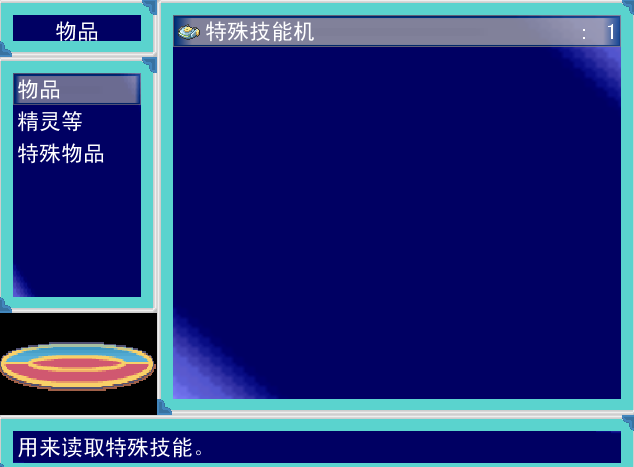
这里有物品分类的脚本和物品显示大图的脚本,请问应该怎么添加物品到相应的分类?
这是物品分类:[pre lang="ruby"]#==============================================================================
# 本脚本来自www.66RPG.com,使用和转载请保留此信息
#==============================================================================
#==============================================================================
# ■ Harts_Window_ItemTitle
#------------------------------------------------------------------------------
# アイテム画面で、タイトルを表示するウィンドウ。
#==============================================================================
class Harts_Window_ItemTitle < Window_Base
#--------------------------------------------------------------------------
# ● オブジェクト初期化
#--------------------------------------------------------------------------
def initialize
super(0, 0, 160, 58)
self.contents = Bitmap.new(width - 32, height - 32)
self.contents.clear
self.contents.font.color = normal_color
self.contents.draw_text(4, 0, 120, 32, $data_system.words.item, 1)
end
end
#==============================================================================
# ■ Harts_Window_ItemCommand
#------------------------------------------------------------------------------
# アイテムの种别选择を行うウィンドウです。
#==============================================================================
class Harts_Window_ItemCommand < Window_Selectable
#--------------------------------------------------------------------------
# ● オブジェクト初期化
#--------------------------------------------------------------------------
def initialize
super(0, 58, 160, 256)
self.contents = Bitmap.new(width - 32, height - 32)
@item_max = 7
@commands = ["物品", "精灵等", "特殊物品"]
refresh
self.index = 0
end
#--------------------------------------------------------------------------
# ● リフレッシュ
#--------------------------------------------------------------------------
def refresh
self.contents.clear
for i in 0...@item_max
draw_item(i, normal_color)
end
end
#--------------------------------------------------------------------------
# ● 项目の描画
# index : 项目番号
# color : 文字色
#--------------------------------------------------------------------------
def draw_item(index, color)
self.contents.font.color = color
y = index * 32
self.contents.draw_text(3, y, 128, 32, @commands[index])
end
#--------------------------------------------------------------------------
# ● ヘルプテキスト更新
#--------------------------------------------------------------------------
def update_help
case self.index
when 0
@text = @commands[0]
when 1
@text = @commands[1]
when 2
@text = @commands[2]
when 3
@text = @commands[3]
when 4
@text = @commands[4]
when 5
@text = @commands[5]
when 6
@text = @commands[6]
#when 7
#@text = @commands[7]
end
@help_window.set_text(@text)
end
end
#==============================================================================
# ■ Window_Item
#------------------------------------------------------------------------------
# アイテム画面で、所持アイテムの一览を表示するウィンドウです。
#==============================================================================
class Harts_Window_ItemList < Window_Selectable
#--------------------------------------------------------------------------
# ● オブジェクト初期化
#--------------------------------------------------------------------------
def initialize
super(160, 0, 480, 416)
refresh
self.index = 0
end
#--------------------------------------------------------------------------
# ● アイテムの取得
#--------------------------------------------------------------------------
def item
return @data[self.index]
end
#--------------------------------------------------------------------------
# ● リフレッシュ
#--------------------------------------------------------------------------
def refresh
if self.contents != nil
self.contents.dispose
self.contents = nil
end
@data = []
end
#--------------------------------------------------------------------------
# ● アイテム一览设定
# command : 选择中のコマンド
#--------------------------------------------------------------------------
#0=平时/1=战斗时/2=菜单时/3=不可使用时
def set_item(command)
refresh
case command
when 0
for i in 1...$data_items.size
if ($data_items.occasion == 0 or $data_items.occasion == 3) and $game_party.item_number(i) > 0
@data.push($data_items)
end
end
when 1
for i in 1...$data_items.size
if ($data_items.occasion == 2 and $game_party.item_number(i) > 0)
@data.push($data_items)
end
end
when 2
for i in 1...$data_weapons.size
if $game_party.weapon_number(i) > 0
@data.push($data_weapons)
end
end
when 3
for i in 1...$data_armors.size
if $data_armors.kind == 0 and $game_party.armor_number(i) > 0
@data.push($data_armors)
end
end
when 4
for i in 1...$data_armors.size
if $data_armors.kind == 1 and $game_party.armor_number(i) > 0
@data.push($data_armors)
end
end
when 5
for i in 1...$data_armors.size
if $data_armors.kind == 2 and $game_party.armor_number(i) > 0
@data.push($data_armors)
end
if $data_armors.kind == 3 and $game_party.armor_number(i) > 0
@data.push($data_armors)
end
end
when 6
for i in 1...$data_items.size
if ($data_items.occasion == 1 and $game_party.item_number(i) > 0)
@data.push($data_items)
end
end
#when 7
# for i in 1...$data_items.size
# if $data_items.occasion == 3 and $game_party.item_number(i) > 0
# @data.push($data_items)
# end
# end
end
# 项目数が 0 でなければビットマップを作成し、全项目を描画
@item_max = @data.size
if @item_max > 0
self.contents = Bitmap.new(width - 32, row_max * 32)
self.contents.clear
for i in 0...@item_max
draw_item(i)
end
end
end
#--------------------------------------------------------------------------
# ● 种类别アイテム数の取得
#--------------------------------------------------------------------------
def item_number
return @item_max
end
#--------------------------------------------------------------------------
# ● 项目の描画
# index : 项目番号
#--------------------------------------------------------------------------
def draw_item(index)
item = @data[index]
case item
when RPG::Item
number = $game_party.item_number(item.id)
when RPG::Weapon
number = $game_party.weapon_number(item.id)
when RPG::Armor
number = $game_party.armor_number(item.id)
end
if item.is_a?(RPG::Item) and
$game_party.item_can_use?(item.id)
self.contents.font.color = normal_color
else
self.contents.font.color = disabled_color
end
x = 4
y = index * 32
bitmap = RPG::Cache.icon(item.icon_name)
opacity = self.contents.font.color == normal_color ? 255 : 128
self.contents.blt(x, y + 4, bitmap, Rect.new(0, 0, 24, 24), opacity)
self.contents.draw_text(x + 28, y, 212, 32, item.name, 0)
self.contents.draw_text(x + 400, y, 16, 32, ":", 1)
self.contents.draw_text(x + 416, y, 24, 32, number.to_s, 2)
end
#--------------------------------------------------------------------------
# ● ヘルプテキスト更新
#--------------------------------------------------------------------------
def update_help
@help_window.set_text(self.item == nil ? "" : self.item.description)
end
end
#==============================================================================
# ■ Harts_Scene_Item
#------------------------------------------------------------------------------
# アイテム画面の处理を行うクラスです。再定义
#==============================================================================
class Scene_Item
#--------------------------------------------------------------------------
# ● メイン处理
#--------------------------------------------------------------------------
def main
# タイトルウィンドウを作成
@itemtitle_window = Harts_Window_ItemTitle.new
#コマンドウィンドウを作成
@itemcommand_window = Harts_Window_ItemCommand.new
@command_index = @itemcommand_window.index
#アイテムウィンドウを作成
@itemlist_window = Harts_Window_ItemList.new
@itemlist_window.active = false
#ヘルプウィンドウを作成
@help_window = Window_Help.new
@help_window.x = 0
@help_window.y = 416
# ヘルプウィンドウを关连付け
@itemcommand_window.help_window = @help_window
@itemlist_window.help_window = @help_window
# ターゲットウィンドウを作成 (不可视?非アクティブに设定)
@target_window = Window_Target.new
@target_window.visible = false
@target_window.active = false
@equip_window = Window_Equip.new
# アイテムウィンドウ内容表示
@itemlist_window.set_item(@command_index)
@sprite = Sprite.new
@sprite.bitmap = Bitmap.new("Graphics/Pictures/图片框")
@sprite.x = 0
@sprite.y = 315
# トランジション实行
Graphics.transition
# メインループ
loop do
# ゲーム画面を更新
Graphics.update
# 入力情报を更新
Input.update
# フレーム更新
update
# 画面が切り替わったらループを中断
if $scene != self
break
end
end
# トランジション准备
Graphics.freeze
# ウィンドウを解放
@sprite.bitmap.dispose
@sprite.dispose
@itemtitle_window.dispose
@itemcommand_window.dispose
@itemlist_window.dispose
@help_window.dispose
@target_window.dispose
@equip_window.dispose
end
#--------------------------------------------------------------------------
# ● フレーム更新
#--------------------------------------------------------------------------
def update
# ウィンドウを更新
@itemtitle_window.update
@itemcommand_window.update
@itemlist_window.update
@help_window.update
@target_window.update
@equip_window.refresh
@equip_window.set_item(@itemlist_window.item)
if @command_index != @itemcommand_window.index
@command_index = @itemcommand_window.index
@itemlist_window.set_item(@command_index)
end
# コマンドウィンドウがアクティブの场合: update_itemcommand を呼ぶ
if @itemcommand_window.active
update_itemcommand
return
end
# アイテムウィンドウがアクティブの场合: update_itemlist を呼ぶ
if @itemlist_window.active
update_itemlist
return
end
# ターゲットウィンドウがアクティブの场合: update_target を呼ぶ
if @target_window.active
update_target
return
end
end
#--------------------------------------------------------------------------
# ● フレーム更新 (コマンドウィンドウがアクティブの场合)
#--------------------------------------------------------------------------
def update_itemcommand
# B ボタンが押された场合
if Input.trigger?(Input::B)
# キャンセル SE を演奏
$game_system.se_play($data_system.cancel_se)
# メニュー画面に切り替え
$scene = Scene_Menu.new(0)
return
end
# C ボタンが押された场合
if Input.trigger?(Input::C)
# 选择中のコマンドのアイテムがない场合
if @itemlist_window.item_number == 0
# ブザー SE を演奏
$game_system.se_play($data_system.buzzer_se)
return
end
# 决定 SE を演奏
$game_system.se_play($data_system.decision_se)
# アイテムウィンドウをアクティブにする
@itemcommand_window.active = false
@itemlist_window.active = true
@itemlist_window.index = 0
return
end
end
#--------------------------------------------------------------------------
# ● フレーム更新 (アイテムウィンドウがアクティブの场合)
#--------------------------------------------------------------------------
def update_itemlist
# B ボタンが押された场合
if Input.trigger?(Input::B)
# キャンセル SE を演奏
$game_system.se_play($data_system.cancel_se)
# アイテムウィンドウをアクティブにする
@itemcommand_window.active = true
@itemlist_window.active = false
@itemlist_window.index = 0
@itemcommand_window.index = @command_index
return
end
# C ボタンが押された场合
if Input.trigger?(Input::C)
# アイテムウィンドウで现在选择されているデータを取得
@item = @itemlist_window.item
# 使用アイテムではない场合
unless @item.is_a?(RPG::Item)
# ブザー SE を演奏
$game_system.se_play($data_system.buzzer_se)
return
end
# 使用できない场合
unless $game_party.item_can_use?(@item.id)
# ブザー SE を演奏
$game_system.se_play($data_system.buzzer_se)
return
end
# 决定 SE を演奏
$game_system.se_play($data_system.decision_se)
# 效果范围が味方の场合
if @item.scope >= 3
# ターゲットウィンドウをアクティブ化
@itemlist_window.active = false
@target_window.x = 304
@target_window.visible = true
@target_window.active = true
# 效果范围 (单体/全体) に应じてカーソル位置を设定
if @item.scope == 4 || @item.scope == 6
@target_window.index = -1
else
@target_window.index = 0
end
# 效果范围が味方以外の场合
else
# コモンイベント ID が有效の场合
if @item.common_event_id > 0
# コモンイベント呼び出し予约
$game_temp.common_event_id = @item.common_event_id
# アイテムの使用时 SE を演奏
$game_system.se_play(@item.menu_se)
# 消耗品の场合
if @item.consumable
# 使用したアイテムを 1 减らす
$game_party.lose_item(@item.id, 1)
# アイテムウィンドウの项目を再描画
@itemlist_window.draw_item(@itemlist_window.index)
end
# マップ画面に切り替え
$scene = Scene_Map.new
return
end
end
return
end
end
#--------------------------------------------------------------------------
# ● フレーム更新 (ターゲットウィンドウがアクティブの场合)
#--------------------------------------------------------------------------
def update_target
# B ボタンが押された场合
if Input.trigger?(Input::B)
# キャンセル SE を演奏
$game_system.se_play($data_system.cancel_se)
# アイテム切れなどで使用できなくなった场合
unless $game_party.item_can_use?(@item.id)
# アイテムウィンドウの内容を再作成
@itemlist_window.refresh
end
# ターゲットウィンドウを消去
@itemlist_window.active = true
@target_window.visible = false
@target_window.active = false
@itemlist_window.set_item(@command_index)
return
end
# C ボタンが押された场合
if Input.trigger?(Input::C)
# アイテムを使い切った场合
if $game_party.item_number(@item.id) == 0
# ブザー SE を演奏
$game_system.se_play($data_system.buzzer_se)
return
end
# ターゲットが全体の场合
if @target_window.index == -1
# パーティ全体にアイテムの使用效果を适用
used = false
for i in $game_party.actors
used |= i.item_effect(@item)
end
end
# ターゲットが单体の场合
if @target_window.index >= 0
# ターゲットのアクターにアイテムの使用效果を适用
target = $game_party.actors[@target_window.index]
used = target.item_effect(@item)
end
# アイテムを使った场合
if used
# アイテムの使用时 SE を演奏
$game_system.se_play(@item.menu_se)
# 消耗品の场合
if @item.consumable
# 使用したアイテムを 1 减らす
$game_party.lose_item(@item.id, 1)
# アイテムウィンドウの项目を再描画
@itemlist_window.draw_item(@itemlist_window.index)
@itemlist_window.set_item(@command_index)
end
# ターゲットウィンドウの内容を再作成
@target_window.refresh
# 全灭の场合
if $game_party.all_dead?
# ゲームオーバー画面に切り替え
$scene = Scene_Gameover.new
return
end
# コモンイベント ID が有效の场合
if @item.common_event_id > 0
# コモンイベント呼び出し予约
$game_temp.common_event_id = @item.common_event_id
# マップ画面に切り替え
$scene = Scene_Map.new
return
end
end
# アイテムを使わなかった场合
unless used
# ブザー SE を演奏
$game_system.se_play($data_system.buzzer_se)
end
return
end
end
end
#==============================================================================
# 本脚本来自www.66RPG.com,使用和转载请保留此信息
#==============================================================================[/pre]
这是物品显示大图:[pre lang="ruby"]module RPG
class Item
def name
name = @name.split(/@/)[0]
return name != nil ? name : ''
end
def pic_name
pic_name = @name.split(/@/)[1]
return pic_name != nil ? pic_name : ""
end
end
class Weapon
def name
name = @name.split(/@/)[0]
return name != nil ? name : ''
end
def pic_name
pic_name = @name.split(/@/)[1]
return pic_name != nil ? pic_name : ""
end
end
class Armor
def name
name = @name.split(/@/)[0]
return name != nil ? name : ''
end
def pic_name
pic_name = @name.split(/@/)[1]
return pic_name != nil ? pic_name : ""
end
end
end
#==============================================================================
# ■ Window_Equip
#------------------------------------------------------------------------------
# 装备物品大图标显示。
#==============================================================================
class Window_Equip < Window_Base
#--------------------------------------------------------------------------
# ● 初始化对像
#--------------------------------------------------------------------------
def initialize
super(26, 298, 640, 480)
@item = nil
self.contents = Bitmap.new(width - 32, height - 32)
self.opacity = 0
refresh
end
#--------------------------------------------------------------------------
# ● 刷新
#--------------------------------------------------------------------------
def refresh
self.contents.clear
if @item != nil
bitmap = RPG::Cache.picture(@item.pic_name)
pic_rect = Rect.new(0, 0, bitmap.width, bitmap.height)
self.contents.blt(0, 0, bitmap, pic_rect)
end
end
def set_item(item)
@item = item
end
end[/pre]
|
|


 写轮眼
写轮眼
 发表于 2015-3-5 11:04:22
 提升卡
提升卡 沉默号角
沉默号角 喧嚣号角
喧嚣号角 变色卡
变色卡 升龙剑
升龙剑