| 赞 | 0 |
| VIP | |
| 好人卡 | |
| 积分 | 1 |
| 经验 | |
| 最后登录 | 2024-4-7 |
| 在线时间 | 99 小时 |
- 梦石
- 0
- 星屑
- 129
- 在线时间
- 99 小时
- 注册时间
- 2012-11-7
- 回帖
- 27
|
楼主 |
发表于 2015-4-8 00:15:32
|
显示全部楼层
本帖最后由 lanlan1923 于 2015-4-8 00:20 编辑
物品
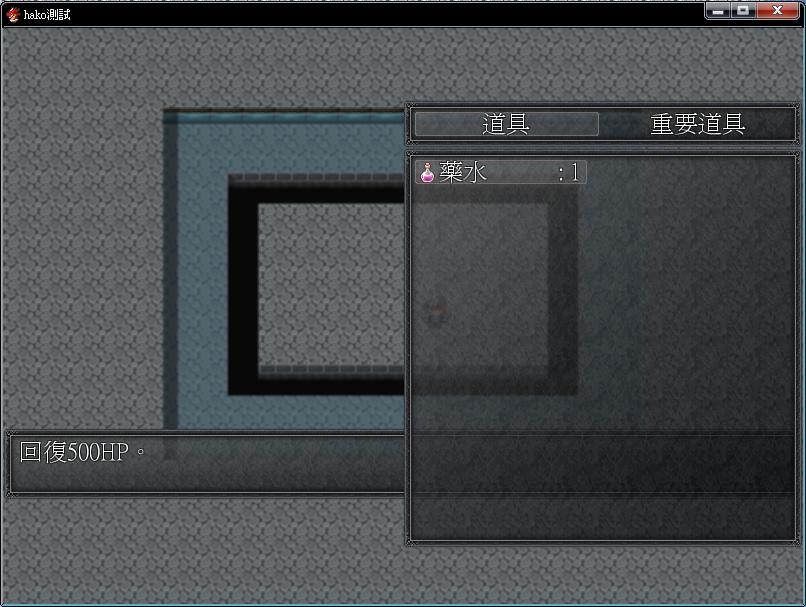
想把help移到下方對齊,不過移動下來後改窗口寬度高度什麼也沒反應了…
調整高度也會出錯,fitting_height(line_number看不明白是什麼?
不知怎麼的說明欄會被分類和列表蓋住
[pre lang="ruby"]#==============================================================================
# ■ Window_Help
#------------------------------------------------------------------------------
# 顯示特技和物品等的說明、以及角色狀態的窗口
#==============================================================================
class Window_Help < Window_Base
#--------------------------------------------------------------------------
# ● 初始化對象
#--------------------------------------------------------------------------
def initialize(line_number = 2)
#~ super(0, 0, Graphics.width, fitting_height(line_number))
super(0, 400, Graphics.width, fitting_height(line_number))#?改成數字整個畫面都跑掉@@
end
#--------------------------------------------------------------------------
# ● 獲取窗口的寬度 沒反應?
#--------------------------------------------------------------------------
def window_width
Graphics.width
end
#--------------------------------------------------------------------------
# ● 獲取窗口的高度 沒反應?
#--------------------------------------------------------------------------
def window_height
400
end
#--------------------------------------------------------------------------
# ● 設置內容
#--------------------------------------------------------------------------
def set_text(text)
if text != @text
@text = text
refresh
end
end
#--------------------------------------------------------------------------
# ● 清除
#--------------------------------------------------------------------------
def clear
set_text("")
end
#--------------------------------------------------------------------------
# ● 設置物品
# item : 技能、物品等
#--------------------------------------------------------------------------
def set_item(item)
set_text(item ? item.description : "")
end
#--------------------------------------------------------------------------
# ● 刷新
#--------------------------------------------------------------------------
def refresh
contents.clear
draw_text_ex(4, 0, @text)
end
end
[/pre]
物品分類的部分想再往上一點(保留主選單的空間)
不過一調就狂出錯,會跳到會跳到@category_window = Window_ItemCategory.new(這個也看不明白怎麼了)
[pre lang="ruby"]#==============================================================================
# ■ Window_ItemCategory
#------------------------------------------------------------------------------
# 物品畫面和商店畫面中,顯示裝備、所持物品等項目列表的窗口。
#==============================================================================
class Window_ItemCategory < Window_HorzCommand
#--------------------------------------------------------------------------
# ● 定義實例變量
#--------------------------------------------------------------------------
attr_reader :item_window
#--------------------------------------------------------------------------
# ● 初始化對象
#--------------------------------------------------------------------------
#~ def initialize (x,y,width,height)
#~ super(400, 48,400,400)# 會跳到@category_window = Window_ItemCategory.new
#~ end
def initialize
super(400, 0) #道具分類往右移
end
#--------------------------------------------------------------------------
# ● 獲取窗口的寬度
#--------------------------------------------------------------------------
def window_width
#~ Graphics.width
400
end
#--------------------------------------------------------------------------
# ● 獲取列數
#--------------------------------------------------------------------------
def col_max
return 2
end
#--------------------------------------------------------------------------
# ● 更新畫面
#--------------------------------------------------------------------------
def update
super
@item_window.category = current_symbol if @item_window
end
#--------------------------------------------------------------------------
# ● 生成指令列表
#--------------------------------------------------------------------------
def make_command_list
add_command(Vocab::item, :item)
#~ add_command(Vocab::weapon, :weapon)
#~ add_command(Vocab::armor, :armor)
add_command(Vocab::key_item, :key_item)
end
#--------------------------------------------------------------------------
# ● 設置物品窗口
#--------------------------------------------------------------------------
def item_window=(item_window)
@item_window = item_window
update
end
end
[/pre]
物品列表的部分暫時位置和高度是和分類欄對齊了…
但搜到有個帖子說改這個窗口大小應該要改Window_ItemList.new(0, wy, Graphics.width, wh)?
是代表列表欄會緊貼分類嗎?不是很明白是哪個高度減哪個,效果又是什麼?
目前貌似是沒什麼問題?還是附上我改的
[pre lang="ruby"]#==============================================================================
# ■ Window_ItemList
#------------------------------------------------------------------------------
# 物品畫面中,顯示持有物品的窗口。
#==============================================================================
class Window_ItemList < Window_Selectable
#--------------------------------------------------------------------------
# ● 初始化對象
#--------------------------------------------------------------------------
def initialize(x, y, width, height)
#~ super
super(400,120,400,400)#變成小格和物品分類欄對齊
@category = :none #?
@data = [] #?
end
#--------------------------------------------------------------------------
# ● 獲取窗口的寬度
#--------------------------------------------------------------------------
#~ def window_width
#~ 400
#~ end
#--------------------------------------------------------------------------
# ● 設置分類
#--------------------------------------------------------------------------
def category=(category)
return if @category == category
@category = category
refresh
self.oy = 0
end
#--------------------------------------------------------------------------
# ● 獲取列數
#--------------------------------------------------------------------------
def col_max
return 2
end
#--------------------------------------------------------------------------
# ● 獲取項目數
#--------------------------------------------------------------------------
def item_max
@data ? @data.size : 1
end
#--------------------------------------------------------------------------
# ● 獲取物品
#--------------------------------------------------------------------------
def item
@data && index >= 0 ? @data[index] : nil
end
#--------------------------------------------------------------------------
# ● 獲取選擇項目的有效狀態
#--------------------------------------------------------------------------
def current_item_enabled?
enable?(@data[index])
end
#--------------------------------------------------------------------------
# ● 查詢列表中是否含有此物品
#--------------------------------------------------------------------------
def include?(item)
case @category
when :item
item.is_a?(RPG::Item) && !item.key_item?
when :weapon
item.is_a?(RPG::Weapon)
when :armor
item.is_a?(RPG::Armor)
when :key_item
item.is_a?(RPG::Item) && item.key_item?
else
false
end
end
#--------------------------------------------------------------------------
# ● 查詢此物品是否可用
#--------------------------------------------------------------------------
def enable?(item)
$game_party.usable?(item)
end
#--------------------------------------------------------------------------
# ● 生成物品列表
#--------------------------------------------------------------------------
def make_item_list
@data = $game_party.all_items.select {|item| include?(item) }
@data.push(nil) if include?(nil)
end
#--------------------------------------------------------------------------
# ● 返回上一個選擇的位置
#--------------------------------------------------------------------------
def select_last
select(@data.index($game_party.last_item.object) || 0)
end
#--------------------------------------------------------------------------
# ● 繪制項目
#--------------------------------------------------------------------------
def draw_item(index)
item = @data[index]
if item
rect = item_rect(index)
rect.width -= 4
draw_item_name(item, rect.x, rect.y, enable?(item))
draw_item_number(rect, item)
end
end
#--------------------------------------------------------------------------
# ● 繪制物品個數
#--------------------------------------------------------------------------
def draw_item_number(rect, item)
draw_text(rect, sprintf(":%2d", $game_party.item_number(item)), 2)
end
#--------------------------------------------------------------------------
# ● 更新幫助內容
#--------------------------------------------------------------------------
def update_help
@help_window.set_item(item)
end
#--------------------------------------------------------------------------
# ● 刷新
#--------------------------------------------------------------------------
def refresh
make_item_list
create_contents
draw_all_items
end
end
[/pre]
幾乎都是看著主選單寫什麼就改什麼的,只要出現不一樣的參數就看不明白orz有點無從查起 |
|


 写轮眼
写轮眼
 发表于 2015-4-7 01:56:40
 提升卡
提升卡 沉默号角
沉默号角 喧嚣号角
喧嚣号角 变色卡
变色卡 升龙剑
升龙剑


