| 赞 | 0 |
| VIP | |
| 好人卡 | |
| 积分 | 0 |
| 经验 | |
| 最后登录 | 2017-9-13 |
| 在线时间 | 784 小时 |
- 梦石
- 0
- 星屑
- 48
- 在线时间
- 784 小时
- 注册时间
- 2013-1-4
- 回帖
- 1057
|
加入我们,或者,欢迎回来。
您需要 登录 才可以下载或查看,没有账号?注册会员
×
本来是打算找个帖子,就去DK大大的空间乱翻。结果发现了几个神一样的古物。完全被吓坏了
第一个: WxRM
真被真被这玩意吓到了有木有。各种神奇和强大。
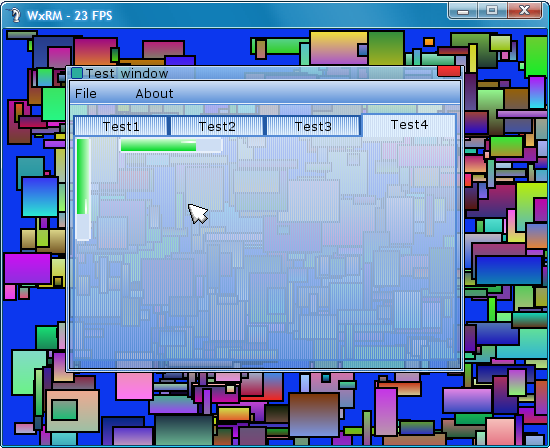
嗯,知道wxruby的就知道这是啥了
这是控件列表:
Frame
Sprite_FrameTitle
Widget
Button
Notebook
NotebookPage
NoteBookTab
Label
TextBox
ScrollBar
Spinner
Slider
CheckBox
ListBox
ComboBox
MenuBar
MenuMainElement
MenuList
WinBar
整个脚本支持鼠标和全键盘。
不过TextBox对输入法是没反应
脚本的作者真的很强大。。。。但是!!!这只能说是是一个纯技术人员的自娱自乐。因为这个在实际游戏开发中基本毫无用处。。。几乎所有的控件都是实时用一个像素点一个像素点画出来的囧。完全是在RM里实现了一套window下的GUI。
这是上边那个界面对应的脚本[pre lang="ruby"]#==============================================================================
# ** TestPage1
#------------------------------------------------------------------------------
# A simple test Page
#==============================================================================
class TestPage1 < NotebookPage
def initialize(parent)
super(parent, 'Test1')
Button.new(self,16,16,120-32,96-24,'Click me') {p 'you did it'}
TextBox.new(self,140,16,120,24) {}
ScrollBar.new(self,width-18,2,height-34,height * 2,true,true) {}
Spinner.new(self,16,128,50,24) {}
@scroll1 = Slider.new(self,16,160,100,20,0,100,false) {}
@scroll2 = Slider.new(self,126,100,20,100) {}
@label = Label.new(self,150,100,150,18,'',14,1,true)
end
def update
super
return if !@label
@label.text = "#{@scroll1.value}-#{@scroll2.value}"
end
end
#==============================================================================
# ** TestPage2
#------------------------------------------------------------------------------
# A simple test Page
#==============================================================================
class TestPage2 < NotebookPage
def initialize(parent)
super(parent, 'Test2')
@ch1 = CheckBox.new(self,8,8,20,20) {}
Button.new(self,38,8,120,20,'Trigger CheckBox') {@ch1.active = !@ch1.active; Input.update}
ScrollBar.new(self,2,height-18,width-34,width * 2,false,true) {}
end
end
#==============================================================================
# ** TestPage3
#------------------------------------------------------------------------------
# A simple test Page
#==============================================================================
class TestPage3 < NotebookPage
def initialize(parent)
super(parent, 'Test3')
elements = [
"A",
"B",
"C",
"D",
"E",
"F",
"G",
"H"
]
ListBox.new(self,8,8,150,160,elements) {}
ComboBox.new(self,180,8,116,20,elements) {}
end
end
#==============================================================================
# ** TestPage4
#------------------------------------------------------------------------------
# A simple test Page
#==============================================================================
class TestPage4 < NotebookPage
def initialize(parent)
super(parent, 'Test4')
@bar1 = WinBar.new(self,2,2,16,104,0,100,true)
@bar2 = WinBar.new(self,46,2,104,16,0,100,false)
@current = 0
end
def update
super
if @current
@current += 1
@current %= 100
@bar1.current = @current
@bar2.current = @current
end
end
end
#==============================================================================
# ** TestMenuList
#------------------------------------------------------------------------------
# A text menu list
#==============================================================================
class TestMenuList < MenuList
def initialize(parent)
super(parent,0,22,150,24*3)
MenuMainElement.new(self,0,0,150,24,'New...',16,false) {select_listbox('new')}
MenuMainElement.new(self,0,24,150,24,'Open...',16,false) {select_listbox('open')}
MenuMainElement.new(self,0,48,150,24,'Exit',16,false) {exit}
end
def select_listbox(value)
print("Choosed: #{value}")
end
end
#==============================================================================
# ** TestMenuBar
#------------------------------------------------------------------------------
# A simple Menu bar
#==============================================================================
class TestMenuBar < MenuBar
def initialize(parent)
super(parent,5,16,parent.width-10)
el1 = MenuMainElement.new(self,1,0,60,24,'File') {show_listbox}
el1.z = 450
MenuMainElement.new(self,61,0,60,24,'About',16,false) {show_about}
@menu_listbox = TestMenuList.new(el1)
@menu_listbox.visible = false
@menu_listbox.z = -1
end
def show_about
print("WxRM V 1.0\nCreador Por Ramiro.\nInspirado en WxRuby.")
end
def show_listbox
@menu_listbox.visible = true
loop do
Graphics.update
Input.update
@menu_listbox.update
break if !@menu_listbox.visible
end
@menu_listbox.parent.triggered = false
update
end
end
#==============================================================================
# ** Test Frame
#------------------------------------------------------------------------------
# A simple Test Frame
#==============================================================================
class TestFrame < Frame
def initialize
super(nil,0,0,400,308,'Test window')
TestMenuBar.new(self)
@notebook = Notebook.new(self,8,48,384,250)
@notebook.add_page(TestPage1.new(@notebook))
@notebook.add_page(TestPage2.new(@notebook))
@notebook.add_page(TestPage3.new(@notebook))
@notebook.add_page(TestPage4.new(@notebook))
end
def on_close
exit
end
end
[/pre]
在多数几句。虽然这个代码实际使用价值不大,但却可以为RM内新的GUI开发提供极大地参考价值。(相必有不少人已经很厌烦RM里靠window来画GUI的囧况了)顺便一提的是,我本人正在为VA开发一套全新的GUI。之前在水区也发过相关的贴子(关于进度。。。之前有个可运行的版本,不过只是最早的一版,后来都是还没写到可运行就推翻重构了。。。前前后后大概重构了有5/6次囧。现在是核心部分差不多没问题了,剩下的就是几个控件的封装,也不是很麻烦。嗯,最主要的原因其实是懒吧233之前也有段时间【大概一两个月ORZ】基本没碰过ruby和RM。这次争取在十月底完成吧囧)。
然后是第二个:
Greenfish 世界地图生成器
然而可惜的是这个貌似有毒被取消掉了囧
看主楼的意思貌似是直接生成RM可用直接使用的地图
另外,有个生成奇幻世界的网站【 @蓝儿 大概是你之前说的那个?
因为之前水区的一篇和世界地图生成有关的帖子。正好最近找了不少过程生成随机地形之类的资料在看。。。。【顺便说一句昨天测试写了个高度图生成的脚本,结果生成的图片极其奇怪。。。ORZ
最后,貌似发现了DK大大的私人照QAQ【八卦之魂瞬间燃起
|
评分
-
查看全部评分
|
 RM-GUI延期。。。最近被黑心老板压迫T_T

 写轮眼
写轮眼
 发表于 2015-10-13 22:25:54

 提升卡
提升卡 沉默号角
沉默号角 喧嚣号角
喧嚣号角 变色卡
变色卡 升龙剑
升龙剑