查看: 5663|回复: 4

[已经解决] 关于脸图载入问题。

[复制链接]
梦石
0
星屑
60
在线时间
306 小时
注册时间
2014-8-5
回帖
403
发表于 2015-11-18 15:13:41 | 显示全部楼层 |阅读模式

加入我们,或者,欢迎回来。

您需要 登录 才可以下载或查看,没有账号?注册会员

×
本帖最后由 夏末渐离 于 2015-11-18 15:24 编辑

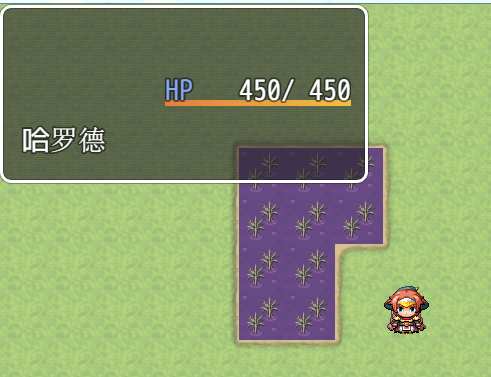
新人想实现一个抬头显视窗口【HUD】。但是在绘制脸图的时候出了点毛病。


一。直接开始游戏到游戏画面,HUD窗口上没有脸图出现。如下图:

1.png


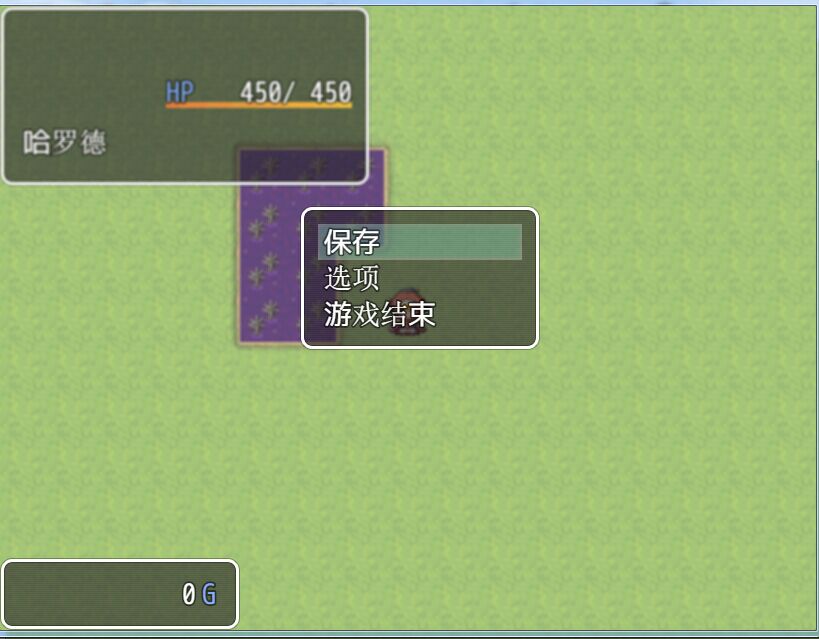
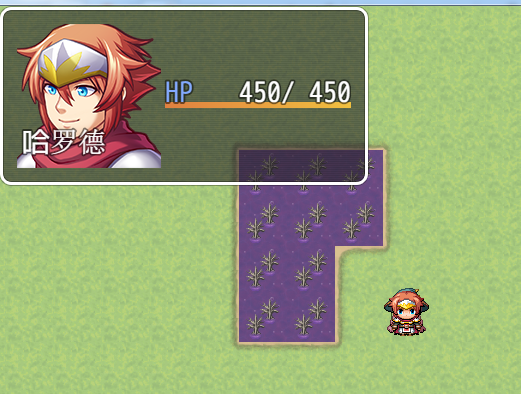
二。然而按ESC呼出游戏菜单,然后关闭游戏菜单就完成了对脸图的绘制。如下图:
2.jpg


3.png


三。Window_HUD 代码如下:
Window_HUD// Window_HUD
// HUD窗口

function Window_HUD() {
    this.initialize.apply(this, arguments);
}

Window_HUD.prototype=Object.create(Window_Base.prototype);
Window_HUD.prototype.constructor = Window_HUD;
//初始化
Window_HUD.prototype.initialize=function(){

    var width = this.windowWidth();
    var height = this.windowHeight();
    Window_Base.prototype.initialize.call(this, 0, 0, width, height);
    this.opacity = 255;//预设背景透明度
    this.actor=$gameActors.actor(1);
    this.old_hp = this.actor.hp;
    this.refresh();
    this.update();
};

//窗口宽
Window_HUD.prototype.windowWidth = function() {
    return 144+4+186+this.standardPadding()*2;
};
//窗口高
Window_HUD.prototype.windowHeight = function() {
    return 144+this.standardPadding()*2;
};

//刷新

Window_HUD.prototype.refresh = function() {
    this.contents.clear();
    this.drawActorFace(this.actor, 0, 0);
    this.drawActorName(this.actor,5,100);
    this.drawActorHp(this.actor,144+4,50);
};       

//更新数据
Window_HUD.prototype.update = function() {

    if(this.old_hp!=this.actor.hp){
    this.refresh();
    this.old_hp=this.actor.hp;
    }


四。在Scene_Map中创建HUD窗口:

Scene_MapScene_Map.prototype.createHUDWindow = function() {
     this.hud = new Window_HUD();
     this.addWindow(this.hud);
};


总结:总觉得少了载入脸图的函数,但是不知道如何修改。
  点我进入    
       ↓      
梦石
0
星屑
70
在线时间
269 小时
注册时间
2015-9-6
回帖
82
发表于 2015-11-18 23:25:11 | 显示全部楼层
本帖最后由 dc1988123 于 2015-11-19 00:00 编辑

估计刷新指令问题吧,下面插个refresh();试试
this.addWindow(this.hud);
this.hud.refresh();
我不懂脚本,只是瞎说的,希望能有用。。

点评

感谢建议,但是并不能解决问题。  发表于 2015-11-22 16:50
回复

使用道具 举报

梦石
0
星屑
60
在线时间
306 小时
注册时间
2014-8-5
回帖
403
 楼主| 发表于 2015-11-22 18:42:11 | 显示全部楼层
本帖最后由 夏末渐离 于 2015-11-23 15:09 编辑

看来是脸图没有那么快读出来,有一定的延时。
  点我进入    
       ↓      
回复

使用道具 举报

梦石
0
星屑
1232
在线时间
1017 小时
注册时间
2011-4-30
回帖
1464
发表于 2015-11-22 20:03:27 | 显示全部楼层
本帖最后由 汪汪 于 2016-2-2 01:13 编辑

主要是脸图没准备好的问题,这里参考的是Window_Message里的写法..
  1. //=============================================================================
  2. // ceshi.js
  3. //=============================================================================
  4. /*:
  5. * @plugindesc 测试
  6. * @author wangwang
  7. */


  8. (function() {

  9. function Window_HUD() {
  10.     this.initialize.apply(this, arguments);
  11. }
  12. Scene_Map.prototype.createDisplayObjects = function() {
  13.     this.createSpriteset();
  14.     this.createMapNameWindow();
  15.     this.createWindowLayer();
  16.     this.createAllWindows();
  17.     this.createHUDWindow()
  18. };
  19. Scene_Map.prototype.createHUDWindow = function() {
  20.       this.hud = new Window_HUD();
  21.       this.addWindow(this.hud);
  22.       
  23. };

  24. // Window_HUD
  25. // HUD窗口

  26. function Window_HUD() {
  27.      this.initialize.apply(this, arguments);
  28. }

  29. Window_HUD.prototype=Object.create(Window_Base.prototype);
  30. Window_HUD.prototype.constructor = Window_HUD;
  31. //初始化
  32. Window_HUD.prototype.initialize=function(){

  33.      var width = this.windowWidth();
  34.      var height = this.windowHeight();
  35.      Window_Base.prototype.initialize.call(this, 0, 0, width, height);
  36.      this.opacity = 255;//预设背景透明度
  37.      this.actor = $gameActors.actor(1);
  38.      this.old_hp = this.actor.hp;
  39.      this.refresh();
  40.      this.update();
  41. };

  42. //窗口宽
  43. Window_HUD.prototype.windowWidth = function() {
  44.      return 144+4+186+this.standardPadding()*2;
  45. };
  46. //窗口高
  47. Window_HUD.prototype.windowHeight = function() {
  48.      return 144+this.standardPadding()*2;
  49. };

  50. //刷新

  51. Window_HUD.prototype.refresh = function() {
  52.      this.contents.clear();
  53.      //让 图片管理器 读取  脸图(没有准备好图片前是绘制不了的,)
  54.      this._faceBitmap = ImageManager.loadFace(this.actor.faceName());
  55.     // this.drawActorFace(this.actor, 0, 0);
  56.     // this.drawActorName(this.actor,5,100);
  57.      this.drawActorHp(this.actor,144+4,50);
  58. };        

  59. //更新数据
  60. Window_HUD.prototype.update = function() {

  61.     if(this.old_hp!=this.actor.hp){
  62.             this.refresh();
  63.             this.old_hp=this.actor.hp;
  64.     }
  65.     // 如果有脸图
  66.      if (this._faceBitmap){
  67.              //如果 图片管理器已经准备好
  68.         if (ImageManager.isReady()) {
  69.                     //绘制脸图(没有准备好图片前是绘制不了的)
  70.                 this.drawActorFace(this.actor, 0, 0);
  71.                 //绘制名称(后绘制的在上,所以在这里写)
  72.                 this.drawActorName(this.actor,5,100);
  73.                 this._faceBitmap = null;
  74.         }
  75.     }
  76. }   


  77. })();
复制代码


//果然还是要读默认脚本啊 T_T
  1. Window_Base.prototype.drawFace = function(faceName, faceIndex, x, y, width, height) {
  2.     width = width || Window_Base._faceWidth;
  3.     height = height || Window_Base._faceHeight;
  4.     var bitmap = ImageManager.loadFace(faceName);
  5.     var pw = Window_Base._faceWidth;
  6.     var ph = Window_Base._faceHeight;
  7.     var sw = Math.min(width, pw);
  8.     var sh = Math.min(height, ph);
  9.     var dx = Math.floor(x + Math.max(width - pw, 0) / 2);
  10.     var dy = Math.floor(y + Math.max(height - ph, 0) / 2);
  11.     var sx = faceIndex % 4 * pw + (pw - sw) / 2;
  12.     var sy = Math.floor(faceIndex / 4) * ph + (ph - sh) / 2;
  13.     bitmap.addLoadListener(
  14.             this.contents.blt.bind(this.contents,bitmap, sx, sy, sw, sh, dx, dy)
  15.     );
  16. };
复制代码
更新一下方法......

点评

不过还是你的好用。本帖终结。  发表于 2015-11-23 15:19
昨天我一直翻ImageManager发现读图有一定延时。自己写了个插件是加快一次执行 ImageManager.loadFace(facename)的过程。  发表于 2015-11-23 15:15

评分

参与人数 1梦石 +1 收起 理由
余烬之中 + 1 不过还是你的好用。本帖终结。.

查看全部评分

回复

使用道具 举报

梦石
0
星屑
60
在线时间
306 小时
注册时间
2014-8-5
回帖
403
 楼主| 发表于 2015-11-23 15:18:29 | 显示全部楼层
加快一次载入脸图过程,成功实现了预期效果。ReadyLoad = {}
ReadyLoad.loadAll = function()
{
    ReadyLoad.loadAllFaces();
}
ReadyLoad.loadAllFaces = function()
{
    if(ReadyLoad.facesLoaded == false)
        ImageManager.loadFace("Actor1");
    ReadyLoad.facesLoaded = true;
}
ReadyLoad.facesLoaded = false;

ReadyLoad.loadAll();


  点我进入    
       ↓      
回复

使用道具 举报

您需要登录后才可以回帖 登录 | 注册会员

本版积分规则

Powered by Discuz! X5.0 © 2001-2026 Discuz! Team.

在本版发帖返回顶部