| 赞 | 168 |
| VIP | |
| 好人卡 | |
| 积分 | 229 |
| 经验 | |
| 最后登录 | 2025-4-1 |
| 在线时间 | 8598 小时 |
- 梦石
- 0
- 星屑
- 22879
- 在线时间
- 8598 小时
- 注册时间
- 2011-12-31
- 回帖
- 3270
|
 发表于 2015-11-23 15:51:26
|
显示全部楼层
发表于 2015-11-23 15:51:26
|
显示全部楼层
本帖最后由 tseyik 于 2015-11-23 16:03 编辑
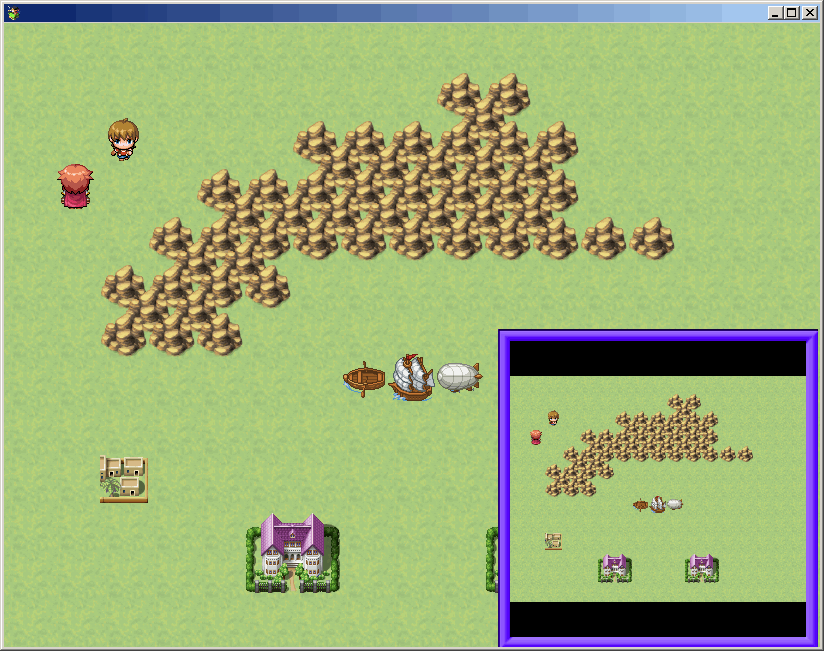
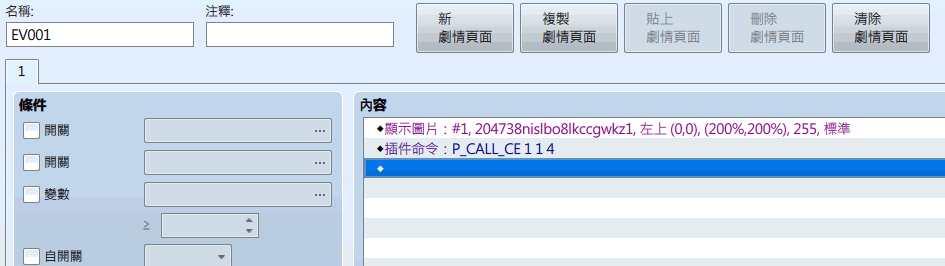
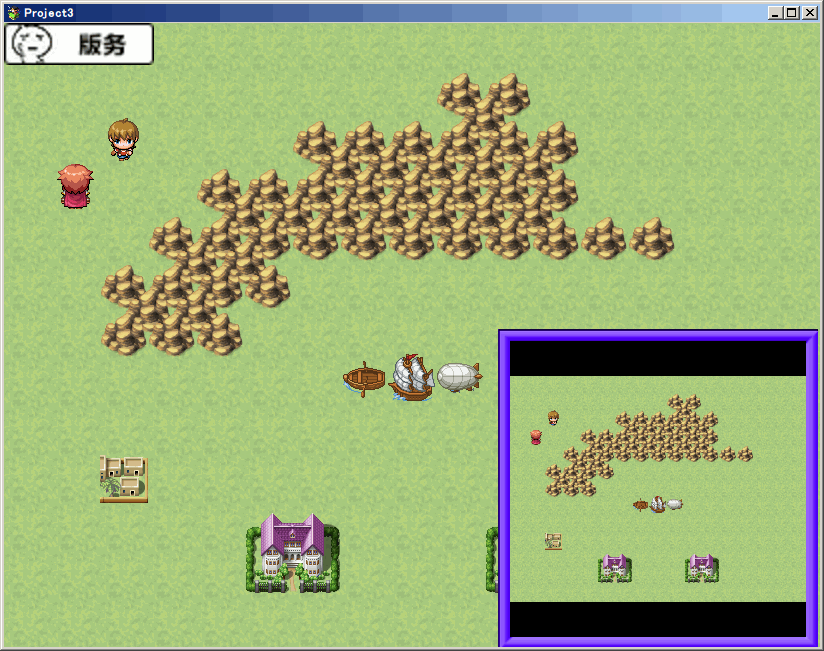
PictureCallCommon
[fold=ChangeMapTouchPolicy]//=============================================================================// ChangeMapTouchPolicy.js// ----------------------------------------------------------------------------// Copyright (c) 2015 Triacontane// This plugin is released under the MIT License.// http://opensource.org/licenses/mit-license.php// ----------------------------------------------------------------------------// Version// 1.0.0 2015/11/18 初版// ----------------------------------------------------------------------------// [Blog] : http://triacontane.blogspot.jp/// [Twitter]: https://twitter.com/triacontane/// [GitHub] : https://github.com/triacontane// ... ==================/*: * @plugindesc Plugin that change policy of 'map touch' * @author triacontane * * @param initPolicyLevel * @desc Initial value of policy level * @default 3 * * @help Plugin that change policy of 'map touch' * There are four stages * * 1 : 'map touch' become invalid * 2 : 'map touch' become simple(move one step) * 3 : 'map touch' become normal(default policy) * 4 : 'map touch' become excessive(auto track to pointer) * * Plugin Command * CHANGE_MTP [policy level] : change policy of 'map touch' * ex:CHANGE_MTP 3 * * This plugin is released under the MIT License. *//*:ja * @plugindesc マップタッチ仕様変更プラグイン * @author トリアコンタン * * @param 仕様レベル初期値 * @desc 初期状態でのマップタッチの仕様レベル * @default 3 * * @help マップをタッチした際の移動の仕方を4種類から変更できます。 * パラメータの「仕様レベル初期値」を設定してください。 * 1 : 無効「マップをタッチしてもプレイヤーは動きません」 * 2 : 簡易「マップをタッチするとプレイヤーが一マスだけ動きます」 * (指定位置へは移動しません。タッチし続けると移動を続けます) * 3 : 通常「マップをタッチするとその位置へプレイヤーが動きます」 * (もともとの仕様です) * 4 : 過剰「一度でもマップクリックすると以後、プレイヤーがポインタを追跡します」 * (もう一度クリックすると移動を止めます) * * プラグインコマンド詳細 * イベントコマンド「プラグインコマンド」から実行。 * (引数の間は半角スペースで区切る) * * CHANGE_MTP [仕様レベル] : マップタッチの仕様レベルを変更します。 * 例:CHANGE_MTP 3 * * 利用規約: * 作者に無断で改変、再配布が可能で、利用形態(商用、18禁利用等) * についても制限はありません。 * ただし、ヘッダのライセンス表示は残してください。 */(function () { var pluginName = 'ChangeMapTouchPolicy'; //============================================================================= // PluginManager // 多言語とnullに対応したパラメータの取得を行います。 // このコードは自動生成され、全てのプラグインで同じものが使用されます。 //============================================================================= PluginManager.getParamString = function(pluginName, paramEngName, paramJpgName) { var value = this.getParamOther(pluginName, paramEngName, paramJpgName); return value == null ? '' : value; }; PluginManager.getParamNumber = function(pluginName, paramEngName, paramJpgName, min, max) { var value = this.getParamOther(pluginName, paramEngName, paramJpgName); if (arguments.length <= 3) min = -Infinity; if (arguments.length <= 4) max = Infinity; return (parseInt(value, 10) || 0).clamp(min, max); }; PluginManager.getParamBoolean = function(pluginName, paramEngName, paramJpgName) { var value = this.getParamOther(pluginName, paramEngName, paramJpgName); return (value || '').toUpperCase() == 'ON'; }; PluginManager.getParamOther = function(pluginName, paramEngName, paramJpgName) { var value = this.parameters(pluginName)[paramEngName]; if (value == null) value = this.parameters(pluginName)[paramJpgName]; return value; }; PluginManager.getCommandName = function(command) { return (command || '').toUpperCase(); }; PluginManager.checkCommandName = function(command, value) { return this.getCommandName(command) === value; }; PluginManager.getArgString = function(index, args) { return args[index] || ''; }; PluginManager.getArgNumber = function(index, args, min, max) { if (arguments.length <= 2) min = -Infinity; if (arguments.length <= 3) max = Infinity; return (parseInt(args[index], 10) || 0).clamp(min, max); }; //============================================================================= // Game_Interpreter // プラグインコマンド[CHANGE_MTP]などを追加定義します。 //============================================================================= var _Game_Interpreter_pluginCommand = Game_Interpreter.prototype.pluginCommand; Game_Interpreter.prototype.pluginCommand = function (command, args) { _Game_Interpreter_pluginCommand.call(this, command, args); if (PluginManager.checkCommandName(command, 'CHANGE_MTP')) { $gameSystem._mapTouchPolicy = PluginManager.getArgNumber(0, args, 1, 4); } }; //============================================================================= // Game_Temp // 移動開始フラグを追加定義します。 //============================================================================= var _Game_Temp_initialize = Game_Temp.prototype.initialize; Game_Temp.prototype.initialize = function() { _Game_Temp_initialize.call(this); this._moveStart = false; }; //============================================================================= // Game_System // 仕様レベルの初期値を追加定義します。 //============================================================================= var _Game_System_initialize = Game_System.prototype.initialize; Game_System.prototype.initialize = function() { _Game_System_initialize.call(this); this._mapTouchPolicy = PluginManager.getParamNumber(pluginName, 'initPolicyLevel', '仕様レベル初期値', 1, 4); }; //============================================================================= // Scene_Map // 仕様レベルによってマップタッチの挙動を変更します。 //============================================================================= var _Scene_Map_isMapTouchOk = Scene_Map.prototype.isMapTouchOk; Scene_Map.prototype.isMapTouchOk = function() { var result = $gameSystem._mapTouchPolicy !== 1 && _Scene_Map_isMapTouchOk.call(this); if (!result) $gameTemp._moveStart = false; return result; }; var _Scene_Map_processMapTouch = Scene_Map.prototype.processMapTouch; Scene_Map.prototype.processMapTouch = function() { switch ($gameSystem._mapTouchPolicy) { case 2: this.processMapTouchLevel2(); break; case 3: _Scene_Map_processMapTouch.call(this); break; case 4: this.processMapTouchLevel4(); break; } }; Scene_Map.prototype.processMapTouchLevel2 = function() { if (TouchInput.isTriggered() || ($gameTemp._moveStart && TouchInput.isPressed())) { var px = $gamePlayer.x; var py = $gamePlayer.y; var deltaX = $gameMap.deltaX($gameMap.canvasToMapX(TouchInput.x), px); var deltaY = $gameMap.deltaY($gameMap.canvasToMapY(TouchInput.y), py); var d = 0; if (Math.abs(deltaX) < Math.abs(deltaY)) { if (deltaY > 0) d = 2; if (deltaY < 0) d = 8; } else { if (deltaX > 0) d = 6; if (deltaX < 0) d = 4; } if (d === 0) return; if (!$gamePlayer.isMapPassable(px, py, d)) { if (Math.abs(deltaX) < Math.abs(deltaY)) { if (deltaX > 0) d = 6; if (deltaX < 0) d = 4; } else { if (deltaY > 0) d = 2; if (deltaY < 0) d = 8; } } if (d === 0) return; if ($gamePlayer.isMapPassable(px, py, d)) { switch (d) { case 2: py++; break; case 4: px--; break; case 6: px++; break; case 8: py--; break; } $gameTemp.setDestination(px, py); $gameTemp._moveStart = true; } } }; Scene_Map.prototype.processMapTouchLevel4 = function() { var x = $gameMap.canvasToMapX(TouchInput.x); var y = $gameMap.canvasToMapY(TouchInput.y); if (TouchInput.isTriggered()) $gameTemp._moveStart = !$gameTemp._moveStart; if ($gameTemp._moveStart) { $gameTemp.setDestination(x, y); } else { $gameTemp.clearDestination(); } }; //============================================================================= // TouchInput // ポインタ移動時にマウス位置の記録を常に行うように元の処理を上書き //============================================================================= TouchInput._onMouseMove = function(event) { var x = Graphics.pageToCanvasX(event.pageX); var y = Graphics.pageToCanvasY(event.pageY); this._onMove(x, y); }})();[/fold]
[fold=PictureCallCommon]//=============================================================================// PictureCallCommon.js// ----------------------------------------------------------------------------// Copyright (c) 2015 Triacontane// This plugin is released under the MIT License.// http://opensource.org/licenses/mit-license.php// ----------------------------------------------------------------------------// Version// 1.1.0 2015/11/23 コモンイベントを呼び出した対象のピクチャ番号を特定する機能を追加// 設定で透明色を考慮する機能を追加// トリガーとして「右クリック」や「長押し」を追加// 1.0.0 2015/11/14 初版// ----------------------------------------------------------------------------// [Blog] : http://triacontane.blogspot.jp/// [Twitter]: https://twitter.com/triacontane/// [GitHub] : https://github.com/triacontane// ... ==================/*:ja * @plugindesc ピクチャのボタン化プラグイン * @author トリアコンタン * * @param 透明色を考慮 * @desc クリックされた箇所が透明色だった場合は、クリックを無効にする。 * @default OFF * * @param ピクチャ番号の変数番号 * @desc コモンイベント呼び出し時にピクチャ番号を格納するゲーム変数の番号 * @default 0 * * @help ピクチャをクリックすると、指定したコモンイベントが * 呼び出されるようになるプラグインコマンドを提供します。 * このプラグインを利用すれば、javascriptの知識がなくても * 誰でも簡単にクリックやタッチを主体にしたゲームを作れます。 * * 注意! * 一度関連づけたピクチャとコモンイベントはピクチャを消去しても有効です。 * ピクチャが存在しなければどこをクリックしても反応しませんが、 * 同じ番号で再度、ピクチャの表示を行うと反応するようになります。 * * プラグインコマンド詳細 * イベントコマンド「プラグインコマンド」から実行。 * (引数の間は半角スペースで区切る) * * P_CALL_CE [ピクチャ番号] [コモンイベントID] [トリガー]: * ピクチャがクリックされたときに呼び出されるコモンイベントを関連づけます。 * トリガーは以下の通りです。(省略すると 1 になります) * 1 : クリックした場合 * 2 : 右クリックした場合 * 3 : 長押しした場合 * 4 : マウスを重ねた場合 * 5 : マウスを放した場合 * * P_CALL_CE_REMOVE [ピクチャ番号] : * ピクチャとコモンイベントの関連づけを解除します。 * 全てのトリガーが削除対象です。 * * 利用規約: * 作者に無断で改変、再配布が可能で、利用形態(商用、18禁利用等) * についても制限はありません。 * ただし、ヘッダのライセンス表示は残してください。 *//*: * @plugindesc Clickable picture plugin * @author triacontane * * @param TransparentConsideration * @desc if click position is transparent, click is disabled. * @default OFF * * @param GameVariablePictureNum * @desc Game variable number that stores the picture number when common event called. * @default 0 * * @help When clicked picture, call common event. * * Plugin Command * * P_CALL_CE [Picture number] [Common event ID] [Trigger]: * When picture was clicked, assign common event id. * Trigger are As below(if omit, It is specified to 1) * 1 : Left click * 2 : Right click * 3 : Long click * 4 : Mouse over * 5 : Mouse out * * P_CALL_CE_REMOVE [Picture number] : * break relation from picture to common event. * * This plugin is released under the MIT License. */(function () { var pluginName = 'PictureCallCommon'; //============================================================================= // PluginManager // 多言語とnullに対応したパラメータの取得を行います。 // このコードは自動生成され、全てのプラグインで同じものが使用されます。 //============================================================================= PluginManager.getParamBoolean = function(pluginName, paramEngName, paramJpgName) { var value = this.getParamOther(pluginName, paramEngName, paramJpgName); return (value || '').toUpperCase() == 'ON'; }; PluginManager.getParamOther = function(pluginName, paramEngName, paramJpgName) { var value = this.parameters(pluginName)[paramEngName]; if (value == null) value = this.parameters(pluginName)[paramJpgName]; return value; }; PluginManager.getCommandName = function(command) { return (command || '').toUpperCase(); }; PluginManager.checkCommandName = function(command, value) { return this.getCommandName(command) === value; }; PluginManager.getArgString = function(index, args) { return args[index] || ''; }; PluginManager.getArgNumber = function(index, args, min, max) { if (arguments.length <= 2) min = -Infinity; if (arguments.length <= 3) max = Infinity; return (parseInt(args[index], 10) || 0).clamp(min, max); }; //============================================================================= // Game_Interpreter // プラグインコマンド[P_CALL_CE]などを追加定義します。 //============================================================================= var _Game_Interpreter_pluginCommand = Game_Interpreter.prototype.pluginCommand; Game_Interpreter.prototype.pluginCommand = function (command, args) { _Game_Interpreter_pluginCommand.call(this, command, args); var pictureId; var commonId; var trigger; switch (PluginManager.getCommandName(command)) { case 'P_CALL_CE' : pictureId = PluginManager.getArgNumber(0, args, 1, 100); commonId = PluginManager.getArgNumber(1, args, 1, 100); trigger = PluginManager.getArgNumber(2, args, 1, 8); $gameScreen.setPictureCallCommon(pictureId, commonId, trigger); break; case 'P_CALL_CE_REMOVE' : pictureId = PluginManager.getArgNumber(0, args, 1, 100); $gameScreen.setPictureRemoveCommon(pictureId); break; } }; //============================================================================= // Game_Temp // 呼び出し予定のコモンイベントIDのフィールドを追加定義します。 //============================================================================= var _Game_Temp_initialize = Game_Temp.prototype.initialize; Game_Temp.prototype.initialize = function() { _Game_Temp_initialize.call(this); this._pictureCommonId = 0; this._pictureNum = 0; }; //============================================================================= // Game_Map // ピクチャがタッチされたときのコモンイベント呼び出し処理を追加定義します。 //============================================================================= var _Game_Map_setupStartingEvent = Game_Map.prototype.setupStartingEvent; Game_Map.prototype.setupStartingEvent = function() { var result = _Game_Map_setupStartingEvent.call(this); return result || this.setupPictureCommonEvent(); }; Game_Map.prototype.setupPictureCommonEvent = function() { var commonId = $gameTemp._pictureCommonId; var event = $dataCommonEvents[commonId]; var result = false; if (commonId > 0 && !this.isEventRunning() && event) { var gameValueNum = PluginManager.getParamNumber(pluginName, 'GameVariablePictureNum', 'ピクチャ番号の変数番号', 0, 5000); if (gameValueNum !== 0) $gameVariables.setValue(gameValueNum, $gameTemp._pictureNum); this._interpreter.setup(event.list); result = true; } $gameTemp._pictureCommonId = 0; $gameTemp._pictureNum = 0; return result; }; //============================================================================= // Game_Troop // ピクチャがタッチされたときのコモンイベント呼び出し処理を追加定義します。 //============================================================================= Game_Troop.prototype.setupPictureCommonEvent = function() { var commonId = $gameTemp._pictureCommonId; var event = $dataCommonEvents[commonId]; if (commonId > 0 && !this.isEventRunning() && event) { this._interpreter.setup(event.list); $gameTemp._pictureCommonId = 0; return true; } return false; }; //============================================================================= // Game_Screen // ピクチャに対応するコモンイベント呼び出し用のID配列を追加定義します。 //============================================================================= var _Game_Screen_initialize = Game_Screen.prototype.initialize; Game_Screen.prototype.initialize = function() { _Game_Screen_initialize.call(this); this._pictureCidArray = []; }; Game_Screen.prototype.setPictureCallCommon = function(pictureId, commonId, trigger) { var realPictureId = this.realPictureId(pictureId); if (this._pictureCidArray[realPictureId] == null) this._pictureCidArray[realPictureId] = []; this._pictureCidArray[realPictureId][trigger] = commonId; }; Game_Screen.prototype.setPictureRemoveCommon = function(pictureId) { var realPictureId = this.realPictureId(pictureId); this._pictureCidArray[realPictureId] = []; }; //============================================================================= // Scene_Map // ピクチャのタッチ状態からのコモンイベント呼び出し予約を追加定義します。 //============================================================================= var _Scene_Map_update = Scene_Map.prototype.update; Scene_Map.prototype.update = function() { if (!$gameMap.isEventRunning()) this.updateTouchPictures(); _Scene_Map_update.call(this); }; Scene_Map.prototype.updateTouchPictures = function() { this._spriteset.callTouchPictures(); }; var _Scene_Map_isMapTouchOk = Scene_Map.prototype.isMapTouchOk; Scene_Map.prototype.isMapTouchOk = function() { return _Scene_Map_isMapTouchOk.call(this) && $gameTemp._pictureCommonId === 0; }; //============================================================================= // Scene_Battle // ピクチャのタッチ状態からのコモンイベント呼び出し予約を追加定義します。 //============================================================================= var _Scene_Battle_update = Scene_Battle.prototype.update; Scene_Battle.prototype.update = function() { this.updateTouchPictures(); $gameTroop.setupPictureCommonEvent(); _Scene_Battle_update.call(this); }; Scene_Battle.prototype.updateTouchPictures = function() { this._spriteset.callTouchPictures(); }; //============================================================================= // Spriteset_Base // ピクチャのタッチ状態からのコモンイベント呼び出し予約を追加定義します。 //============================================================================= Spriteset_Base.prototype.callTouchPictures = function() { this._pictureContainer.children.forEach(function(picture) { picture.callTouch(); }, this); }; //============================================================================= // Sprite_Picture // ピクチャのタッチ状態からのコモンイベント呼び出し予約を追加定義します。 //============================================================================= var _Sprite_Picture_initialize = Sprite_Picture.prototype.initialize; Sprite_Picture.prototype.initialize = function(pictureId) { _Sprite_Picture_initialize.call(this, pictureId); this._triggerHandler = []; this._triggerHandler[1] = this.isTriggered.bind(this); this._triggerHandler[2] = this.isCancelled.bind(this); this._triggerHandler[3] = this.isLongPressed.bind(this); this._triggerHandler[4] = this.isOnFocus.bind(this); this._triggerHandler[5] = this.isOutFocus.bind(this); this._triggerHandler[6] = this.isReleased.bind(this); this._triggerHandler[7] = this.isRepeated.bind(this); this._triggerHandler[8] = this.isPressed.bind(this); this._onMouse = false; this._outMouse = false; this._wasOnMouse = false; this._transparentConsideration = PluginManager.getParamBoolean(pluginName, 'TransparentConsideration', '透明色を考慮'); }; var _Sprite_update = Sprite_Picture.prototype.update; Sprite_Picture.prototype.update = function() { _Sprite_update.call(this); this._onMouse = false; this._outMouse = false; if (TouchInput.isMoved()) { if (this.isTouchPosInRect() && this.isNotTransparent()) { if (!this._wasOnMouse) { this._onMouse = true; this._wasOnMouse = true; } } else { if (this._wasOnMouse) { this._outMouse = true; this._wasOnMouse = false; } } } }; Sprite_Picture.prototype.callTouch = function() { var commandIds = $gameScreen._pictureCidArray[$gameScreen.realPictureId(this._pictureId)]; if (commandIds == null) return; for (var i = 1; i <= this._triggerHandler.length; i++) { if (commandIds != null && this._triggerHandler() && (i === 5 || i === 4 || this.isNotTransparent())) { $gameTemp._pictureCommonId = commandIds; $gameTemp._pictureNum = this._pictureId; } } }; Sprite_Picture.prototype.isNotTransparent = function () { if (!this._transparentConsideration) return true; var bx = (TouchInput.x - this.x) / this.scale.x + this.anchor.x * this.width; var by = (TouchInput.y - this.y) / this.scale.y + this.anchor.y * this.height; var alpha = this.bitmap.getAlphaPixel(bx, by); return alpha !== 0; }; //============================================================================= // Sprite_Picture // タッチ操作を可能にする共通部分 //============================================================================= Sprite_Picture.prototype.screenWidth = function() { return (this.width || 0) * this.scale.x; }; Sprite_Picture.prototype.screenHeight = function() { return (this.height || 0) * this.scale.y; }; Sprite_Picture.prototype.screenX = function() { return (this.x || 0) - this.anchor.x * this.screenWidth(); }; Sprite_Picture.prototype.screenY = function() { return (this.y || 0) - this.anchor.y * this.screenHeight(); }; Sprite_Picture.prototype.minX = function() { var width = this.screenWidth(); return Math.min(this.screenX(), this.screenX() + width); }; Sprite_Picture.prototype.minY = function() { var height = this.screenHeight(); return Math.min(this.screenY(), this.screenY() + height); }; Sprite_Picture.prototype.maxX = function() { var width = this.screenWidth(); return Math.max(this.screenX(), this.screenX() + width); }; Sprite_Picture.prototype.maxY = function() { var height = this.screenHeight(); return Math.max(this.screenY(), this.screenY() + height); }; Sprite_Picture.prototype.isTouchPosInRect = function () { var tx = TouchInput.x; var ty = TouchInput.y; return (tx >= this.minX() && tx <= this.maxX() && ty >= this.minY() && ty <= this.maxY()); }; Sprite_Picture.prototype.isTouchable = function() { return this.bitmap != null && this.visible && this.scale.x !== 0 && this.scale.y !== 0; }; Sprite_Picture.prototype.isTriggered = function() { return this.isTouchEvent(TouchInput.isTriggered()); }; Sprite_Picture.prototype.isCancelled = function() { return this.isTouchEvent(TouchInput.isCancelled()); }; Sprite_Picture.prototype.isLongPressed = function() { return this.isTouchEvent(TouchInput.isLongPressed()); }; Sprite_Picture.prototype.isPressed = function() { return this.isTouchEvent(TouchInput.isPressed()); }; Sprite_Picture.prototype.isReleased = function() { return this.isTouchEvent(TouchInput.isReleased()); }; Sprite_Picture.prototype.isRepeated = function() { return this.isTouchEvent(TouchInput.isRepeated()); }; Sprite_Picture.prototype.isOnFocus = function() { return this._onMouse; }; Sprite_Picture.prototype.isOutFocus = function() { return this._outMouse; }; Sprite_Picture.prototype.isTouchEvent = function(triggerResult) { return this.isTouchable && triggerResult && this.isTouchPosInRect(); }; //============================================================================= // TouchInput // ポインタ移動時にマウス位置の記録を常に行うように元の処理を上書き //============================================================================= TouchInput._onMouseMove = function(event) { var x = Graphics.pageToCanvasX(event.pageX); var y = Graphics.pageToCanvasY(event.pageY); this._onMove(x, y); }})();[/fold]
|
评分
-
查看全部评分
|




 写轮眼
写轮眼


 提升卡
提升卡 沉默号角
沉默号角 喧嚣号角
喧嚣号角 变色卡
变色卡 升龙剑
升龙剑