| 赞 | 168 |
| VIP | |
| 好人卡 | |
| 积分 | 229 |
| 经验 | |
| 最后登录 | 2025-4-1 |
| 在线时间 | 8598 小时 |
- 梦石
- 0
- 星屑
- 22879
- 在线时间
- 8598 小时
- 注册时间
- 2011-12-31
- 回帖
- 3270
|
加入我们,或者,欢迎回来。
您需要 登录 才可以下载或查看,没有账号?注册会员
×
本帖最后由 tseyik 于 2015-11-22 14:00 编辑
原網頁
http://gamecome.hateblo.jp/entry/2015/11/20/000934
生成特效
PixiParticlesEditor
http://cloudkidstudio.github.io/PixiParticlesEditor/
js放在lib文件夾

使った画像をpicturesフォルダに保存。
プラグイン中の指定
PIXI.Texture.fromImage('./img/pictures/Sparks.png') , PIXI.Texture.fromImage('./img/pictures/index.png')
事件調用
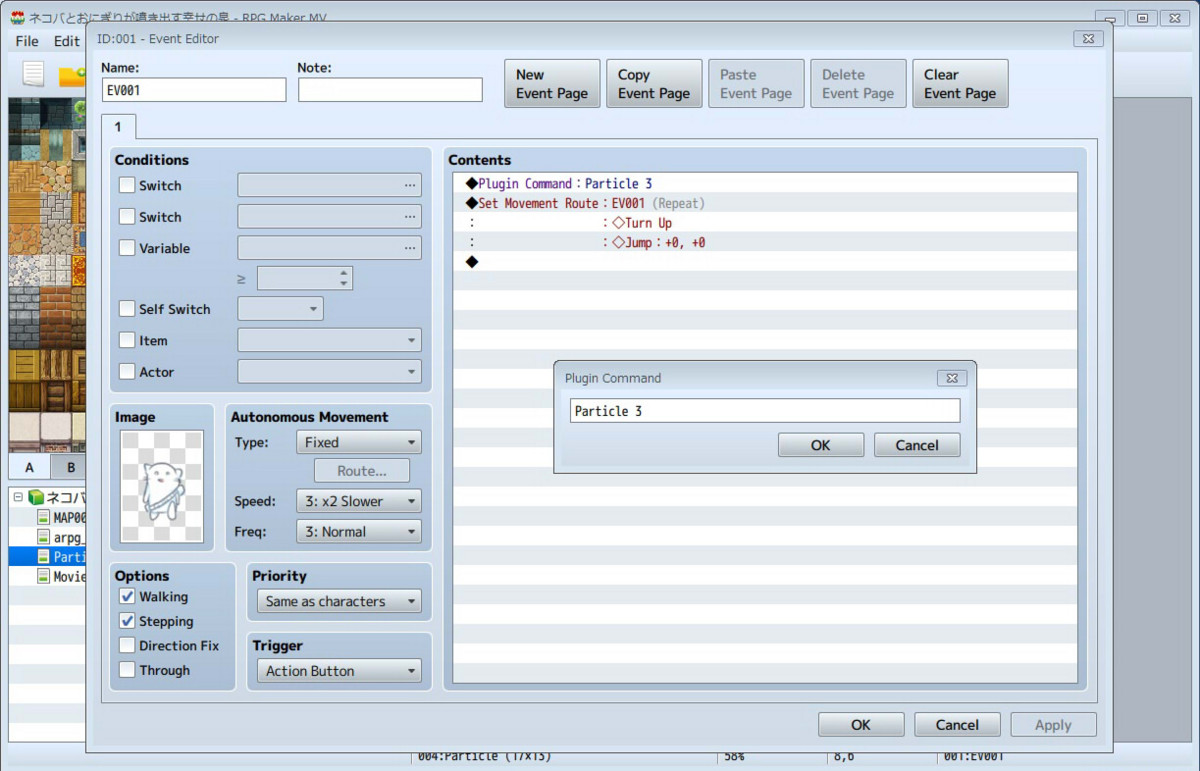
[fold= Particle.js]//=============================================================================
// Particle.js
//=============================================================================
/*:
* @plugindesc ネコバとおにぎりが噴き出す幸せの泉
* @author nekoba
*
* @desc spine map test
*
* @help pokotin
*/
var readFile = function(url) {
var script;
script = document.createElement('script');
script.type = 'text/javascript';
script.src = url;
script.async = true;
script.onerror = function() {
return console.log("読み込みエラー");
};
script.onload = function() {
return console.log("ok");
};
script._url = url;
return document.body.appendChild(script);
};
readFile("./js/libs/pixi-particles.js");
(function() {
//=============================================================================
// Game_Interpreter - register plugin commands
//=============================================================================
var _Game_Interpreter_pluginCommand =
Game_Interpreter.prototype.pluginCommand;
Game_Interpreter.prototype.pluginCommand = function(command, args) {
_Game_Interpreter_pluginCommand.call(this, command, args)
if (command === 'Particle'){
var obj = $gameMap.event(args[0]);
var sprite = test(obj.screenX() , obj.screenY());
var scene = SceneManager._scene;
var container = new PIXI.DisplayObjectContainer();
container.addChild(sprite);
scene.addChild(container);
}
};
function test(x , y){
var emitter = new cloudkid.Emitter(
null,
[PIXI.Texture.fromImage('./img/pictures/Sparks.png') , PIXI.Texture.fromImage('./img/pictures/index.png')],
{
"alpha": {
"start": 1,
"end": 0.43
},
"scale": {
"start": 0.5,
"end": 1,
"minimumScaleMultiplier": 1
},
"color": {
"start": "#ffffff",
"end": "#9ff3ff"
},
"speed": {
"start": 1000,
"end": 200
},
"acceleration": {
"x": 0,
"y": 0
},
"startRotation": {
"min": 225,
"max": 320
},
"rotationSpeed": {
"min": 0,
"max": 180
},
"lifetime": {
"min": 0.25,
"max": 0.5
},
"blendMode": "normal",
"frequency": 0.001,
"emitterLifetime": -1,
"maxParticles": 1000,
"pos": {
"x": 0,
"y": 0
},
"addAtBack": false,
"spawnType": "point"
}
);
emitter.updateOwnerPos(x, y);
emitter.emit = true;
var obj = new PIXI.DisplayObjectContainer();
for(var attr in obj) {
//if (obj.hasOwnProperty(attr)){}
if(!emitter[attr]){
emitter[attr] = obj[attr];
}
}
var scene = SceneManager._scene;
var _update = scene.updateScene;
var elapsed = Date.now();
scene.updateScene = function(){
_update.call(this);
var now = Date.now();
emitter.update((now - elapsed) * 0.001);
elapsed = now;
};
return emitter;
}
})();[/fold] |
|



 写轮眼
写轮眼
 发表于 2015-11-22 13:58:17
 提升卡
提升卡 沉默号角
沉默号角 喧嚣号角
喧嚣号角 变色卡
变色卡 升龙剑
升龙剑