| 赞 | 168 |
| VIP | |
| 好人卡 | |
| 积分 | 229 |
| 经验 | |
| 最后登录 | 2025-4-1 |
| 在线时间 | 8598 小时 |
- 梦石
- 0
- 星屑
- 22879
- 在线时间
- 8598 小时
- 注册时间
- 2011-12-31
- 回帖
- 3270
|
楼主 |
发表于 2015-11-25 09:21:18
|
显示全部楼层
本帖最后由 tseyik 于 2015-11-25 09:32 编辑
Sensor SelfSwitch 3.1.1
http://mvplugins.com/plugin/Lyson/Sensor%20SelfSwitch
[fold=Sensor SelfSwitch 3.1.1]//=========================================================
// Sensor SelfSwitch
// Sensor SelfSwitch.js
// Version: 3.1.1
//=========================================================
var Imported = Imported || {};
Imported.LSensor = true;
var Lyson = Lyson || {};
Lyson.Sensor = Lyson.Sensor || {};
/*:
* @author Lyson
* @plugindesc Allows events to flip a self switch when a
* player is in range.
* <Sensor SelfSwitch>
*
* @param Event Self Switch
* @desc The self switch for event tags.
* A, B, C, or D
* @default D
*
* @param Comment Self Switch
* @desc The self switch for comment tags.
* A, B, C, or D
* @default D
*
* @param Blackout Region
* @desc The region number that will stop the selfswitch.
* Number between 1 and 255
* @default
*
* @param Blackout Variable
* @desc Set Blackout Region to be the a variable number.
* NO - false, YES - true
* @default false
*
* @param Blackout Switch
* @desc Set Blackout Region to trigger by a switch (set below).
* NO - false, YES - true
* @default false
*
*
* @param Blackout Switch Number
* @desc Set the number of the switch to trigger the Blackout Region.
* This will not be used unless Blackout Switch is set to YES.
* @default
*
* @help
* =============================================================================
* What does it do?
* =============================================================================
*
* This plugin activates a self switch when a player is in a certain proximity
* of an event. It uses a notetag in the note of the event to set the proximity.
*
* =============================================================================
* Usage
* =============================================================================
*
* In the plugin parameters, set the self switch to be triggered on the event
* when a player enters the range. Options are A, B, C, and D. Default is D.
*
* Event tags provide 2 way functionality, they will turn off the switch when
* the player leaves the event's range.
*
* Comment tags only provide 1 way switching, they will NOT turn off the Self
* Switch when the player leaves the event's range.
*
* The value of Blackout Region is the number of the region where you want the
* sensor to be ineffectual.
* When Blackout Variable is true, Blackout Region is the variable number whose
* value contains the desired region number, anything other than a number set
* to the variable will most likely cause errors.
*
* When Blackout Switch is true and the switch (set in Blackout Switch Number)
* is off, the region established for Blackout Region will not alter the
* funcitons of the sensor. When it is ON the established region will prevent
* triggering the self switch.
*
*
* -----------------------------------------------------------------------------
* Notetags
* -----------------------------------------------------------------------------
*
* These notetags go in the note box for the event or in a comment on an event
* page.
*
* <Sensor: x>
*
* Where x is the number of tiles away that the selfswitch will be triggered.
*
*
* <SensorLV: x>
*
* This makes it so that the selfswitch will only be triggered in a straight
* line in the direction the event is facing.
* Where x is the number of tiles away that the selfswitch will be triggered.
*
* <SensorVar: x>
*
* This makes it so that the selfswitch range is set to the value of variable
* x.
* Where x is the number of tiles away that the selfswitch will be triggered.
*
* <SensorLVar: x>
*
* This makes it so that the selfswitch will only be triggered in a straight
* line in the direction the event is facing, and the range is set by
* variable x.
* Where x is the number of tiles away that the selfswitch will be triggered.
*
* <SensorCV: x>
*
* This makes it so that the selfswitch will be triggered in a cone, the
* direction the event is looking.
* Where x is the number of tiles away the cone extends.
*
* <SensorCVar: x>
*
* This makes it so that the selfswitch will be triggered in a cone, the
* direction the event is looking and the range is set by variable x.
* Where x is the number of tiles away the cone extends.
*
* <SensorRV: x, y>
*
* This makes it so that the selfswitch will only be triggered in a
* rectangular line in the direction the event is facing.
* Where x is the number of tiles to both sides of the event's looking
* direction, and y is the number of tiles away that the selfswitch will be
* triggered.
*
* <SensorRVar: x, y>
*
* This makes it so that the selfswitch will only be triggered in a
* rectangular line in the direction the event is facing.
* Where x is the number of variable whose value is the number of tiles to
* both sides of the event's looking direction, and y is the number of
* variable whose value is the number of tiles away that the selfswitch will be
* triggered.
* Additionally, putting a ! in front of either number uses the number given
* instead of a variable.
*
* -----------------------------------------------------------------------------
* Special Thanks to Gilles!
* ----------------------------------------------------------------------------
* =============================================================================
*/
Lyson.Parameters = $plugins.filter(function (plugin) { return plugin.description.indexOf('<Sensor SelfSwitch>') != -1; })[0].parameters;
Lyson.Param = Lyson.Param || {};
Lyson.Param.SelfSwitch = String(Lyson.Parameters['Event Self Switch']);
Lyson.Param.CommentSwitch = String(Lyson.Parameters['Comment Self Switch']);
Lyson.Param.RegionBlock = Number(Lyson.Parameters['Blackout Region']);
Lyson.Param.blockVariable = String(Lyson.Parameters['Blackout Variable']);
Lyson.Param.blockSwitch = String(Lyson.Parameters['Blackout Switch']);
Lyson.Param.blockSwitchNum = Number(Lyson.Parameters['Blackout Switch Number']);
Lyson.Sensor.playerMoved = false;
Lyson.Sensor.Game_Event_setupPage = Game_Event.prototype.setupPage;
Game_Event.prototype.setupPage = function () {
Lyson.Sensor.Game_Event_setupPage.call(this);
this.setupSensor();
};
Game_Event.prototype.setupSensor = function () {
this._sensorRange = 0;
this._sensorWidth = 0;
};
Lyson.Sensor.Game_Event_update = Game_Event.prototype.update;
Game_Event.prototype.update = function () {
Lyson.Sensor.Game_Event_update.call(this);
this.updateSensor();
};
Game_Event.prototype.updateSensor = function () {
if (this._erased) return;
if (!this._sensorRange) { this._sensorRange = 0 };
if (!this._sensorWidth) { this._sensorWidth = 0 };
if (this._sensorRange < 0) return;
Lyson.Sensor.playerMoved = $gamePlayer.isMoving();
if (!Lyson.Sensor.playerMoved) return;
Lyson.Sensor.processEventNotetags.call(this);
Lyson.Sensor.proccessPageComments.call(this);
};
Lyson.Sensor.processEventNotetags = function () {
if (!$dataMap) {
return;
}
var event = this.event();
if (event.note) {
var note1 = /<(?:SENSOR):[ ](\d+)>/i;
var note2 = /<(?:SENSORVAR):[ ](\d+)>/i;
var note3 = /<(?:SENSORLV):[ ](\d+)>/i;
var note4 = /<(?:SENSORLVAR):[ ](\d+)>/i;
var note5 = /<(?:SENSORCV):[ ](\d+)>/i;
var note6 = /<(?:SENSORCVAR):[ ](\d+)>/i;
var note7 = /<(?:SENSORRV):[ ](\d+),[ ](\d+)>/i;
var note8 = /<(?:SENSORRVAR):[ ](!?)(\d+),[ ](!?)(\d+)>/i;
var notedata = event.note.split(/(?:>)[ ]/);
for (var i = 0; i < notedata.length; i++) {
var tag = notedata;
if (tag.match(note1)) {
this._sensorRange = parseInt(RegExp.$1);
Lyson.Sensor.basicSensor.call(this);
return;
}
if (tag.match(note2)) {
this._sensorRange = $gameVariables.value(parseInt(RegExp.$1));
Lyson.Sensor.basicSensor.call(this);
return;
}
if (tag.match(note3)) {
this._sensorWidth = 0;
this._sensorRange = parseInt(RegExp.$1);
Lyson.Sensor.rectSensor.call(this);
return;
}
if (tag.match(note4)) {
this._sensorWidth = 0;
this._sensorRange = $gameVariables.value(parseInt(RegExp.$1));
Lyson.Sensor.rectSensor.call(this);
return;
}
if (tag.match(note5)) {
this._sensorRange = parseInt(RegExp.$1);
Lyson.Sensor.coneSensor.call(this);
return;
}
if (tag.match(note6)) {
this._sensorRange = $gameVariables.value(parseInt(RegExp.$1));
Lyson.Sensor.coneSensor.call(this);
return;
}
if (tag.match(note7)) {
this._sensorWidth = parseInt(RegExp.$1);
this._sensorRange = parseInt(RegExp.$2);
Lyson.Sensor.rectSensor.call(this);
return;
}
if (tag.match(note8)) {
this._sensorWidth = $gameVariables.value(parseInt(RegExp.$2));
if (RegExp.$1 === "!") { this._sensorWidth = parseInt(RegExp.$2); }
this._sensorRange = $gameVariables.value(parseInt(RegExp.$4));
if (RegExp.$3 === "!") { this._sensorRange = parseInt(RegExp.$4); }
Lyson.Sensor.rectSensor.call(this);
return;
}
}
}
};
Lyson.Sensor.proccessPageComments = function () {
if (!$dataMap) {
return;
}
var list;
if (!this.page()) { list = this.event().pages[0]; } else { list = this.page().list; };
var note1 = /<(?:SENSOR):[ ](\d+)>/i;
var note2 = /<(?:SENSORVAR):[ ](\d+)>/i;
var note3 = /<(?:SENSORLV):[ ](\d+)>/i;
var note4 = /<(?:SENSORLVAR):[ ](\d+)>/i;
var note5 = /<(?:SENSORCV):[ ](\d+)>/i;
var note6 = /<(?:SENSORCVAR):[ ](\d+)>/i;
var note7 = /<(?:SENSORRV):[ ](\d+),[ ](\d+)>/i;
var note8 = /<(?:SENSORRVAR):[ ](!?)(\d+),[ ](!?)(\d+)>/i;
var tag;
for (var i = 0; i < list.length; i++) {
if (list.code === 108 || list.code === 408) {
tag = list.parameters[0];
if (tag.match(note1)) {
this._sensorRange = parseInt(RegExp.$1);
Lyson.Sensor.basicSensor.call(this, 'comm');
return;
}
if (tag.match(note2)) {
this._sensorRange = $gameVariables.value(parseInt(RegExp.$1));
Lyson.Sensor.basicSensor.call(this, 'comm');
return;
}
if (tag.match(note3)) {
this._sensorWidth = 0;
this._sensorRange = parseInt(RegExp.$1);
Lyson.Sensor.rectSensor.call(this, 'comm');
return;
}
if (tag.match(note4)) {
this._sensorWidth = 0;
this._sensorRange = $gameVariables.value(parseInt(RegExp.$1));
Lyson.Sensor.rectSensor.call(this, 'comm');
return;
}
if (tag.match(note5)) {
this._sensorRange = parseInt(RegExp.$1);
Lyson.Sensor.coneSensor.call(this, 'comm');
return;
}
if (tag.match(note6)) {
this._sensorRange = $gameVariables.value(parseInt(RegExp.$1));
Lyson.Sensor.coneSensor.call(this, 'comm');
return;
}
if (tag.match(note7)) {
this._sensorWidth = parseInt(RegExp.$1);
this._sensorRange = parseInt(RegExp.$2);
Lyson.Sensor.rectSensor.call(this, 'comm');
return;
}
if (tag.match(note8)) {
this._sensorWidth = $gameVariables.value(parseInt(RegExp.$2));
if (RegExp.$1 === "!") { this._sensorWidth = parseInt(RegExp.$2); }
this._sensorRange = $gameVariables.value(parseInt(RegExp.$4));
if (RegExp.$3 === "!") { this._sensorRange = parseInt(RegExp.$4); }
Lyson.Sensor.rectSensor.call(this, 'comm');
return;
}
}
}
};
Lyson.Sensor.basicSensor = function (c) {
var selfs = Lyson.Sensor.selfSwitch;
if (c === 'comm') var selfs = Lyson.Sensor.selfSwitchC;
if (Lyson.Sensor.regionBlock()) { selfs.call(this, false); return; };
var inRange = Math.abs(this.deltaXFrom($gamePlayer.x));
inRange += Math.abs(this.deltaYFrom($gamePlayer.y));
if (inRange <= this._sensorRange) {
selfs.call(this, true);
} else {
selfs.call(this, false);
};
};
Lyson.Sensor.rectSensor = function (c) {
var selfs = Lyson.Sensor.selfSwitch;
if (c === 'comm') var selfs = Lyson.Sensor.selfSwitchC;
if (Lyson.Sensor.regionBlock()) { selfs.call(this, false); return; };
var trigger = false;
var absY = Math.abs(this.deltaYFrom($gamePlayer.y));
var absX = Math.abs(this.deltaXFrom($gamePlayer.x));
var sensor = this._sensorRange;
var sWidth = this._sensorWidth;
var sensorNeg = 0 - sensor;
var dir = this.direction();
if ((dir === 2 || dir === 8)) {
var inFront = this.deltaYFrom($gamePlayer.y);
if (absX <= sWidth) {
if (dir === 8) {
if (inFront <= sensor && inFront > 0) trigger = true;
} else {
if (inFront >= sensorNeg && inFront < 0) trigger = true;
};
};
} else {
var inFront = this.deltaXFrom($gamePlayer.x);
if (absY <= sWidth) {
if (dir === 4) {
if (inFront <= sensor && inFront > 0) trigger = true;
} else {
if (inFront >= sensorNeg && inFront < 0) trigger = true;
};
};
};
selfs.call(this, trigger);
};
Lyson.Sensor.coneSensor = function (c) {
var selfs = Lyson.Sensor.selfSwitch;
if (c === 'comm') { var selfs = Lyson.Sensor.selfSwitchC }
if (Lyson.Sensor.regionBlock()) { selfs.call(this, false); return; };
var trigger = false;
var absY = Math.abs(this.deltaYFrom($gamePlayer.y));
var absX = Math.abs(this.deltaXFrom($gamePlayer.x));
var sensor = this._sensorRange;
var sensorNeg = 0 - sensor;
var coneL = this.deltaXFrom($gamePlayer.x) - absY;
var coneR = this.deltaXFrom($gamePlayer.x) + absY;
var coneU = this.deltaYFrom($gamePlayer.y) - absX;
var coneD = this.deltaYFrom($gamePlayer.y) + absX;
var dir = this.direction();
if ((dir === 2 || dir === 8)) {
var inFront = this.deltaYFrom($gamePlayer.y);
if (coneU >= 0 && dir === 8) {
if (inFront <= sensor && inFront > 0) trigger = true;
} else if (coneD <= 0 && dir === 2) {
if (inFront >= sensorNeg && inFront < 0) trigger = true;
};
} else {
var inFront = this.deltaXFrom($gamePlayer.x);
if (coneL >= 0 && dir === 4) {
if (inFront <= sensor && inFront > 0) trigger = true;
} else if (coneR <= 0 && dir === 6) {
if (inFront >= sensorNeg && inFront < 0) trigger = true;
};
};
selfs.call(this, trigger);
};
Lyson.Sensor.regionBlock = function () {
var blockedRegion;
if (Lyson.Param.RegionBlock > 0) { blockedRegion = Lyson.Param.RegionBlock };
if (Lyson.Param.blockVariable === 'true') { blockedRegion = $gameVariables.value(Lyson.Param.RegionBlock) };
if (Lyson.Param.blockSwitch === 'true') {
if ($gameSwitches.value(Lyson.Param.blockSwitchNum) !== true) { return false; };
};
if ($gamePlayer.regionId() === blockedRegion) { return true; } else { return false; };
};
Lyson.Sensor.selfSwitch = function (selfs) {
$gameSelfSwitches.setValue([this._mapId, this._eventId, Lyson.Param.SelfSwitch], selfs);
};
Lyson.Sensor.selfSwitchC = function (selfs) {
$gameSelfSwitches.setValue([this._mapId, this._eventId, Lyson.Param.CommentSwitch], selfs);
};
// End of File[/fold]
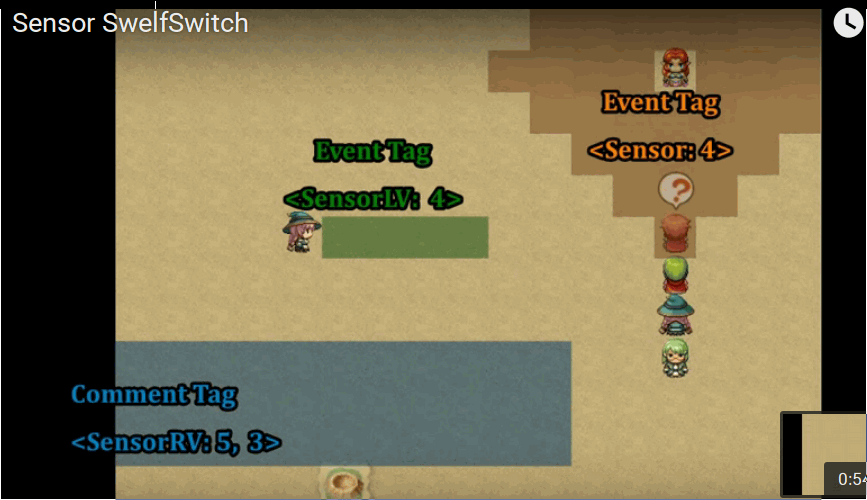
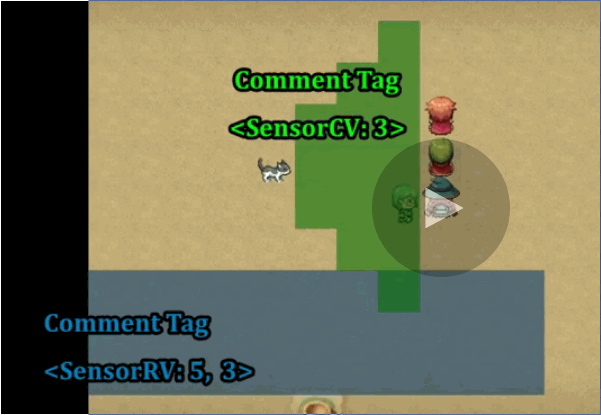
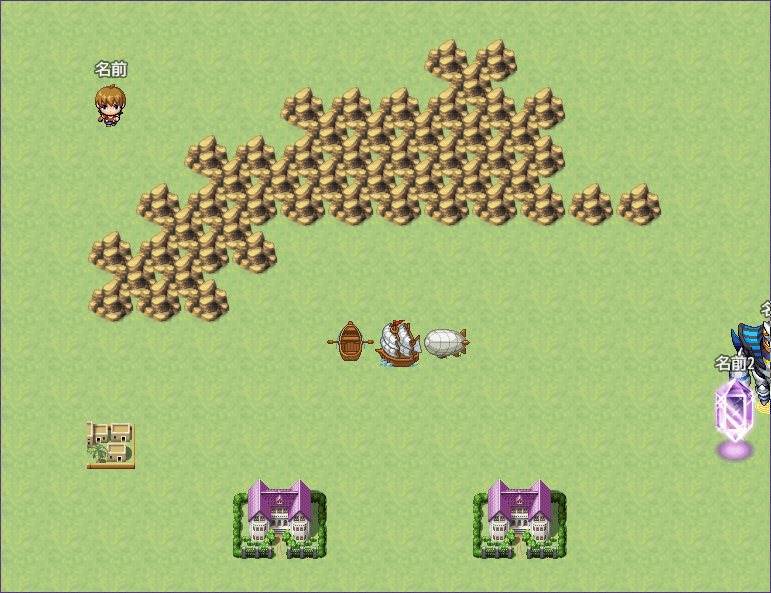
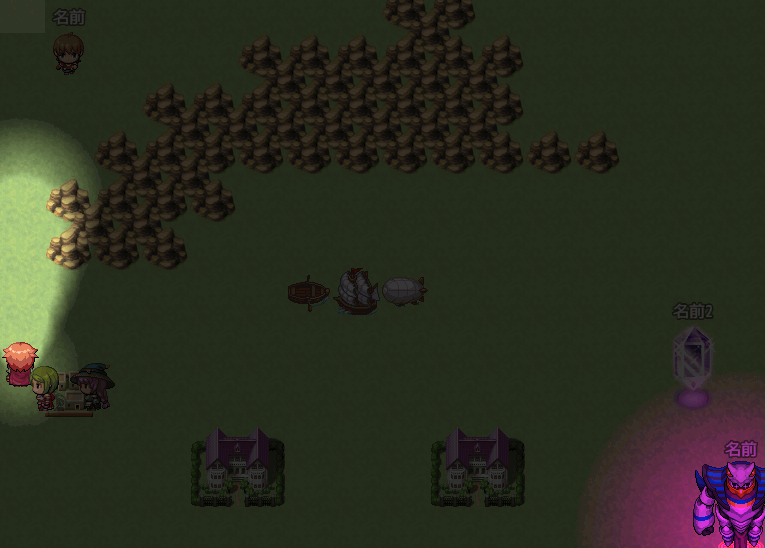
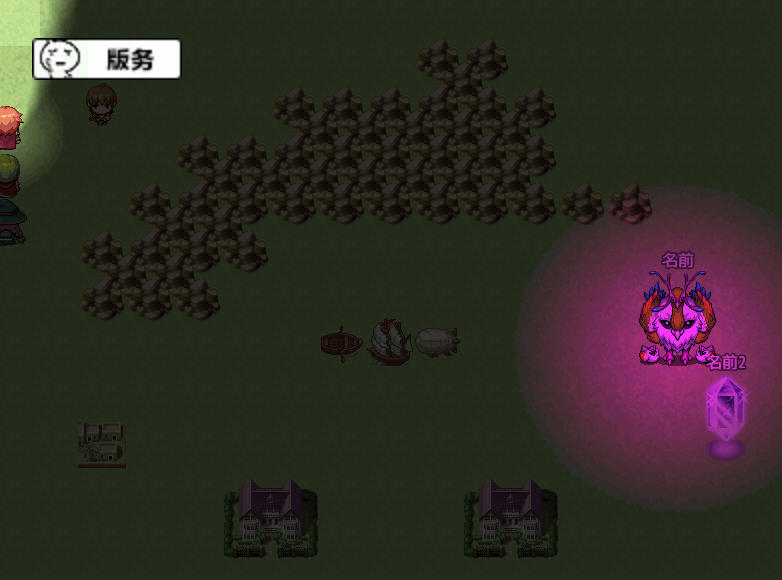
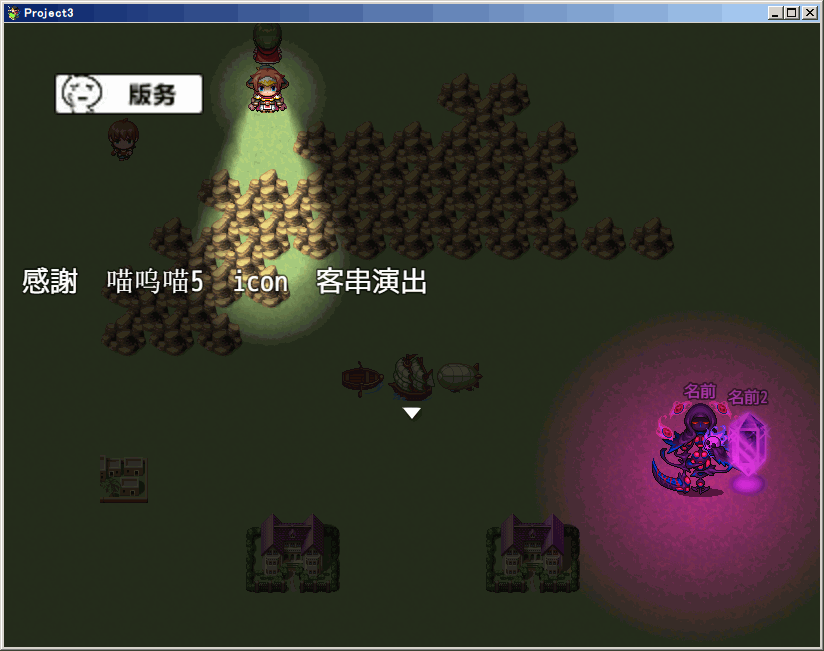
這個插件,當玩者接近該事件打開自用開關。
明雷/巡邏用
notetags在附註中記述
* <Sensor: x>
* 範圍x觸發
*
* <SensorVar: x>
* 範圍変数x觸發
*
* <SensorLV: x>
* 範圍x(事件正面)觸發
*
* <SensorLVar: x>
*
*
* <SensorCV: x>
* 範圍x(錐)(事件正面)觸發
*
* <SensorCVar: x>
*
*
* <SensorRV: x, y>
* 範圍xy(四辺形)(事件正面)觸發
*
* <SensorRVar: x, y>
*
* |
评分
-
查看全部评分
|



 写轮眼
写轮眼
 发表于 2015-11-24 21:26:24




 提升卡
提升卡 沉默号角
沉默号角 喧嚣号角
喧嚣号角 变色卡
变色卡 升龙剑
升龙剑