| 赞 | 3 |
| VIP | |
| 好人卡 | |
| 积分 | 1 |
| 经验 | |
| 最后登录 | 2018-11-11 |
| 在线时间 | 306 小时 |
- 梦石
- 0
- 星屑
- 60
- 在线时间
- 306 小时
- 注册时间
- 2014-8-5
- 回帖
- 403
|
加入我们,或者,欢迎回来。
您需要 登录 才可以下载或查看,没有账号?注册会员
×
本帖最后由 夏末渐离 于 2016-1-22 11:38 编辑
【自我介绍】
这个新人是懒癌+拖延症患者。
(于是顺利进入正题。)
【脚本介绍】
一.使用脚本怕麻烦的童鞋就不要往下看了。因为要设置的参数很多。……(果然还是希望你们往下看)
二.DIYHUD是一个即使看不懂任何代码的童鞋也能轻松在插件管理器(F10)定制各种风格的HUD窗口。
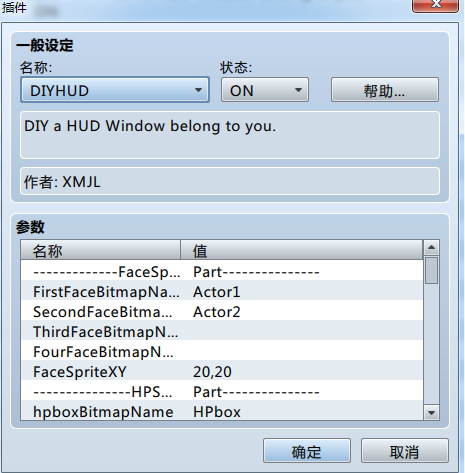
三.绘制效果展示:
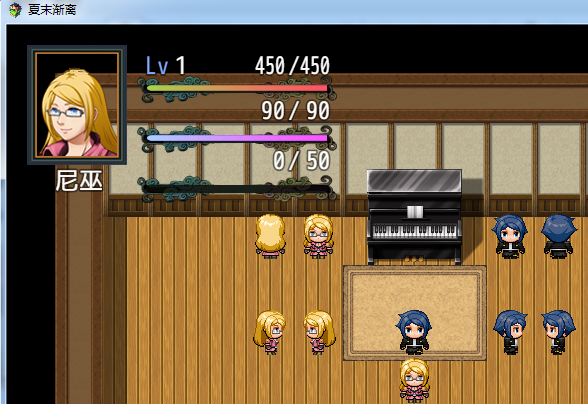
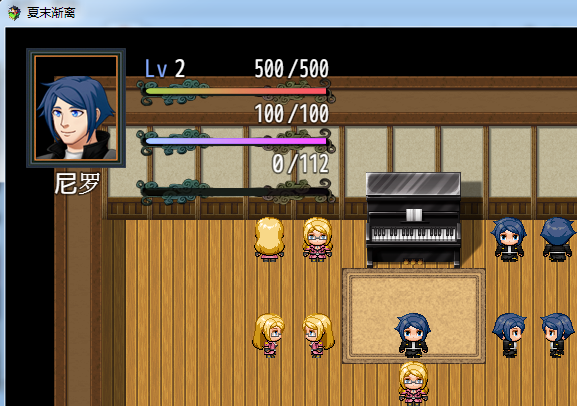
四,具体功能:
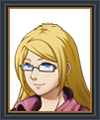
1. 你可以使用自己设计的头像图片(任意大小,任意位置)
2. 你可以使用自己设计的HP/MP/EXP槽图片(任意大小,任意位置),如留空则代表不绘制各类槽。

3. 你可以使用自己设计的HP/MP/EXP条图片(任意大小,配合各类槽的位置),如留空则代表不绘制各类条。

4.你可以修改该窗口字体大小(唯一), 各种字符信息在窗口里的绘制位置。
5.你可以按某个键来向后切换领队并显示领队的即时状态。
(当然,键值也可以改变的,具体键值请自行查阅【rpg_core】或该脚本的帮助文档【食用说明】。)
五.注意事项
1.窗口字符能被HP/MP/EXP条所遮挡。(脸图和HP/MP/EXP槽例外)。
2.各类槽和各类条是通过XY拼在一起的。
3.各类图片都必须保存在img/pictures下且图片格式为png。
4.如不想显示特定的窗口字符,可设置TextXY大于窗口宽高。
5.关于血条/蓝条/经验条的图片宽度一般情况下,图片左端像素为0,图片右端像素为图片的宽度。
如图片的宽度为180,那么就填: 0,180
进入游戏测试若发现血条/蓝条/经验条绘制不准确的话,那么就是该图片宽度大于实际图像宽度。
需要校准HP/MP/EXP图片以使游戏内变量精灵(HP/MP/EXP)绘制准确。
提供方法:
⑴.打开画图,放大图片。
⑵.把鼠标移至实际图像的左端,记下left。
⑶.把鼠标移至实际图像的右端,记下right。
⑷.将Check HP/MP/EXP pixel的参数设为:left,right
6.【必看的申明】【作者】夏末渐离
【插件来源】66RPG论坛
这个插件你可以随意用在非商业游戏中.
用在您的游戏中请在致谢名单署名。
6.如果该脚本出现BUG,欢迎在本贴进行反馈。(其实这些代码都是瞎扯的,希望BUG君不要出现。)
【脚本代码】
点击展开/收起[pre lang="JAVASCRIPT" file="DIYHUD.js"]
/**
* Created by 夏末渐离 on 2015/11/30.
* 注意:脚本文件名为:DIYHUD.js
*/
//DIY部分
/*:
* @plugindesc DIY a HUD Window belong to you.
* @author XMJL
*
*
* @param -------------FaceSprite
* @desc undefine
* @default Part---------------
*
*
* @param FirstFaceBitmapName
* @desc Please input HUDFaceBitmap filename at img/Pictures/.
* @default
*
* @param SecondFaceBitmapName
* @desc Please input HUDFaceBitmap filename at img/Pictures/.
* @default
*
* @param ThirdFaceBitmapName
* @desc Please input HUDFaceBitmap filename at img/Pictures/.
* @default
*
* @param FourFaceBitmapName
* @desc Please input HUDFaceBitmap filename at img/Pictures/.
* @default
*
* @param FaceSpriteXY
* @desc Point.Position.x,Point.Position.y (The Point at Bitmap upper left corner.)
* @default 20,20
*
* @param ---------------HPSprite
* @desc undefine
* @default Part---------------
*
* @param hpboxBitmapName
* @desc Please input HPBitmap filename at img/Pictures/.
* @default
*
* @param hpboxSpriteXY
* @desc Point.Position.x,Point.Position.y (The Point at Bitmap upper left corner.)
* @default 130,50
*
* @param hpbarBitmapName
* @desc Please input HPBitmap filename at img/Pictures/.
* @default
*
* @param hpbarSpriteXY
* @desc Point.Position.x,Point.Position.y (The Point at Bitmap upper left corner.)
* @default 140,60
*
* @param checkHPpixel
* @desc Pixel.Position.left,Piexl.Position.y (The Pixel at Bitmap left corner and right corner.)
* @default 0,180
*
* * @param ---------------MPSprite
* @desc undefine
* @default Part---------------
*
* @param mpboxBitmapName
* @desc Please input MPBitmap filename at img/Pictures/.
* @default
*
* @param mpboxSpriteXY
* @desc Point.Position.x,Point.Position.y (The Point at Bitmap upper left corner.)
* @default 130,100
*
* @param mpbarBitmapName
* @desc Please input MPBitmap filename at img/Pictures/.
* @default
*
* @param mpbarSpriteXY
* @desc Point.Position.x,Point.Position.y (The Point at Bitmap upper left corner.)
* @default 140,110
*
* @param checkMPpixel
* @desc Pixel.Position.left,Piexl.Position.y (The Pixel at Bitmap left corner and right corner.)
* @default 0,180
*
* @param --------------EXPSprite
* @desc undefine
* @default Part---------------
*
* @param expboxBitmapName
* @desc Please input EXPBitmap filename at img/Pictures/.
* @default
*
* @param expboxSpriteXY
* @desc Point.Position.x,Point.Position.y (The Point at Bitmap upper left corner.)
* @default 130,150
*
* @param expbarBitmapName
* @desc Please input EXPBitmap filename at img/Pictures/.
* @default
*
* @param expbarSpriteXY
* @desc Point.Position.x,Point.Position.y (The Point at Bitmap upper left corner.)
* @default 140,160
*
* @param checkEXPpixel
* @desc Pixel.Position.left,Piexl.Position.y (The Pixel at Bitmap left corner and right corner.)
* @default 0,180
*
* @param ---------------Window
* @desc undefine
* @default Part---------------
*
* @param WindowWidth
* @desc This HUDWindow Width
* @default 400
*
* @param WindowHeight
* @desc This HUDWindow Height
* @default 200
*
* @param WindowOpacity
* @desc This HUDWindow Opacity between 0-255
* @default 255
*
* @param WindowXY
* @desc This HUDWindow Position xy
* @default 0,0
*
* @param -----------WindowText
* @desc undefine
* @default Part---------------
*
* @param FontWidth
* @desc this Window Text Size;
* @default 24
*
* @param ValueWidth
* @desc the number frame width and "/" frame width equal ValueWidth/2;
* @default 30
*
* @param HPTextXY
* @desc HPText.Position.x,HPText.Position.y
* @default 305,5
*
* @param MPTextXY
* @desc MPText.Position.x,MPText.Position.y
* @default 305,50
*
* @param EXPTextXY
* @desc EXPText.Position.x,EXPText.Position.y
* @default 305,100
*
* @param NameTextXY
* @desc NameText.Position.x,NameText.Position.y
* @default 30,120
*
* @param levelTextXY
* @desc levelText.Position.x,levelText.Position.y
* @default 120,5
*
* @param levelNumberWidth
* @desc the levelNumber position (x+levelNumberWidth)
* @default 30
*/
(function ()
{
// set parameters
//脸图部分
//第一位主角
var parameters = PluginManager.parameters('DIYHUD');
//读取脸图
var FirstFaceBitmap = parameters['FirstFaceBitmapName'];
var SecondFaceBitmap = parameters['SecondFaceBitmapName'];
var ThirdFaceBitmap=parameters['ThirdFaceBitmapName'];
var FourFaceBitmap=parameters['FourFaceBitmapName'];
//脸图位置
var FacePosition = FaceSpriteXY();
function FaceSpriteXY()
{
//正则表达式匹配字符串
var resFace = /(\d+),*(\d+)/.exec(parameters['FaceSpriteXY']);
return {x: Number(resFace[1]), y: Number(resFace[2])};
}
//HP精灵
//血槽
var hpboxBitmap = parameters['hpboxBitmapName'];
var hpboxPosition = hpboxSpriteXY();
function hpboxSpriteXY()
{
//正则表达式匹配字符串
var reshpbox = /(\d+),*(\d+)/.exec(parameters['hpboxSpriteXY']);
return {x: Number(reshpbox[1]), y: Number(reshpbox[2])};
}
//血条
var hpbarBitmap = parameters['hpbarBitmapName'];
var hpbarPosition = hpbarSpriteXY();
function hpbarSpriteXY()
{
//正则表达式匹配字符串
var reshpbar = /(\d+),*(\d+)/.exec(parameters['hpbarSpriteXY']);
return {x: Number(reshpbar[1]), y: Number(reshpbar[2])};
}
//校准血条
var hpcheck = checkHPpixel();
function checkHPpixel()
{
//正则表达式匹配字符串
var resHPpixel = /(\d+),*(\d+)/.exec(parameters['checkHPpixel']);
return {left: Number(resHPpixel[1]), right: Number(resHPpixel[2])};
}
//MP精灵
//蓝槽
var mpboxBitmap = parameters['mpboxBitmapName'];
var mpboxPosition = mpboxSpriteXY();
function mpboxSpriteXY()
{
//正则表达式匹配字符串
var resmpbox = /(\d+),*(\d+)/.exec(parameters['mpboxSpriteXY']);
return {x: Number(resmpbox[1]), y: Number(resmpbox[2])};
}
//蓝条
var mpbarBitmap = parameters['mpbarBitmapName'];
var mpbarPosition = mpbarSpriteXY();
function mpbarSpriteXY()
{
//正则表达式匹配字符串
var resmpbar = /(\d+),*(\d+)/.exec(parameters['mpbarSpriteXY']);
return {x: Number(resmpbar[1]), y: Number(resmpbar[2])};
}
//校准蓝条
var mpcheck = checkMPpixel();
function checkMPpixel()
{
//正则表达式匹配字符串
var resMPpixel = /(\d+),*(\d+)/.exec(parameters['checkMPpixel']);
return {left: Number(resMPpixel[1]), right: Number(resMPpixel[2])};
}
//EXP精灵
//经验槽
var expboxBitmap = parameters['expboxBitmapName'];
var expboxPosition = expboxSpriteXY();
function expboxSpriteXY()
{
//正则表达式匹配字符串
var resexpbox = /(\d+),*(\d+)/.exec(parameters['expboxSpriteXY']);
return {x: Number(resexpbox[1]), y: Number(resexpbox[2])};
}
//经验条
var expbarBitmap = parameters['expbarBitmapName'];
var expbarPosition = expbarSpriteXY();
function expbarSpriteXY()
{
//正则表达式匹配字符串
var resexpbar = /(\d+),*(\d+)/.exec(parameters['expbarSpriteXY']);
return {x: Number(resexpbar[1]), y: Number(resexpbar[2])};
}
//校准经验条
var expcheck = checkEXPpixel();
function checkEXPpixel()
{
//正则表达式匹配字符串
var resEXPpixel = /(\d+),*(\d+)/.exec(parameters['checkEXPpixel']);
return {left: Number(resEXPpixel[1]), right: Number(resEXPpixel[2])};
}
//窗口部分
var WindowWidth = Number(parameters['WindowWidth'] || 400);
var WindowHeight = Number(parameters['WindowHeigh'] || 200);
var WindowOpacity = Number(parameters['WindowOpacity'] || 255);
var WindowPosition = WindowXY();
function WindowXY()
{
//正则表达式匹配字符串
var reswindowxy = /(\d+),*(\d+)/.exec(parameters['WindowXY']);
return {x: Number(reswindowxy[1]), y: Number(reswindowxy[2])};
}
//文字部分
//HP相关
var valueWidth = Number(parameters['ValueWidth'] || 30);
var textSize = Number(parameters['FontWidth'] || 24);
var HPtextPosition = hptextXY();
function hptextXY()
{
//正则表达式匹配字符串
var reshptext = /(\d+),*(\d+)/.exec(parameters['HPTextXY']);
return {x: Number(reshptext[1]), y: Number(reshptext[2])};
}
//MP相关
var MPtextPosition = mptextXY();
function mptextXY()
{
//正则表达式匹配字符串
var resmptext = /(\d+),*(\d+)/.exec(parameters['MPTextXY']);
return {x: Number(resmptext[1]), y: Number(resmptext[2])};
}
//EXP相关
var EXPtextPosition = exptextXY();
function exptextXY()
{
//正则表达式匹配字符串
var resexptext = /(\d+),*(\d+)/.exec(parameters['EXPTextXY']);
return {x: Number(resexptext[1]), y: Number(resexptext[2])};
}
//名字相关
var NamePosition = NametextXY();
function NametextXY()
{
//正则表达式匹配字符串
var resnametext = /(\d+),*(\d+)/.exec(parameters['NameTextXY']);
return {x: Number(resnametext[1]), y: Number(resnametext[2])};
}
//等级相关
var addwidth = Number(parameters['levelNumberWidth'] || "10");
var levelPosition = leveltextXY();
function leveltextXY()
{
//正则表达式匹配字符串
var resleveltext = /(\d+),*(\d+)/.exec(parameters['levelTextXY']);
return {x: Number(resleveltext[1]), y: Number(resleveltext[2])};
}
var _Scene_Map_createAllWindows = Scene_Map.prototype.createAllWindows;
Scene_Map.prototype.createAllWindows = function ()
{
_Scene_Map_createAllWindows.call(this);
this.addChild(new Window_HUD());
};
//-----------------------------------------------------------------------------
// Window_HUD
// HUD窗口
function Window_HUD()
{
this.initialize.apply(this, arguments);
}
Window_HUD.prototype = Object.create(Window_Base.prototype);
Window_HUD.prototype.constructor = Window_HUD;
//初始化
Window_HUD.prototype.initialize = function ()
{
var width = this.windowWidth();
var height = this.windowHeight();
Window_Base.prototype.initialize.call(this, WindowPosition.x, WindowPosition.y, width, height);
this.opacity = WindowOpacity;
this.actor = $gameParty.members()[0];
this.drawDIYFace($gameParty._actors[0]);
this.drawDIYHP();
this.drawDIYMP();
this.drawDIYEXP();
this.drawALLText();
this.actor.lasthp = null;
this.actor.lastmp = null;
this.actor.lastLevel = this.actor.level;
this.actor.lastexp = null;
};
//窗口宽
Window_HUD.prototype.windowWidth = function ()
{
return WindowWidth;
};
//窗口高
Window_HUD.prototype.windowHeight = function ()
{
return WindowHeight;
};
//绘制脸图精灵
Window_HUD.prototype.DIYFace = function(BitmapName)
{
var FaceSp = new Sprite();
FaceSp.bitmap = ImageManager.loadPicture(BitmapName);
this.addChild(FaceSp);
this.addChildToBack(FaceSp);
FaceSp.move(FacePosition.x, FacePosition.y);
this.MyFaceSp=FaceSp;
}
//选择脸图
Window_HUD.prototype.drawDIYFace = function (Index)
{
switch(Index)
{
case 1:
this.DIYFace(FirstFaceBitmap);
break;
case 2:
this.DIYFace(SecondFaceBitmap);
break;
case 3:
this.DIYFace(ThirdFaceBitmap);
break;
case 4:
this.DIYFace(FourFaceBitmap);
break;
}
};
//绘制HP
Window_HUD.prototype.drawDIYHP = function ()
{
//如果载入血槽图.png
if (hpboxBitmap)
{
var hpBox = new Sprite();
hpBox.bitmap = ImageManager.loadPicture(hpboxBitmap);
this.addChild(hpBox);
this.addChildToBack(hpBox);
hpBox.move(hpboxPosition.x, hpboxPosition.y);
}
//如果载入血条图.png
if (hpbarBitmap)
{
hpBar = new Sprite();
hpBar.bitmap = ImageManager.loadPicture(hpbarBitmap);
this.addChild(hpBar);
hpBar.move(hpbarPosition.x, hpbarPosition.y);
this.hpBar = hpBar;
}
};
//绘制MP
Window_HUD.prototype.drawDIYMP = function ()
{
//如果载入蓝槽图.png
if (mpboxBitmap)
{
var mpBox = new Sprite();
mpBox.bitmap = ImageManager.loadPicture(mpboxBitmap);
this.addChild(mpBox);
this.addChildToBack(mpBox);
mpBox.move(mpboxPosition.x, mpboxPosition.y);
}
//如果载入蓝条图.png
if (mpbarBitmap)
{
var mpBar = new Sprite();
mpBar.bitmap = ImageManager.loadPicture(mpbarBitmap);
this.addChild(mpBar);
mpBar.move(mpbarPosition.x, mpbarPosition.y);
this.mpBar = mpBar;
}
};
//绘制EXP
Window_HUD.prototype.drawDIYEXP = function ()
{
//如果载入EXP槽图.png
if (expboxBitmap)
{
var expBox = new Sprite();
expBox.bitmap = ImageManager.loadPicture(expboxBitmap);
this.addChild(expBox);
this.addChildToBack(expBox);
expBox.move(expboxPosition.x, expboxPosition.y);
}
//如果载入EXP条图.png
if (expbarBitmap)
{
var expBar = new Sprite();
expBar.bitmap = ImageManager.loadPicture(expbarBitmap);
this.addChild(expBar);
expBar.move(expbarPosition.x, expbarPosition.y);
this.expBar = expBar;
}
};
//绘制文本信息
Window_HUD.prototype.drawALLText= function()
{
this.contents.clear();
this.contents.fontSize = textSize;
this.drawActorName(this.actor, NamePosition.x, NamePosition.y);
this.drawHPText(this.actor.hp,this.actor.mhp,HPtextPosition.x,HPtextPosition.y);
this.drawMPText(this.actor.mp,this.actor.mmp,MPtextPosition.x,MPtextPosition.y);
this.drawEXPText(EXPtextPosition.x,EXPtextPosition.y);
this.drawLevel(this.actor, levelPosition.x, levelPosition.y, addwidth);
};
//绘制HP
Window_HUD.prototype.drawHPText=function(current,max,x,y)
{
var x1 = x - valueWidth;
var x2 = x1 - valueWidth/2;
var x3 = x2 - valueWidth;
this.drawText(current, x3, y, valueWidth, 'right');
this.drawText('/', x2, y, valueWidth/2, 'right');
this.drawText(max, x1, y, valueWidth, 'right');
};
//绘制MP
Window_HUD.prototype.drawMPText=function(current,max,x,y)
{
var x1 = x - valueWidth;
var x2 = x1 - valueWidth/2;
var x3 = x2 - valueWidth;
this.drawText(current, x3, y, valueWidth, 'right');
this.drawText('/',x2, y, valueWidth/2, 'right');
this.drawText(max, x1, y, valueWidth, 'right');
};
//绘制EXP
Window_HUD.prototype.drawEXPText=function(x,y)
{
var x1 = x - valueWidth;
var x2 = x1 - valueWidth/2;
var x3 = x2 - valueWidth;
this.drawText(this.GetCurrentExp(), x3, y, valueWidth, 'right');
this.drawText('/',x2, y, valueWidth/2, 'right');
this.drawText(this.GetMaxExp(), x1, y, valueWidth, 'right');
};
Window_HUD.prototype.GetCurrentExp=function()
{
return this.actor.currentExp()-this.actor.expForLevel(this.actor.level);
};
Window_HUD.prototype.GetMaxExp=function()
{
return this.actor.nextLevelExp()-this.actor.expForLevel(this.actor.level);
};
//绘制等级
Window_HUD.prototype.drawLevel = function (curactor, x, y, width)
{
this.changeTextColor(this.systemColor());
this.drawText(TextManager.levelA, x, y, 48);
this.resetTextColor();
this.drawText(curactor.level, x + width, y, 36, 'left');
};
//切换队员
Window_HUD.prototype.SwitchActor = function ()
{
//设置键值
if (Input.isTriggered('pageup'))
{
$gameParty._actors.push($gameParty._actors.shift());
this.actor=$gameParty.members()[0];
$gamePlayer.refresh();
this.removeChild(this.MyFaceSp);
this.drawDIYFace($gameParty._actors[0]);
if(hpbarBitmap)this.refresh_HP();
if(mpbarBitmap)this.refresh_MP();
if(expbarBitmap)this.refresh_EXP();
this.drawALLText();
}
};
//刷新HP
Window_HUD.prototype.refresh_HP = function ()
{
var left = hpcheck.left; //血条图像左端像素
var right = hpcheck.right;//血条图像右端像素
var percent = this.actor.hp / this.actor.mhp;
if(hpbarBitmap)
{
this.hpBar.width = percent * (right - left) + left;
this.drawALLText();
this.actor.lasthp = this.actor.hp;
}
};
//刷新MP
Window_HUD.prototype.refresh_MP = function (index)
{
var left = mpcheck.left; //蓝条图像左端像素
var right = mpcheck.right;//蓝条图像右端像素
//判定当前队员序号再重绘蓝条
var percent = this.actor.mp / this.actor.mmp;
if(mpbarBitmap)
{
this.mpBar.width = percent * (right - left) + left;
this.drawALLText();
this.actor.lastmp = this.actor.mp;
}
};
//刷新EXP
Window_HUD.prototype.refresh_EXP = function (index)
{
var left = expcheck.left; //血条图像左端像素
var right = expcheck.right;//血条图像右端像素
//判定当前队员序号再重绘经验条
var percent = this.GetCurrentExp(index)/ this.GetMaxExp(index);
if(expbarBitmap)
{
this.expBar.width = percent * (right - left) + left;
this.drawALLText();
this.actor.lastexp = this.GetCurrentExp(index);
}
};
//刷新等级
Window_HUD.prototype.refresh_level = function (){
//升级满状态回复
this.actor.setHp(this.actor.mhp);
this.actor.setMp(this.actor.mmp);
//重绘血条
this.refresh_HP();
//重绘蓝条
this.refresh_MP();
this.actor.lastLevel=this.actor.level;
};
Window_HUD.prototype.update = function ()
{
this.SwitchActor();
if(this.actor.hp!=this.actor.lasthp)
this.refresh_HP();
if(this.actor.mp!=this.actor.lastmp)
this.refresh_MP();
if (this.GetCurrentExp()!=this.actor.lastexp)
this.refresh_EXP();
if(this.actor.level!=this.actor.lastLevel)
this.refresh_level();
};
})();
[/pre]
【默认版本下载地址】
 DIYHUD整合包1.1.rar
(125.95 KB, 下载次数: 614)
DIYHUD整合包1.1.rar
(125.95 KB, 下载次数: 614)
DIYHUD1.1.rar
(1.99 MB, 下载次数: 683)
【可控版本下载地址】
发现BUG:可控版在打开开关后,再呼出游戏菜单,最后返回地图时HUD窗口将消失。现取消可控版下载,修复之后再提供下载。
在默认版本的基础上改编:
【switch number】
新建游戏时默认不显示HUD窗口,需要开启开关才能显示HUD窗口。
参数:控制HUD开关的数字ID。
在游戏里设置该开关:on为显示,off为关闭。
建议:把该项开关做成公共事件。
比如角色回到安全地带的时候就关闭该事件,到达怪物区域就启用该事件。
【更新日志】
【DIYHUD1.1 BY 2015/12/25】
1.修复呼出菜单键使主角满状态回复的BUG。【感谢11楼的测试与反馈】
2.新增支持4名队员切换(之前结构太混乱只能双人切换)。
3.新增切换时会替换领队角色的功能(按排队的顺序切换)。
|
评分
-
查看全部评分
|
 RM-GUI延期。。。最近被黑心老板压迫T_T

 写轮眼
写轮眼
 发表于 2015-12-1 00:35:32


 提升卡
提升卡 沉默号角
沉默号角 喧嚣号角
喧嚣号角 变色卡
变色卡 升龙剑
升龙剑


