| 赞 | 58 |
| VIP | |
| 好人卡 | |
| 积分 | 12 |
| 经验 | |
| 最后登录 | 2023-5-29 |
| 在线时间 | 1017 小时 |
- 梦石
- 0
- 星屑
- 1232
- 在线时间
- 1017 小时
- 注册时间
- 2011-4-30
- 回帖
- 1464
|
加入我们,或者,欢迎回来。
您需要 登录 才可以下载或查看,没有账号?注册会员
×
本帖最后由 汪汪 于 2015-12-10 19:54 编辑
[fold=TouchInput 添加手势
支持4方向手势,8方向手势,以及 n方向 手势
总之......不太好用
]
[pre lang="JavaScript" file="ww_Gesture.js"]//=============================================================================
// ww_Gesture.js
//=============================================================================
/*:
* @plugindesc TouchInput 添加手势 n方向
* @author wangwang
*
* @param fx
* @desc 默认鼠标轨迹方向 4 8 0
* @default 4
*
* @param fx0
* @desc 默认0方向
* @default [[0 ,0,135],[1,135,315],[0,315,360]]
*
* @param wzjiange
* @desc 默认鼠标轨迹记录位置间隔
* @default 100
*
* @param sjjiange
* @desc 默认鼠标轨迹记录时间间隔
* @default 1
*
* @param sjshuru
* @desc 默认时间输入方式 0 间隔内间断 1 间隔内连续
* @default 0
*
* @param wzshuru
* @desc 默认位置输入方式 0 间隔内间断 1 间隔内连续
* @default 0
*
* @param fangshi
* @desc 默认判断方式 0 完全匹配 1 最后匹配 2 最前匹配 3 包含
* @default 0
*
* @param jishi
* @desc 是否即时判断? 0 兼用 1 即时 2 之前
* @default 0
*
* @help
* 参考:
* FireGestures.uc.js
* 功能:
* 触摸上添加鼠标手势的判断
* 使用方法:
* TouchInput.Gesture(手势1,手势2,手势3.....)
* 支持4方向[2,6,8,4],8方向[6,9,8,7,4,1,2,3] 不定方向[...]
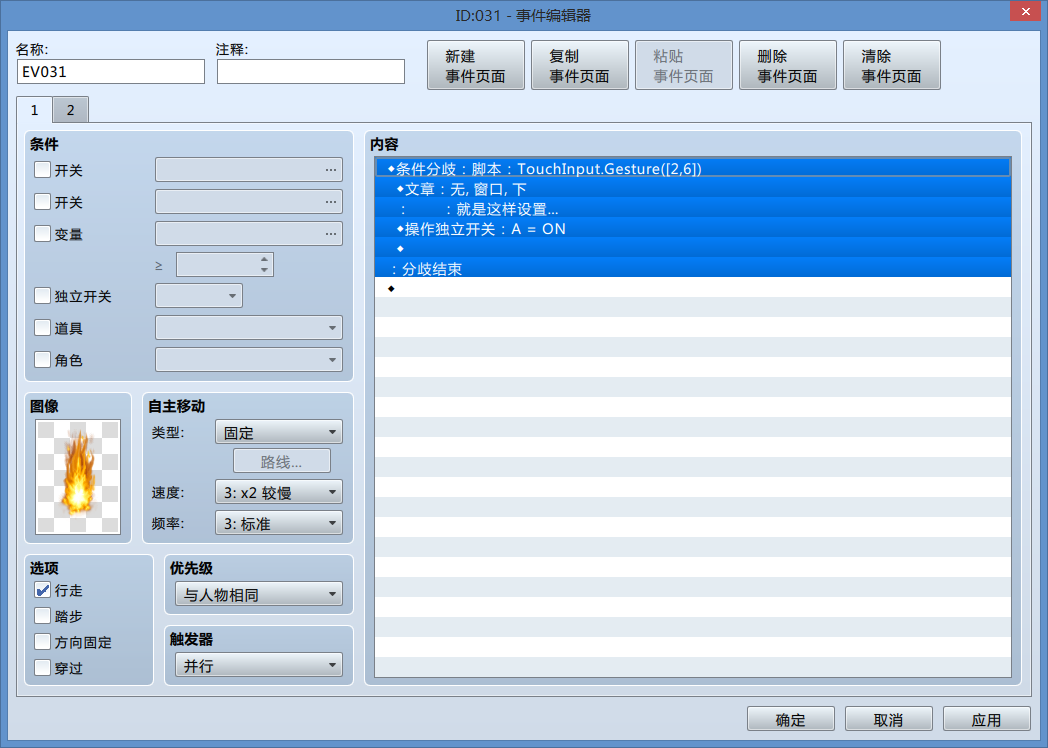
* 比如 TouchInput.Gesture(2,6)
******************************************************
* 以下可以读取的主要变量,不建议设置
* TouchInput._Gesture_directionChain 当下的手势
* TouchInput._Gesture_time 当下手势时间
* TouchInput._Gesture_last_dChain 上一个手势
* TouchInput._Gesture_last_time = 0 上一个手势时间
******************************************************
* 以下可以设置
* TouchInput._Gesture_fx n方向判定 4 四方向 8 八方向 0 不定向
*
* TouchInput._Gesture_fx0 = [] 不定向判断
* 是一个数组
* TouchInput._Gesture_fx0 = [
* [ 键0,jd0 min,jd0 max ] ,
* [ 键1,jd1 min,jd1 max ] ,
* [ 键2,jd2 min,jd2 max ],
* ....
* ]
*
* 举例: 3方向
* TouchInput._Gesture_fx0 =[ [0 ,0,120],[1,120,240],[2,240,360] ]
* 2方向 / 斜划
* TouchInput._Gesture_fx0 =[ [0 ,0,135],[1,135,315],[0,315,360] ]
*
* TouchInput._Gesture_wzjiange 位置间隔
*
* TouchInput._Gesture_sjjiange 时间间隔
*
* TouchInput._Gesture_sjshuru 时间输入方式
* 0 断点 ,绘制手势时移动小于间隔则不处理
* 1 连续 ,绘制的手势小于时间间隔也会记录最后位置,以这个最后位置计算方向
*
* TouchInput._Gesture_wzshuru 位置输入方式
* 0 断点 ,绘制手势时移动小于间隔则不处理
* 1 连续 ,绘制的手势移动小于间隔也会记录最后位置,以这个最后位置计算方向
*
* TouchInput._Gesture_fangshi 判断的方式,
* 0 完全匹配 必须手势完全一致
* 1 最后匹配 必须最后的那部分手势完全一致
* 2 最前匹配 必须最前面的那部分手势完全一致
* 3 包含匹配 手势包含即可
*
* TouchInput._Gesture_jishi 判断是否即时?
* 0 兼用 ,判断 正在绘制的手势或者之前绘制完的手势
* 1 即时 ,判断 正在绘制的手势
* 2 判断 ,判断 之前绘制完的手势
*/
(function() {
TouchInput.clear = function() {
//鼠标按下
this._mousePressed = false;
//屏幕按下
this._screenPressed = false;
//按下时间
this._pressedTime = 0;
//事件
this._events = {};
//事件 触发
this._events.triggered = false;
//事件 取消
this._events.cancelled = false;
//事件 移动
this._events.moved = false;
//事件释放
this._events.released = false;
//事件 轮x
this._events.wheelX = 0;
//事件 轮y
this._events.wheelY = 0;
//触发
this._triggered = false;
//取消
this._cancelled = false;
//移动
this._moved = false;
//释放
this._released = false;
//轮x
this._wheelX = 0;
//轮y
this._wheelY = 0;
this._x = 0;
this._y = 0;
//日期
this._date = 0;
//修改部分
this.Gesture_clear();
};
TouchInput._onTrigger = function(x, y) {
this._events.triggered = true;
this._x = x;
this._y = y;
this._date = Date.now();
//修改部分
this.startGesture(x,y);
};
/**当取消 x,y
* @static
* @method _onCancel
* @param {Number} x
* @param {Number} y
* @private
*/
TouchInput._onCancel = function(x, y) {
this._events.cancelled = true;
this._x = x;
this._y = y;
//修改部分
this.stopGesture(x,y);
};
/**当移动 x,y
* @static
* @method _onMove
* @param {Number} x
* @param {Number} y
* @private
*/
TouchInput._onMove = function(x, y) {
this._events.moved = true;
this._x = x;
this._y = y;
//修改部分
this.progressGesture(x,y);
};
/**当释放
* @static
* @method _onRelease
* @param {Number} x
* @param {Number} y
* @private
*/
TouchInput._onRelease = function(x, y) {
this._events.released = true;
this._x = x;
this._y = y;
//修改部分
this.stopGesture(x,y);
};
//手势设置清除
TouchInput.Gesture_clear = function() {
this._Gesture_last_dChain = [];
this._Gesture_last_time = 0;
this._Gesture_directionChain = [];
this._Gesture_time = 0;
this._Gesture_lastX = 0;
this._Gesture_lastY = 0;
//n方向 读取默认值
var fx = parseInt(PluginManager.parameters("ww_Gesture")["fx"], 10);
if (isFinite(fx) && [0,4,8].contains(fx) ){
this._Gesture_fx = fx;
}else {
this._Gesture_fx = 4;
}
//不定向判断 重置
var fx0 =(PluginManager.parameters("ww_Gesture")["fx0"])
if(fx0 != ""){
this._Gesture_fx0 = JSON.parse(fx0);
}else{
this._Gesture_fx0 = [];
}
//时间输入方式 读取默认值
var sjshuru = parseInt(PluginManager.parameters("ww_Gesture")["sjshuru"], 10);
if (isFinite(sjshuru) && [0,1].contains(sjshuru) )
{
this._Gesture_sjshuru = sjshuru
}else {
this._Gesture_sjshuru = 0;
}
//位置输入方式 读取默认值
var wzshuru = parseInt(PluginManager.parameters("ww_Gesture")["wzshuru"], 10);
if (isFinite(wzshuru) && [0,1].contains(wzshuru) ) {
this._Gesture_wzshuru = wzshuru;
}else {
this._Gesture_wzshuru = 0;
}
//位置间隔 读取默认值
var wzjiange = parseInt(PluginManager.parameters("ww_Gesture")["wzjiange"], 10);
if (isFinite(wzjiange) && wzjiange > 0 ){
this._Gesture_wzjiange = wzjiange;
}else {
this._Gesture_wzjiange = 100;
}
//时间间隔 读取默认值
var sjjiange = parseInt(PluginManager.parameters("ww_Gesture")["sjjiange"], 10);
if (isFinite(sjjiange) && sjjiange > 0 ) {
this._Gesture_sjjiange = sjjiange;
}else {
this._Gesture_sjjiange = 1;
}
//判断方式 读取默认值
var fangshi = parseInt(PluginManager.parameters("ww_Gesture")["fangshi"], 10);
if (isFinite(fangshi) && [0,1,2,3].contains(fangshi) ){
this._Gesture_fangshi = fangshi;
}else {
this._Gesture_fangshi = 0;
}
//判断是否即时 读取默认值
var jishi =parseInt(PluginManager.parameters("ww_Gesture")["jishi"], 10);
if (isFinite(jishi) && [0,1,2].contains(jishi) ) {
this._Gesture_jishi = jishi;
}else {
this._Gesture_jishi = 0;
}
}
//开始手势
TouchInput.startGesture = function (x,y) {
this._Gesture_lastX = x;
this._Gesture_lastY = y;
this._Gesture_time = 0;
this._Gesture_directionChain = [];
}
//进行手势
TouchInput.progressGesture = function (x,y) {
//手势时间++
this._Gesture_time ++;
//判断时间间隔
if (this._Gesture_sjjiange> 0){
if (this._Gesture_time.mod(this._Gesture_sjjiange) != 0){
//时间输入方式
this.Gesture_sjshuru(x,y) ;
return;
}
}
var x1 = this._Gesture_lastX;
var y1 = this._Gesture_lastY;
var x2 = x;
var y2 = y;
var wzjiange = this._Gesture_wzjiange;
var jiaodu;
var direction ;
//位置输入方式
this.Gesture_wzshuru(x,y) ;
//n方向判断
var fx = this._Gesture_fx;
if (fx == 4){
//4方向
direction = this.Gesture_4d(x1,y1,x2,y2,wzjiange);
}else {
//计算角度
jiaodu = this.Gesture_jd(x1,y1,x2,y2,wzjiange);
if (!isFinite(jiaodu)){return };
if(fx==8){
//8方向
direction = this.Gesture_8d(jiaodu)
}else {
//不定方向
direction = this.Gesture_0d(jiaodu)
}
}
if (!isFinite(direction)){return } ;
// 手势 添加
this.Gesture_push(direction);
// 记录最后位置
this._Gesture_lastX = x;
this._Gesture_lastY = y;
}
//停止手势
TouchInput.stopGesture = function (x,y) {
this._Gesture_last_time = this._Gesture_time
this._Gesture_last_dChain = this._Gesture_directionChain
this._Gesture_directionChain = [];
this._Gesture_time = 0;
this._Gesture_lastX = x;
this._Gesture_lastY = y;
}
//时间输入方式
TouchInput.Gesture_sjshuru = function (x,y) {
if (this._Gesture_sjshuru == 1){
this._Gesture_lastX = x;
this._Gesture_lastY = y;
}
}
//位置输入方式
TouchInput.Gesture_wzshuru = function (x,y) {
if (this._Gesture_wzshuru == 1){
this._Gesture_lastX = x;
this._Gesture_lastY = y;
}
}
//四方向
TouchInput.Gesture_4d= function (x1,y1,x2,y2,wzjiange){
var x = x2;
var y = y2;
var lastX = x1;
var lastY = y1;
var wzjiange = wzjiange;
//差值
var subX = x - lastX;
var subY = y - lastY;
//差值的绝对值
var distX = (subX > 0 ? subX : (-subX))
var distY = (subY > 0 ? subY : (-subY));
var direction;
//如果差值绝对值小于间隔
if (distX < wzjiange && distY < wzjiange )
return ;
// 如果 x 差值 > y 差值
if (distX > distY){
//方向左
direction = subX < 0 ? 4 : 6;
}else{
//方向上下
direction = subY < 0 ? 8 : 2;
}
return direction;
}
//360 角度计算
TouchInput.Gesture_jd =function (x1,y1,x2,y2,wzjiange) {
var subx=Math.abs(x1-x2);
var suby=Math.abs(y1-y2);
var subz2 = subx*subx +suby*suby;
//如果间隔距离的平方和 小于间隔的平方
if (subz2 < wzjiange*wzjiange){
return ;
}
//判定角度
if ((x2-x1)==0 && (y2-y1)==0 ){
return ;
}else if (x2-x1 == 0){
if ((y1-y2)>0) {
jiaodu = 90;
}else if ((y1-y2)<0){
jiaodu = 270;
}
}else if (y2-y1 == 0){
if ((x2-x1)>0) {
jiaodu = 0;
}else if ((x2-x1)<0){
jiaodu = 180;
}
}else{
var subz=Math.sqrt(subz2);
var jiaodu =((Math.asin(suby/subz)/Math.PI)*180);
if ((x2-x1) > 0 && (y1-y2)>0){
jiaodu = jiaodu.mod(360);
}else if ((x2-x1) > 0 && (y1-y2)<0 ) {
jiaodu = (-jiaodu).mod(360);
}else if ((x2-x1) < 0 && (y1-y2)<0 ) {
jiaodu = (180+ jiaodu).mod(360);
}else if ((x2-x1) < 0 && (y1-y2)>0 ){
jiaodu = (180-jiaodu).mod(360);
}
}
return jiaodu;
}
//8方向
TouchInput.Gesture_8d= function (jiaodu) {
var direction;
var jiaodu=jiaodu.mod(360)
var dirs =[6,9,8,7,4,1,2,3,6]
var dirjd=[0,45,90,135,180,225,270,315,360]
for (var id =0;id < dirjd.length ;id++){
if ( Math.abs(dirjd[id]-jiaodu) <= 22.5 ){
direction = dirs[id]
return direction;
}
}
return direction;
}
// 不定方向
TouchInput.Gesture_0d= function (jiaodu) {
var direction ;
var jiaodu = jiaodu.mod(360);
var dirjd = this._Gesture_fx0 ;
for (var id =0;id < dirjd.length ;id++){
if ((jiaodu >= (dirjd[id][1]).mod(360) )&& (jiaodu <= (dirjd[id][2]).mod(360) ) ){
direction = dirjd[id][0];
return direction;
}
}
return direction;
}
// 方向添加
TouchInput.Gesture_push = function (direction) {
if (direction != this._Gesture_directionChain[this._Gesture_directionChain.length - 1]) {
this._Gesture_directionChain.push(direction);
}
}
//手势
TouchInput.Gesture = function(gt){
/*console.log(112)
var arg =[]
for (var i=0;i<arguments.length;i++){arg.push(arguments)}
var gt = arg
*/
//是否即时
var jishi = this._Gesture_jishi ;
var gesture;
var gesture2 ;
//即时手势
if ( jishi == 1 || jishi == 0){
gesture = this._Gesture_directionChain.clone();
gesture2= gt.clone();
if (this.Gesture_true(gesture,gesture2)){
return true;
}
}
//之前的手势
if (jishi == 2 || jishi == 0){
gesture = this._Gesture_last_dChain.clone();
gesture2= gt.clone();
if (this.Gesture_true(gesture,gesture2)){
return true;
}
}
return false;
}
TouchInput.Gesture_true = function (gesture,gesture2) {
//判定方式
var fangshi = this._Gesture_fangshi;
if(gesture.join()!= "" && gesture2.join() != ""){
//完全符合
if (fangshi == 0){
if ( gesture.join() == gesture2.join()){
return true;
}
}
//结尾符合
if ( fangshi == 1 ){
gesture.reverse();
gesture2.reverse();
if( gesture.join().indexOf( gesture2.join()) == 0 ){
return true;
}
}
//开头符合
if ( fangshi == 2 ){
if( gesture.join().indexOf( gesture2.join()) == 0 ){
return true;
}
}
//包含
if ( fangshi == 3 ){
if( gesture.join().indexOf( gesture2.join()) >= 0 ){
return true;
}
}
}
return false ;
}
})();
[/pre]
[/fold] |
评分
-
查看全部评分
|



 写轮眼
写轮眼
 发表于 2015-12-5 12:30:19

 提升卡
提升卡 沉默号角
沉默号角 喧嚣号角
喧嚣号角 变色卡
变色卡 升龙剑
升龙剑