| 赞 | 0 |
| VIP | |
| 好人卡 | |
| 积分 | 1 |
| 经验 | |
| 最后登录 | 2017-3-15 |
| 在线时间 | 168 小时 |
- 梦石
- 0
- 星屑
- 50
- 在线时间
- 168 小时
- 注册时间
- 2007-7-26
- 回帖
- 427
|
加入我们,或者,欢迎回来。
您需要 登录 才可以下载或查看,没有账号?注册会员
×
本帖最后由 cmmd1 于 2015-12-9 15:58 编辑
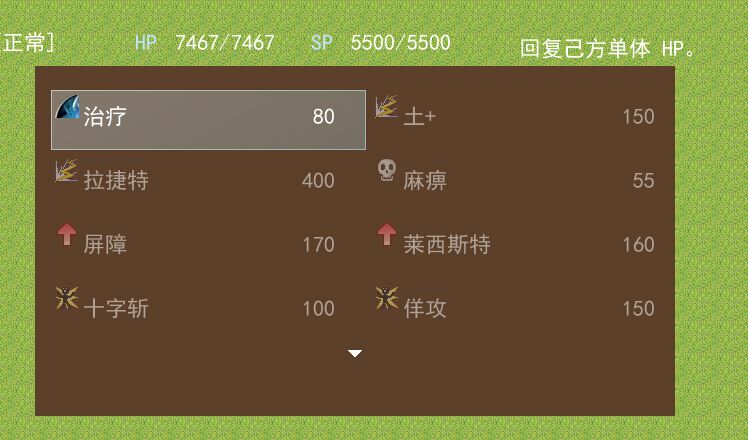
上图说明
打开技能正常。
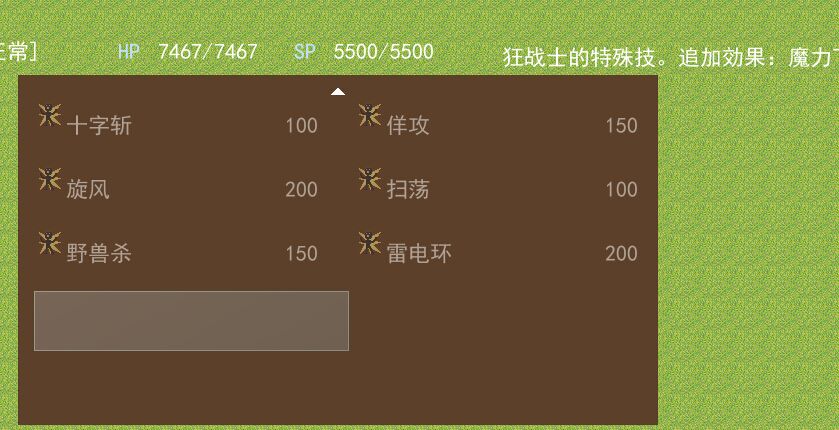
方向键按到下面,就这样。
Window_Skill #==============================================================================
# ■ Window_Skill
#------------------------------------------------------------------------------
# 特技画面、战斗画面、显示可以使用的特技浏览的窗口。
#==============================================================================
class Window_Skill < Window_Selectable
#--------------------------------------------------------------------------
# ● 初始化对像
# actor : 角色
#--------------------------------------------------------------------------
def initialize(actor)
super(200, 128, 640, 288)
@actor = actor
@column_max = 2
refresh
self.index = 0
# 战斗中的情况下将窗口移至中央并将其半透明化
if $game_temp.in_battle
self.y = 64
self.height = 256
self.back_opacity = 160
end
end
#--------------------------------------------------------------------------
# ● 获取特技
#--------------------------------------------------------------------------
def skill
return @data[self.index]
end
#--------------------------------------------------------------------------
# ● 刷新
#--------------------------------------------------------------------------
def refresh
if self.contents != nil
self.contents.dispose
self.contents = nil
end
@data = []
for i in 0...@actor.skills.size
skill = $data_skills[@actor.skills]
if skill != nil
@data.push(skill)
end
end
# 如果项目数不是 0 就生成位图、重新描绘全部项目
@item_max = @data.size
if @item_max > 0
self.contents = Bitmap.new(width - 32, row_max * 32)
for i in 0...@item_max
draw_item(i)
end
end
end
#--------------------------------------------------------------------------
# ● 窗口要显示的行数#######################
#--------------------------------------------------------------------------
def window_lines
return 5
end
#--------------------------------------------------------------------------
# ● 窗口高度###########################
#--------------------------------------------------------------------------
def window_height
return line_height * window_lines + 32 # 这个32不要动
end
#--------------------------------------------------------------------------
# ● 行高#############################
#--------------------------------------------------------------------------
def line_height
return 64
end
#--------------------------------------------------------------------------
# ● 项目间距
#--------------------------------------------------------------------------
def space
return 1#16
end
#--------------------------------------------------------------------------
# ● 描绘项目
# index : 项目编号
#--------------------------------------------------------------------------
def draw_item(index)
skill = @data[index]
if @actor.skill_can_use?(skill.id)
self.contents.font.color = normal_color
else
self.contents.font.color = disabled_color
end
x = 4 + index % 2 * (288 + 32)
# x = 16 + index % @column_max * (62 + space) # x宽度加上间距
# y = index / 2 * 64
y = index / @column_max * line_height
rect = Rect.new(x, y, self.width / @column_max - 32, 32)
self.contents.fill_rect(rect, Color.new(0, 0, 0, 0))
bitmap = RPG::Cache.icon(skill.icon_name)
opacity = self.contents.font.color == normal_color ? 255 : 128
self.contents.blt(x, y + 4, bitmap, Rect.new(0, 0, 24, 24), opacity)
self.contents.draw_text(x + 28, y, 204, 52, skill.name, 0)
self.contents.draw_text(x + 232, y, 48, 52, skill.sp_cost.to_s, 2)
end
#--------------------------------------------------------------------------
# ● 更新光标矩形
#--------------------------------------------------------------------------
def update_cursor_rect
# 光标位置不满 0 的情况下
if @index < 0
self.cursor_rect.empty
return
end
# 获取当前的行
row = @index / @column_max
# 当前行被显示开头行前面的情况下
if row < self.top_row
# 从当前行向开头行滚动
self.top_row = row
end
# 当前行被显示末尾行之后的情况下
if row > self.top_row + (self.page_row_max - 1)
# 从当前行向末尾滚动
self.top_row = row - (self.page_row_max - 1)
end
# 计算光标的宽度
cursor_width = self.width / @column_max - 5#32
# 计算光标坐标
x = @index % @column_max * (cursor_width + space) # x宽度加上间距
y = @index / @column_max * line_height - self.oy # y高度*行高
# 更新光标矩形
self.cursor_rect.set(x, y, cursor_width, 60)
end
#--------------------------------------------------------------------------
# ● 获取开头行
#--------------------------------------------------------------------------
def top_row
# 将窗口内容的传送源 Y 坐标、1 行高等分
return self.oy / line_height
end
#--------------------------------------------------------------------------
# ● 设置开头行
# row : 显示开头的行
#--------------------------------------------------------------------------
def top_row=(row)
# row 未满 0 的场合更正为 0
if row < 0
row = 0
end
# row 超过 row_max - 1 的情况下更正为 row_max - 1
if row > row_max - 1
row = row_max - 1
end
# row 1 行的行高、窗口内容的传送源 Y 坐标
self.oy = row * line_height
end
#--------------------------------------------------------------------------
# ● 获取 1 页可以显示的行数
#--------------------------------------------------------------------------
def page_row_max
# 窗口的高度,设置画面的高度减去 32 ,除以 1 行的高度
return (self.height - 32) / line_height
end
#--------------------------------------------------------------------------
# ● 刷新帮助文本
#--------------------------------------------------------------------------
def update_help
@help_window.set_text(self.skill == nil ? "" : self.skill.description)
end
end
甚至这样
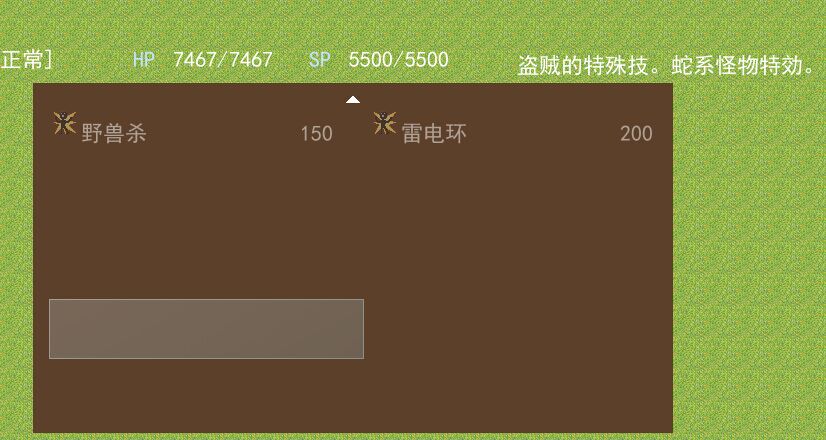
其实下面是有技能的,只是没有名字了,看右上角有显示技能说明。
@cinderelmini
|
评分
-
查看全部评分
|



 写轮眼
写轮眼
 发表于 2015-12-9 15:54:09

 提升卡
提升卡 沉默号角
沉默号角 喧嚣号角
喧嚣号角 变色卡
变色卡 升龙剑
升龙剑


