| 赞 | 5 |
| VIP | |
| 好人卡 | |
| 积分 | 73 |
| 经验 | |
| 最后登录 | 2026-10-18 |
| 在线时间 | 1244 小时 |
- 梦石
- 0
- 星屑
- 7301
- 在线时间
- 1244 小时
- 注册时间
- 2015-8-15
- 回帖
- 473
|
加入我们,或者,欢迎回来。
您需要 登录 才可以下载或查看,没有账号?注册会员
×
本帖最后由 金芒芒 于 2016-1-25 17:29 编辑
 [attach]
300272[/attach]
[pre lang="ruby"]#==============================================================================
# ■ Window_MenuStatus
#------------------------------------------------------------------------------
# 显示菜单画面和同伴状态的窗口。
#==============================================================================
class Window_MenuStatus < Window_Selectable
#--------------------------------------------------------------------------
# ● 初始化对像
#--------------------------------------------------------------------------
def initialize(index = 0)
super(0, 64, 1200, 480)
self.contents = Bitmap.new(width - 32, height - 32)
refresh
self.index = index
end
#--------------------------------------------------------------------------
# ● 刷新
#--------------------------------------------------------------------------
def refresh
self.contents.clear
# @item_max = 4 #$game_party.actors.size
# @item_may = 4
# @column_max = 4
# for i in 0...4 #$game_party.actors.size
# x = i * 116
# y = 0
@item_max = $game_party.actors.size
for i in 0...$game_party.actors.size
x = ( i + 1 ) * 92 +25
y = 44
@column_max = 4
actor = $game_party.actors
bitmap = Bitmap.new ("Graphics/Status/" + actor.id. to_s + "_h") #RPG::Cache.character(actor.character_name, actor.character_hue)
cw = bitmap.width
ch = bitmap.height
src_rect = Rect.new(0, 0, cw, ch)
self.contents.blt(x - ch , y - cw/ 2, bitmap, src_rect)
#draw_actor_graphic(actor, x - 40, y + 80)
# draw_actor_name(actor, x, y)
# draw_actor_class(actor, x + 144, y)
# draw_actor_level(actor, x, y + 32)
# draw_actor_state(actor, x + 90, y + 32)
# draw_actor_exp(actor, x, y + 64)
# draw_actor_hp(actor, x + 236, y + 32)
# draw_actor_sp(actor, x + 236, y + 64)
draw_item(i)
end
end
#--------------------------------------------------------------------------
# ● 更新光标举行
#--------------------------------------------------------------------------
def draw_item(index, color = normal_color)
self.contents.font.color = color
x = 104 + index * 80 + 40
# self.contents.draw_text(x-11, 0, 44, 32, @menustatus[index])
end
#--------------------------------------------------------------------------
# ● 项目无效化
# index : 项目编号
#--------------------------------------------------------------------------
def disable_item(index)
draw_item(index, disabled_color)
end
#--------------------------------------------------------------------------
# ● 刷新光标矩形
#--------------------------------------------------------------------------
def update_cursor_rect
# 光标位置不满 0 的情况下
if @index <= -1
self.cursor_rect.empty
return
end
# 获取当前的行
row = @index / @column_max
# 当前行被显示开头行前面的情况下
if row < self.top_row
# 从当前行向开头行滚动
self.top_row = row
end
# 当前行被显示末尾行之后的情况下
if row > self.top_row + (self.page_row_max - 1)
# 从当前行向末尾滚动
self.top_row = row - (self.page_row_max - 1)
end
# 计算光标的宽
cursor_width = 90
#cursor_width = 536 / (@column_max + 1) + 1 #光标大小
# 计算光标坐标
x = 0 + @index % @column_max * (cursor_width + 1) - 4 #光标位置调节 覆盖31行
y = @index / @column_max * 32 - self.oy
# 更新国标矩形
self.cursor_rect.set(x, y, cursor_width, 128)#(x, y, cursor_width, 32)
end
end
[/pre]
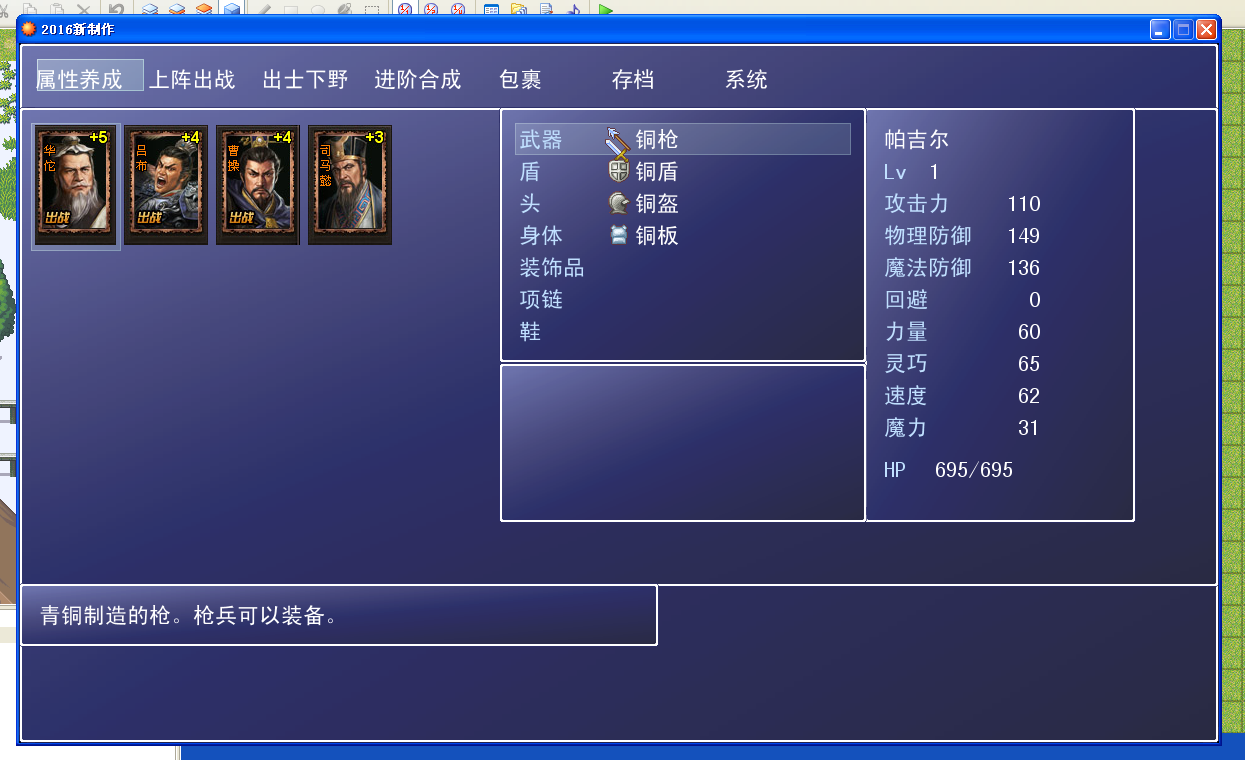
选择第2角色光标使用后就跳到第一个角色去了 |
|



 写轮眼
写轮眼
 发表于 2016-1-25 17:28:42

 提升卡
提升卡 沉默号角
沉默号角 喧嚣号角
喧嚣号角 变色卡
变色卡 升龙剑
升龙剑