| 赞 | 168 |
| VIP | |
| 好人卡 | |
| 积分 | 229 |
| 经验 | |
| 最后登录 | 2025-4-1 |
| 在线时间 | 8598 小时 |
- 梦石
- 0
- 星屑
- 22879
- 在线时间
- 8598 小时
- 注册时间
- 2011-12-31
- 回帖
- 3270
|
 发表于 2016-1-31 11:53:37
|
显示全部楼层
13701225339 发表于 2016-1-31 10:53 
我按照一模一样的方法试了一下还是一点反应也没有啊。。。。。。。。。。。。。。是我哪里设置错了吗?我 ...
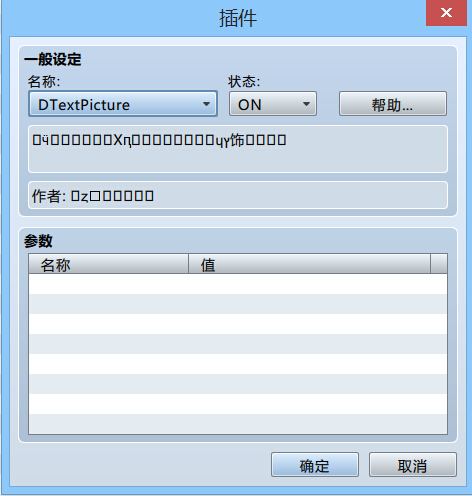
DTextPicture.js- //=============================================================================
- // DTextPicture.js
- // ----------------------------------------------------------------------------
- // Copyright (c) 2015 Triacontane
- // This software is released under the MIT License.
- // [url]http://opensource.org/licenses/mit-license.php[/url]
- // ----------------------------------------------------------------------------
- // Version
- // 1.2.1 2016/01/29 コマンド「D_TEXT_SETTING」の実装が「D_TEST_SETTING」になっていたので修正(笑)
- // 1.2.0 2016/01/27 複数行表示に対応
- // 文字列の揃えと背景色を設定する機能を追加
- // 変数をゼロ埋めして表示する機能を追加
- // 1.1.3 2015/12/10 戦闘画面でもピクチャを使用できるよう修正
- // 描画後にデバッグ画面等を開いて変数を修正した場合、再描画で変更が反映されてしまう問題を修正
- // 1.1.2 2015/11/07 描画文字列に半角スペースが含まれていた場合も問題なく実行できるよう修正
- // 1.1.0 2015/11/07 制御文字\C[n] \I[n] \{ \} に対応(\$と表示スピード制御系以外全部)
- // 1.0.1 2015/11/07 RPGツクールMV(日本語版)に合わせてコメントの表記を変更
- // 1.0.0 2015/11/06 初版
- // ----------------------------------------------------------------------------
- // [Blog] : [url]http://triacontane.blogspot.jp/[/url]
- // [Twitter]: [url]https://twitter.com/triacontane/[/url]
- // [GitHub] : [url]https://github.com/triacontane/[/url]
- //=============================================================================
- /*:
- * @plugindesc 動的文字列ピクチャ生成プラグイン
- * @author トリアコンタン
- *
- * @help 指定した文字列でピクチャを動的に生成するコマンドを提供します。
- * 以下の手順で表示します。
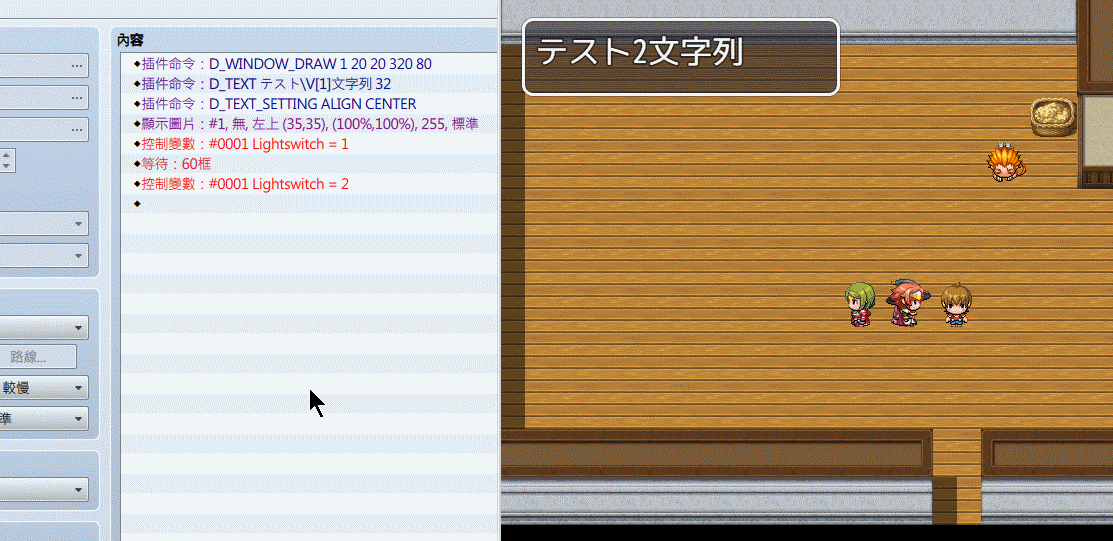
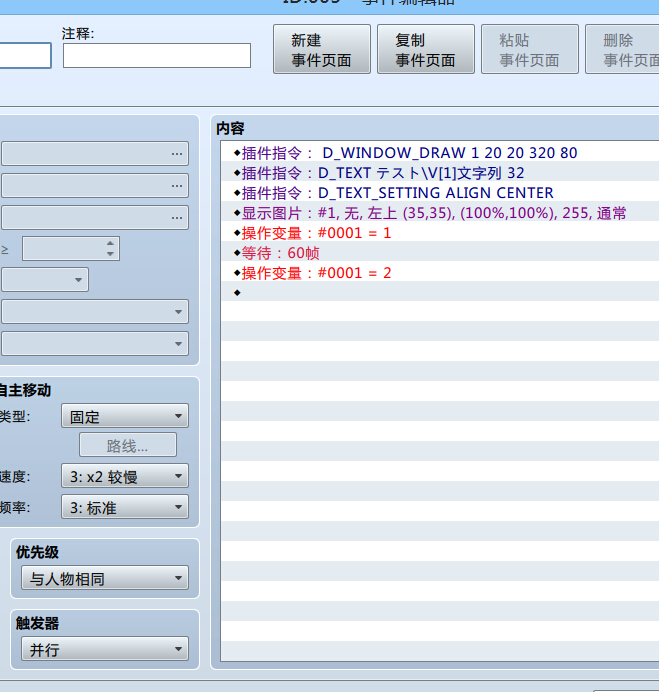
- * 1 : プラグインコマンド[D_TEXT]で描画したい文字列と引数を指定(下記の例参照)
- * 2 : プラグインコマンド[D_TEXT_SETTING]で背景色や揃えを指定(任意)
- * 3 : イベントコマンド「ピクチャの表示」で「画像」を未選択に指定。
- * ※ 1の時点ではピクチャは表示されないので必ずセットで呼び出してください。
- * ※ ピクチャ表示前にD_TEXTを複数回実行すると、複数行表示できます。
- *
- * プラグインコマンド詳細
- * イベントコマンド「プラグインコマンド」から実行。
- * (引数の間は半角スペースで区切る)
- *
- * D_TEXT [描画文字列] [文字サイズ] : 動的文字列ピクチャ生成の準備
- * 例:D_TEXT テスト文字列 32
- *
- * 表示後は通常のピクチャと同様に移動や回転、消去ができます。
- * また、変数やアクターの表示など制御文字にも対応しています。
- *
- * D_TEXT_SETTING ALIGN [揃え] : 揃え(左揃え、中央揃え、右揃え)の設定
- * 0:左揃え 1:中央揃え 2:右揃え
- *
- * 例:D_TEXT_SETTING ALIGN 0
- * D_TEXT_SETTING ALIGN CENTER
- *
- * D_TEXT_SETTING BG_COLOR [背景色] : 背景色の設定(CSSの色指定と同様の書式)
- *
- * 例:D_TEXT_SETTING BG_COLOR black
- * D_TEXT_SETTING BG_COLOR #336699
- * D_TEXT_SETTING BG_COLOR rgba(255,255,255,0.5)
- *
- * これらの設定はD_TEXTと同様、ピクチャを表示する前に行ってください。
- *
- * 対応制御文字一覧(イベントコマンド「文章の表示」と同一です)
- * \V[n]
- * \N[n]
- * \P[n]
- * \G
- * \C[n]
- * \I[n]
- * \{
- * \}
- * \V[n,m](m桁分のゼロ埋め)
- *
- * 利用規約:
- * 作者に無断で改変、再配布が可能で、利用形態(商用、18禁利用等)
- * についても制限はありません。
- * このプラグインはもうあなたのものです。
- */
- (function () {
- var getCommandName = function (command) {
- return (command || '').toUpperCase();
- };
- var getArgNumber = function (arg, min, max) {
- if (arguments.length < 2) min = -Infinity;
- if (arguments.length < 3) max = Infinity;
- return (parseInt(convertEscapeCharacters(arg.toString()), 10) || 0).clamp(min, max);
- };
- var getArgString = function (arg, upperFlg) {
- arg = convertEscapeCharacters(arg);
- return upperFlg ? arg.toUpperCase() : arg;
- };
- var connectArgs = function (args, startIndex, endIndex) {
- if (arguments.length < 2) startIndex = 0;
- if (arguments.length < 3) endIndex = args.length;
- var text = '';
- for (var i = startIndex; i < endIndex; i++) {
- text += args[i];
- if (i < endIndex - 1) text += ' ';
- }
- return text;
- };
- var convertEscapeCharacters = function(text) {
- if (text == null) text = '';
- text = text.replace(/\\/g, '\x1b');
- text = text.replace(/\x1b\x1b/g, '\\');
- text = text.replace(/\x1bV\[(\d+)\,(\d+)\]/gi, function() {
- return $gameVariables.value(parseInt(arguments[1])).padZero(arguments[2]);
- }.bind(this));
- var window = SceneManager.getHiddenWindow();
- return window ? window.convertEscapeCharacters(text) : text;
- };
- SceneManager.getHiddenWindow = function() {
- return this._scene._hiddenWindow;
- };
- //=============================================================================
- // Game_Interpreter
- // プラグインコマンド[D_TEXT]を追加定義します。
- //=============================================================================
- var _Game_Interpreter_pluginCommand = Game_Interpreter.prototype.pluginCommand;
- Game_Interpreter.prototype.pluginCommand = function (command, args) {
- _Game_Interpreter_pluginCommand.apply(this, arguments);
- try {
- this.pluginCommandDTextPicture(command, args);
- } catch (e) {
- if ($gameTemp.isPlaytest() && Utils.isNwjs()) {
- var window = require('nw.gui').Window.get();
- if (!window.isDevToolsOpen()) {
- var devTool = window.showDevTools();
- devTool.moveTo(0, 0);
- devTool.resizeTo(Graphics.width, Graphics.height);
- window.focus();
- }
- }
- console.log('プラグインコマンドの実行中にエラーが発生しました。');
- console.log('- コマンド名 : ' + command);
- console.log('- コマンド引数 : ' + args);
- console.log('- エラー原因 : ' + e.toString());
- }
- };
- Game_Interpreter.textAlignMapper = {
- LEFT:0, CENTER:1, RIGHT:2, 左:0, 中央:1, 右:2
- };
- Game_Interpreter.prototype.pluginCommandDTextPicture = function(command, args) {
- switch (getCommandName(command)) {
- case 'D_TEXT' :
- if (isNaN(args[args.length - 1])) args.push($gameScreen.dTextSize || 28);
- var fontSize = getArgNumber(args.pop());
- $gameScreen.setDTextPicture(getArgString(connectArgs(args), false), fontSize);
- break;
- case 'D_TEXT_SETTING':
- switch (getCommandName(args[0])) {
- case 'ALIGN' :
- $gameScreen.dTextAlign = isNaN(args[1]) ?
- Game_Interpreter.textAlignMapper[getArgString(args[1], true)] : getArgNumber(args[1], 0, 2);
- break;
- case 'BG_COLOR' :
- $gameScreen.dTextBackColor = getArgString(connectArgs(args, 1));
- break;
- case 'FONT':
- $gameScreen.setFont(getArgString(args[1]));
- break;
- }
- break;
- }
- };
- //=============================================================================
- // Game_Screen
- // 動的ピクチャ用のプロパティを追加定義します。
- //=============================================================================
- var _Game_Screen_clear = Game_Screen.prototype.clear;
- Game_Screen.prototype.clear = function() {
- _Game_Screen_clear.call(this);
- this.clearDTextPicture();
- };
- Game_Screen.prototype.clearDTextPicture = function() {
- this.dTextValue = null;
- this.dTextSize = 0;
- this.dTextAlign = 0;
- this.dTextBackColor = null;
- this.dTextFont = null;
- };
- Game_Screen.prototype.setDTextPicture = function(value, size) {
- if (!this.dTextValue) this.dTextValue = [];
- this.dTextValue.push(value);
- this.dTextSize = size;
- };
- Game_Screen.prototype.getDTextPictureInfo = function() {
- return {value:this.dTextValue, size:this.dTextSize, align:this.dTextAlign,
- color:this.dTextBackColor, font:this.dTextFont};
- };
- Game_Screen.prototype.isSettingDText = function() {
- return !!this.dTextValue;
- };
- Game_Screen.prototype.setFont = function(name) {
- if (Graphics.isFontLoaded(name)) {
- this.dTextFont = name;
- }
- };
- //=============================================================================
- // Game_Picture
- // 動的ピクチャ用のプロパティを追加定義し、表示処理を動的ピクチャ対応に変更します。
- //=============================================================================
- var _Game_Picture_initBasic = Game_Picture.prototype.initBasic;
- Game_Picture.prototype.initBasic = function() {
- _Game_Picture_initBasic.call(this);
- this.dTextValue = null;
- this.dTextInfo = null;
- };
- var _Game_Picture_show = Game_Picture.prototype.show;
- Game_Picture.prototype.show = function(name, origin, x, y, scaleX,
- scaleY, opacity, blendMode) {
- if ($gameScreen.isSettingDText()) {
- arguments[0] = Date.now().toString();
- var textValue = "";
- this.dTextInfo = $gameScreen.getDTextPictureInfo();
- this.dTextInfo.value.forEach(function(text) {
- textValue += text + '\n';
- }.bind(this));
- this.dTextInfo.value = textValue;
- } else {
- this.dTextInfo = null;
- }
- $gameScreen.clearDTextPicture();
- _Game_Picture_show.apply(this, arguments);
- };
- //=============================================================================
- // Sprite_Picture
- // 画像の動的生成を追加定義します。
- //=============================================================================
- var _Sprite_Picture_loadBitmap = Sprite_Picture.prototype.loadBitmap;
- Sprite_Picture.prototype.loadBitmap = function() {
- this.dTextInfo = this.picture().dTextInfo;
- if (this.dTextInfo) {
- this.makeDynamicBitmap();
- } else {
- _Sprite_Picture_loadBitmap.call(this);
- }
- };
- Sprite_Picture.prototype.makeDynamicBitmap = function() {
- this.textWidths = [];
- this.hiddenWindow = SceneManager.getHiddenWindow();
- if (this.dTextInfo.font) this.hiddenWindow.contents.fontFace = this.dTextInfo.font;
- if (this.dTextInfo.size > 0) this.hiddenWindow.contents.fontSize = this.dTextInfo.size;
- var bitmapVirtual = new Bitmap_Virtual();
- this._processText(bitmapVirtual);
- this.bitmap = new Bitmap(bitmapVirtual.width, bitmapVirtual.height);
- if (this.dTextInfo.font) this.bitmap.fontFace = this.dTextInfo.font;
- if (this.dTextInfo.color) this.bitmap.fillAll(this.dTextInfo.color);
- this._processText(this.bitmap);
- this.hiddenWindow = null;
- };
- Sprite_Picture.prototype._processText = function(bitmap) {
- var textState = {index: 0, x: 0, y: 0, text: this.dTextInfo.value, left:0, line:-1, height:0};
- this._processNewLine(textState, bitmap);
- textState.height = this.hiddenWindow.calcTextHeight(textState, false);
- textState.index = 0;
- while (textState.text[textState.index]) {
- this._processCharacter(textState, bitmap);
- }
- };
- Sprite_Picture.prototype._processCharacter = function(textState, bitmap) {
- if (textState.text[textState.index] === '\x1b') {
- var code = this.hiddenWindow.obtainEscapeCode(textState);
- switch (code) {
- case 'C':
- bitmap.textColor = this.hiddenWindow.textColor(this.hiddenWindow.obtainEscapeParam(textState));
- break;
- case 'I':
- this._processDrawIcon(this.hiddenWindow.obtainEscapeParam(textState), textState, bitmap);
- break;
- case '{':
- this.hiddenWindow.makeFontBigger();
- break;
- case '}':
- this.hiddenWindow.makeFontSmaller();
- break;
- case 'F':
- switch (this.hiddenWindow.obtainEscapeParam(textState)) {
- case 'I':
- bitmap.fontItalic = true;
- break;
- case '/':
- case 'N':
- bitmap.fontItalic = false;
- break;
- }
- break;
- }
- } else if (textState.text[textState.index] === '\n') {
- this._processNewLine(textState, bitmap);
- } else {
- var c = textState.text[textState.index++];
- var w = this.hiddenWindow.textWidth(c);
- bitmap.fontSize = this.hiddenWindow.contents.fontSize;
- bitmap.drawText(c, textState.x, textState.y, w * 2, textState.height, "left");
- textState.x += w;
- }
- };
- Sprite_Picture.prototype._processNewLine = function(textState, bitmap) {
- if (bitmap instanceof Bitmap_Virtual)
- this.textWidths[textState.line] = textState.x;
- this.hiddenWindow.processNewLine(textState);
- textState.line++;
- if (bitmap instanceof Bitmap)
- textState.x = (bitmap.width - this.textWidths[textState.line]) / 2 * this.dTextInfo.align;
- };
- Sprite_Picture.prototype._processDrawIcon = function(iconIndex, textState, bitmap) {
- var iconBitmap = ImageManager.loadSystem('IconSet');
- var pw = Window_Base._iconWidth;
- var ph = Window_Base._iconHeight;
- var sx = iconIndex % 16 * pw;
- var sy = Math.floor(iconIndex / 16) * ph;
- bitmap.blt(iconBitmap, sx, sy, pw, ph, textState.x + 2, textState.y + (textState.height - ph) / 2);
- textState.x += Window_Base._iconWidth + 4;
- };
- //=============================================================================
- // Scene_Map
- // 動的ピクチャ作成用の隠しウィンドウを追加定義します。
- //=============================================================================
- var _Scene_Map_createDisplayObjects = Scene_Map.prototype.createDisplayObjects;
- Scene_Map.prototype.createDisplayObjects = function() {
- this._hiddenWindow = new Window_Base(1,1,1,1);
- this._hiddenWindow.hide();
- this._hiddenWindow.deactivate();
- _Scene_Map_createDisplayObjects.call(this);
- this.addChild(this._hiddenWindow);
- };
- //=============================================================================
- // Scene_Battle
- // 動的ピクチャ作成用の隠しウィンドウを追加定義します。
- //=============================================================================
- var _Scene_Battle_createDisplayObjects = Scene_Battle.prototype.createDisplayObjects;
- Scene_Battle.prototype.createDisplayObjects = function() {
- this._hiddenWindow = new Window_Base(1,1,1,1);
- this._hiddenWindow.hide();
- this._hiddenWindow.deactivate();
- _Scene_Battle_createDisplayObjects.call(this);
- this.addChild(this._hiddenWindow);
- };
- //=============================================================================
- // Bitmap_Virtual
- // サイズを計算するための仮想ビットマップクラス
- //=============================================================================
- function Bitmap_Virtual() {
- this.initialize.apply(this, arguments);
- }
- Bitmap_Virtual.prototype.initialize = function() {
- this.window = SceneManager.getHiddenWindow();
- this.width = 0;
- this.height = 0;
- };
- Bitmap_Virtual.prototype.drawText = function(text, x, y, maxWidth, lineHeight, align) {
- this.width = Math.max(x + this.window.textWidth(text), this.width);
- this.height = Math.max(y + this.window.contents.fontSize + 8, this.height);
- };
- Bitmap_Virtual.prototype.blt = function(source, sx, sy, sw, sh, dx, dy, dw, dh) {
- this.width = Math.max(dx + (dw || sw), this.width);
- this.height = Math.max(dy + (dy || sy), this.height);
- };
- })();
|
|



 写轮眼

 提升卡
 沉默号角
 喧嚣号角
 变色卡
 升龙剑