| 赞 | 0 |
| VIP | |
| 好人卡 | |
| 积分 | 1 |
| 经验 | |
| 最后登录 | 2016-3-19 |
| 在线时间 | 9 小时 |
- 梦石
- 0
- 星屑
- 1400
- 在线时间
- 9 小时
- 注册时间
- 2015-7-20
- 回帖
- 2
|
加入我们,或者,欢迎回来。
您需要 登录 才可以下载或查看,没有账号?注册会员
×
本帖最后由 RyanBern 于 2016-2-5 10:38 编辑
大家好 我是卞當
我想請問一個問題 就是為什麼使用了這個腳本後 開不起遊戲呢?
腳本# ▼▲▼ XRXS 9. メッセージ表示フルグレードアップ ver..11 ▼▲▼
# by 桜雅 在土, 和希, RaTTiE
#==============================================================================
# ■ Window_Message
#==============================================================================
class Window_Message < Window_Selectable
# 一文字ずつ描写
DEFAULT_TYPING_ENABLE = true # falseにすると瞬間表示
#--------------------------------------------------------------------------
# ● オブジェクト初期化
#--------------------------------------------------------------------------
alias xrxs9_initialize initialize
def initialize
xrxs9_initialize
# 再生サウンド名がない場合は""とする
if $soundname_on_speak == nil then
$soundname_on_speak = ""
end
# 外字ファイルパス設定
$gaiji_file = "./Graphics/Gaiji/sample.png"
# 外字データ読み込み
if FileTest.exist?($gaiji_file)
@gaiji_cache = Bitmap.new($gaiji_file)
else
@gaigi_cache = nil
end
# 文字透過転送用バッファ
@opacity_text_buf = Bitmap.new(32, 32)
end
#--------------------------------------------------------------------------
# ● メッセージ終了処理
#--------------------------------------------------------------------------
alias xrxs9_terminate_message terminate_message
def terminate_message
if @name_window_frame != nil
@name_window_frame.dispose
@name_window_frame = nil
end
if @name_window_text != nil
@name_window_text.dispose
@name_window_text = nil
end
xrxs9_terminate_message
end
#--------------------------------------------------------------------------
# ● リフレッシュ
#--------------------------------------------------------------------------
def refresh
# 初期化
self.contents.clear
self.contents.font.color = normal_color
self.contents.font.size = Font.default_size
@x = @y = @max_x = @max_y = @indent = @lines = 0
@face_indent = 0
@opacity = 255
@cursor_width = 0
@write_speed = 0
@write_wait = 0
@mid_stop = false
@face_file = nil
# @popchar が -2 の場合、標準位置。-1の場合、文字センター。
# 0以上の場合 キャラポップ。0は主人公、1以降はイベント。
@popchar = -2
# 選択肢なら字下げを行う
if $game_temp.choice_start == 0
@x = 8
end
# 表示待ちのメッセージがある場合
if $game_temp.message_text != nil
@now_text = $game_temp.message_text
# 顔表示指定\Fがあるか?
if (/\A\\[Ff]\[(.+?)\]/.match(@now_text))!=nil then
# ファイルチェック
if FileTest.exist?("Graphics/Pictures/" + $1 + ".png")
# 顔グラを描画
@face_file = $1 + ".png"
self.contents.blt(16, 16, RPG::Cache.picture(@face_file), Rect.new(0, 0, 96, 96))
# 全行 128ピクセルのインデントを入れる。
@x = @face_indent = 128
end
@now_text.gsub!(/\\[Ff]\[(.*?)\]/) { "" }
end
# \nameがあるか?
name_window_set = false
if (/\\[Nn]ame\[(.+?)\]/.match(@now_text)) != nil
# 値を設定
name_window_set = true
name_text = $1
# \name[]部分を削除
@now_text.sub!(/\\[Nn]ame\[(.*?)\]/) { "" }
end
# ウィンドウ位置判定
if (/\\[Pp]\[([-1,0-9]+)\]/.match(@now_text))!=nil then
@popchar = $1.to_i
if @popchar == -1
@x = @indent = 48
@y = 4
end
@now_text.gsub!(/\\[Pp]\[([-1,0-9]+)\]/) { "" }
end
# 制御文字処理
begin
last_text = @now_text.clone
# \Vを独自ルーチンに変更(追加部分)
@now_text.gsub!(/\\[Vv]\[([IiWwAaSs]?)([0-9]+)\]/) { convart_value($1, $2.to_i) }
end until @now_text == last_text
@now_text.gsub!(/\\[Nn]\[([0-9]+)\]/) do
$game_actors[$1.to_i] != nil ? $game_actors[$1.to_i].name : ""
end
# 便宜上、"\\\\" を "\000" に変換
@now_text.gsub!(/\\\\/) { "\000" }
# "\\C" を "\001" に、"\\G" を "\002" に、
# "\\S" を "\003" に、"\\A" を "\004" に変換
@now_text.gsub!(/\\[Cc]\[([0-9]+)\]/) { "\001[#{$1}]" }
@now_text.gsub!(/\\[Gg]/) { "\002" }
@now_text.gsub!(/\\[Ss]\[([0-9]+)\]/) { "\003[#{$1}]" }
@now_text.gsub!(/\\[Aa]\[(.*?)\]/) { "\004[#{$1}]" }
@now_text.gsub!(/\\[.]/) { "\005" }
@now_text.gsub!(/\\[|]/) { "\006" }
# 競合すると何かと気まずいので、\016以降を使用する
@now_text.gsub!(/\\[>]/) { "\016" }
@now_text.gsub!(/\\[<]/) { "\017" }
@now_text.gsub!(/\\[!]/) { "\020" }
@now_text.gsub!(/\\[~]/) { "\021" }
@now_text.gsub!(/\\[Ee]\[([0-9]+)\]/) { "\022[#{$1}]" }
# インデント設定(追加部分)
@now_text.gsub!(/\\[Ii]/) { "\023" }
# テキスト透過率指定(追加部分)
@now_text.gsub!(/\\[Oo]\[([0-9]+)\]/) { "\024[#{$1}]" }
# テキストサイズ指定(追加部分)
@now_text.gsub!(/\\[Hh]\[([0-9]+)\]/) { "\025[#{$1}]" }
# 空白挿入(追加部分)
@now_text.gsub!(/\\[Bb]\[([0-9]+)\]/) { "\026[#{$1}]" }
# ルビ表示(追加部分)
@now_text.gsub!(/\\[Rr]\[(.*?)\]/) { "\027[#{$1}]" }
if @popchar >= 0
@text_save = @now_text.clone
@max_x = 0
@max_y = 4
for i in 0..3
line = @now_text.split(/\n/)[3-i]
@max_y -= 1 if line == nil and @max_y <= 4-i
next if line == nil
cx = contents.text_size(line).width
@max_x = cx if cx > @max_x
end
self.width = @max_x + 48 + @face_indent
self.height = (@max_y - 1) * 32 + 64
else
@max_x = self.width - 32 - @face_indent
end
# ここで一旦ウィンドウ位置更新
reset_window
# \nameがあるか?
if name_window_set
# オフセット位置
off_x = 0
off_y = 0
# 枠だけウィンドウの作成(余白を 2 に設定)
space = 2
x = self.x + off_x - space / 2
y = self.y + off_y - space / 2
w = self.contents.text_size(name_text).width + 8 + space
h = 26 + space
@name_window_frame = Window_Frame.new(x, y, w, h)
@name_window_frame.z = self.z + 1
# 擬似的な空中文字描写ウィンドウを作成
x = self.x + off_x + 4
y = self.y + off_y
@name_window_text = Air_Text.new(x, y, name_text)
@name_window_text.z = self.z + 2
end
end
# ウィンドウを更新
reset_window
# 選択肢の場合
if $game_temp.choice_max > 0
@item_max = $game_temp.choice_max
self.active = true
self.index = 0
end
# 数値入力の場合
if $game_temp.num_input_variable_id > 0
digits_max = $game_temp.num_input_digits_max
number = $game_variables[$game_temp.num_input_variable_id]
@input_number_window = Window_InputNumber.new(digits_max)
@input_number_window.number = number
@input_number_window.x = self.x + 8
@input_number_window.y = self.y + $game_temp.num_input_start * 32
end
end
#--------------------------------------------------------------------------
# ● フレーム更新
#--------------------------------------------------------------------------
def update
super
# フェードインの場合
if @fade_in
self.contents_opacity += 24
if @input_number_window != nil
@input_number_window.contents_opacity += 24
end
if self.contents_opacity == 255
@fade_in = false
end
return
end
@now_text = nil if @now_text == "" # 変換
# 表示待ちのメッセージがある場合
if @now_text != nil and @mid_stop == false
if @write_wait > 0
@write_wait -= 1
return
end
text_not_skip = DEFAULT_TYPING_ENABLE
while true
# 最大 x y の保存。
@max_x = @x if @max_x < @x
@max_y = @y if @max_y < @y
# c に 1 文字を取得 (文字が取得できなくなるまでループ)
if (c = @now_text.slice!(/./m)) != nil
# \\ の場合
if c == "\000"
# 本来の文字に戻す
c = "\\"
end
# \C[n] の場合
if c == "\001"
# 文字色を変更
@now_text.sub!(/\[([0-9]+)\]/, "")
color = $1.to_i
if color >= 0 and color <= 7
self.contents.font.color = text_color(color)
end
# 次の文字へ
c = ""
end
# \G の場合
if c == "\002"
# ゴールドウィンドウを作成
if @gold_window == nil and @popchar <= 0
@gold_window = Window_Gold.new
@gold_window.x = 560 - @gold_window.width
if $game_temp.in_battle
@gold_window.y = 192
else
@gold_window.y = self.y >= 128 ? 32 : 384
end
@gold_window.opacity = self.opacity
@gold_window.back_opacity = self.back_opacity
end
# 次の文字へ
c = ""
end
# \S[n] の場合
if c == "\003"
# 文字色を変更
@now_text.sub!(/\[([0-9]+)\]/, "")
speed = $1.to_i
if speed >= 0 and speed <= 19
@write_speed = speed
end
# 次の文字へ
c = ""
end
# \A[soundname] の場合
if c == "\004"
# 再生ファイルを変更するための準備
@now_text.sub!(/\[(.*?)\]/, "")
buftxt = $1.dup.to_s
# 再生ファイル名に"/"があるか?
if buftxt.match(/\//) == nil and buftxt != "" then
# なければ"Audio/SE/"を結合する
$soundname_on_speak = "Audio/SE/" + buftxt
else
# あればそのままコピー
$soundname_on_speak = buftxt.dup
end
# 次の文字へ
c = ""
elsif c == "\004"
# 次の文字へ
c = ""
end
# \. の場合
if c == "\005"
@write_wait += 5
c = ""
end
# \| の場合
if c == "\006"
@write_wait += 20
c = ""
end
# \> の場合
if c == "\016"
text_not_skip = false
c = ""
end
# \<の場合
if c == "\017"
text_not_skip = true
c = ""
end
# \!の場合
if c == "\020"
@mid_stop = true
c = ""
end
# \~の場合
if c == "\021"
terminate_message
return
end
# \Iの場合(追加部分)
if c == "\023"
# 今の@xをインデント位置に設定
@indent = @x
c = ""
end
# \Oの場合(追加部分)
if c == "\024"
@now_text.sub!(/\[([0-9]+)\]/, "")
@opacity = $1.to_i
c = ""
end
# \Hの場合(追加部分)
if c == "\025"
@now_text.sub!(/\[([0-9]+)\]/, "")
self.contents.font.size = [[$1.to_i, 6].max, 32].min
c = ""
end
# \Bの場合(追加部分)
if c == "\026"
@now_text.sub!(/\[([0-9]+)\]/, "")
@x += $1.to_i
c = ""
end
# \Rの場合(追加部分)
if c == "\027"
@now_text.sub!(/\[(.*?)\]/, "")
# 文字を描画
@x += ruby_draw_text(self.contents, @x, @y * line_height + (line_height - self.contents.font.size), $1, @opacity)
# 文字描写のSEを演奏
if $soundname_on_speak != ""
Audio.se_play($soundname_on_speak)
end
c = ""
end
# アイコン描画用シーケンスの場合(追加部分)
if c == "\030"
# アイコンファイル名を取得
@now_text.sub!(/\[(.*?)\]/, "")
# アイコンを描画
self.contents.blt(@x , @y * line_height + 8, RPG::Cache.icon($1), Rect.new(0, 0, 24, 24))
# 文字描写のSEを演奏
if $soundname_on_speak != ""
Audio.se_play($soundname_on_speak)
end
@x += 24
# 次の文字へ
c = ""
end
# 改行文字の場合
if c == "\n"
# 選択肢ならカーソルの幅を更新
if @lines >= $game_temp.choice_start
@cursor_width = [@cursor_width, @max_x - @face_indent].max
end
# y に 1 を加算
@lines += 1
@y += 1
@x = 0 + @indent + @face_indent
# 選択肢なら字下げを行う
if @lines >= $game_temp.choice_start
@x = 8 + @indent + @face_indent
end
# 次の文字へ
c = ""
end
# 外字表示の場合
if c == "\022"
# []部分の除去
@now_text.sub!(/\[([0-9]+)\]/, "")
# 外字を表示
@x += gaiji_draw(4 + @x, @y * line_height + (line_height - self.contents.font.size), $1.to_i)
# 次の文字へ
c = ""
end
if c != ""
# 文字を描画
@x += opacity_draw_text(self.contents, @x, @y * line_height + (line_height - self.contents.font.size), c, @opacity)
# 文字描写のSEを演奏
if $soundname_on_speak != "" then
Audio.se_play($soundname_on_speak)
end
end
# Bボタンが押された場合
if Input.press?(Input::B)
text_not_skip = false
end
else
text_not_skip = true
break
end
# 終了判定
if text_not_skip
break
end
end
@write_wait += @write_speed
return
end
# 数値入力中の場合
if @input_number_window != nil
@input_number_window.update
# 決定
if Input.trigger?(Input::C)
$game_system.se_play($data_system.decision_se)
$game_variables[$game_temp.num_input_variable_id] =
@input_number_window.number
$game_map.need_refresh = true
# 数値入力ウィンドウを解放
@input_number_window.dispose
@input_number_window = nil
terminate_message
end
return
end
# メッセージ表示中の場合
if @contents_showing
# 選択肢の表示中でなければポーズサインを表示
if $game_temp.choice_max == 0
self.pause = true
end
# キャンセル
if Input.trigger?(Input::B)
if $game_temp.choice_max > 0 and $game_temp.choice_cancel_type > 0
$game_system.se_play($data_system.cancel_se)
$game_temp.choice_proc.call($game_temp.choice_cancel_type - 1)
terminate_message
end
end
# 決定
if Input.trigger?(Input::C)
if $game_temp.choice_max > 0
$game_system.se_play($data_system.decision_se)
$game_temp.choice_proc.call(self.index)
end
if @mid_stop
@mid_stop = false
return
else
terminate_message
end
end
return
end
# フェードアウト中以外で表示待ちのメッセージか選択肢がある場合
if @fade_out == false and $game_temp.message_text != nil
@contents_showing = true
$game_temp.message_window_showing = true
refresh
Graphics.frame_reset
self.visible = true
self.contents_opacity = 0
if @input_number_window != nil
@input_number_window.contents_opacity = 0
end
@fade_in = true
return
end
# 表示すべきメッセージがないが、ウィンドウが可視状態の場合
if self.visible
@fade_out = true
self.opacity -= 48
if self.opacity == 0
self.visible = false
@fade_out = false
$game_temp.message_window_showing = false
end
return
end
end
#--------------------------------------------------------------------------
# ● キャラクターの取得
# parameter : パラメータ
#--------------------------------------------------------------------------
def get_character(parameter)
# パラメータで分岐
case parameter
when 0 # プレイヤー
return $game_player
else # 特定のイベント
events = $game_map.events
return events == nil ? nil : events[parameter]
end
end
#--------------------------------------------------------------------------
# ● ウィンドウの位置と不透明度の設定
#--------------------------------------------------------------------------
def reset_window
# 判定
if @popchar >= 0
events = $game_map.events
if events != nil
character = get_character(@popchar)
x = [[character.screen_x - 0 - self.width / 2, 4].max, 636 - self.width].min
y = [[character.screen_y - 48 - self.height, 4].max, 476 - self.height].min
self.x = x
self.y = y
end
elsif @popchar == -1
self.x = -4
self.y = -4
self.width = 648
self.height = 488
else
if $game_temp.in_battle
self.y = 16
else
case $game_system.message_position
when 0 # 上
self.y = 16
when 1 # 中
self.y = 160
when 2 # 下
self.y = 304
end
self.x = 80
if @face_file == nil
self.width = 480
else
self.width = 600
self.x -= 60
end
self.height = 160
end
end
self.contents = Bitmap.new(self.width - 32, self.height - 32)
if @face_file != nil
self.contents.blt(16, 16, RPG::Cache.picture(@face_file), Rect.new(0, 0, 96, 96))
end
if @popchar == -1
self.opacity = 255
self.back_opacity = 0
elsif $game_system.message_frame == 0
self.opacity = 255
self.back_opacity = 160
else
self.opacity = 0
self.back_opacity = 160
end
end
#--------------------------------------------------------------------------
# ● 外字描画
#--------------------------------------------------------------------------
# x :x座標
# y :y座標
# num :外字番号
# 返り値:外字幅(@x増加値)
#--------------------------------------------------------------------------
def gaiji_draw(x, y, num)
# 外字データが存在しない場合は何もしない
if @gaiji_cache == nil
return 0
else
# 指定した外字がキャッシュ範囲を超えている場合は何もしない
if @gaiji_cache.width < num * 24
return 0
end
# 文字サイズを計算
if self.contents.font.size >= 20 and self.contents.font.size <= 24
size = 24
else
size = self.contents.font.size * 100 * 24 / 2200
end
# 外字データをstretch_bltで転送
self.contents.stretch_blt(Rect.new(x, y, size, size), @gaiji_cache, Rect.new(num * 24, 0, 24, 24))
# 文字描写のSEを演奏
if $soundname_on_speak != "" then
Audio.se_play($soundname_on_speak)
end
# 文字サイズを返す
return size
end
end
#--------------------------------------------------------------------------
# ● line_height
#--------------------------------------------------------------------------
# 返り値:行の高さ(@y増加値)を返します。
#--------------------------------------------------------------------------
def line_height
# 現状、選択肢等に対応ができない為、自動的に32を返します。
return 32
# 文字サイズを計算
if self.contents.font.size >= 20 and self.contents.font.size <= 24
return 32
else
return self.contents.font.size * 15 / 10
end
end
#--------------------------------------------------------------------------
# ● 透過文字描画
#--------------------------------------------------------------------------
# target :描画対象。Bitmapクラスを指定。
# x :x座標
# y :y座標
# str :描画文字列
# opacity:透過率(0~255)
# 返り値 :文字幅(@x増加値)。
#--------------------------------------------------------------------------
def opacity_draw_text(target, x, y, str,opacity)
# heightとwidthを計算
height = target.font.size
width = target.text_size(str).width
# opacityに規定値以上の値が入っている場合は修正。
opacity = [[opacity, 0].max, 255].min
# opacityが255(透過なし)の場合は通常描画
if opacity == 255
target.draw_text(x, y, width, height, str)
return width
else
# 表示テキストのheight、widthがバッファサイズを上回る場合は
# バッファを再生成する。
if @opacity_text_buf.width < width or @opacity_text_buf.height < height
@opacity_text_buf.dispose
@opacity_text_buf = Bitmap.new(width, height)
# そうでない場合はバッファクリア。
else
@opacity_text_buf.clear
end
# バッファに現在の文字サイズを反映
@opacity_text_buf.font.size = target.font.size
# バッファにテキスト描画
@opacity_text_buf.draw_text(0, 0, width, height, str)
# バッファデータをtargetに転送
target.blt(x, y, @opacity_text_buf, Rect.new(0, 0, width, height), opacity)
# 文字サイズを返す
return width
end
end
#--------------------------------------------------------------------------
# ● ルビ文字描画
#--------------------------------------------------------------------------
# target :描画対象。Bitmapクラスを指定。
# x :x座標
# y :y座標
# str :描画文字列。本文,ルビの形式で入力。
# ,区切りが2つ以上あった場合は自動的に無視される。
# opacity:透過率(0~255)
# 返り値 :文字幅(@x増加値)。
#--------------------------------------------------------------------------
def ruby_draw_text(target, x, y, str,opacity)
# フォントサイズをバックアップしておく
sizeback = target.font.size
# ルビサイズの計算
target.font.size * 3 / 2 > 32 ? rubysize = 32 - target.font.size : rubysize = target.font.size / 2
rubysize = [rubysize, 6].max
# opacityに規定値以上の値が入っている場合は修正。
opacity = [[opacity, 0].max, 255].min
# strをsplitで分割し、split_sに格納
split_s = str.split(/,/)
# split_sがnilの場合は""にしておく(誤動作防止)
split_s[0] == nil ? split_s[0] = "" : nil
split_s[1] == nil ? split_s[1] = "" : nil
# heightとwidthを計算
height = sizeback + rubysize
width = target.text_size(split_s[0]).width
# バッファ用の幅計算(ルビの幅が本文の幅を越える可能性がある為)
target.font.size = rubysize
ruby_width = target.text_size(split_s[1]).width
target.font.size = sizeback
buf_width = [target.text_size(split_s[0]).width, ruby_width].max
# 本文の描画幅とルビの描画幅の差を1/2にして変数に格納(後で使用)
width - ruby_width != 0 ? sub_x = (width - ruby_width) / 2 : sub_x = 0
# opacityが255(透過なし)の場合は通常描画
if opacity == 255
# ルビの描画
target.font.size = rubysize
target.draw_text(x + sub_x, y - target.font.size, target.text_size(split_s[1]).width, target.font.size, split_s[1])
target.font.size = sizeback
# 本文の描画
target.draw_text(x, y, width, target.font.size, split_s[0])
return width
else
# 表示テキストのheight、widthがバッファサイズを上回る場合は
# バッファを再生成する。
if @opacity_text_buf.width < buf_width or @opacity_text_buf.height < height
@opacity_text_buf.dispose
@opacity_text_buf = Bitmap.new(buf_width, height)
# そうでない場合はバッファクリア。
else
@opacity_text_buf.clear
end
# バッファにテキスト描画
# ルビの描画
@opacity_text_buf.font.size = rubysize
@opacity_text_buf.draw_text(0 , 0, buf_width, rubysize, split_s[1], 1)
@opacity_text_buf.font.size = sizeback
# 本文の描画
@opacity_text_buf.draw_text(0 , rubysize, buf_width, sizeback, split_s[0], 1)
# ルビの幅が本文の幅を下回る場合
if sub_x >= 0
target.blt(x, y - rubysize, @opacity_text_buf, Rect.new(0, 0, buf_width, height), opacity)
# ルビの幅が本文の幅を上回る場合
else
target.blt(x + sub_x, y - rubysize, @opacity_text_buf, Rect.new(0, 0, buf_width, height), opacity)
end
# 文字サイズを返す
return width
end
end
#--------------------------------------------------------------------------
# ● \V変換
#--------------------------------------------------------------------------
# option :オプション。無指定又は規定外の場合はindexのユーザ変数値を返す。
# index :インデックス
# 返り値 :変換結果(アイコン表示用シーケンス込み)
#--------------------------------------------------------------------------
def convart_value(option, index)
# optionがnilの場合は""に直す(誤動作防止)
option == nil ? option = "" : nil
# optionはdowncaseしておく。
option.downcase!
# \030はアイコン表示用のシーケンス。\030[アイコンファイル名]で定義。
case option
when "i"
unless $data_items[index].name == nil
r = sprintf("\030[%s]%s", $data_items[index].icon_name, $data_items[index].name)
end
when "w"
unless $data_weapons[index].name == nil
r = sprintf("\030[%s]%s", $data_weapons[index].icon_name, $data_weapons[index].name)
end
when "a"
unless $data_armors[index].name == nil
r = sprintf("\030[%s]%s", $data_armors[index].icon_name, $data_armors[index].name)
end
when "s"
unless $data_skills[index].name == nil
r = sprintf("\030[%s]%s", $data_skills[index].icon_name, $data_skills[index].name)
end
else
r = $game_variables[index]
end
r == nil ? r = "" : nil
return r
end
#--------------------------------------------------------------------------
# ● 解放
#--------------------------------------------------------------------------
def dispose
terminate_message
# 外字キャッシュ開放
if @gaiji_cache != nil
unless @gaiji_cache.disposed?
@gaiji_cache.dispose
end
end
# 文字透過転送用バッファ開放
unless @opacity_text_buf.disposed?
@opacity_text_buf.dispose
end
$game_temp.message_window_showing = false
if @input_number_window != nil
@input_number_window.dispose
end
super
end
#--------------------------------------------------------------------------
# ● カーソルの矩形更新
#--------------------------------------------------------------------------
def update_cursor_rect
if @index >= 0
n = $game_temp.choice_start + @index
self.cursor_rect.set(4 + @indent + @face_indent, n * 32 + 4, @cursor_width, 32)
else
self.cursor_rect.empty
end
end
end
#==============================================================================
# ■ Window_Frame (枠だけで中身の無いウィンドウ)
#==============================================================================
class Window_Frame < Window_Base
#--------------------------------------------------------------------------
# ● オブジェクト初期化
#--------------------------------------------------------------------------
def initialize(x, y, width, height)
super(x, y, width, height)
self.contents = nil
self.back_opacity = 160
end
#--------------------------------------------------------------------------
# ● 解放
#--------------------------------------------------------------------------
def dispose
super
end
end
#==============================================================================
# ■ Air_Text (何も無いところに文字描写 = 枠の無い瞬間表示メッセージウィンドウ)
#==============================================================================
class Air_Text < Window_Base
#--------------------------------------------------------------------------
# ● オブジェクト初期化
#--------------------------------------------------------------------------
def initialize(x, y, designate_text)
super(x-16, y-16, 32 + designate_text.size * 12, 56)
self.opacity = 0
self.back_opacity = 0
self.contents = Bitmap.new(self.width - 32, self.height - 32)
w = self.contents.width
h = self.contents.height
self.contents.draw_text(0, 0, w, h, designate_text)
end
#--------------------------------------------------------------------------
# ● 解放
#--------------------------------------------------------------------------
def dispose
self.contents.clear
super
end
end
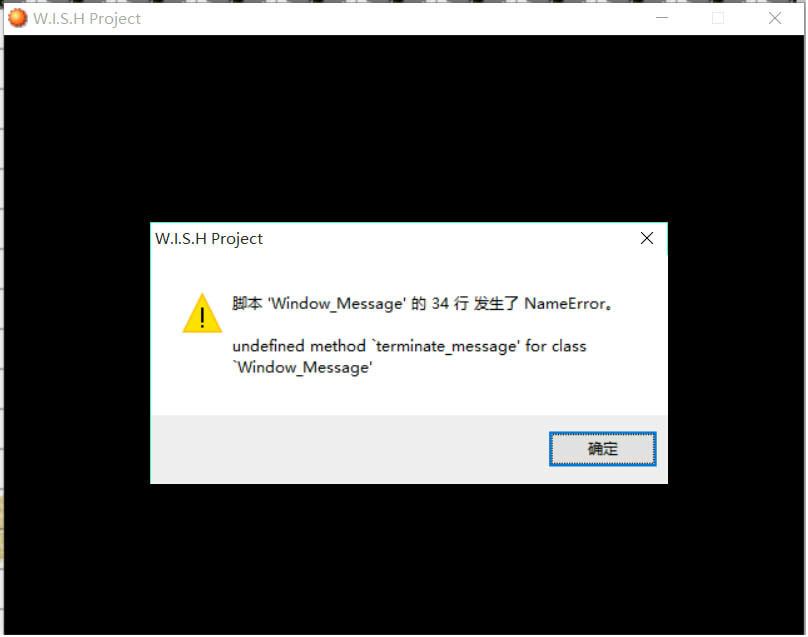
希望各位幫助我qq |
|


 写轮眼
写轮眼
 发表于 2016-2-5 10:29:16
 提升卡
提升卡 沉默号角
沉默号角 喧嚣号角
喧嚣号角 变色卡
变色卡 升龙剑
升龙剑


 发表于 2016-2-5 10:39:59
