| 赞 | 5 |
| VIP | |
| 好人卡 | |
| 积分 | 73 |
| 经验 | |
| 最后登录 | 2026-11-1 |
| 在线时间 | 1244 小时 |
- 梦石
- 0
- 星屑
- 7306
- 在线时间
- 1244 小时
- 注册时间
- 2015-8-15
- 回帖
- 473
|
加入我们,或者,欢迎回来。
您需要 登录 才可以下载或查看,没有账号?注册会员
×
- #==============================================================================
- # ■ Window_MenuStatus
- #------------------------------------------------------------------------------
- # 显示菜单画面和同伴状态的窗口。
- #==============================================================================
- class Window_MenuStatus < Window_Selectable
- #--------------------------------------------------------------------------
- # ● 初始化对像
- #--------------------------------------------------------------------------
- def initialize(actor_index = 0, equip_index = 0)#def initialize(index = 0)
- super(0, 64, 1200, 480)
- @item_max = $game_party.actors.size
- self.contents = Bitmap.new(width - 32, 400)
- refresh
- # self.active = index
- self.index = index
- # equip_index =
- @column_max = 4
- end
- #--------------------------------------------------------------------------
- # ● 刷新
- #--------------------------------------------------------------------------
- def refresh
- self.contents.clear
-
- # @item_max = $game_party.actors.size
- for i in 0...$game_party.actors.size
- # draw_item(i, normal_color)
- # x = ( i + 1 ) * 92 +25
- # y = 44
- # x = ( i + 1 ) % @column_max * (cursor_width + 1) - 4
- # y = ( i + 1 ) / @column_max * 128 - self.oy
- # x = 0 + index % 4 * (90 + 1) - 4
- # y = index / 90 * 128 - self.oy
- # actor_width = 128
- x =120 + i % 4 * (58 + 32) # 根据包裹坐标修改过来的
- y = 44 + i / 4 * 128
- actor = $game_party.actors[i]
- bitmap = Bitmap.new ("Graphics/Status/" + actor.id. to_s + "_h") #RPG::Cache.character(actor.character_name, actor.character_hue)
- cw = bitmap.width
- ch = bitmap.height
- src_rect = Rect.new(0, 0, cw, ch + 50)
- self.contents.blt(x - ch , y - cw/ 2, bitmap, src_rect) #src_rect
- draw_actor_xdrs_lx(actor, x-ch, y)#转生次数
- if i <= 3
- self.contents.font.color = Color.new(255,255,0,255)
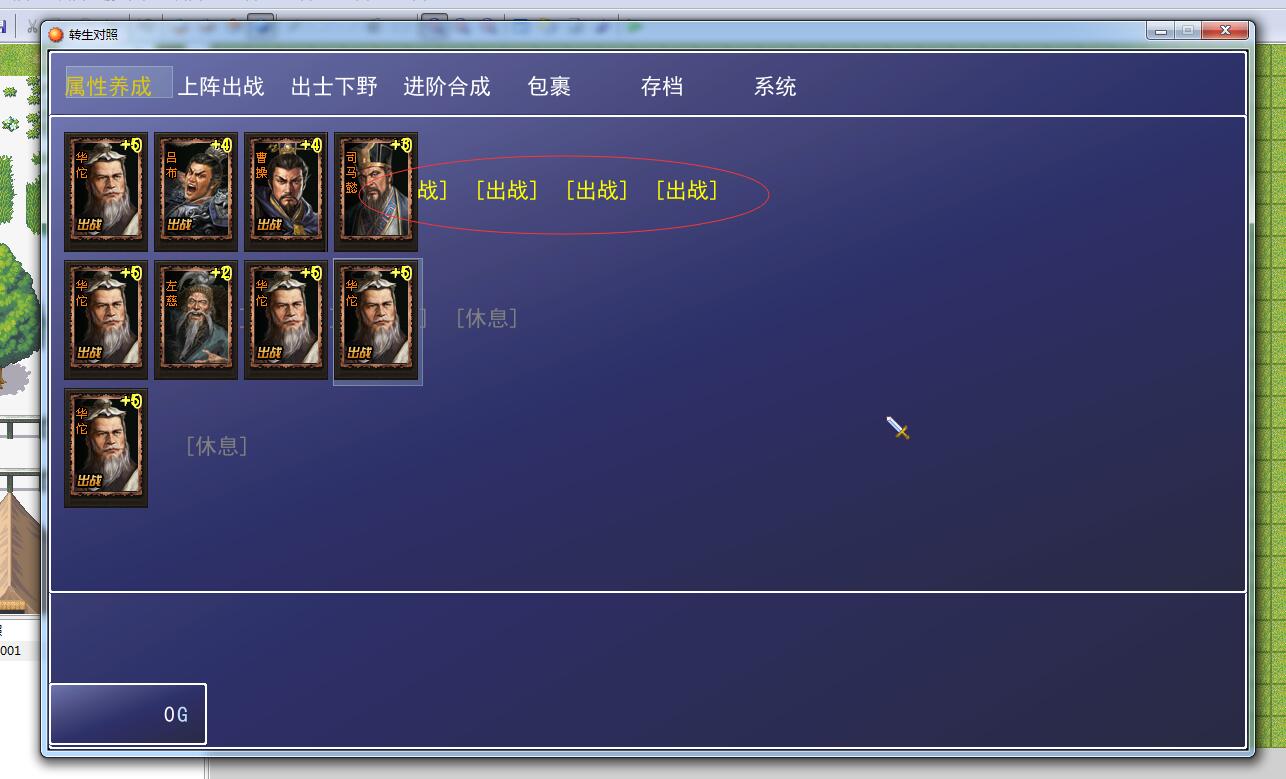
- self.contents.draw_text(x + 200 , y ,160,32,"[出战]",999)
- self.contents.font.color = normal_color
-
- else
- self.contents.font.color = Color.new(128,128,128,255)
- self.contents.draw_text(x ,y,160,32,"[休息]",999)
- self.contents.font.color = normal_color
-
- end
- end
- # @item_max = $game_party.actors.size
- # if @item_max > 4
- # self.contents = Bitmap.new(width - 32, row_max * 32)
- # for i in 0...@item_max
- # raw_item(i, normal_color)
- # end
- # end
- end
- #
-
- #--------------------------------------------------------------------------
- # ● 更新光标举行
- #--------------------------------------------------------------------------
- #--------------------------------------------------------------------------
- # ● 项目无效化
- # index : 项目编号
- #--------------------------------------------------------------------------
- def disable_item(index)
- draw_item(index, disabled_color)
- end
- #--------------------------------------------------------------------------
- # ● 刷新光标矩形
- #--------------------------------------------------------------------------
-
- def update_cursor_rect
- # 光标位置不满 0 的情况下
- if @index <= - 1
- self.cursor_rect.empty
-
- return
- end
- # 获取当前的行
- row = @index / @column_max
- # 当前行被显示开头行前面的情况下
- if row < self.top_row
- # 从当前行向开头行滚动
- self.top_row = row
- end
- # 当前行被显示末尾行之后的情况下
- if row > self.top_row + (self.page_row_max - 1)
- # 从当前行向末尾滚动
- self.top_row = row - (self.page_row_max - 1)
- end
- # 计算光标的宽
- cursor_width = 90
- #cursor_width = 536 / (@column_max + 1) + 1 #光标大小
- # 计算光标坐标
-
- x = 0 + @index % @column_max * (cursor_width + 1) - 4 #光标位置调节 覆盖31行
- y = @index / @column_max * 128 - self.oy
- # 更新国标矩形
- self.cursor_rect.set(x, y, cursor_width, 128)#(x, y, cursor_width, 32)
-
- end
- end
|
-
|



 写轮眼

 发表于 2016-2-11 14:44:31
 提升卡
 沉默号角
 喧嚣号角
 变色卡
 升龙剑


